


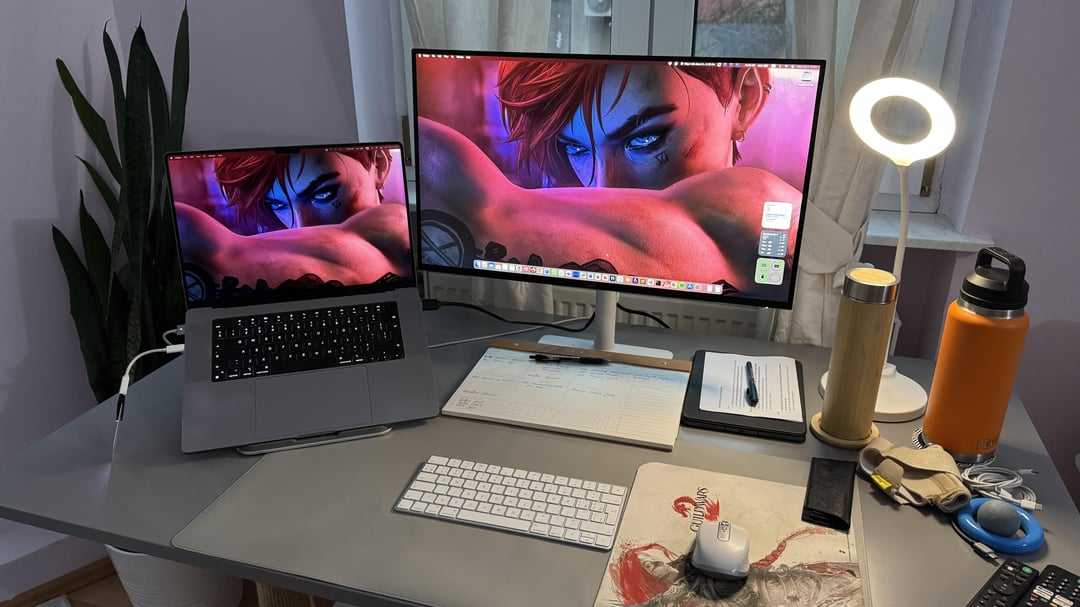
A 27-inch monitor can be a great addition to your office desk, offering ample screen space for multitasking without overwhelming your workspace. If you need something that balances size and comfort, this is often an ideal choice. In short, a 27-inch monitor is generally good for an office desk because it provides enough room for multiple windows and detailed work, yet fits comfortably on most desks. Whether you’re working on spreadsheets, editing documents, or browsing, it offers an immersive experience that boosts productivity while maintaining an ergonomic setup.
Choosing the right monitor size for your office depends on your specific needs and desk space. A 27-inch screen strikes a perfect balance, giving you plenty of room to work efficiently without feeling cramped. It’s large enough to reduce eye strain from squinting at tiny text, but not so big that it dominates your entire workspace. For most office tasks, it’s an excellent size that enhances your workflow, making it a popular choice for many professionals seeking comfort and productivity in one package.

Is 27 Inch Monitor Good for Office Desk?
Understanding the Size of a 27 Inch Monitor
A 27 inch monitor is a popular choice for many office setups because of its generous screen size. The term refers to the diagonal measurement from one corner of the display to the opposite corner. This size provides ample space for multiple windows and applications to be open simultaneously, which can boost productivity.
Why Size Matters for Office Work
Choosing the right monitor size depends on your work tasks and workspace. A monitor that is too small might make you strain your eyes or constantly switch between applications. On the other hand, an overly large monitor can clutter your desk and become difficult to position comfortably.
Screen Size vs. Desk Space
It is important to consider your desk space before selecting a 27 inch monitor. Measure your desk’s width and height to ensure there is enough room for the monitor and other essentials. A 27 inch monitor typically requires a desk width of at least 30 inches for comfortable placement.
Ergonomics and Comfort
Using a 27 inch monitor can improve ergonomics if positioned properly. The monitor should be at eye level, about 20 inches from your face. This reduces neck strain and encourages good posture during long work hours. Adjustable stands can help customize the height, tilt, and rotation for optimal comfort.
Display Quality and Resolution
The visual benefits of a 27 inch monitor depend greatly on its resolution. Common resolutions include Full HD (1080p), Quad HD (1440p), and 4K (2160p). Higher resolutions provide sharper images and text, which is especially helpful for detailed tasks like graphic design or data analysis.
Full HD (1080p) Monitors
These monitors are affordable and widely available. They are suitable for basic office tasks like word processing, browsing, and video calls. However, text might appear less sharp on a 27 inch screen compared to higher resolutions.
Quad HD (1440p) Monitors
These offer a good balance between cost and clarity. They deliver sharper images, making them ideal for multitasking and detailed work. They also provide enough screen space to comfortably view multiple applications side by side.
4K (2160p) Monitors
4K displays provide the highest clarity and detail. They allow for very crisp images and are excellent for specialized tasks requiring high precision. Keep in mind that 4K monitors may demand more powerful hardware and higher costs.
Multitasking Capabilities
Multitasking is easier on a 27 inch monitor because of the ample screen space. You can open multiple windows, spreadsheets, or documents side by side without constantly resizing. This efficiency helps in reducing time spent switching between applications.
Split-Screen Features
Many 27 inch monitors come with software features that enable split-screen functionality. This allows dividing the screen into sections to display different applications. It is especially useful for tasks like comparing data or monitoring multiple projects.
Connectivity Options
A good office monitor should offer multiple connectivity options. Look for HDMI, DisplayPort, and USB-C ports to connect various devices such as laptops, desktops, or docking stations. This flexibility streamlines your workspace and simplifies cable management.
Refresh Rate and Response Time
While gaming monitors focus on high refresh rates and low response times, for office work, these specifications are less critical. Standard 60Hz refresh rates are sufficient for daily tasks. However, a monitor with a low response time can reduce motion blur during video calls.
Color Accuracy and Brightness
For tasks involving color fidelity like photo editing or graphic design, look for monitors with high color accuracy and wide color gamuts. Brightness levels also matter for readability in well-lit offices. A brightness of 250 to 350 nits is generally adequate for most office environments.
Price Range and Budget Considerations
The cost of a 27 inch monitor can vary widely based on features and resolution. Entry-level models start around $200, while high-end 4K monitors can exceed $700. Define your budget based on your needs, balancing cost with necessary specifications.
Potential Drawbacks of a 27 Inch Monitor
Although many users find 27 inch monitors beneficial, some drawbacks exist. Larger screens may cause desk clutter if space is limited. Also, high-resolution monitors require more powerful hardware, which could increase overall costs.
Is a 27 Inch Monitor Suitable for Small Desks?
For small desks, a 27 inch monitor might feel overwhelming or take up too much space. In such cases, consider smaller screens like 24 inches or opting for a monitor with a slim profile and adjustable stand to maximize available space.
Summary of Key Points
- A 27 inch monitor provides ample screen space for multitasking and increased productivity.
- Resolution options (1080p, 1440p, 4K) impact image quality and hardware requirements.
- Proper ergonomics and adjustable features are essential for comfort during long work hours.
- Connectivity choices and price should match your specific office needs and budget.
- Evaluate desk space to ensure a 27 inch monitor fits comfortably without cluttering your workspace.
Related Topics to Consider
- Best monitors for remote work and home offices
- How to set up an ergonomic workstation
- Comparing ultrawide vs. standard monitors for office use
- Importance of eye care and monitor settings for prolonged use
Final Thoughts
A 27 inch monitor can be a smart choice for many office environments, especially when combined with the right resolution and ergonomic features. It provides enough space to work efficiently without overwhelming smaller desks. Carefully assess your workspace, budget, and specific needs to determine if this size is ideal for your situation.
Desk Setup Monitor Upgrade from AMAZON!
Frequently Asked Questions
Does a 27-inch monitor provide enough screen space for multitasking in an office setting?
Yes, a 27-inch monitor offers ample screen space that allows you to open multiple windows side by side. This makes multitasking more comfortable and efficient, especially when working with documents, spreadsheets, or multiple applications simultaneously. The increased display area helps reduce the need to switch between tabs and windows frequently.
How does a 27-inch monitor affect workspace ergonomics and comfort?
A 27-inch monitor strikes a good balance between size and desk space. It provides a comfortable viewing experience without overwhelming your workspace. When properly positioned at eye level, it minimizes neck and eye strain, promoting better posture during long hours at your desk. Ensuring appropriate desk ergonomics enhances overall productivity and comfort.
Is a 27-inch monitor suitable for both desk space and visual clarity?
Absolutely. A 27-inch monitor generally offers high-resolution options that deliver sharp and clear visuals. Its size is large enough to make details easily visible, which benefits tasks that require precision, such as graphic design, data analysis, or detailed editing. However, it’s important to ensure your desk has enough space to accommodate the monitor comfortably.
Can a 27-inch monitor improve my work efficiency compared to smaller screens?
Yes, working with a 27-inch monitor can improve efficiency by providing more visual real estate. This allows you to view more information at once and reduces the need to switch between multiple screens or tabs. The larger display can also enhance focus on complex tasks and improve overall workflow.
What are the common limitations of using a 27-inch monitor on a standard office desk?
One common limitation might be limited desk space, especially if your workspace is compact. Additionally, if the monitor is not positioned correctly, it could lead to neck or eye discomfort. To avoid these issues, choose a monitor stand that allows height adjustment and position the screen at an appropriate distance for comfortable viewing.
Final Thoughts
A 27 inch monitor offers ample screen space, making multitasking easier and more efficient. It provides enough room for multiple windows, reducing the need to switch between tabs. This size fits well on most office desks without feeling overwhelming.
For productivity and comfort, a 27 inch monitor is an excellent choice for office environments. Many users find it balances visibility with desk space.
In conclusion, is 27 inch monitor good for office desk? Yes, it enhances workflow and comfort, making it a practical option for many professionals.



