


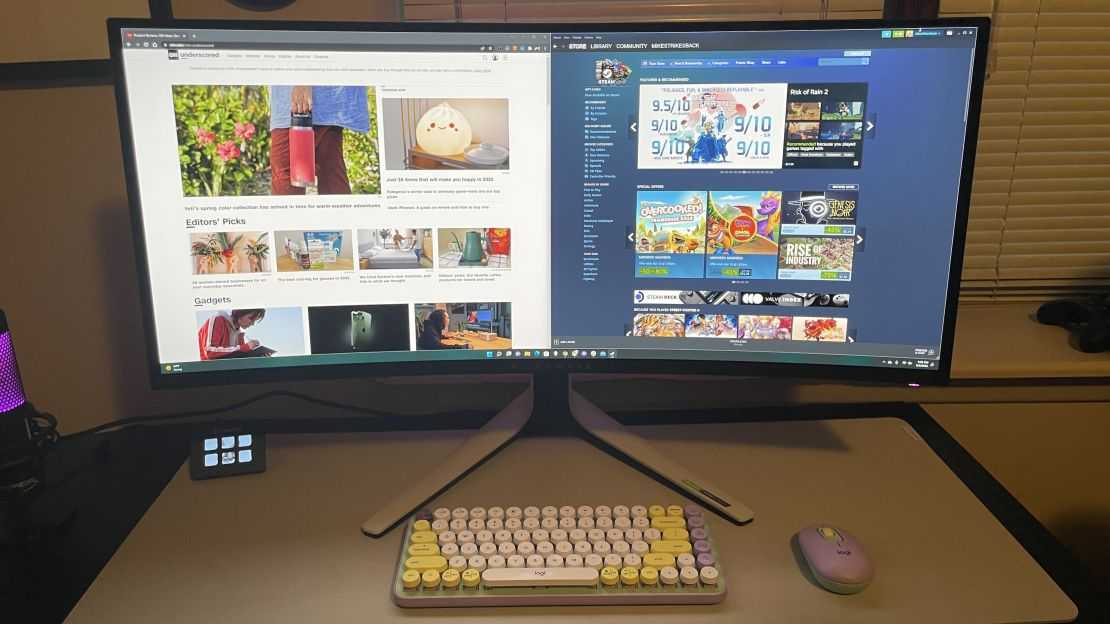
Yes, OLED monitors can be better for multitasking depending on your needs, thanks to their stunning color accuracy and fast refresh rates. However, they also have some drawbacks like potential burn-in and higher costs. Overall, OLED monitors offer vibrant visuals and excellent responsiveness that can enhance your multitasking experience, but it’s important to weigh these benefits against your specific use case.
If you’re considering whether an OLED monitor is right for multitasking, the answer depends on what you prioritize most—vivid visuals and quick performance or long-term durability and budget. OLED technology delivers exceptional color precision and deep blacks, which can make switching between multiple tasks more pleasant and visually engaging. On the other hand, their risks of burn-in and higher price tags might not suit all users, especially those needing a more economical, long-lasting display. This article explores the benefits and drawbacks of OLED monitors in multitasking scenarios, helping you decide if their advanced features are worth the investment for your productivity needs.

Is OLED Monitor Better for Multitasking? An In-Depth Look
What Makes a Monitor Suitable for Multitasking?
When you think about multitasking, you want a monitor that provides clear images and easy viewing across multiple screens. A good monitor should have high resolution, strong color accuracy, and fast response times. These features help you switch between tasks smoothly without straining your eyes.
Understanding OLED Technology
OLED stands for Organic Light Emitting Diode. Unlike traditional LCD screens that need a backlight, each OLED pixel emits its own light. This allows for deeper blacks, brighter colors, and better contrast. Because each pixel can turn on and off independently, OLED screens produce images with more detail and vibrancy.
Advantages of OLED Monitors for Multitasking
Superior Color Accuracy and Brightness
OLED displays can reproduce a wider color range with more vividness. This makes it easier to distinguish between multiple windows, especially when working with graphics or color-sensitive tasks. The high brightness levels improve visibility in bright rooms or during long working hours.
High Contrast Ratios and Deep Blacks
The ability of OLED screens to produce true black enhances the distinction between overlapping windows. This minimizes visual clutter and aids focus during multitasking. When blacks are deep, on-screen elements pop out more clearly.
Fast Response Times and Minimal Motion Blur
OLED monitors typically have response times below 1 millisecond. This reduces motion blur, making fast-moving content—like videos or rapid scrolling—appear smoother. It’s a benefit if your multitasking involves video editing or live streams.
Wide Viewing Angles
OLED screens maintain consistent color and brightness even from wide angles. This allows multiple users or a single user moving around their desk to see content clearly. Good viewing angles promote comfort when managing several windows.
Challenges of Using OLED Monitors for Multitasking
Potential Burn-In Risks
While OLED screens have many advantages, they can suffer from burn-in if static images stay on the display for long periods. This can be problematic for multitaskers who leave certain windows or icons displayed continuously.
Cost Considerations
OLED monitors tend to be more expensive than LED or LCD counterparts. Investing in one for multitasking may require a higher budget, although prices are gradually decreasing over time.
Limited Size Options
Currently, OLED monitors are less available in larger sizes compared to traditional LCD monitors. If your multitasking involves multiple large screens, options might be more limited.
Comparison with LCD Monitors for Multitasking
| Feature | OLED Monitors | LCD Monitors |
|---|---|---|
| Color Range | Wider, more vibrant | Good, but less vivid |
| Black Levels | Deep black, true blacks | Grayish blacks, depends on backlight |
| Response Time | Lower than 1 ms | Usually above 4 ms |
| Price | Higher | More affordable |
| Burn-In Risk | Possible with static images | Not an issue |
Ideal Usage Scenarios for OLED in Multitasking
Creative Work and Design
Photographers, graphic designers, and video editors benefit from OLED’s color accuracy and contrast. These features help manage multiple editing windows and preview images with detail.
Financial and Data Analysis
High contrast and sharp images make it easier to read complex spreadsheets and charts across multiple monitors. The vivid colors improve data visualization.
Gaming and Entertainment
Fast response times and deep blacks enhance immersive experiences when multitasking with gaming and media content. OLED displays handle fast-paced scenes with minimal motion artifacts.
Office Productivity
Multitaskers working with document editing, communication apps, and browsing will find OLED screens useful for their vibrant images and wide viewing angles. This reduces eye fatigue during long work hours.
Choosing the Right OLED Monitor for Multitasking
Size and Resolution
Look for monitors with at least a 27-inch size and 1440p or 4K resolution. Higher resolution and larger screens improve clarity when managing multiple windows.
Refresh Rate and Response Time
For smoother multitasking, especially with video or gaming, select a monitor with a refresh rate of 120Hz or higher and a response time under 1 ms.
Connectivity Options
Ensure the monitor supports multiple inputs like HDMI, DisplayPort, and USB-C. This allows easy connection of several devices for seamless multitasking.
Price and Warranty
Compare options within your budget but prioritize models with good warranty coverage. Durable monitor build and manufacturer support matter over time.
Future Outlook of OLED Technology and Multitasking
As OLED technology becomes more advanced and affordable, expect larger sizes, better burn-in resistance, and more options tailored for multitasking needs. Integration with curved screens and flexible designs may also enhance user experience.
Summary
In summary, OLED monitors offer **significant benefits** for multitasking, especially in areas requiring vivid visuals and deep blacks. While challenges like cost and burn-in exist, the advantages often outweigh these issues for users who prioritize image quality and responsiveness. Improving technology and increased competition are making OLED options more accessible for everyday multitasking tasks.
By considering your specific needs, like budget, screen size, and usage scenarios, you can decide if an OLED monitor suits your multitasking setup. Remember that the right monitor can enhance your productivity, reduce eye strain, and make managing multiple tasks more enjoyable.
1440p OLED or 4K Monitor for Gaming?
Frequently Asked Questions
How does the color accuracy of OLED monitors benefit multitasking users?
OLED monitors offer superior color accuracy, which helps multitasking users spend less time adjusting displays for different tasks. Precise color representation enables clear distinctions between overlapping windows and detailed images, making it easier to work across multiple applications without confusion or eye strain.
Are OLED monitors better at handling multiple displays or split-screen setups?
Yes, OLED monitors often provide better visual clarity and contrast, making it easier to differentiate between split-screen sections. Their high contrast ratios and vibrant colors help users navigate complex multitasking environments smoothly, reducing visual fatigue during prolonged use.
What impact does the refresh rate of OLED screens have on multitasking experiences?
Higher refresh rates in OLED screens result in smoother motion rendering, which benefits multitasking when switching between rapid visual updates or multitasking across media and interactive applications. This reduces lag and makes transitions seamless, keeping the workflow uninterrupted.
Can OLED monitors reduce eye fatigue during extended multitasking sessions?
Yes, OLED monitors typically emit less blue light and have better contrast ratios, which can help reduce eye strain during long hours of multitasking. Their ability to produce deep blacks and vibrant images minimizes eye fatigue and makes prolonged use more comfortable.
How does the response time of OLED screens influence multitasking efficiency?
OLED monitors feature fast response times, which eliminate motion blur and ghosting effects. This clarity is especially useful when multitasking with dynamic visuals or fast-moving content, allowing users to see everything clearly and respond quickly without distraction.
Final Thoughts
An OLED monitor offers vibrant colors and deep blacks, enhancing visual clarity and contrast. This makes multitasking more enjoyable, especially when switching between applications and viewing detailed content.
However, OLED screens can suffer from burn-in if static images remain for long periods, which may affect long-term usability for multitasking.
In conclusion, is oled monitor better for multitasking? It depends on your priorities. For vivid visuals and superior contrast, OLED provides a compelling option that can improve your multitasking experience.



