


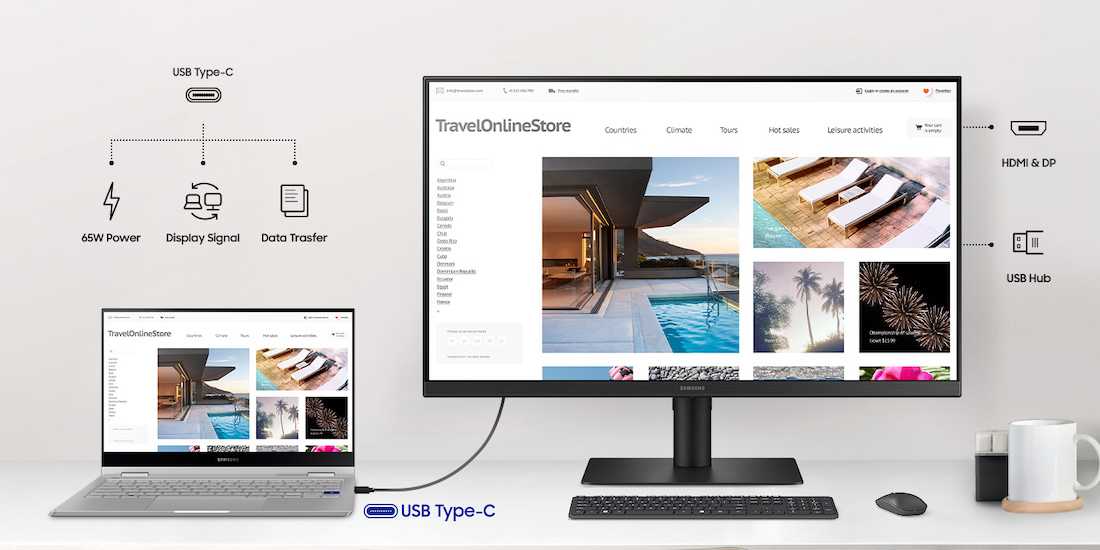
Yes, USB-C monitors can be a worthwhile investment, especially if you’re looking to streamline your workspace with fewer cables and enhanced connectivity. They offer the convenience of charging, data transfer, and video output all through a single port, making setups cleaner and more efficient. But whether they’re worth it depends on your specific needs and tech setup.
In short, if you want a sleek, versatile monitor that simplifies your connections and can enhance productivity, a USB-C monitor is definitely worth considering. However, for casual use or budget-conscious buyers, it’s important to weigh the benefits against the cost.
If you’re considering upgrading your workspace or seeking a monitor that reduces clutter and increases compatibility with modern devices, you might wonder if USB-C monitors are the right choice. These monitors have gained popularity for their convenience, allowing you to connect your laptop or other devices via a single cable that handles power, video, and data. This feature is particularly appealing for professionals, gamers, and students who want a tidy, efficient setup. But are they really worth the investment? Let’s dive into the key advantages and potential drawbacks to help you decide if a USB-C monitor fits your needs.

Are USB C Monitors Worth It? An In-Depth Look
What Is a USB C Monitor? Understanding the Basics
A USB C monitor uses a USB Type-C port to connect to your computer or device. Unlike traditional monitors that require multiple cables, these monitors often combine power, data, and video transmission into a single cable. This setup can make your workspace cleaner and more organized.
Benefits of Using a USB C Monitor
- Simplified Cable Management: One cable connects your device to the monitor for power, data, and display. No need for multiple cords cluttering your desk.
- Fast Data Transfer: USB C supports high-speed data transfer, which is perfect for connecting external drives or peripherals.
- Power Delivery: Many USB C monitors can charge your laptop or device while in use, reducing the number of chargers needed.
- Versatility: These monitors can connect to a wide range of devices like laptops, tablets, and smartphones that support USB C.
Are USB C Monitors Compatible With Your Devices?
Most newer laptops and devices support USB C connections, but compatibility varies. Check if your device supports USB C display output or power delivery to ensure compatibility. Some older devices may require adapters or different types of connections.
Cost Considerations: Are USB C Monitors Pricey?
- Price Range
- USB C monitors tend to be more expensive than traditional monitors. Expect prices to start around $200 and go over $1000 for high-end models.
- Value for Money
- Higher costs often come with better features like higher resolutions, faster refresh rates, and larger screens. Think about your specific needs before investing.
Image Quality and Resolution
Good image quality depends on resolution and display technology. Many USB C monitors offer resolutions from Full HD (1080p) to 4K (2160p), providing sharp, clear images. Higher resolution monitors are ideal for professional work and multimedia.
Refresh Rates and Response Times
For gaming or fast-paced work, look for monitors with higher refresh rates (above 60Hz). USB C monitors with 75Hz, 120Hz, or higher refresh rates provide smoother motion. Response times also matter for minimizing blur and ghosting effects.
Size and Design of USB C Monitors
From compact 24-inch screens to large 32-inch or ultrawide displays, size impacts usability. Consider your workspace and whether you prefer a portable monitor or a larger one for multitasking. Sleek, modern designs can also enhance your workspace aesthetic.
Power Delivery: A Major Advantage
Many USB C monitors support Power Delivery (PD), enabling them to charge connected devices. This feature can deliver up to 100W of power, enough to charge most laptops while in use. It reduces clutter and simplifies your setup.
Multifunctionality and Connectivity Options
Apart from USB C, these monitors often include HDMI, DisplayPort, and USB hubs. This flexibility lets you connect various peripherals such as keyboards, mice, and external drives. Some models also support daisy-chaining multiple monitors.
Portability and Use Cases
Got a laptop or need a portable setup? USB C monitors are usually lightweight and slim, making them suitable for travel or working on the go. They’re perfect for remote workers, students, and those with limited desk space.
Potential Drawbacks of USB C Monitors
- Higher Costs: Advanced features and convenience come with a premium price.
- Compatibility Gaps: Not all devices support USB C video output.
- Limited Availability: Fewer models are available compared to traditional monitors, especially at lower price points.
- Dependency on Good Cables: Poor-quality cables can result in unstable connections or reduced performance.
Choosing the Right USB C Monitor for Your Needs
Identify your primary use—whether for work, gaming, or multimedia—and select a model with appropriate specs. For example, creative professionals benefit from higher resolutions and color accuracy, while gamers prioritize high refresh rates.
Key Features to Consider
- Screen Size: Choose based on your workspace and preference for multitasking.
- Resolution: Higher resolutions deliver sharper images; essential for detailed work.
- Refresh Rate: Important for gaming and fast-moving visuals.
- Connectivity: Ensure the monitor supports your device’s ports and standards.
- Build Quality: Durable materials and a stable stand make for comfortable use.
Future Trends and Developments in USB C Monitors
Manufacturers are continuously upgrading USB C monitors with better display technology, higher resolutions, and advanced features. Expect to see more models with integrated smart features, higher refresh rates, and enhanced power delivery options in the coming years.
Summary of Pros and Cons
| Advantages | Disadvantages |
|---|---|
| Single cable for power, video, and data | Often more expensive than traditional monitors |
| Reduces workspace clutter | Compatibility issues with older devices |
| Supports fast data transfer and charging | Limited options at lower price points |
Deciding if a USB C monitor is worth it depends on your specific needs and budget. If you seek a sleek, versatile setup with minimal cables, then these monitors are an excellent choice. They provide convenience and future-proof your workspace for ongoing technology upgrades.
Are USB-C Monitors Worth it? – LG 27UD88 27" USB-C 4K IPS Monitor Review
Frequently Asked Questions
What are the main advantages of using a USB-C monitor over traditional HDMI or DisplayPort monitors?
USB-C monitors often support power delivery, allowing you to charge your laptop or device directly through the monitor. They also combine data transfer, video output, and charging into a single cable, reducing clutter on your workspace. Additionally, many USB-C monitors are designed for versatile connectivity, making it easier to connect multiple peripherals seamlessly.
How does USB-C connectivity impact the portability of a monitor setup?
Using USB-C significantly enhances portability because it minimizes the number of cables needed to connect your device. Many USB-C monitors are lightweight and slim, which makes them easier to carry around. The simplicity of a single cable connection also speeds up setup and breakdown, ideal for those who frequently move between locations.
Are there any limitations to consider when choosing a USB-C monitor?
While USB-C monitors offer many benefits, they can have limitations such as compatibility issues with older devices that lack USB-C ports. Additionally, not all USB-C ports support the same data transfer speeds or power delivery, so checking the specifications is essential. Some models may also be more expensive compared to traditional monitors with separate cables and input ports.
Can a USB-C monitor support high-resolution displays suitable for professional work?
Many USB-C monitors today support high resolutions, including 4K and even 5K displays, making them suitable for professional tasks like graphic design, video editing, and detailed work. Ensure that your device’s USB-C port and the monitor both support the desired resolution and refresh rates to get the best experience.
Is the investment in a USB-C monitor justified for everyday use and casual browsing?
For everyday tasks and casual browsing, the benefits of a USB-C monitor might not justify the higher price compared to basic monitors. However, if you value a clean workspace, quick setup, and the convenience of a single cable for multiple functions, investing in a USB-C monitor can enhance your daily computer experience significantly.
Final Thoughts
In conclusion, are usb c monitors worth it? These monitors offer convenience, with single cables for power, data, and video, reducing clutter. They support fast data transfer and high-resolution displays, making work more efficient. If you value simplicity and modern features, investing in a USB-C monitor is a smart choice.



