


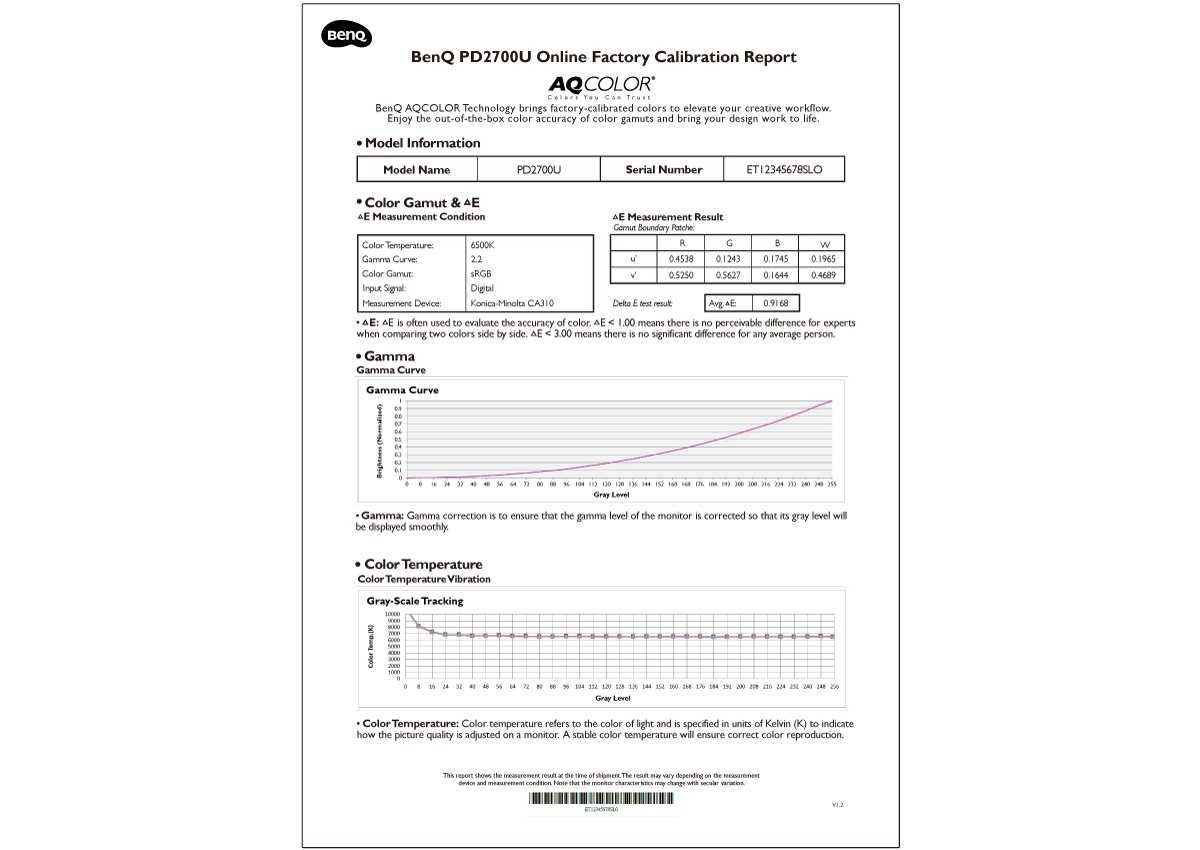
Yes, many modern design monitors do come factory calibrated, ensuring color accuracy straight out of the box. This means you can start working immediately without worrying about extensive calibration processes, saving you time and effort. However, not all monitors are pre-calibrated, so it’s essential to check specifications before purchasing.
For creative professionals, having a monitor that arrives calibrated is a game-changer, providing reliable color consistency for graphic design, photography, and video editing. Most high-end models from reputable brands come factory calibrated, giving users confidence in their color accuracy from day one. Still, there are also more affordable options that may require additional calibration to meet precise standards. Whether you’re a seasoned designer or just starting out, understanding which monitors are factory calibrated can help you make better choices for your creative workflow.

Do Design Monitors Come Factory Calibrated? An In-Depth Look
Understanding Factory Calibration and Its Importance
Manufacturers often calibrate monitors at the factory to ensure accurate color and image display. Factory calibration involves adjusting the monitor’s settings so that colors, contrast, and brightness align with standardized values. This process is essential for anyone doing professional work that demands precise color accuracy, such as graphic design, photography, and video editing.
Are All Design Monitors Factory Calibrated?
The answer is no; not all design monitors arrive pre-calibrated from the factory. Some models are designed specifically with calibration in mind and come with factory calibration reports. Others may be set to default factory settings, which might not be perfect but are generally acceptable for everyday tasks.
Types of Monitors and Their Calibration Features
Professional Design Monitors
These monitors usually come factory calibrated and are built for color accuracy. They often include calibration reports and support hardware calibration tools. Brands like Eizo and BenQ make models known for their high calibration standards.
Consumer and Entry-Level Monitors
Most consumer monitors do not come factory calibrated. They are designed for general use, such as browsing or watching videos. While some may have decent color settings out of the box, they often require manual calibration for professional work.
The Benefits of Factory Calibrated Monitors
- Time-Saving: Ready-to-use out of the box, saving time on calibration.
- Consistency: Reliable color accuracy across different units of the same model.
- Professional Assurance: Suitable for critical tasks where color precision is essential.
How to Identify a Factory Calibrated Monitor
Manufacturers often advertise factory calibration on the product specifications. Look for terms like “factory calibrated”, “calibration report included”, or “hardware calibration support”. Reviewing expert reviews and calibration reports can also provide insights.
Can You Calibrate a Non-Factory Calibrated Monitor?
Absolutely. If your monitor isn’t factory calibrated, you can calibrate it manually using calibration tools and software. This process helps improve color accuracy, especially important for design work. Calibration ensures your display shows colors as intended, matching industry standards.
Tools and Software for Calibration
- Hardware Calibration Devices: Devices like X-Rite i1Display Pro or Datacolor SpyderX help measure and calibrate colors accurately.
- Calibration Software: Software like DisplayCAL or the built-in calibration options in operating systems assist in aligning display settings.
Steps to Calibrate Your Monitor
- Connect your calibration device to your computer and install necessary drivers.
- Open calibration software and follow on-screen instructions.
- Adjust monitor settings as guided by the software, focusing on brightness, contrast, and color temperature.
- Save the calibration profile for consistent use in your workflow.
Additional Factors to Consider for Design Monitors
Color Coverage and Accuracy
Look for monitors supporting wide color gamuts like Adobe RGB or DCI-P3, which are crucial for professional design tasks. High Color Gamut ensures vibrant and true-to-life colors.
Brightness and Contrast Ratio
A high brightness level, typically between 300 to 600 nits, combined with a good contrast ratio, enhances detail in images. This is vital for fine color gradations and shadow details in design work.
Viewing Angles and Uniformity
Wide viewing angles prevent color shift when viewing from different positions. Uniformity across the display ensures consistent color and brightness, avoiding distractions during editing.
The Cost of Factory Calibrated Monitors
Typically, factory-calibrated monitors are priced higher due to their advanced calibration features and professional-grade components. Entry-level models might cost around $300, while high-end professional monitors can exceed $2000.
Summary: Should You Choose a Factory Calibrated Monitor?
If your work involves color-sensitive tasks, investing in a factory-calibrated monitor can save time and enhance accuracy. For casual use, manual calibration may suffice, but professional designers benefit from the precision these monitors offer. Decide based on your specific needs, budget, and the level of color accuracy required in your projects.
Why creative pros should custom calibrate display, even though they are factory calibrated!
Frequently Asked Questions
Are design monitors typically calibrated before leaving the factory?
Many design monitors are calibrated at the factory to provide accurate color representation and consistent performance. However, the level of calibration can vary between models and manufacturers. It’s always advisable to check the specifications or contact the manufacturer to confirm if the monitor has been factory calibrated for professional work.
What benefits does factory calibration provide for design monitors?
Factory calibration ensures that color accuracy and contrast are set correctly right out of the box. This reduces the need for initial adjustments, saving time and effort. For designers, this means they can rely on the monitor for precise color work without extensive preliminary calibration.
Can I rely on a non-calibrated monitor for professional design work?
While some non-calibrated monitors can be fine for casual or non-critical tasks, they may not deliver consistent color accuracy necessary for professional design projects. To ensure fidelity in your work, consider calibrating your monitor regularly, especially if it lacks factory calibration or if color precision is vital.
How often should I calibrate my design monitor even if it is factory calibrated?
It’s recommended to calibrate your monitor at least once a month or after significant changes in lighting conditions. Although factory calibration provides a good baseline, monitors can drift over time, affecting color accuracy. Regular calibration helps maintain high-quality visual output suitable for professional work.
What tools can I use to calibrate my design monitor if it isn’t factory calibrated?
You can use hardware calibration devices, such as colorimeters or spectrophotometers, paired with calibration software to fine-tune your monitor. These tools allow you to achieve precise color settings tailored to your specific workflow, especially if the monitor did not come pre-calibrated from the manufacturer.
Final Thoughts
Design monitors vary in their calibration processes. Many high-end models come factory calibrated, ensuring accurate color and brightness out of the box. This saves time and provides consistency for professionals.
However, some budget options may require manual calibration for optimal performance.
In conclusion, do design monitors come factory calibrated? Yes, many do, especially premium models, making them ready for precise work straight away.



