


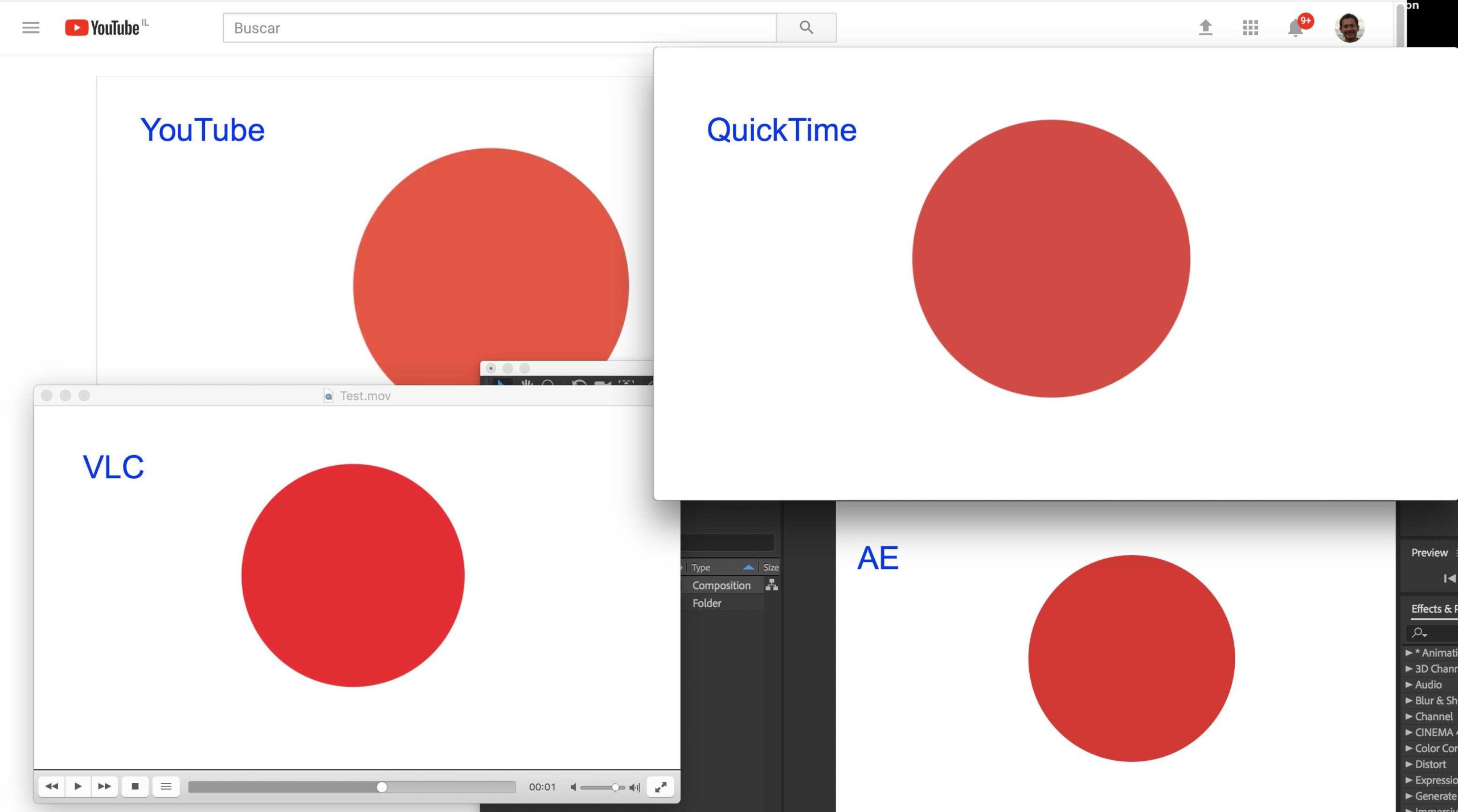
Yes, monitors can significantly influence the colors you see in After Effects exports. Your screen’s calibration, color accuracy, and display technology all impact how your project looks during the editing process and in the final export. If your monitor isn’t properly calibrated, you might see colors differently than they will appear elsewhere, leading to mismatched or dull results on different devices.
In short, monitors do affect export color in After Effects, but the impact depends on how accurately your monitor displays colors during editing. Proper calibration ensures what you see on screen is closer to the final output, minimizing surprises when exporting.
When working in After Effects, understanding how your monitor influences color accuracy is crucial for achieving professional results. Many creators overlook this aspect, assuming that what they see on their screen is an exact representation of the final product. However, monitors vary widely in their ability to replicate true colors, contrast, and brightness. An uncalibrated or low-quality display can lead to color shifts, dullness, or oversaturation, which means your final export might not look what you intended. By using color calibration tools and choosing monitors designed for color work, you ensure a more consistent viewing experience from editing to export. This not only makes your workflow more reliable but also guarantees your creative vision stays intact across all devices and platforms.

Do Monitors Affect Export Color in After Effects
Understanding Monitor Color Accuracy
Monitors are essential tools for video editors and motion designers. They display the colors you see while working on your project. If a monitor doesn’t show accurate colors, your exported videos may look different on other screens. This mismatch can impact the final quality of your work.
Many monitors, especially cheaper or consumer-grade ones, lack the color calibration needed for precise color work. Professional-grade monitors, however, offer features like wide color gamuts and factory calibration, which help ensure color fidelity.
The Role of Color Space in Exported Videos
Color space defines how colors are represented in your project and final video files. Common color spaces include sRGB, Rec. 709, and DCI-P3. Your monitor’s ability to accurately display these spaces directly influences how you perceive colors during editing.
If your monitor doesn’t support the same color space as your export settings, colors can appear washed out, oversaturated, or off. It’s crucial to match your monitor’s color profile with your project requirements for consistent results.
How Monitor Calibration Affects Color Reproduction
Calibration adjusts your monitor’s settings to match a known standard. A calibrated monitor displays colors as they are intended to appear. Without calibration, colors can be skewed, leading to inaccuracies in your work.
Calibration tools, such as colorimeters or spectrophotometers, help achieve this standardization. Regular calibration ensures your monitor continues to display accurate colors over time, which is especially important for professional video exports.
Impact of Monitor Specifications on Color Export
Not all monitors are equal in their capability to show accurate colors. Key specifications include:
- Color Gamut: Wider gamuts like Adobe RGB or DCI-P3 provide more vibrant and accurate colors.
- Resolution: Higher resolutions improve detail but don’t directly affect color accuracy.
- Panel Type: IPS panels typically offer better color accuracy than TN or VA panels.
- Bit Depth: Monitors with higher bit depth (8-bit, 10-bit) can display more color shades, reducing banding.
Choosing a monitor with these features helps ensure precise color reproduction during the editing process and in your exported videos.
Color Management in After Effects
After Effects supports color management settings that help match your project’s color space with your monitor and export formats. Proper color management workflows involve:
- Setting the correct working space in After Effects.
- Enabling “Display Color Management” to view accurate colors onscreen.
- Using calibrated monitors that support color profiles for real-time accuracy.
When these settings are correctly configured, the display on your monitor will closely match the exported video’s colors, minimizing surprises after export.
Why Exported Colors Can Differ from On-Screen Display
Despite efforts to calibrate your monitor, some discrepancies can still occur. Exported videos may look different on other screens due to:
- Variation in monitor calibration and color profiles of viewer screens.
- Differences in hardware capabilities, such as color gamut support.
- Display technology, including LED, OLED, or LCD screens, which depict colors differently.
This makes it vital to preview your videos on multiple devices if possible, especially before final delivery.
Best Practices for Ensuring Color Fidelity During Export
To get consistent color results from After Effects exports, consider these best practices:
- Work on a calibrated monitor that’s capable of displaying full color gamut.
- Set your project’s color space to match the intended display environment.
- Use high-quality export settings that support color profiles, such as ProRes or DNxHR.
- Embed color profiles in your exported files to tell players how to display colors correctly.
- Regularly calibrate your monitor to prevent drift in color accuracy over time.
- Preview your videos on different screens to check for color consistency.
Applying these methods helps maintain color accuracy from editing through to final export.
Related Topics: Color Gamut and Monitoring Technologies
Understanding the differences between color gamuts can influence your choice of monitor and export settings. For example:
| Color Gamut | Description | Ideal For |
|---|---|---|
| sRGB | The most common standard for the web and consumer screens | Web videos, standard broadcasts |
| Rec. 709 | Standard for HD TV and video production | HD productions |
| DCI-P3 | Wider gamut used in digital cinema and HDR content | Filmmaking, HDR projects |
| Adobe RGB | Wider color space for photography and print | Color-critical projects beyond video |
Monitoring technology options include IPS, OLED, and LED panels, each offering different levels of color accuracy and viewing angles. IPS panels are preferred for professional color work due to their superior color consistency.
The quality and calibration of your monitor play a key role in how accurately your colors are displayed during editing and in the final exported videos. While a high-quality monitor with wide color gamuts and regular calibration helps ensure color fidelity, understanding the color space and proper workflows in After Effects further enhances consistency.
Remember that even with the best monitor, differences in viewer screens can lead to variations in perceived color. Regularly checking your work across multiple displays and embedding color profiles can help mitigate these issues. Prioritizing color accuracy throughout your editing process ensures your final videos look their best wherever they are viewed.
How to fix washed out colors after export – After Effects and Adobe Media Encoder
Frequently Asked Questions
How does monitor calibration impact color accuracy in After Effects exports?
Proper monitor calibration ensures that the colors displayed on your screen accurately reflect the original footage and project settings. When your monitor is calibrated correctly, the colors you see while editing match the intended output, reducing discrepancies during export. Without calibration, the exported colors might appear different on other devices or screens, leading to inconsistencies in your final project.
Can the quality of monitor color reproduction influence the final exported video?
Yes, the quality of your monitor’s color reproduction plays a significant role in the accuracy of your exported video. A monitor with a wide color gamut and accurate color representation helps you make precise color adjustments. If your monitor cannot display colors correctly, you risk exporting videos with unintended color shifts or dullness, especially when grading or working with subtle color nuances.
Does using different monitors affect consistency when exporting colors in After Effects?
Using different monitors can lead to color consistency issues because each display has unique color profiles and calibration settings. To maintain uniformity, it is essential to calibrate each monitor regularly and consider working within a color-managed workflow. Otherwise, your exported videos may look different across various screens, undermining color consistency across projects.
How does monitor type (LCD, OLED, etc.) influence color export accuracy?
The type of monitor impacts how colors are rendered and perceived. For instance, OLED screens typically offer higher contrast and better color accuracy compared to standard LCDs. Working on a monitor with high color fidelity helps ensure that your exports have accurate colors. If you use a display with limited color accuracy, your final output might not represent the true colors intended during editing.
Should I rely solely on my monitor for color grading before exporting in After Effects?
While your monitor is a crucial tool for color grading, relying solely on it can be risky unless it is properly calibrated and validated with known color standards. Combining monitor calibration with external tools like color charts or scopes provides a more reliable basis for consistent color grading. This approach helps ensure that your exported project maintains accurate color representation across different viewing environments.
Final Thoughts
Monitors play a crucial role in the color accuracy of your exports in After Effects. A high-quality display ensures that what you see during editing closely matches the final output. Variations in monitor calibration can lead to discrepancies in color accuracy.
Do monitors affect export color in After Effects? Yes, they significantly influence how your project appears before and after exporting. Ensuring your monitor is properly calibrated helps achieve consistent color results in your exports.



