


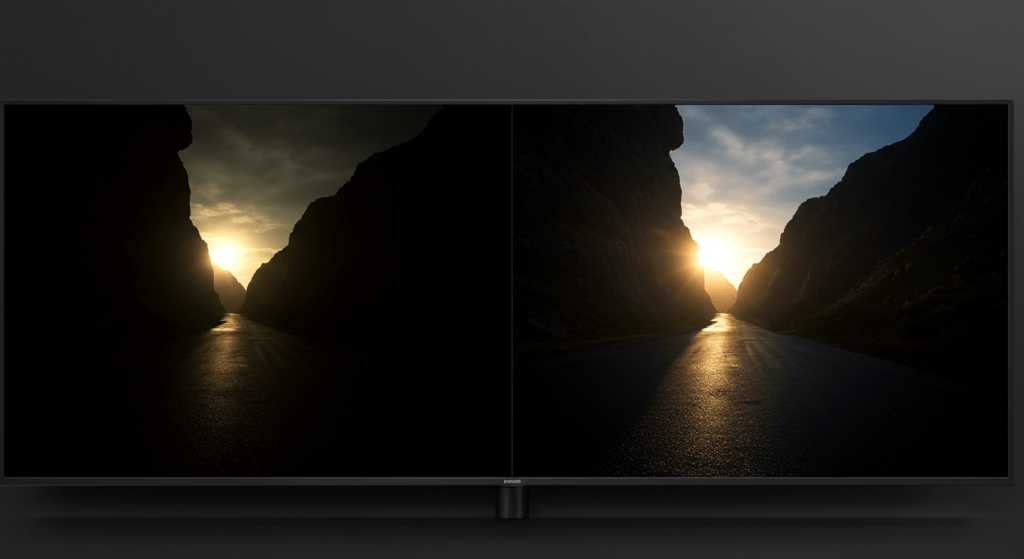
Yes, monitors with local dimming can significantly improve editing contrast, making your work more vibrant and accurate. They allow darker areas of the screen to be much deeper black, while still maintaining bright highlights, which is essential for professional editing. Overall, they can provide a more dynamic range and enhance the visual accuracy of your images and videos.
Monitors equipped with local dimming are a game-changer for editors who need precise control over contrast and detail. By adjusting the backlight in specific zones, these screens deliver richer blacks and better highlight detail, essential for high-quality editing work. If you’re serious about visual fidelity, understanding how local dimming impacts your monitor’s contrast can help you choose the right display for your creative projects.
When it comes to editing, having a monitor that displays accurate contrast can make all the difference. Local dimming technology works by selectively dimming parts of the backlight, creating deeper blacks and more vivid colors. This results in images that look more realistic and true to life, allowing editors to see fine details that might otherwise be lost. Whether you’re working on photos, videos, or graphic design, a monitor with local dimming can elevate your workflow by providing a clearer, more nuanced picture of your work.

Do Monitors with Local Dimming Improve Editing Contrast?
Understanding Local Dimming Technology
Local dimming is a feature found in many modern monitors and TVs that enhances contrast by controlling the brightness of specific screen areas. Unlike traditional displays that light up the entire screen uniformly, local dimming can darken or brighten parts of the image independently. This technology relies on an array of LEDs behind the screen that adjust dynamically based on the content being displayed.
By turning off or dimming LEDs behind dark areas, local dimming creates deeper blacks, making bright elements pop more vividly. This results in a more dynamic and realistic image, especially important during tasks requiring precise contrast, like photo editing or video color correction.
Why Contrast Matters in Editing
Contrast is a crucial element for image editing because it defines the difference between the darkest and brightest areas of an image. When contrast is accurately represented, editors can see details in shadows and highlights, facilitating precise adjustments.
High contrast levels help in distinguishing subtle gradations, ensuring that images don’t appear washed out or overly dark. For editors working on photos, videos, or digital artwork, monitors with good contrast capabilities allow for more accurate color grading and detail retention.
Advantages of Local Dimming for Editing Contrast
Monitors equipped with local dimming can significantly enhance editing contrast by providing deeper blacks and brighter highlights. This feature allows for better differentiation between similar shades, making it easier to spot fine details.
A major benefit is that local dimming reduces light bleed and halo effects around bright objects on dark backgrounds, ensuring clearer images. This means editors can trust their monitor to display true-to-life contrasts, which directly benefits tasks like color grading, retouching, and compositing.
Types of Local Dimming and Their Impact
There are primarily two types of local dimming: edge-lit and full-array.
- Edge-lit local dimming: Uses LEDs along the edges of the screen. It offers thinner designs but may have less precise control over contrast zones, leading to potential blooming around bright objects.
- Full-array local dimming: Contains LEDs across the entire back panel, allowing for more zones of control. This provides superior contrast ratios, fewer halos, and better overall display quality, ideal for detailed editing work.
Full-array systems are generally preferred for editing because they produce more uniform contrast enhancements without compromising image clarity.
Measuring the Effectiveness of Local Dimming
To determine how well a monitor’s local dimming performs, look at metrics such as contrast ratio and number of dimming zones.
Contrast ratio indicates the difference between white and black, with higher ratios representing better contrast. Monitors with thousands of zones can more precisely control brightness levels, reducing unwanted light bleed.
Test patterns and reviews often include measurements of blooming and halo effects, which help assess the real-world impact of local dimming technology.
Limitations and Challenges of Local Dimming
Despite its advantages, local dimming isn’t perfect. Some monitors may still exhibit halo effects around bright objects on dark backgrounds, especially if the number of dimming zones is limited.
Screen size and design also influence performance; larger screens require more zones for effective contrast control. Additionally, high-cost models tend to offer better local dimming capabilities due to advanced technology and more LED zones.
It’s important for users to recognize that local dimming can sometimes cause flickering or uneven brightness, which might be distracting during detailed editing sessions.
Comparing Monitors: With and Without Local Dimming
Choosing between monitors with or without local dimming depends on your specific editing needs.
| Feature | With Local Dimming | Without Local Dimming |
|---|---|---|
| Contrast Ratio | Higher, deeper blacks, more vivid highlights | Lower, uniform brightness, less contrast |
| Black Levels | Much better, true black display | Grayer blacks, washed-out dark areas |
| Halo Effect | Potential, depends on zone control | None, uniform lighting |
| Ideal for | Photo editing, video grading, detailed work | Basic tasks, general use |
Ultimately, monitors with local dimming are recommended for professional editors demanding high contrast accuracy.
Additional Factors Influencing Editing Contrast
While local dimming plays a significant role, other features also impact editing quality.
- Panel type: IPS panels provide better color accuracy and viewing angles, essential for editing.
- Color coverage: Look for monitors covering high percentages of sRGB, Adobe RGB, or DCI-P3 for richer color representation.
- Brightness levels: Higher brightness ensures your display can handle a variety of lighting conditions and HDR content effectively.
- Calibration capabilities: Monitors that support hardware calibration help maintain consistent contrast and color settings over time.
These attributes, combined with local dimming, create an environment where contrast and color fidelity are at their best.
Technological Trends and Future Developments
Advances in local dimming technology continue to improve monitor performance. Manufacturers are developing more zones and smarter algorithms to minimize halo effects.
Emerging areas include micro-LEDs, which promise even finer contrast control and minimal light bleed, ideal for editing monitors. Additionally, AI-powered dimming systems are being integrated to dynamically adapt contrast adjustments for more precise editing experiences.
Practical Tips for Choosing a Monitor for Editing
When selecting a monitor with local dimming, consider the following tips:
- Prioritize full-array local dimming with a high number of zones for better contrast.
- Ensure the monitor has high color accuracy and wide color coverage for editing fidelity.
- Check for adjustable brightness and contrast settings, along with calibration options.
- Opt for monitors with sturdy build quality and anti-reflective coatings to minimize glare.
- Read professional reviews and look at test charts to see how models handle contrast and halo effects.
Investing in a high-quality monitor with these features helps achieve more precise editing results and saves time during post-processing.
Real-World Testing and User Feedback
Many professional editors test monitors by examining test images and real-world footage. They look for issues like blooming or inability to differentiate dark shades.
User feedback often highlights that monitors with full-array local dimming deliver an improved editing experience, especially when working on high-contrast content. Professional calibration and consistent performance over time are also key factors users consider.
Summary of Benefits for Editing Contrast
Monitors with local dimming significantly improve editing contrast by providing deeper blacks, brighter highlights, and clearer details in dark scenes.
They are especially useful for color grading, photo retouching, and video editing where contrast accuracy directly impacts the final output. While not perfect, advancements in local dimming technology continue to make these monitors better suited for professional editing tasks.
This combination of enhanced contrast, better black levels, and minimized halo effects makes monitors with local dimming a valuable asset for anyone serious about image quality.
The Only Monitor Settings Guide You Need
Frequently Asked Questions
How does local dimming affect the clarity of dark areas during editing?
Local dimming enhances the contrast between dark and bright regions by dimming areas of the screen that display black or dark tones. This results in darker blacks and more detailed shadows, allowing editors to view subtle differences in dark scenes more clearly. As a result, editing in dark environments becomes more precise because the monitor preserves detail without washing out shadows or losing contrast.
Can monitors with local dimming reduce glare and reflections during editing sessions?
Yes, monitors equipped with local dimming often have better contrast handling, which can help reduce glare and reflections. By controlling brightness levels across different zones, these monitors prevent bright reflections from overpowering darker areas. This leads to a more consistent viewing experience, especially in rooms with ambient light, making editing work more comfortable and accurate.
Do local dimming features improve color accuracy in editing applications?
While local dimming primarily increases contrast, it also positively influences color accuracy by providing deeper blacks and more vibrant highlights. The improved contrast allows colors to appear more distinct and true to life, which benefits tasks that require precise color grading and detail correction. However, for color accuracy, combine local dimming with a high-quality color calibration process.
Are there any downsides to using monitors with local dimming for editing work?
Some monitors with local dimming may produce uneven backlighting, leading to a phenomenon called “halo effect” around bright objects on dark backgrounds. This can be distracting during detailed editing, especially in dark scenes. Additionally, not all local dimming implementations are equally effective; choosing a model with a high number of dimming zones offers better performance and fewer artifacts.
Does local dimming impact the response time of monitors during fast-paced editing or playback?
In most cases, local dimming features do not significantly affect response times or the monitor’s ability to handle fast-moving images. Modern monitors are designed to balance contrast enhancements with quick response times, ensuring smooth editing and playback experiences. However, some lower-tier models might experience minor delays, so it’s advisable to select a monitor with a well-implemented local dimming system for editing workflows requiring speed.
Final Thoughts
Monitors with local dimming enhance editing contrast by improving contrast ratios and deeper blacks. This feature allows sections of the screen to dim independently, resulting in more vivid images and accurate color grading.
Do monitors with local dimming improve editing contrast? Yes, they significantly boost visual clarity, making details stand out and aiding precise editing work. Overall, this technology offers noticeable improvements for professional editing tasks.



