


Have you ever joined an important video call only to find your webcam blurry or your voice barely heard? It’s frustrating when technology doesn’t keep up with your needs.
A poor webcam can make meetings stressful and streaming less fun. But choosing the right webcam changes everything. Clear video and sharp sound help you connect easily with friends, family, and colleagues. Whether you work from home or enjoy gaming, the right webcam makes daily life smoother and more enjoyable.
In this article, I’ll share some of the best and affordable webcams that offer great quality without breaking the bank. Keep reading to find the perfect one that fits your needs and budget.
Logitech Brio 101 Webcam

The Logitech Brio 101 Full HD 1080p Webcam is ideal for professionals, streamers, and remote workers who require high-quality video for meetings, streaming, and gaming. If you use platforms like Zoom, Microsoft Teams, or the Nintendo Switch 2’s New GameChat Mode, this webcam offers excellent compatibility and performance. It’s perfect for anyone looking to enhance their desktop or laptop video experience with crisp visuals and clear audio.
Pros:
- Delivers Full HD 1080p video quality for sharp and clear visuals
- Built-in microphone captures clear audio without needing extra equipment
- Features a privacy shutter for secure use when the webcam is not in use
- Compatible with popular platforms like Zoom, Microsoft Teams, and Nintendo Switch 2
- Compact and sleek black design fits seamlessly on desktops or laptops
Cons:
- Requires a USB-A port, which might need an adapter for some modern laptops
- Does not support native 4K resolution despite its premium branding
- Limited adjustability options compared to some competing webcams
The Logitech Brio 101 is designed with user convenience in mind, offering outstanding video clarity at 1080p resolution which makes online meetings and streams look professional and polished. Its built-in microphone ensures users don’t need additional audio hardware, simplifying setup and reducing clutter. The privacy shutter is a thoughtful feature that provides peace of mind by physically blocking the camera lens when not in use.
Moreover, this webcam’s compatibility with popular software like Zoom and Microsoft Teams, along with the unique support for Nintendo Switch 2’s GameChat Mode, makes it a versatile choice for both work and play. Its compact size and sleek design allow it to blend naturally with any workstation setup, making it an excellent investment for anyone seeking reliable, high-quality video performance on a desktop or laptop.
To buy this product, click here.
Diccik Webcam For Pc

The Diccik Webcam for PC is ideal for individuals who require high-quality video communication for professional meetings, online classes, or casual video calls. This webcam is perfect for remote workers, students, content creators, and anyone who uses platforms like Skype, Zoom, FaceTime, or Hangouts on their PC, Mac, laptop, MacBook, or tablet. If you are looking for a reliable and easy-to-use webcam with excellent video clarity, this product is a great choice.
Pros:
- Provides Full HD 1080P video quality for clear and sharp images
- Features HD light correction for better visibility in low-light conditions
- Compatible with multiple platforms including Skype, Zoom, FaceTime, and Hangouts
- Lightweight design at approximately 0.13 pounds for easy portability
- Works seamlessly with PC, Mac, laptop, MacBook, and tablet devices
Cons:
- May require manual adjustment for optimal positioning
- Lacks built-in microphone, necessitating an external audio input
- Limited additional features beyond video calling capabilities
The Diccik Webcam offers a robust Full HD 1080P video calling experience, ensuring users enjoy crisp and detailed visuals during their calls. Its HD light correction technology enhances image quality by automatically adjusting brightness, which is especially beneficial when using the webcam in dimly lit environments. This ensures that users always look their best, making it suitable for professional and personal use.
Compatibility is another key strength of the Diccik Webcam. It supports a wide range of popular video conferencing applications such as Skype, Zoom, FaceTime, and Hangouts, and it works effortlessly across various devices including PCs, Macs, laptops, MacBooks, and tablets. This versatility makes it a practical accessory for users who switch between different devices and communication platforms. Additionally, its lightweight design makes it easy to carry and set up wherever needed.
To buy this product, click here.
Logitech C270 Hd Webcam

The Logitech C270 HD Webcam is an excellent choice for individuals seeking a reliable and affordable webcam for everyday use. It is ideal for remote workers, students attending online classes, content creators, and anyone who wants to enhance their video calling experience with clear visuals and sound. If you need a device compatible with platforms like Zoom or the new GameChat mode on Nintendo Switch 2, this webcam is designed to meet those demands efficiently.
Pros:
- Delivers 720p widescreen HD video for crisp and clear image quality
- Equipped with light correction to improve video in low-light conditions
- Noise-reducing microphone ensures clear audio without background distractions
- Compatible with multiple platforms including PC, Mac, Laptop, MacBook, Tablet, and Nintendo Switch 2
- Lightweight and compact design for easy portability and setup
Cons:
- Video resolution is limited to 720p, which may not satisfy users requiring Full HD or higher
- No advanced features like autofocus or pan/tilt/zoom control
- Fixed focus may result in slightly softer images at close distances
The Logitech C270 HD Webcam features a straightforward plug-and-play design that connects easily to various devices via USB. It supports 720p HD video at a widescreen aspect ratio, providing a clear and natural viewing experience during video calls or recordings. The built-in light correction technology automatically adjusts to different lighting environments, ensuring you look your best whether you are in a dimly lit room or a bright space.
Additionally, the webcam includes a noise-reducing microphone which filters out background noise, delivering crisp and clear audio for meetings, chats, or streaming. Its compatibility with popular platforms such as Zoom and the innovative GameChat mode on Nintendo Switch 2 makes it a versatile accessory for gamers and professionals alike. With its compact size and lightweight build, the Logitech C270 is highly portable, allowing users to maintain high-quality video communication wherever they go.
To buy this product, click here.
Shcngqio 1080p Hd Webcam

The Shcngqio 1080P HD Webcam with Microphone is ideal for professionals, content creators, and remote workers who require clear video and audio quality for virtual meetings, streaming, or online classes. This webcam is perfect for those seeking a reliable, easy-to-use device that enhances video calls and recordings without the need for complicated setup.
Pros:
- 1080P HD video quality for crisp and clear visuals
- Built-in noise cancellation microphone for clear audio
- Privacy cover to protect your privacy when not in use
- Wide-angle lens to capture more background and participants
- Auto light correction for optimal video performance in various lighting conditions
- Plug & Play USB connectivity for easy setup on multiple devices
Cons:
- May require additional software for advanced camera settings
- Privacy cover mechanism might be less durable over time
The Shcngqio 1080P HD Webcam delivers exceptional video quality with its high-definition resolution and wide-angle lens, allowing users to present themselves professionally in any virtual setting. The auto light correction feature ensures that your image remains bright and clear regardless of ambient lighting, which is especially beneficial for users who often join meetings in dim or unevenly lit environments. Additionally, the built-in microphone with noise cancellation technology enhances audio clarity by minimizing background noise, making conversations more effective and reducing distractions.
Designed with user convenience in mind, this webcam offers a plug & play USB connection that supports seamless integration with laptops, desktops, and Macs without the hassle of complicated installations. The inclusion of a privacy cover adds an important layer of security, giving users peace of mind when the webcam is not in use. Whether you’re participating in a Zoom call, Skype meeting, or live streaming, the Shcngqio webcam provides a versatile and user-friendly solution to elevate your video communication experience.
To buy this product, click here.
Gozvrpu 1080p Hd Webcam
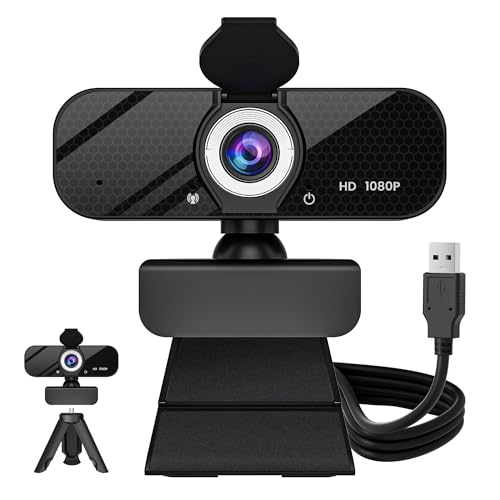
The GOZVRPU 1080P HD Webcam is ideal for professionals, streamers, and remote workers who require clear video quality for virtual meetings, online classes, or live streaming. It is perfect for users looking for an easy-to-use, high-definition webcam with advanced features like a built-in microphone and privacy cover to enhance their video communication experience.
Pros:
- 1080P HD resolution for crystal clear video quality
- Built-in microphone ensures clear audio capture
- Rotatable tripod allows flexible positioning
- Wide-angle lens covers more area in the frame
- Privacy cover protects your privacy when not in use
- Auto light correction improves video quality in various lighting conditions
- Plug & Play USB-A makes setup quick and hassle-free
Cons:
- May require additional lighting in very dark environments despite auto light correction
- Rotatable tripod might be less stable on uneven surfaces
The GOZVRPU 1080P HD Webcam boasts a high-definition resolution that delivers crisp and sharp video, enhancing your online presence whether in professional meetings or casual video chats. Its built-in microphone captures clear audio, reducing the need for extra accessories and making communication seamless. The wide-angle lens ensures a broader field of view, which is particularly beneficial for group calls or showcasing more background.
Additionally, the webcam features a rotatable tripod that allows users to adjust the camera angle easily, providing flexibility for different setups. The privacy cover gives peace of mind by physically blocking the lens when the webcam is not in use, while auto light correction helps maintain optimal video quality under varying lighting conditions. The simple Plug & Play USB-A connection ensures quick installation on laptops, desktops, or PCs without the need for complicated software, making it an excellent choice for both beginners and advanced users.
To buy this product, click here.
Frequently Asked Questions
What Features Make Logitech Brio 101 Ideal For Streaming?
Logitech Brio 101 offers Full HD 1080p video, built-in mic, and HDR support. It includes a privacy shutter and works well with Zoom and Microsoft Teams. Its compatibility with Nintendo Switch 2’s GameChat mode adds versatility for gamers and streamers.
Is Logitech C270 Good For Video Calls And Meetings?
Yes, Logitech C270 delivers 720p HD video with widescreen format. It features light correction and noise-reducing mic, improving video call quality. It supports popular platforms like Zoom and Skype, making it suitable for everyday meetings and calls.
How Does Shcngqio 1080p Webcam Enhance Video Quality?
Shcngqio 1080P webcam offers noise cancellation and auto light correction. Its wide-angle lens captures more in frame. The privacy cover ensures security, and its plug-and-play USB design makes setup easy for laptops and desktops.
What Benefits Does Gozvrpu 1080p Webcam Provide For Streaming?
GOZVRPU 1080P webcam includes a built-in microphone and rotatable tripod for flexible angles. It features a wide-angle lens and privacy cover. Auto light correction improves image quality. This webcam is plug-and-play compatible with laptops and PCs, perfect for streaming.
Are These Webcams Compatible With Multiple Devices?
Yes, all listed webcams support PC, Mac, laptops, and tablets. They work with popular software like Zoom, Skype, FaceTime, and Microsoft Teams. Some models also support Nintendo Switch 2’s GameChat mode, enhancing device compatibility.
Conclusion
Finding a cheap and best webcam is easier than you think. The options listed offer good video quality and clear sound for calls and streaming. Whether you need a simple 720p model or a full HD 1080p webcam, there is a choice for every budget.
Features like light correction, noise reduction, and privacy covers add extra value. These webcams work well with popular apps like Zoom, Skype, and Microsoft Teams. Easy setup and USB plug-and-play make them user-friendly. You don’t have to spend a lot to get reliable performance.
Think about what matters most: video clarity, microphone quality, or portability. Then pick the webcam that fits your needs best. With these affordable options, you can enjoy smooth video calls and clear communication without breaking the bank. A good webcam can make a big difference in your online experience.
Simple, effective, and budget-friendly—just what you need.



