


Have you ever struggled with a keyboard that just doesn’t feel right or a mouse that lags while working on your Mac Mini? It’s frustrating when your tools slow you down or make typing uncomfortable.
Choosing the right keyboard and mouse can change everything. The right combo makes daily tasks smoother and more enjoyable. It fits perfectly with your Mac Mini, helping you work faster and with less stress. In this article, I’ll share some of the best keyboard and mouse sets designed for Mac users.
These picks will help you find the perfect match, whether you want something compact, quiet, or multi-device ready. Keep reading to discover options that make your Mac Mini experience truly seamless.
Protoarc Backlit Bluetooth Keyboard And Mouse For Mac

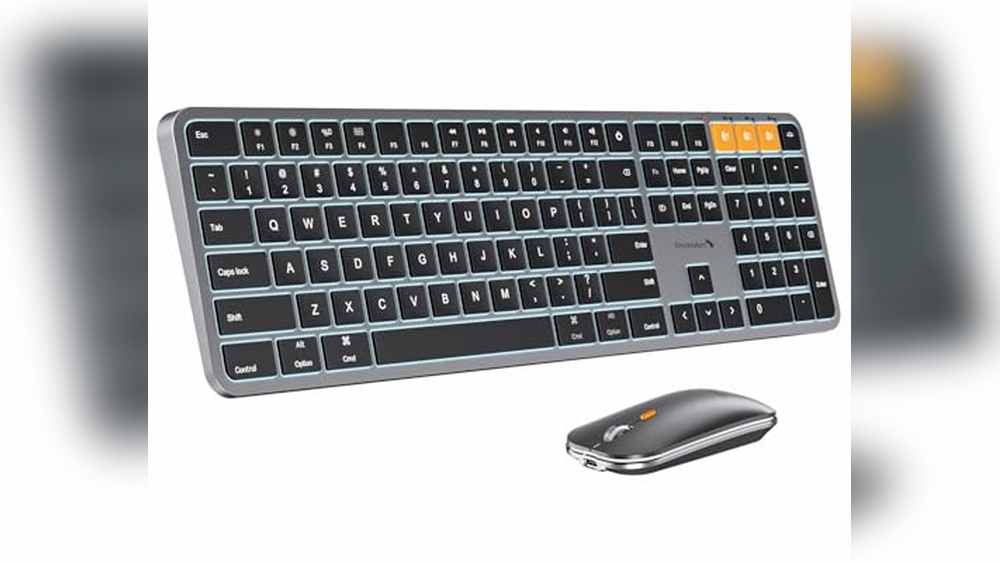
The ProtoArc Backlit Bluetooth Keyboard and Mouse for Mac, KM100-A is ideal for Mac users who seek a sleek, efficient, and fully wireless input solution. Perfect for professionals, students, and creatives who own a MacBook Pro, MacBook Air, iPhone, or iPad, this combo caters to those who value portability, multi-device compatibility, and a visually appealing workspace in space gray.
Pros:
- Full-size wireless keyboard and mouse designed specifically for Mac devices
- Backlit keys enhance usability in low-light environments
- Multi-device Bluetooth connectivity allows seamless switching between MacBook, iPhone, and iPad
- Rechargeable battery eliminates the need for frequent replacements
- Sleek space gray color complements Apple aesthetics
- Lightweight and compact design for easy portability
Cons:
- Limited to Bluetooth connectivity, which may experience occasional interference
- May have a learning curve for users new to Mac-specific keyboard layouts
The ProtoArc KM100-A features a thoughtfully designed full-size keyboard that offers an intuitive typing experience tailored for Mac users. The inclusion of backlit keys not only improves visibility in dim settings but also adds a modern touch to your desk setup. Coupled with the ergonomic wireless mouse, this combo enhances productivity by providing comfort during extended use. Its space gray finish aligns perfectly with Mac’s signature design language, making it an elegant accessory for any Apple device user.
Thanks to its multi-device Bluetooth capabilities, the ProtoArc keyboard and mouse set supports effortless switching between your MacBook, iPhone, and iPad, streamlining your workflow across devices. The rechargeable battery ensures uninterrupted use while reducing waste associated with disposable batteries. Compact dimensions and lightweight construction make this combo a great choice for those who work on the go or prefer a clutter-free workspace without sacrificing functionality.
To buy this product, click here.
Seenda Bluetooth Keyboard And Mouse Combo For Mac

The seenda Bluetooth Keyboard and Mouse Combo for Mac is ideal for users who are seeking a sleek, efficient, and versatile input solution for their Apple devices. Whether you own a MacBook Pro, MacBook Air, iPad, or iPhone, this combo is perfect for professionals, students, and casual users who value portability and multi-device functionality. If you want a compact, rechargeable, and wireless setup that seamlessly integrates with your Apple ecosystem, this product is designed for you.
Pros:
- Compact and slim design in elegant Space Gray that complements Apple devices
- Rechargeable battery ensures long-lasting wireless usage without frequent replacements
- Supports 3 Multi-Device Connection, allowing easy switching between Mac, iPad, and iPhone
- Reliable Bluetooth connectivity for smooth and lag-free typing and navigation
- Includes both keyboard and mouse, offering a complete input solution in one package
Cons:
- May have a learning curve for users new to compact keyboards
- Mouse size might be small for users preferring larger devices
- Compatibility primarily focused on Apple products, limiting use with non-Apple devices
The seenda SKM64-2 Bluetooth Keyboard and Mouse Combo is designed with a slim and compact profile, making it highly portable and convenient for users on the go. Its rechargeable feature eliminates the hassle of constantly changing batteries, while the multi-device connection capability allows effortless switching between your Mac, iPad, and iPhone. This flexibility ensures that you remain productive without needing multiple input devices cluttering your workspace.
Additionally, the combo’s space gray color and sleek design perfectly match the aesthetic of Apple products, enhancing the visual appeal of your setup. The keyboard provides comfortable and responsive typing, while the mouse offers precise navigation, contributing to an overall improved user experience. This combo is an excellent choice for anyone wanting a unified and stylish wireless keyboard and mouse solution compatible with their Apple devices.
To buy this product, click here.
Logitech Pebble 2 Combo For Mac

The Logitech Pebble 2 Combo for Mac is an excellent choice for professionals, students, and creatives who seek a slim, quiet, and portable wireless keyboard and mouse set specifically designed for macOS and iPadOS. Ideal for users who value a clutter-free workspace and need seamless switching between devices, this combo caters perfectly to those who prioritize both functionality and aesthetics in their tech accessories.
Pros:
- Wireless Bluetooth connectivity for a clean, cable-free setup
- Easy-Switch technology to toggle effortlessly between multiple devices
- Quiet typing and clicking ideal for shared or quiet environments
- Customizable keys and buttons to enhance productivity
- Slim and lightweight design enhances portability for on-the-go use
- Designed specifically for macOS and iPadOS ensuring compatibility and optimized user experience
Cons:
- Limited color option, only available in tonal white
- No backlighting on the keyboard, which may affect use in low-light conditions
- Lacks advanced gaming features, making it less suitable for gamers
The Logitech Pebble 2 Combo boasts a sleek and minimalistic design that fits perfectly on any desk. Its Bluetooth mouse and keyboard deliver a smooth, responsive experience while maintaining a quiet operation, which is ideal for office settings or libraries. The combo’s Easy-Switch feature allows users to pair and switch between up to three devices seamlessly, greatly enhancing productivity for those who juggle multiple Apple devices. Additionally, the customizable keys provide users with the flexibility to tailor the keyboard functions to their specific workflow, making daily tasks faster and more efficient.
Portability is another significant benefit of this combo. With its slim profile and lightweight construction, the Logitech Pebble 2 Combo is easy to carry, making it a perfect companion for remote work or travel. The tonal white color adds a modern and clean aesthetic, complementing Apple’s design philosophy. Overall, this combo is a reliable and stylish input solution that balances comfort, convenience, and performance for Mac and iPad users alike.
To buy this product, click here.
Protoarc Backlit Bluetooth Keyboard And Mouse For Mac

The ProtoArc Backlit Bluetooth Keyboard and Mouse for Mac, KM100-A is ideal for Mac users who seek a seamless and efficient multi-device wireless typing and navigation experience. Whether you own a MacBook Pro, MacBook Air, iPhone, or iPad, this rechargeable, full-size keyboard and mouse combo is designed for professionals, students, and anyone who values portability combined with advanced functionality.
Pros:
- Backlit keys for comfortable typing in low-light environments
- Multi-device Bluetooth connectivity for easy switching between Mac and iOS devices
- Full-size layout enhances typing speed and accuracy
- Rechargeable battery reduces the need for frequent replacements
- Elegant white and silver color complements Apple devices
- Compact and lightweight design for portability
Cons:
- Limited compatibility outside Apple ecosystem
- May require occasional Bluetooth re-pairing
The ProtoArc KM100-A keyboard and mouse combo boasts a sleek design with a white and silver finish that perfectly matches the aesthetics of Apple products. The backlit feature allows users to work comfortably in dimly lit environments, enhancing productivity during late-night sessions. Its full-size keyboard layout ensures that users can type efficiently without compromising on comfort, which is essential for long hours of work or study.
Thanks to its multi-device Bluetooth functionality, users can effortlessly switch between their MacBook, iPhone, and iPad, streamlining their workflow and reducing the need for multiple peripherals. The rechargeable battery not only promotes sustainability but also ensures that the devices are always ready for use without the hassle of constant battery replacements. Overall, the ProtoArc Backlit Bluetooth Keyboard and Mouse is a stylish, functional, and reliable accessory for Apple enthusiasts.
To buy this product, click here.
Bluetooth Keyboard And Mouse For Mac
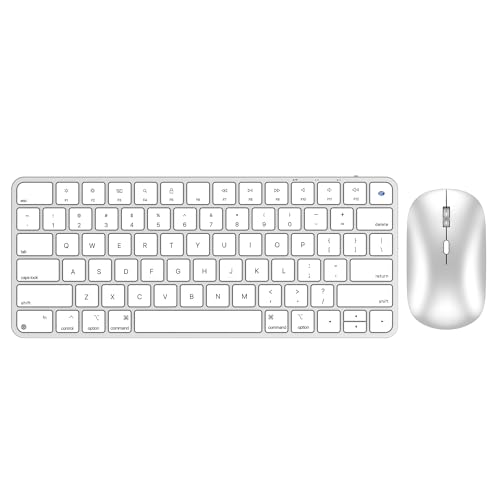
The Bluetooth Keyboard and Mouse for Mac by ULSOU is perfect for professionals, students, and Mac enthusiasts who seek a compact, efficient, and stylish input solution. Ideal for those using MacBook Air/Pro, iPad, or iPhone, this combo offers seamless wireless connectivity with a focus on portability and quiet operation. If you value sleek design combined with functional versatility, this mini-sized set is tailored for your needs.
Pros:
- Rechargeable battery eliminates the need for frequent replacements, offering eco-friendly convenience.
- Ultra slim and mini size design ensures easy portability and a clutter-free workspace.
- Quiet typing minimizes noise, perfect for shared or quiet environments.
- 4 Level DPI adjustment on the mouse allows for customizable sensitivity to enhance precision.
- Wide compatibility with Mac, iPad, iPhone, and MacBook Air/Pro devices.
Cons:
- Smaller key size may require an adjustment period for users accustomed to full-sized keyboards.
- White color may show dirt and smudges more easily than darker variants.
- Limited color options restrict personalization choices.
The Bluetooth Keyboard and Mouse for Mac boasts a sleek and minimalistic design with dimensions of 11.1 inches in length, 4.64 inches in width, and a height of just 0.2 inches, making it incredibly portable. Its lightweight nature, weighing only 0.9 pounds, ensures effortless mobility, whether you’re working from a café or moving between office spaces. The rechargeable feature provides the convenience of wireless operation without the hassle of constantly changing batteries, promoting long-term usability and sustainability.
Functionality is enhanced by the 4 level DPI adjustment on the mouse, allowing users to tailor cursor sensitivity to their specific tasks, from precise graphic work to fast browsing. The keyboard’s quiet typing experience is designed to reduce distractions, making it an excellent choice for environments requiring focus and minimal noise. Furthermore, its broad compatibility with Apple devices such as the MacBook Air/Pro, iPad, and iPhone ensures seamless integration into your existing tech ecosystem.
To buy this product, click here.
Frequently Asked Questions
Which Keyboard And Mouse Combo Suits Mac Mini Best?
The ProtoArc KM100-A and Seenda SKM64-2 are top choices. Both offer multi-device Bluetooth connections and rechargeable batteries. They are compact, compatible with macOS, and provide quiet typing, ideal for Mac Mini users.
Are These Combos Compatible With Macbook And Ipad?
Yes, all listed combos support MacBook Pro/Air, iPad, and iPhone. They use Bluetooth connectivity and are designed for seamless multi-device switching, ensuring smooth compatibility across Apple devices.
How Long Do The Rechargeable Batteries Last?
Battery life varies, but typically lasts several days on a single charge. These combos include efficient power management and quick charging, ideal for daily use without frequent recharging interruptions.
Do These Keyboards Offer Backlighting For Low-light Use?
The ProtoArc KM100-A features backlit keys for easy typing in dim environments. This enhances visibility and user comfort, especially during late-night work sessions on your Mac Mini.
Can I Customize Keys Or Mouse Buttons On These Combos?
Yes, especially the Logitech Pebble 2 Combo supports customizable keys and buttons. This allows users to personalize shortcuts, enhancing productivity and making navigation smoother on macOS devices.
Conclusion
Choosing the right keyboard and mouse for your Mac Mini can make a big difference. The options listed offer great features like wireless connectivity, multi-device support, and sleek designs. Whether you prefer a full-size keyboard or a compact, slim option, there is something for everyone.
Rechargeable batteries and quiet typing add to the convenience. Compatibility with MacBook, iPad, and iPhone ensures flexibility. Pay attention to your needs—do you want backlit keys or ultra-slim devices? Each combo here combines style and function to improve your daily work or play.
Remember, a good keyboard and mouse setup helps you work faster and more comfortably. Take your time to pick what fits best with your Mac Mini and personal style. With the right choice, your Mac Mini experience will be smoother and more enjoyable every day.



