


Have you ever struggled with a keyboard that just doesn’t feel right? Maybe your fingers ache after long typing sessions.
Or the keys are too quiet, too loud, or hard to see. It’s frustrating when your keyboard slows you down or makes work uncomfortable. But the right keyboard can change everything. It can make typing smooth, reduce strain on your hands, and even brighten your workspace with gentle backlighting.
Whether you work from home, write daily, or just love typing comfortably, choosing the best keyboard matters. In this article, you’ll find carefully picked keyboards designed to make your typing easier and more enjoyable. Keep reading to discover which one fits your needs perfectly and turns your daily typing into a better experience.
Perixx Periboard-512b Wired Ergonomic Keyboard

The Perixx PERIBOARD-512B Wired Ergonomic Keyboard is ideal for professionals, writers, and anyone who spends extended hours typing. If you are looking for a keyboard that promotes natural hand positioning and reduces wrist strain, this split keyboard with a built-in wrist rest is designed specifically for your comfort and productivity needs.
Pros:
- Ergonomic split keyboard design supports natural hand and wrist posture
- Includes a comfortable wrist rest to minimize strain during long typing sessions
- Reliable wired USB connectivity ensures stable and fast data transmission
- Compact dimensions with a sleek black finish fit well in any workspace
- Durable build quality from a reputable brand, Perixx
Cons:
- Wired connection may limit mobility compared to wireless alternatives
- Lack of additional multimedia keys or programmable buttons
- May require an adjustment period for users unfamiliar with split keyboards
The Perixx PERIBOARD-512B features a thoughtfully designed split layout that encourages a more natural typing position, reducing the risk of repetitive strain injuries. Its integrated wrist rest provides essential support, helping users maintain comfort during prolonged work or gaming sessions. The wired USB connectivity guarantees a consistent and lag-free experience, making it suitable for demanding tasks that require precision and speed.
Measuring just under 2 inches in height and less than 19 inches in length, this keyboard offers a compact and space-saving solution without compromising key functionality. Its sturdy construction and classic black color blend seamlessly into any office or home setup. Overall, the Perixx PERIBOARD-512B delivers both ergonomic benefits and reliable performance, making it a smart choice for anyone seeking a healthier, more efficient typing experience.
To buy this product, click here.
Large Print Backlit Wireless Keyboard
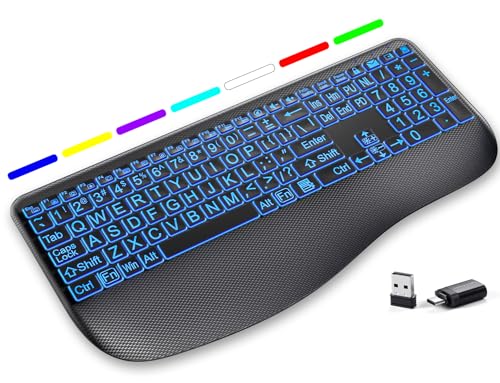
The Large Print Backlit Wireless Keyboard is ideal for users who prioritize comfort, visibility, and quiet operation in their typing experience. This keyboard is perfect for professionals working long hours, gamers seeking silent keys, and individuals with visual impairments who benefit from the large print and customizable backlighting features. Its wireless and rechargeable design also makes it an excellent choice for those who want a clutter-free workspace compatible with Windows and Mac systems.
Pros:
- Silent low profile keys provide a quiet typing experience.
- 7-color backlit keys enhance visibility and aesthetic appeal.
- Large print keys improve readability for users with vision challenges.
- Ergonomic wrist rest reduces strain during extended use.
- Wireless 2.4G connectivity offers reliable, cable-free convenience.
- Rechargeable battery ensures eco-friendly and long-lasting power.
- Full-size keypad supports efficient data entry and navigation.
Cons:
- The black color may show fingerprints and dust more easily.
- Some users might find the height of 0.94 inches slightly thick compared to ultra-slim keyboards.
- Compatibility might require driver installation for certain Mac features.
The Large Print Backlit Wireless Keyboard features a well-thought-out design, combining ergonomics and functionality. Its quiet low profile keys allow for a distraction-free typing environment, making it suitable for both office and home use. The inclusion of a wrist rest adds an extra layer of comfort, promoting better hand positioning and reducing fatigue during lengthy typing sessions. Additionally, the 7-color backlit lighting not only makes the keyboard visually appealing but also improves key visibility in low-light conditions, enhancing overall usability.
This keyboard’s wireless 2.4G connectivity offers users freedom from tangled cables while maintaining a stable connection to computers or laptops running Windows or Mac. The rechargeable battery ensures continuous use without the need for frequent replacements, aligning with environmentally friendly practices. With its large print keys, this keyboard caters especially well to users with limited vision, providing clear and easy-to-read characters. Overall, it is a versatile and user-friendly accessory that blends style, comfort, and functionality.
To buy this product, click here.
Logitech Wave Keys Wireless Ergonomic Keyboard

The Logitech Wave Keys Wireless Ergonomic Keyboard is ideal for professionals and avid computer users who spend long hours typing and seek to enhance their comfort and productivity. This keyboard is perfect for individuals who value ergonomic design, seamless multi-device connectivity, and compatibility with various operating systems such as Windows and Mac. If you experience wrist strain or discomfort during typing sessions, this keyboard offers a well-designed solution to improve your overall typing experience.
Pros:
- Ergonomic wave design with a cushioned palm rest to reduce wrist strain and improve typing comfort
- Supports Easy-Switch technology for effortless connection between multiple devices via Bluetooth or Logi Bolt Receiver
- Compatible with various multi-OS platforms including Windows and Mac
- Compact and stylish graphite color design fits well in any workspace
- Durable build quality from the trusted Logitech brand
Cons:
- Slightly higher price point compared to standard keyboards
- Keyboard size may take some adjustment for users accustomed to traditional layouts
The Logitech Wave Keys Wireless Ergonomic Keyboard features a unique wave-shaped layout that promotes a more natural hand, wrist, and forearm posture, which significantly reduces discomfort during extended typing sessions. Its cushioned palm rest adds an extra layer of comfort, making it an excellent choice for users who prioritize ergonomics. The wireless connectivity options include both Bluetooth and the Logi Bolt Receiver, offering versatile and reliable connections to multiple devices. This flexibility allows users to switch between computers, tablets, and other devices seamlessly without the hassle of reconnecting.
Designed with multi-OS compatibility, this keyboard supports both Windows and Mac operating systems, making it a versatile tool for mixed-device environments. The graphite finish not only lends a modern and professional look but also ensures durability. Overall, the Logitech Wave Keys keyboard delivers a combination of comfort, convenience, and reliable performance, making it a valuable investment for anyone looking to enhance their typing experience while maintaining ergonomic health.
To buy this product, click here.
Quasio Large Print Backlit Keyboard

The QUASIO Large Print Backlit Keyboard is ideal for users who require enhanced visibility and ease of use, such as seniors, individuals with visual impairments, or anyone who prefers oversized, illuminated keys for comfortable typing. This keyboard is perfect for people working in low-light environments or those seeking a reliable wired USB keyboard for their PC, laptop, or Windows desktop.
Pros:
- Features 7-color backlit illumination to suit different preferences and environments.
- Oversized letters keys make typing easier and reduce strain on the eyes.
- Wired USB connection ensures stable and lag-free performance.
- Compatible with multiple devices including PC, laptops, and Windows desktops.
- Durable design from the trusted QUASIO brand and manufacturer.
Cons:
- Lacks wireless connectivity which may limit portability.
- Backlit colors may not be adjustable beyond preset options.
The QUASIO Large Print Backlit Keyboard stands out with its vibrant 7-color backlit feature, allowing users to customize the keyboard lighting based on their environment or mood. This enhances visibility in dimly lit rooms and reduces eye strain, making it ideal for extended typing sessions. The oversized letters on the keys are designed to be easy to see, improving typing accuracy and speed for users who struggle with smaller fonts.
Additionally, the keyboard’s wired USB interface guarantees a reliable connection without interruptions, suitable for professional and personal use. Its compatibility with various Windows devices ensures a versatile experience, while the build quality from QUASIO provides long-lasting durability. Overall, this keyboard offers a practical and user-friendly solution for those needing a clear, illuminated typing experience.
To buy this product, click here.
Logitech Signature Slim K950 Wireless Keyboard

The Logitech Signature Slim K950 Wireless Keyboard is ideal for professionals, students, and tech enthusiasts who seek a sleek and efficient typing experience. If you often switch between multiple devices or prefer a quiet, comfortable keyboard that complements various operating systems like Windows, Mac, and Chrome, this keyboard is designed for you.
Pros:
- Sleek and slim design that saves desk space and adds a modern aesthetic
- Seamless switch typing capability between multiple devices via Bluetooth
- Quiet typing experience suitable for shared or quiet environments
- Multi-OS compatibility including Windows, Mac, and Chrome
- Lightweight design with a weight of approximately 1.51 pounds for easy portability
Cons:
- May have a higher price point compared to basic keyboards
- Lacks backlit keys which could be useful in low-light settings
- Bluetooth connection may occasionally experience latency issues depending on the environment
The Logitech Signature Slim K950 features a modern graphite finish and a compact form factor that enhances any workspace. Its ability to connect wirelessly via Bluetooth to multiple devices allows users to effortlessly toggle between work on a laptop, tablet, or desktop without needing multiple keyboards. This flexibility increases productivity and reduces clutter.
Additionally, the keyboard’s quiet typing mechanism benefits users in shared spaces or during late-night work sessions, minimizing distractions. Compatibility across multiple operating systems ensures that users do not need to worry about driver issues, making it a versatile choice for mixed-device households or offices. Overall, the Logitech Signature Slim K950 balances style, function, and convenience effectively.
To buy this product, click here.
Frequently Asked Questions
What Makes A Keyboard Ergonomic For Typing?
An ergonomic keyboard reduces strain by promoting natural hand and wrist positions. Models like Perixx PERIBOARD-512B offer split layouts and wrist rests to enhance comfort during long typing sessions.
Are Wireless Keyboards Good For Typing Accuracy?
Yes, wireless keyboards like Logitech Wave Keys provide reliable connectivity and responsive keys. They offer freedom of movement without sacrificing typing accuracy or speed.
How Important Are Backlit Keys For Typing?
Backlit keys improve visibility in low light, reducing typing errors. Keyboards like QUASIO Large Print Backlit make it easier to type accurately in dark environments.
Which Keyboard Features Support Quiet Typing?
Keyboards with low-profile, silent keys, such as the Large Print Backlit Wireless Keyboard, minimize noise. They are ideal for shared spaces or quiet work environments.
Can Multi-device Keyboards Improve Typing Efficiency?
Yes, keyboards like Logitech Signature Slim K950 allow seamless switching between devices. This boosts productivity by reducing the need to switch keyboards when multitasking.
Do Large Print Keyboards Benefit Typing Speed?
Large print keyboards enhance key visibility, reducing typing mistakes. They are especially helpful for users with vision challenges or those preferring clearer key labeling.
Conclusion
Choosing the best keyboard for typing depends on your needs and comfort. Ergonomic designs like the Perixx PERIBOARD-512B help reduce wrist strain. Wireless options such as the Logitech Wave Keys offer freedom and cushioned palm rests for comfort. Large print keyboards like the QUASIO model make typing easier for those with vision challenges.
Backlit keys improve visibility in low light, seen in both the Perixx and QUASIO keyboards. If you want a sleek, slim design, the Logitech Signature K950 fits well on any desk. Quiet keys are great for shared spaces or offices.
Consider how you use your keyboard daily—wired or wireless, backlit or simple, ergonomic or compact. The right choice will make typing faster and more comfortable. Test a few if you can, and pick what feels best for your hands and work style.
Your ideal keyboard is out there.



