


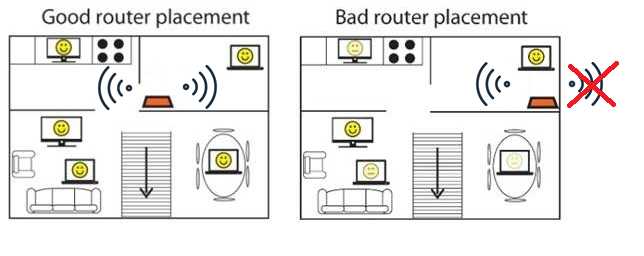
To maximize your Wi-Fi signal at home, place your router in a central, open spot away from thick walls and electronic interference. Elevate it on a shelf or high surface for better coverage, and keep it away from large metal objects. Adjusting the position of your router can significantly improve your internet strength and speed.
In short, positioning your router in a central, elevated location and avoiding obstructions helps ensure a strong, reliable Wi-Fi signal throughout your home. Strategic placement minimizes interference and maximizes coverage, giving you better connectivity wherever you are.
Getting a strong Wi-Fi signal at home often feels like a game of hide and seek with your router. Many forget that its placement matters just as much as the device itself. By thinking carefully about where you put your router—ideally in a central, open, and elevated spot—you can dramatically improve your internet speed and stability. Avoid placing it near large metal objects or electronic devices that can cause interference. With a few simple adjustments, you’ll enjoy seamless streaming, smoother video calls, and faster downloads, making your online experience much more enjoyable.

How to position your router for the strongest signal at home
Understanding the importance of proper router placement
Proper router placement plays a crucial role in determining the strength and quality of your Wi-Fi signal. A well-positioned router can provide faster internet speeds and reduce dead zones in your home. Knowing where to put your router helps ensure that all devices stay connected smoothly without interruptions.
Choose the best central location
A central spot in your house ensures Wi-Fi coverage reaches all rooms evenly. Place your router at the heart of your home, ideally on a high shelf or mounted on a wall. Avoid placing it in corners or behind large furniture, which can block signals.
Avoid obstacles and interference
Physical barriers such as thick walls, metal objects, and large appliances can weaken signals. Keep your router away from devices like microwave ovens, cordless phones, and Bluetooth gadgets that cause wireless interference. Clear space around your router maximizes signal strength.
Position your router off the floor
Placing your router at a higher elevation ensures better coverage. Avoid placing it on the ground where signals can be absorbed or blocked by furniture and other objects. Use a shelf or mount to elevate the device for optimal signal propagation.
Maintain optimal distance from electronic devices
Electronic devices emitting electromagnetic signals can interfere with Wi-Fi signals. Keep your router away from TVs, gaming consoles, and other electronic gadgets. Maintaining some distance improves connection quality and reduces interference.
Experiment with antenna positioning
If your router has adjustable antennas, position them vertically or at angles to maximize coverage. For two antennas, try one vertical and one horizontal to cover multiple directions. Changing antenna angles can significantly improve signal reach.
Keep router firmware updated
Regularly updating your router’s firmware ensures it runs efficiently and supports the latest Wi-Fi standards. Check your manufacturer’s website for updates and follow instructions for installation to optimize performance.
Avoid placing the router near water sources
Water can absorb wireless signals, so avoid placing your router near aquariums or large water containers. Keeping it away from such sources reduces signal degradation and maintains consistent connectivity.
Test your Wi-Fi signal strength
Use free apps or tools like Speedtest or Wi-Fi Analyzer to monitor signal strength throughout your home. Testing helps identify dead spots and areas needing better placement, leading to more reliable Wi-Fi coverage.
Utilize Wi-Fi extenders or mesh systems if needed
If your home has thick walls or extensive space, consider using Wi-Fi extenders or mesh networks. These devices help distribute signals evenly, especially in large or multi-story homes, ensuring strong coverage everywhere.
Consider the layout of your home
Open floor plans allow signals to travel freely, but complex layouts with many rooms and walls may require strategic placement. Study your home’s layout and adjust your router’s position accordingly to improve coverage.
Use different frequency bands wisely
Modern routers operate on 2.4 GHz and 5 GHz bands. The 2.4 GHz band offers better range but slower speeds, ideal for general browsing. The 5 GHz band delivers faster speeds over shorter distances. Place the router to favor both bands as needed.
Portability and future-proofing
Think about how your home’s setup may change over time. Position your router in a way that accommodates future changes, such as new furniture or additional rooms. This foresight helps maintain strong signals without frequent adjustments.
Summary of key tips for optimal router placement
- Choose a central, elevated spot
- Avoid obstacles and electronic interference
- Experiment with antenna positions
- Keep firmware updated regularly
- Use Wi-Fi analyzers to test signals
- Consider extenders or mesh systems for large homes
Additional considerations for specific home designs
Some homes may require tailored solutions based on their architecture. For example, homes with thick concrete walls may limit Wi-Fi range, necessitating multiple access points. Always assess your home’s unique features when planning your router placement.
Positioning your router correctly is simple but essential for ensuring the strongest internet connection at home. By selecting the right location, avoiding interference, and using the right tools, you can improve Wi-Fi performance significantly. Regular testing and adjustments ensure your setup adapts to your changing needs, providing a seamless online experience every day.
Fix Your Wi-Fi Signal Instantly – Router Placement Tips!
Frequently Asked Questions
What are the best places to avoid when positioning your router?
Avoid placing your router near large metal objects, thick walls, or appliances that emit electromagnetic interference, such as microwaves and cordless phones. These obstacles can block or weaken the Wi-Fi signal, reducing its strength and coverage throughout your home. Keep the router away from cluttered areas and enclosed spaces that can trap signals instead of allowing them to spread evenly.
How does the height of the router influence your Wi-Fi signal?
Positioning your router higher off the ground helps broadcast the Wi-Fi signal more effectively across your home. Elevated placement minimizes obstructions and allows signals to travel freely over furniture and other obstacles. Mounting the router on a shelf or wall can improve coverage, especially in multi-story homes.
Why should you consider placing your router near the center of your home?
Placing the router in a central location ensures that the Wi-Fi signal reaches all areas evenly. This minimizes dead zones and provides a more consistent connection in bedrooms, living rooms, and other frequently used spaces. Avoid placing it in corners or basements where signals tend to weaken.
What impact do large furniture and appliances have on Wi-Fi signal strength?
Large furniture and appliances can obstruct the Wi-Fi signal, causing it to weaken or become uneven. Positioning your router away from bulky items, especially those made of metal or dense materials, helps maintain a clear line of sight and ensures stronger signal propagation throughout your home.
How can the orientation of your router’s antennas improve coverage?
Adjusting the antennas to be vertical or at specific angles can optimize Wi-Fi coverage. For homes with multiple floors, positioning some antennas vertically and others at an angle can help distribute the signal more evenly across different levels. Experimenting with antenna directions allows you to find the best setup for your space.
Final Thoughts
How to position your router for the strongest signal at home. Position your router centrally to maximize coverage and reduce dead zones. Keep it elevated on a shelf or high furniture, away from walls or metal objects that can block signals. Avoid placing it near electronic devices that emit interference.
Maintaining an optimal placement ensures a reliable connection throughout your home. Follow these tips for the best performance and enjoy seamless internet.



