Have you ever joined an important video call only to find your webcam blurry, dark, or frozen? It’s frustrating when others can’t see or hear you clearly.
These small tech troubles can make meetings, classes, or catching up with loved ones stressful. But the right webcam changes everything. It brings your face into clear focus, captures true colors, and picks up your voice perfectly. Suddenly, online chats feel natural and smooth.
No more awkward pauses or repeated “Can you hear me? ” moments. Choosing the best webcam for your computer can brighten your day and boost your confidence on every call. In this article, you’ll find top webcams that fit different needs and budgets. Keep reading to find the perfect one that makes your video calls easy and enjoyable.
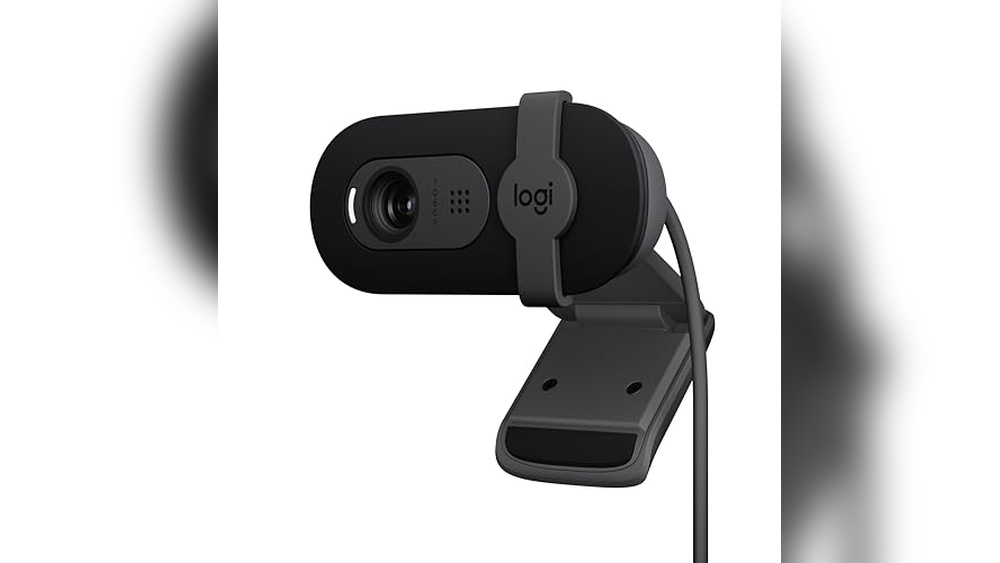
Logitech Brio 101 Webcam

The Logitech Brio 101 Full HD 1080p Webcam is ideal for professionals, streamers, and remote workers who require high-quality video for meetings and live streaming. If you use platforms like Zoom, Microsoft Teams, or even gaming consoles such as the Nintendo Switch 2, this webcam offers seamless compatibility and enhanced performance to elevate your video communication experience.
Pros:
- Full HD 1080p resolution ensures crisp and clear video quality.
- Built-in microphone with noise reduction for clear audio capture.
- Privacy shutter for secure and worry-free usage.
- Compatible with popular platforms like Zoom, Microsoft Teams, and Nintendo Switch 2’s GameChat Mode.
- Compact and sleek black design fits well on desktops, laptops, and PCs.
- Easy USB-A connection for plug-and-play convenience.
Cons:
- Does not support 4K resolution, limiting ultra-high-definition streaming.
- Fixed lens without zoom or autofocus features.
- May require additional lighting for optimal video quality in low-light environments.
The Logitech Brio 101 webcam boasts a sleek and compact design measuring approximately 2.62 inches in height and 2.87 inches in width, making it an unobtrusive addition to any workspace. Its Full HD 1080p video capability ensures sharp and vibrant visuals, which is essential for professional meetings and streaming sessions. The built-in microphone with noise reduction technology captures clear audio, minimizing background noise and enhancing communication quality.
Additionally, the webcam includes a handy privacy shutter that gives users control over their camera’s operation, ensuring privacy when the device is not in use. Compatibility with a wide range of platforms, including Zoom, Microsoft Teams, and Nintendo Switch 2’s new GameChat Mode, makes this webcam versatile for multiple scenarios. The USB-A connection guarantees simple setup and broad compatibility with most devices, making it a reliable choice for anyone seeking an efficient and user-friendly webcam.
To buy this product, click here.
Shcngqio 1080p Hd Webcam

The Shcngqio 1080P HD Webcam with Microphone is ideal for professionals, content creators, and remote workers who need a reliable and high-quality video communication tool. If you frequently participate in Zoom, Skype, or live streaming sessions, or simply want to enhance your video calls on PC, Mac, or laptop, this webcam is designed to meet your needs with its user-friendly features.
Pros:
- 1080P HD video quality ensures clear and sharp visuals for video calls and streaming.
- Noise cancellation microphone provides crisp audio by reducing background noise.
- Privacy cover offers added security and peace of mind when the webcam is not in use.
- Wide-angle lens captures more of the room, perfect for group calls or presentations.
- Auto light correction adjusts to different lighting conditions for optimal image quality.
- Plug & Play USB connectivity makes setup quick and hassle-free without additional software.
Cons:
- The fixed wide-angle lens may not suit users needing adjustable zoom or focus.
- Some users might find the privacy cover a bit small or fiddly to operate.
Equipped with a 1080P HD camera, the Shcngqio webcam delivers crisp and vibrant video, enhancing the clarity of your online meetings and streams. The inclusion of a noise cancellation microphone ensures your voice comes through clearly, minimizing distracting background sounds. This combination is especially beneficial for professionals who rely on clear communication and content creators who want to maintain high production value during live sessions.
Additionally, the wide-angle lens expands the field of view, making it easier to fit multiple people or a larger background into the frame. The auto light correction feature automatically adjusts the brightness and contrast, so you always look your best regardless of the lighting environment. Its plug & play USB design means you can quickly connect it to any compatible device without needing to install additional drivers, making it a convenient solution for anyone looking to upgrade their video call experience immediately.
To buy this product, click here.
Logitech C920x Hd Pro Pc Webcam

The Logitech C920x HD Pro PC Webcam is ideal for professionals, content creators, and remote workers who need high-quality video and clear audio for virtual meetings, streaming, or online collaboration. It is perfect for users who demand reliable performance with compatibility across popular platforms like Microsoft Teams, Google Meet, and Zoom, as well as gamers using the Nintendo Switch 2’s new GameChat mode.
Pros:
- Full HD 1080p video resolution at 30fps for crisp, clear visuals
- Integrated stereo microphones deliver clear audio quality
- HD light correction adjusts automatically for bright and natural video even in low light
- Wide compatibility with multiple platforms and devices including Mac and tablet
- Compact and sleek black design that is easy to position and transport
Cons:
- Fixed focus lens may not suit users needing advanced autofocus features
- No built-in privacy shutter, requiring a separate accessory for privacy concerns
The Logitech C920x HD Pro Webcam boasts a high-definition 1080p video quality that ensures every virtual interaction is sharp and professional-looking. Its ability to deliver smooth video at 30 frames per second makes it suitable for both video conferencing and content creation. The inclusion of HD light correction technology enhances video clarity by automatically adjusting to lighting conditions, which is especially useful for those working in varied environments.
Users will appreciate the webcam’s dual stereo microphones that provide clear audio, minimizing the need for additional audio equipment. Compatibility across major communication platforms such as Microsoft Teams, Google Meet, and Zoom ensures seamless integration, while support for Nintendo Switch 2’s GameChat mode expands its versatility for gamers. Its lightweight and compact black design make it a convenient accessory for any workspace or travel setup.
To buy this product, click here.
Emeet 1080p Webcam

The EMEET 1080P Webcam with Microphone is ideal for professionals, remote workers, and students who require a reliable and high-quality video conferencing tool. If you frequently participate in online meetings, virtual classes, or video calls on platforms like Zoom, Teams, or Facetime, this webcam is designed to enhance your communication experience with crystal-clear visuals and audio. Its plug-and-play functionality also makes it perfect for those who want a hassle-free setup without technical complications.
Pros:
- High-definition 1080P video quality for crisp and clear visuals.
- Dual 2 microphones for enhanced audio capture and noise reduction.
- 90° field of view (FOV) to capture a wider area during video calls.
- Includes both USB Type-A and A-to-C adapter for versatile connectivity options.
- Plug & Play functionality for easy and quick setup without drivers.
- Switch 2 Camera Support allows seamless switching between two cameras.
- Compact and lightweight design making it easy to carry and install anywhere.
Cons:
- Limited to 1080P resolution, which might not satisfy users seeking 4K quality.
- Fixed 90° FOV may not be adjustable for all user preferences.
- Compatibility primarily with USB Type-A and C may require adapters for other connection types.
The EMEET 1080P Webcam delivers excellent video performance with its full HD resolution, ensuring every detail is captured sharply during online sessions. The dual microphones improve voice clarity by reducing background noise, which is crucial for professional meetings and online learning environments. Its wide 90-degree field of view allows users to include multiple people or a larger background without needing to adjust the camera frequently.
Additionally, the webcam’s compatibility with multiple USB connections and its plug-and-play design make it a user-friendly device for anyone, regardless of technical expertise. The support for switching between two cameras is a beneficial feature for content creators and presenters who need to alternate between different views smoothly. Overall, the EMEET C960 Webcam balances quality, convenience, and versatility, making it a great choice for enhancing online communication.
To buy this product, click here.
Nexigo N60 Webcam

The NexiGo N60 1080P Webcam with Microphone is ideal for professionals, remote workers, and students who require high-quality video for virtual meetings, online classes, or video calls. If you are someone who frequently uses platforms like Zoom, Skype, or Teams for conferencing and want a reliable, easy-to-use webcam with excellent image clarity and privacy features, this product is designed for you.
Pros:
- 1080P HD resolution for clear and sharp video quality
- Built-in microphone for clear audio capture
- Privacy cover ensures security when the webcam is not in use
- Plug and play USB connection for easy setup without additional drivers
- Software control allows customization of camera settings
- Compact and lightweight design for portability
Cons:
- Limited to USB 2.0, which may affect data transfer speed on some systems
- No built-in autofocus feature
- Privacy cover might be small and easy to misplace
The NexiGo N60 Webcam boasts a 1080P HD resolution that delivers crisp and vibrant video, enhancing the visual experience during virtual meetings and online communication. Its integrated microphone captures clear and natural sound, eliminating the need for an external mic and simplifying the setup process. The webcam’s plug and play functionality ensures quick installation, making it accessible even for users without technical expertise.
Additionally, the inclusion of a privacy cover gives users peace of mind by physically blocking the camera lens when not in use, safeguarding personal privacy. The device also features software control capabilities, allowing users to adjust settings such as brightness and contrast to optimize their video appearance. With its compact design and compatibility with popular conferencing platforms, the NexiGo N60 is a versatile choice for anyone looking to improve their video calling experience.
To buy this product, click here.
Frequently Asked Questions
What Features Make Logitech Brio 101 Stand Out?
Logitech Brio 101 offers Full HD 1080p video, built-in mic, and a privacy shutter. It supports Zoom, Microsoft Teams, and Nintendo Switch 2’s GameChat mode, ensuring versatile use for meetings and streaming.
How Does Shcngqio 1080p Webcam Improve Video Calls?
Shcngqio 1080P webcam includes noise cancellation, auto light correction, and a wide-angle lens. It also has a privacy cover, making it ideal for clear, secure video calls on multiple platforms.
Is Logitech C920x Suitable For Professional Streaming?
Yes, Logitech C920x delivers Full HD 1080p at 30fps with clear audio and HD light correction. It supports popular platforms like Microsoft Teams and Google Meet, perfect for professional streaming and calls.
What Advantages Does Emeet 1080p Webcam Offer?
EMEET 1080P webcam features two microphones and a 90° field of view. It includes USB Type-A and A-to-C adapters, enabling easy plug-and-play use for calls on Zoom, Teams, and FaceTime.
Can Nexigo N60 Webcam Ensure Privacy And Control?
NexiGo N60 offers software control and a privacy cover for secure use. It supports plug-and-play functionality and is ideal for conferencing and video calls on Zoom, Skype, and Teams.
Conclusion
Choosing the best webcam for your computer depends on your needs and budget. The Logitech Brio 101 offers sharp full HD video and a built-in mic, ideal for meetings and streaming. The Shcngqio 1080P webcam provides noise cancellation and wide-angle views, perfect for clear video calls.
Logitech C920x delivers smooth full HD video with excellent light correction for various platforms. EMEET’s webcam features dual microphones and a wide field of view for better sound and image quality. NexiGo N60 stands out with software control and a privacy cover for added security.
Each webcam supports popular apps like Zoom, Microsoft Teams, and Skype. Remember to pick one that suits your space and usage. Good video and sound quality make your online presence more professional and engaging. This guide helps you find a reliable webcam without confusion or extra cost.
Choose wisely and enjoy better video calls every time.

I specialize in process engineering and system optimization. I enjoy writing guides that simplify troubleshooting and help improve efficiency in everyday tech use.