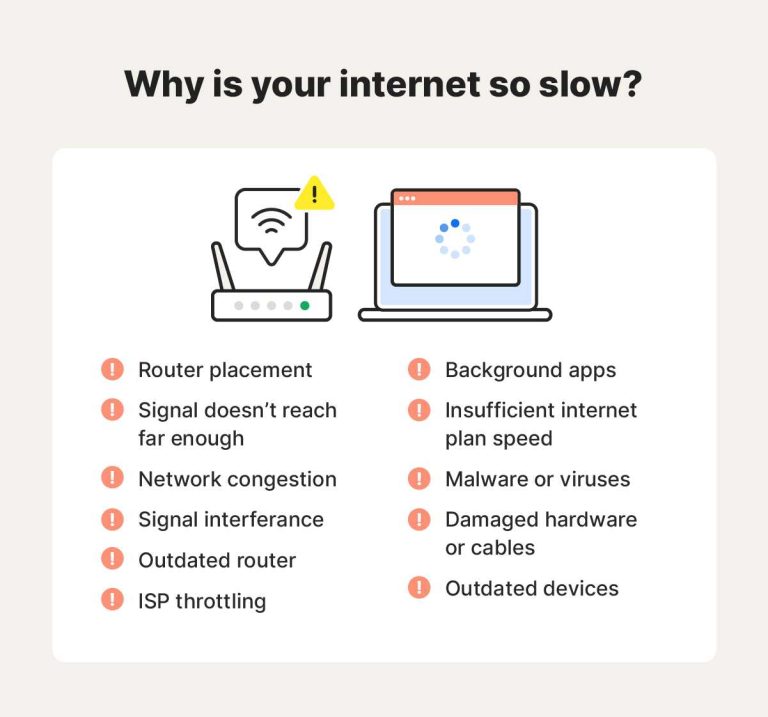
To choose a router with high-speed performance, look for the latest Wi-Fi standards like Wi-Fi 6, prioritize high bandwidth capabilities, and check for strong signal strength and coverage.
In short, pick a router that supports the newest Wi-Fi technologies, offers ample speed options, and fits your space to ensure fast, reliable internet. These factors help you enjoy smoother streaming, faster downloads, and seamless online gaming.
When shopping for a high-performance router, it’s essential to focus on several key aspects to get the best value for your money. First, consider the Wi-Fi standard—Wi-Fi 6 (802.11ax) is currently the fastest and most future-proof choice, providing better speed and efficiency. Look at the maximum speed ratings and ensure the router supports multiple devices without slowing down. Signal strength and coverage are equally important; a router with multiple antennas or mesh compatibility can help eliminate dead zones. Lastly, think about your specific needs, whether it’s gaming, streaming, or working from home, and pick a model that offers the right features and performance levels to match.

How to choose a router with high speed performance
Understanding the Basics of Wi-Fi Speed
Choosing a router that provides high speed performance starts with understanding Wi-Fi speed concepts. The key factors include bandwidth, data transfer rates, and signal strength. Higher bandwidth generally means faster internet, but other features also influence overall speed.
Key Specifications to Look For
To ensure your router offers high performance, focus on specific specifications:
- Wi-Fi Standard: Look for routers supporting at least Wi-Fi 5 (802.11ac) or Wi-Fi 6 (802.11ax). Wi-Fi 6 offers faster speeds and better handling of multiple devices.
- Maximum Data Rate: Check the maximum speed listed on the box, usually in Mbps or Gbps. Higher numbers indicate faster potential download and upload speeds.
- Dual or Tri-Band Support: Dual-band routers operate on 2.4 GHz and 5 GHz bands, while tri-band adds an extra 5 GHz band. This reduces interference and improves speed when multiple devices connect.
- Processor and RAM: A powerful processor and sufficient RAM help manage multiple connections smoothly, maintaining high speeds.
Choosing the Right Wi-Fi Standard
Wi-Fi standards evolve to support higher speeds and more devices. Here’s a quick overview:
| Standard | Maximum Theoretical Speed | Best Use |
|---|---|---|
| Wi-Fi 4 (802.11n) | 600 Mbps | Basic internet browsing and streaming |
| Wi-Fi 5 (802.11ac) | 3.5 Gbps | High-definition streaming and gaming |
| Wi-Fi 6 (802.11ax) | 9.6 Gbps | Multiple devices, heavy internet use |
Understanding Frequency Bands and Their Impact
The 2.4 GHz band offers wider coverage but slower speeds, perfect for basic tasks. The 5 GHz band provides faster speeds ideal for gaming, 4K streaming, and large downloads. Using a router that supports both bands allows flexibility and better performance.
Importance of Beamforming Technology
Beamforming focuses the Wi-Fi signal directly toward devices, increasing speed and stability. Routers with this technology can provide stronger signals over longer distances, especially useful in larger homes.
Evaluating Router Performance with Multiple Devices
Modern households often connect many devices simultaneously. Choose routers with features like MU-MIMO (Multi-User, Multiple Input, Multiple Output), which manages multiple connections efficiently without sacrificing speed.
Additional Features That Enhance Speed
Look for routers that include:
- Quality of Service (QoS): Prioritizes bandwidth for important activities such as video calls or gaming.
- Gigabit Ethernet Ports: Wired connections provide consistent high-speed internet, ideal for desktops and smart TVs.
- Advanced Security: Features like WPA3 encrypt your connection, protecting high-speed data transfers.
Assessing Your Internet Plan Compatibility
A router’s maximum speed should match or exceed your internet plan’s speed. For example, if your plan offers 300 Mbps, choosing a router with a theoretical max of 1 Gbps ensures you’re not bottlenecked by hardware.
Placement and Signal Optimization
Even the best router needs proper placement for optimal speed. Position it centrally in your home, away from thick walls or metal objects that can block signals. Elevate the router for better coverage.
Role of Antennas in Enhancing Performance
Adjustable antennas can direct signals more effectively. Multiple antennas, especially with MIMO technology, improve speed and reduce dead zones.
Wired vs. Wireless Connection for Speed
Wired Ethernet connections are faster and more reliable for devices needing consistent performance. Use Ethernet for gaming consoles, desktop computers, or smart TVs to maximize speed.
Future-Proofing Your Router Choice
Opt for routers compatible with upcoming Wi-Fi standards and capable of handling future internet speed upgrades. Features like OFDMA (Orthogonal Frequency Division Multiple Access) prepare your network for increased device demands.
Cost vs. Performance
While high-speed routers can be more expensive, investing in a quality device ensures better speed, coverage, and longevity. Balance your budget with your specific needs to choose the best router.
How to Read Reviews and Ratings
Look for real-world tests in reviews that measure actual speeds and coverage. User feedback often highlights performance issues or strengths not obvious from specifications alone.
Summary of Key Factors
In summary, selecting a router with high speed performance involves:
- Matching the Wi-Fi standard to your needs
- Considering dual or tri-band support
- Checking maximum data transfer rates
- Ensuring compatibility with your internet plan
- Evaluating additional speed-enhancing features
Final Tips for Choosing Your High-Speed Router
Always compare options based on your household’s specific internet usage. Prioritize features that improve speed, stability, and security. Remember, a high-quality router provides faster connections and a better online experience overall.
How to choose the BEST Wifi Router for home | 10 must know Tips before Buying a Wifi Router in 2025
Frequently Asked Questions
What features should I look for to ensure a router offers high-speed performance?
To guarantee high-speed performance, focus on routers that support the latest Wi-Fi standards such as Wi-Fi 6 (802.11ax). These standards provide faster data transfer rates and improved efficiency. Check for dual or tri-band capabilities, which distribute devices across multiple frequency bands, reducing congestion. Additionally, ensure the router has ample Ethernet ports for wired connections and support for advanced technologies like MU-MIMO and OFDMA to handle multiple devices simultaneously without slowing down.
How does the processor and memory affect a router’s speed capabilities?
The router’s processor and memory directly impact its ability to manage data traffic efficiently. A powerful multi-core processor processes data packets faster, reducing latency. Sufficient RAM allows the router to handle more connected devices and maintain high speeds during heavy network usage. Investing in routers with higher processing power and memory ensures consistent high-speed performance, especially in busy environments with multiple users and devices.
Why is the choice of frequency bands essential when selecting a high-performance router?
Different frequency bands offer varying speeds and coverage. 2.4 GHz bands provide broader coverage but limited speeds, making them suitable for basic tasks. 5 GHz bands deliver faster speeds ideal for activities such as gaming or streaming high-definition videos. Routers supporting both bands allow you to switch based on your needs, optimizing overall network performance. Choosing a router with dual-band or tri-band capabilities helps maintain high speeds even when many devices are connected.
How important is the placement of the router in achieving high-speed internet across my home?
Proper router placement significantly impacts Wi-Fi performance. Place the router in a central location away from obstructions like thick walls or electronic devices that cause interference. Elevate the router to a higher position for better coverage. Avoid placing it near metal objects or cordless phones, which can disrupt signals. Correct positioning ensures a stable connection and high speeds throughout your home, maximizing your internet experience.
What role does firmware and security features play in maintaining high-speed performance?
Up-to-date firmware ensures your router runs efficiently, incorporates new features, and resolves bugs that could hinder speed. Advanced security features prevent unauthorized access, which can slow down your network and cause congestion. Regularly updating your router’s firmware and enabling security features like WPA3 help maintain optimal speed and protect your network from external threats.
Final Thoughts
Choosing a router with high speed performance depends on several key factors. First, check the Wi-Fi standards; routers supporting 802.11ac or ax offer faster speeds and better connectivity. Second, consider the processor and RAM, as they influence overall performance. Third, evaluate the coverage area to ensure your entire space receives strong signals.
Finally, prioritize routers with advanced security features and easy firmware updates. How to choose a router with high speed performance involves balancing these elements to meet your needs and ensure seamless browsing.

I’m passionate about hardware, especially laptops, monitors, and home office gear. I share reviews and practical advice to help readers choose the right devices and get the best performance.