
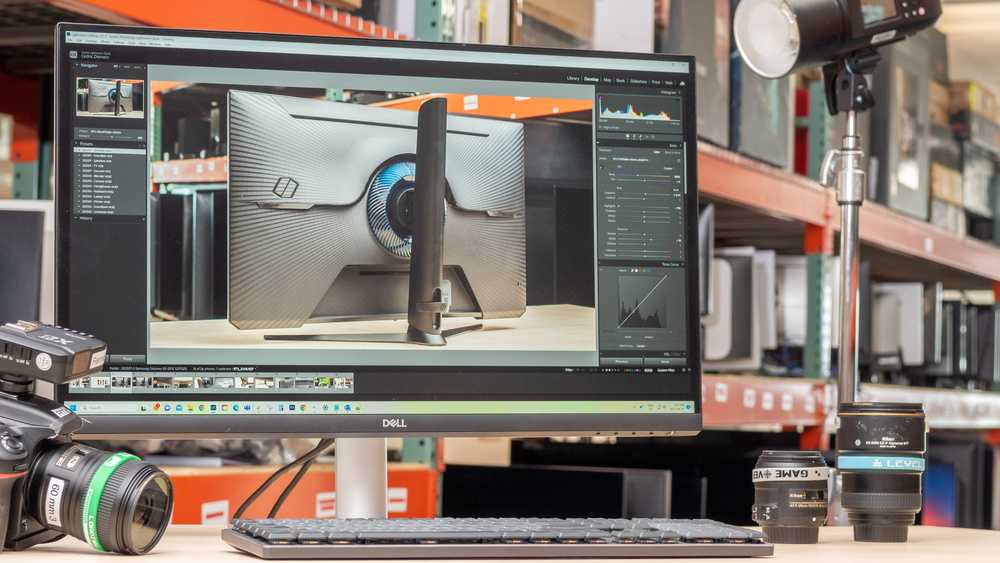
Yes, a 4K monitor can be excellent for content creation due to its sharp resolution and color accuracy. It allows creators to see fine details and vibrant colors, which are crucial for editing photos, videos, and graphic design. However, whether it is the right choice depends on your specific needs and hardware setup.
A 4K monitor is generally a great investment for content creators because it offers high resolution and better color precision, making it easier to work on intricate projects. Still, it’s important to consider factors like your computer’s graphics capabilities and the type of content you produce. If you’re serious about editing and want the best visual clarity, a 4K display can significantly enhance your workflow and the quality of your final product.

Is 4K Monitor Good for Content Creation?
Understanding 4K Resolution and Its Relevance for Creators
A 4K monitor offers a resolution of 3840 pixels by 2160 pixels, which is four times the pixel count of Full HD. This higher resolution provides much sharper images and more detailed visuals, making it ideal for tasks that require precision. For content creators, especially those involved in video editing, photo retouching, or graphic design, this sharpness can make a noticeable difference.
Benefits of Using a 4K Monitor for Content Creation
Enhanced Image Clarity and Detail
With 4K resolution, creators see finer details in their work, reducing the need to zoom in constantly. This clarity helps in making precise edits, color corrections, and retouching tasks more accurate.
More Screen Real Estate
A 4K monitor provides extra workspace on the screen. This allows multiple applications or tools to be open simultaneously without clutter, improving workflow efficiency. For example, video editors can have their timeline, preview, and effects panels all visible at once.
Better Color Accuracy and Range
Many 4K monitors come with larger color gamuts and support for features like HDR (High Dynamic Range). This results in more vibrant, true-to-life colors, which is crucial for visual content creation where color precision matters.
Technical Considerations for 4K Content Creation
Hardware Compatibility
Creating content in 4K requires a powerful computer with a capable graphics card, ample RAM, and fast storage. Without these, the experience can be slow or frustrating due to lag and rendering delays.
Software Support
Most modern editing programs like Adobe Photoshop, Premiere Pro, and DaVinci Resolve support 4K workflows. Ensure your software is compatible and optimized for 4K editing to avoid issues.
Color Calibration and Calibration Tools
For professional-quality output, color accuracy is vital. Investing in calibration tools like colorimeters ensures your monitor displays colors accurately, which is essential for print and digital media.
Potential Downsides of 4K Monitors
Cost Considerations
4K monitors tend to be more expensive than lower-resolution screens, especially those with high refresh rates and professional color features. Budget planning is important if you’re considering upgrading.
Performance Demands
Working with 4K content can tax your hardware, leading to slower render times and potential lag. Ensuring your system is up to date helps mitigate these performance issues.
Size and Desk Space
Most 4K monitors are larger to fully appreciate their resolution. They require ample desk space and may not be suitable for smaller work environments.
Choosing the Right 4K Monitor for Content Creation
Key Features to Look For
- Color Gamut Support: Look for monitors supporting Adobe RGB or DCI-P3 for better color accuracy.
- Panel Type: IPS panels offer better color consistency and viewing angles compared to TN or VA panels.
- Brightness and HDR: Higher brightness levels and HDR support improve visual quality, vital for detailed editing.
- Connectivity Options: Multiple HDMI, DisplayPort, and USB-C ports allow flexible setup options.
Popular Models for Content Creators
Some widely recommended 4K monitors include the LG 27UK850, Dell Ultrasharp U2723QE, and ASUS ProArt PA279CV. These models offer a good balance of color accuracy, screen size, and features.
Integrating a 4K Monitor Into Your Creative Workflow
Hardware Upgrades
Ensure your computer’s hardware matches the demands of 4K editing. Upgrade graphics cards, RAM, and storage if necessary to improve performance.
Color Management Workflow
Establish a consistent color management process by calibrating your monitor regularly. Use hardware calibration tools and color profiles to maintain color fidelity.
Organizing Your Workspace
Arrange your workspace to maximize the benefits of 4K resolution. Position windows and panels for easy access, and consider a dual monitor setup for even more productivity.
Summary of Key Takeaways
- A 4K monitor provides sharper images, more workspace, and better color accuracy for content creation.
- It requires compatible hardware and software to work effectively.
- Consider factors like color support, panel type, and connectivity when choosing a monitor.
- While more costly and demanding on hardware, the benefits often outweigh these challenges for serious creators.
Choosing a 4K monitor can significantly improve the quality and efficiency of your content creation workflow. It offers outstanding clarity, more room to work, and vibrant colors that bring your projects to life. However, it’s important to evaluate your hardware and budget before investing. With the right setup, a 4K display can make editing, designing, and producing content more enjoyable and precise.
Best Budget 4K Monitor for Creatives in 2024: ASUS ProArt PA279CRV Review!
Frequently Asked Questions
Does a 4K monitor enhance the accuracy of visual details for content creators?
Yes, a 4K monitor provides higher resolution, which results in sharper and more precise visuals. This allows content creators to see fine details clearly, making it easier to fine-tune images and videos for professional quality. The increased pixel density helps with tasks like color grading, graphic editing, and detailed design work, leading to more accurate results.
How does a 4K display impact workflow efficiency during content production?
A 4K display offers more screen real estate, enabling creators to view multiple windows or timelines simultaneously without clutter. This improvement in workspace allows for smoother multitasking, quicker adjustments, and more efficient editing processes. The clarity and resolution help detect issues early, reducing the need for repeated revisions.
Is color reproduction better on a 4K monitor for editing purposes?
Many 4K monitors come with wide color gamuts and high color accuracy, which are essential for editing tasks like photo editing, video color correction, and digital art. Accurate color representation ensures that your edits look consistent across different devices and outputs, ultimately delivering professional-grade content.
Can a 4K monitor handle high-resolution content creation without latency issues?
Most modern 4K monitors are equipped with high refresh rates and low latency features, allowing smooth editing and previewing of high-resolution footage. This responsiveness improves the overall editing experience, especially when working with fast-moving visuals or real-time playback, making it suitable for demanding content creation tasks.
What should I consider when choosing a 4K monitor for content creation?
Look for a monitor that offers accurate color calibration options, high contrast ratios, and wide viewing angles. It’s also important to check for connectivity options compatible with your devices, adjustable stands for ergonomic comfort, and a panel quality that ensures consistent brightness and color accuracy over time. These features support a productive and precise editing environment.
Final Thoughts
A 4K monitor offers sharp visuals and detailed clarity, making it ideal for content creation. The increased resolution enhances precision in editing images and videos, boosting productivity.
For creators, the extra screen space also improves workflow and multitasking.
Ultimately, is 4k monitor good for content creation? Yes, it provides the visual accuracy and workspace needed for high-quality output.

I’m passionate about hardware, especially laptops, monitors, and home office gear. I share reviews and practical advice to help readers choose the right devices and get the best performance.
