
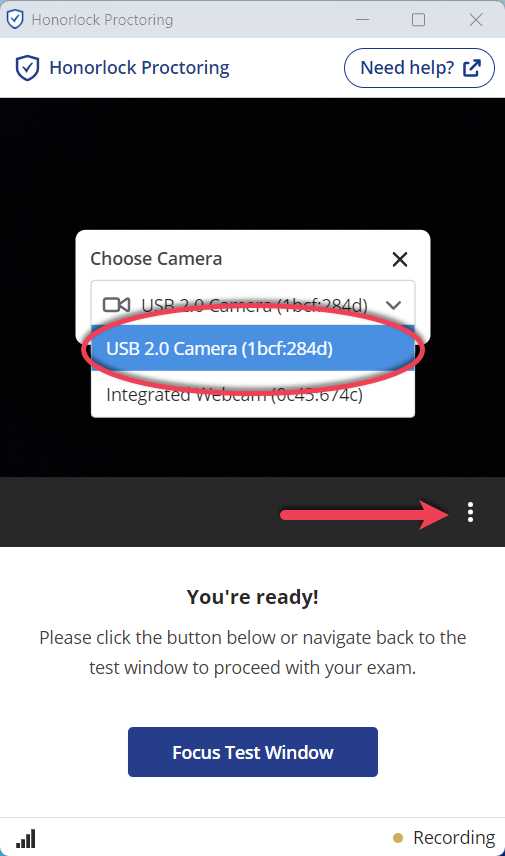
Absolutely, an external webcam can be a game-changer for students. If you’re attending online classes or taking part in virtual exams, investing in a good quality external webcam can significantly improve your video clarity and ensure smoother communication. While many laptops have built-in webcams, they often fall short in delivering sharp images or reliable performance, especially in less-than-ideal lighting conditions. So, is an external webcam necessary? Not always, but in many cases, it can enhance your online learning experience, making it more professional and comfortable. For students who need to present themselves confidently during virtual presentations, or for those living in crowded or noisy environments, upgrading to an external webcam can make a noticeable difference. Ultimately, it depends on your specific needs, but it’s worth considering for a more seamless online education experience.

Is External WebCam Necessary for Students?
Understanding the Role of a WebCam in Student Learning
Webcams have become a common tool during online classes and virtual meetings. They help students see and be seen by teachers and classmates. This visual connection makes learning more engaging and interactive.
Many students wonder if they truly need an external webcam or if their built-in one is enough. It’s important to know what benefits an external webcam offers and if it’s worth the investment for students.
Built-in Webcams: What Are They and How Do They Work?
Most laptops and tablets come with a built-in webcam. These cameras are usually small and located at the top of the screen. They’re simple to use and don’t require extra setup.
However, built-in webcams can have limitations. They often offer lower video quality and may struggle in low-light conditions. This can affect the clarity of your video during class or meetings.
Advantages of Using an External WebCam for Students
- Better Video Quality: External webcams typically provide higher resolution videos. This means clearer images and more detailed visuals, which is especially helpful for presentations or projects.
- Enhanced Lighting and Autofocus: Many external webcams have features like automatic focus and improved lighting adjustments. This ensures you look good even in dim or uneven lighting environments.
- Adjustable Positioning: With an external webcam, you can easily move and position the camera for the best angle. This helps create a professional and appealing appearance during online classes.
- Additional Features: External webcams often include microphone options, background noise reduction, and zoom capabilities. These features improve communication and overall quality of online sessions.
- Reliability: External webcams are generally more durable and less prone to technical issues than built-in cameras that can get obscured or damaged over time.
When Is an External WebCam Necessary?
High-Quality Visuals for Presentations
Students presenting reports or working on visual projects benefit from crisp, clear video feeds. External webcams ensure their image is sharp and professional-looking.
Limited Built-in Camera Capabilities
If a student’s device has a low-resolution or malfunctioning built-in webcam, upgrading to an external camera can significantly improve the experience.
Improving Engagement During Classes
A clear and stable video feed helps maintain attention and interaction. External webcams often provide better stability and image quality, making online learning more effective.
Working in Low-Light Environments
External webcams with advanced sensors perform better in poor lighting. Students who study in less bright spaces will find this particularly useful.
Considerations Before Buying an External WebCam
Compatibility with Devices
It is vital to ensure the webcam is compatible with the student’s device. Most webcams connect through USB ports, but some may require specific drivers or software.
Budget Constraints
Prices for external webcams range from affordable to high-end. Students and parents should consider what features are most important within their budget.
Ease of Use
A straightforward setup and user-friendly interface make external webcams easy to operate for students of all ages.
Size and Portability
For students who move between classrooms or study spaces, a compact and lightweight webcam can be more convenient.
Popular Types of External WebCams for Students
Entry-Level WebCams
These are budget-friendly options providing 720p resolution. Ideal for students who need basic video quality without extra features.
Mid-Range WebCams
Offering 1080p resolution and better autofocus, mid-range webcams cater to students looking for more clarity and convenience.
High-End WebCams
These come with features like 4K video, stereo microphones, and wide-angle lenses. Suitable for students involved in creative projects or professional presentations.
Technical Features to Consider in an External WebCam
| Feature | Importance |
|---|---|
| Resolution | Clearer videos and sharper images. Aim for at least 720p for basic needs, 1080p for better quality. |
| Frame Rate | Higher frame rates (60 fps) provide smoother video, useful for dynamic presentations or videos. |
| Autofocus | Automatically adjusts focus for clarity, especially when moving around or changing positions. |
| Lighting Correction | Compensates for poor lighting, making the user look better on camera. |
| Microphone Quality | Clear audio is essential for effective communication. Built-in microphones are common, but some webcams offer stereo sound. |
| Connectivity | USB 2.0, USB 3.0, or USB-C options affect data transfer speed and compatibility. |
Impact of Webcam Quality on Student Performance
A good webcam can help students appear more confident and engaged. It promotes better communication with teachers and classmates.
Conversely, poor video quality can lead to misunderstandings or reduced interaction. Investing in a decent external webcam can make online learning smoother and more enjoyable.
Additional Accessories and Setups for Optimal Use
- Tripods or Mounts: Keep the webcam stable and at eye level for natural interactions.
- Lighting: Use desk lamps or ring lights for uniform and flattering illumination.
- Backdrop: Choose a tidy, uncluttered background to minimize distractions.
Determining if an external webcam is necessary depends on several factors. If a student requires higher video quality, better lighting, and flexible positioning, investing in an external webcam makes sense. It enhances online learning experiences and helps students communicate more effectively. While built-in webcams may suffice for basic needs, an external camera offers valuable advantages that can improve a student’s overall virtual classroom experience.
This Webcam Just Feels Right
Frequently Asked Questions
How does an external webcam improve the quality of online classes for students?
An external webcam often provides higher resolution and better image clarity compared to built-in laptop cameras. This results in clearer video for instructors and peers, making interactions more engaging and reducing misunderstandings caused by poor visuals. Improved video quality can also minimize eye strain and frustration during long online sessions.
What are the benefits of using an external webcam for virtual presentations?
Using an external webcam offers flexible positioning, allowing students to set the camera at optimal angles for presentations. Many external models feature better lighting and autofocus, ensuring professional-looking visuals. This enhances the overall impression during presentations, helping students communicate more effectively.
Can an external webcam help students with technical issues during online learning?
Yes, external webcams generally have better build quality and more reliable connection options, reducing issues like lag or poor focus. They often come with additional features such as adjustable settings and noise reduction microphones, which can improve audio and video consistency throughout virtual lessons.
Is it necessary to have an external webcam if a student’s current camera works fine?
If the existing camera delivers clear images and functions smoothly, an external webcam may not be essential. However, upgrading can be beneficial if the built-in camera has low resolution, poor lighting performance, or limited flexibility in positioning, especially during important presentations or group discussions.
What factors should students consider when choosing an external webcam for educational purposes?
Students should look for webcams with high resolution, good low-light performance, and adjustable settings. Compatibility with their devices and software is also important. Additionally, features like a versatile mounting option, privacy cover, and built-in microphone can enhance the overall learning experience.
Final Thoughts
In summary, an external webcam can enhance the quality of online classes and improve communication for students. It offers better video clarity and flexibility compared to built-in laptop cameras.
Considering these benefits, is external webcam necessary for students? It depends on their learning environment and the importance of clear visuals. For better interaction and focus, investing in an external webcam might be a wise choice.

I follow the latest trends in smart devices, portable monitors, and gaming accessories. My goal is to provide real-world insights that help readers make smarter tech decisions.


