


If you’re paying for a 300Mbps internet plan, a weak Wi-Fi signal in parts of your home can be incredibly frustrating. You’re not getting what you paid for. That’s where the right Wi-Fi extender comes in. It can capture your router’s signal and rebroadcast it, eliminating dead zones and delivering those fast speeds to every corner. This roundup reviews the best Wi-Fi extenders specifically capable of handling a 300Mbps connection, ensuring you maximize your investment.
Quick Product Comparison
Our Top 5 Best Wifi Extender For 300Mbps Reviews – Expert Tested & Recommended
1. TP-Link AC1200 WiFi Extender with Dual Band, Ethernet Port, and 1500 Sq.ft Coverage
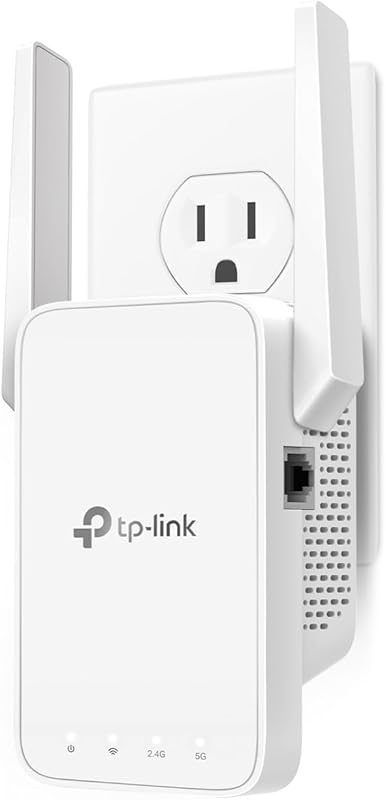
The TP-Link AC1200 RE315 is our top pick because it perfectly balances speed, ease of use, and reliable coverage. It’s designed to handle your 300Mbps plan with ease, offering dedicated bands to keep your fast devices on the 5GHz frequency.
Key Features That Stand Out
✓ Dual-band speeds up to 1.2Gbps (300Mbps on 2.4GHz, 867Mbps on 5GHz).
✓ Smart Adaptive Path Selection picks the best band for your device.
✓ Simple setup with the TP-Link Tether app or WPS button.
✓ Includes a Fast Ethernet port for a wired connection.
✓ Compatible with TP-Link OneMesh for seamless whole-home coverage.
Why We Recommend It
We recommend this extender because it just works. The setup is famously easy, and the performance is consistently strong. The dual-band support means your video calls and gaming won’t interfere with other devices on the network, which is key for a 300Mbps connection.
Best For
This is the best Wi-Fi extender for 300Mbps for most homes. It’s ideal for users who want a hassle-free setup, reliable dual-band performance, and the option to create a mesh network later.
Pros and Cons
Pros:
- Incredibly simple and fast installation process.
- Strong, consistent dual-band performance perfect for 300Mbps plans.
- Future-proof with OneMesh compatibility.
- Compact wall-plug design saves space.
Cons:
- The two external antennas are not adjustable.
- Coverage may be less than advertised in homes with many thick walls.
Customer Reviews
Customer Review: “The TP-Link AC1200 Wi-Fi Range Extender RE315 is a solid, budget-friendly fix that actually works. Setup is a breeze and only takes about five minutes using the Tether app. What I love most is the OneMesh support, which creates a single, seamless network so your phone doesn’t drop the signal…”
Customer Review: “I’ve been using my TP-Link product for about a year now, and I can confidently say it has exceeded my expectations in every way. From the moment I set it up, the installation process was quick and straightforward — the instructions were clear, and the TP-Link app made the entire setup smooth and eff…”
2. Tenda AC1200 Dual Band WiFi Extender with 300Mbps 2.4GHz and Ethernet Port
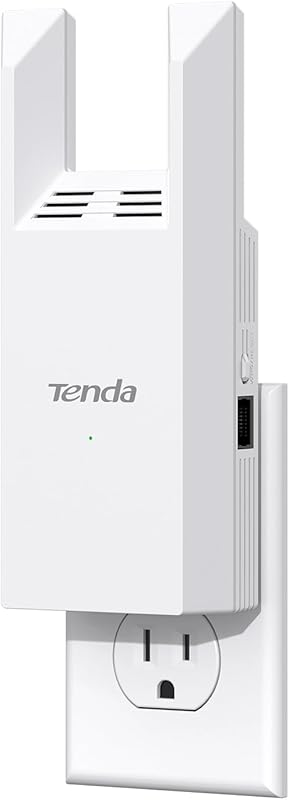
The Tenda A18 earns our Editor’s Choice award for delivering fantastic value. It packs high-performance hardware, like dual FEM chips, into an affordable package, making it a powerful tool to extend your 300Mbps network.
Key Features That Stand Out
✓ Combined dual-band speed of 1167Mbps (867Mbps 5GHz + 300Mbps 2.4GHz).
✓ Supports up to 23 devices simultaneously on the extended network.
✓ Dual external 3dBi antennas for better signal reach.
✓ Intelligent signal indicator helps find the optimal placement.
✓ Includes a Fast Ethernet port for gaming consoles or PCs.
Why We Recommend It
We recommend the Tenda A18 because it punches above its weight class. The hardware specs are impressive for the price, and it handles multiple connected devices well without significant slowdowns, which is crucial for modern smart homes on a 300Mbps plan.
Best For
Best for budget-conscious users who still want robust dual-band performance and the ability to connect several smart home devices, phones, and tablets in a dead zone.
Pros and Cons
Pros:
- Excellent price-to-performance ratio.
- Strong signal amplification hardware (FEM chips).
- Easy setup with the Tenda app or web interface.
- Helpful LED signal strength indicator.
Cons:
- Brand name is less recognized than TP-Link or Netgear.
- The companion app may have fewer advanced features.
Customer Reviews
Customer Review: “Works great reasonably priced easy to configure- surely recommend.”
Customer Review: “Perfect remedy for spotty household WiFi. Gets the job done plus it’s much cheaper than some of the other WiFi extenders.”
3. WiFi Extender with Long Range up to 13355 Sq.ft and Ethernet Port
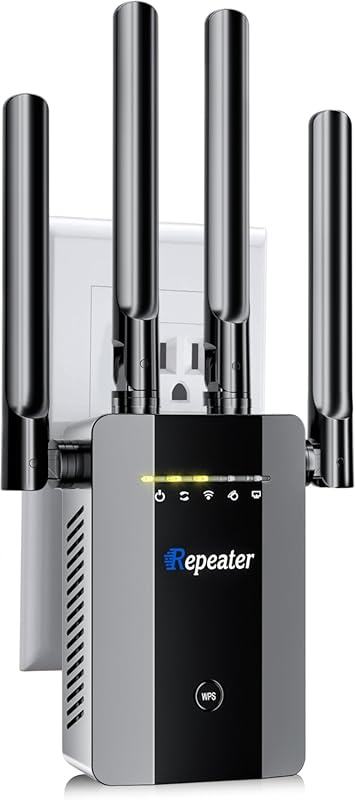
This long-range extender is the ultimate budget champion for large spaces. With four high-gain antennas, it’s built to push a signal farther than typical plug-in models, making it a great match for spreading your 300Mbps speed across a workshop, garage, or large home.
Key Features That Stand Out
✓ Claims extreme coverage up to 13,355 sq. ft. with 4 high-gain antennas.
✓ Supports a massive 68+ connected devices.
✓ Both Ethernet and WLAN input ports for flexible setup.
✓ One-tap WPS setup for instant connection.
✓ Advanced signal enhancement technology focused on range.
Why We Recommend It
We recommend it if your main problem is distance, not just a few walls. For the price, the hardware (four antennas) is geared towards maximizing range, which is perfect for reaching a detached garage or backyard where you still want a usable 300Mbps signal.
Best For
Best for users with very large homes, outdoor areas, or outbuildings who need to cover a vast distance on a tight budget.
Pros and Cons
Pros:
- Unbeatable price for the claimed range and antenna array.
- High device capacity is great for smart homes or offices.
- Flexible connectivity options with two types of ports.
- Simple WPS button setup.
Cons:
- Coverage claims are optimistic; real-world results will vary.
- Larger physical footprint than a simple wall plug.
- Brand may be unfamiliar, leading to questions about long-term support.
Customer Reviews
Customer Review: “In today’s digital age, a robust and reliable WiFi connection is essential, especially for those who rely on security cameras to monitor their properties. The Long-Range 300 Mbps WiFi Range Extender proves to be an exceptional solution, effectively bridging the gap betw…”
Customer Review: “Absolutely game-changing! The Wi-Fi extender exceeded my expectations in every way. Setup was a breeze—just plug it in, and the intuitive app guided me through the process in minutes. I noticed a significant improvement in signal strength throughout my home, effectively eliminating those frustrating…”
4. TP-Link N300 WiFi Extender with Wall Plug Design and Access Point Support

The TP-Link RE105 is a reliable, single-band workhorse. If your 300Mbps devices primarily use the 2.4GHz band or you need a simple, effective extender for basic web browsing and email in a dead zone, this model gets the job done without fuss.
Key Features That Stand Out
✓ N300 speed on the 2.4GHz band, matching the 300Mbps target.
✓ Two external antennas for improved signal reliability.
✓ Dual-mode functionality: works as a repeater or a standalone Access Point.
✓ Fast Ethernet port to create a wired connection point.
✓ Compact, direct wall-plug design.
Why We Recommend It
We recommend it for its simplicity and flexibility. The Access Point mode is a standout feature. You can connect it via Ethernet to your router to create a completely new Wi-Fi network in a room, which is more stable than repeating a signal.
Best For
Best for users who need to extend coverage for older devices, smart home gadgets on 2.4GHz, or who specifically want to use the Access Point mode for a wired-to-wireless connection.
Pros and Cons
Pros:
- Very affordable and reliable from a trusted brand.
- Access Point mode offers a more stable connection option.
- Easy setup with the TP-Link Tether app.
- Compact and unobtrusive.
Cons:
- Single-band only (2.4GHz), so it can get congested.
- Not ideal for high-bandwidth activities like 4K streaming on the extended network.
- Maximum speed is capped at 300Mbps.
Customer Reviews
Customer Review: “I bought this repeater for an unconventional purpose, trying to get wifi access in my metal building from the access point / router in the house 100 feet away. Since this repeater is 2.4ghz only, I suspected it would be best for not intermittently losing the house side. Works flawlessly, and it was…”
Customer Review: “Does exactly what it says. My home office was a dead zone. Plugged this in halfway, followed the simple app instructions, and now I have full bars. Perfect for work emails and web browsing.”
5. 300Mbps WiFi Extender Signal Booster,WiFi Extender Dual Band for Home,New Gen 6X Faster Internet …

This versatile dual-band extender is a strong contender focused on whole-home coverage and multi-device support. It’s designed to be a simple solution that blankets a large area with a stable signal from your 300Mbps plan.
Key Features That Stand Out
✓ Dual-band support for reduced interference.
✓ Claims coverage up to 6000 square feet.
✓ Intuitive smartphone app for guided setup and management.
✓ Wide compatibility with all common Wi-Fi devices.
✓ Supports a high number of simultaneous connections.
Why We Recommend It
We recommend it for users who prioritize an easy app-based experience and need to cover a multi-story home. The focus on wide-area coverage and device handling makes it a good fit for families with many phones, tablets, and smart devices.
Best For
Best for users who want a modern app-controlled extender to eliminate dead zones across a large, multi-floor house without dealing with complex settings.
Pros and Cons
Pros:
- User-friendly app makes setup and management simple.
- Good overall coverage for the price.
- Dual-band keeps modern devices running smoothly.
- Handles many devices well.
Cons:
- “6X Faster” is a marketing term; actual speed depends on your existing signal.
- Performance can be inconsistent between different units (common with lesser-known brands).
- Long-term software support may be uncertain.
Customer Reviews
Customer Review: “I live in a long house, and the WiFi signal used to be weak at the far end. After installing this extender, the coverage improved a lot. It was easy to set up and works well with multiple devices. The speed is stable, and I can finally watch videos without buffering. Great value for the price!”
Customer Review: “I added this dual-band Wi-Fi extender to my home, and it was a simple fix that made a big difference. Connection feels stable even three rooms away from the router, and it supports up to 65 devices without slowing down. Ideal for streaming, work, and smart devices!”
Complete Buying Guide for Best Wifi Extender For 300Mbps
Essential Factors We Consider
Choosing the right extender for your 300Mbps plan isn’t just about the highest number. Think about your space. Dual-band is almost essential—it lets you put fast devices on the cleaner 5GHz band. Check for an Ethernet port; it’s perfect for gaming consoles or PCs that need the most stable connection. Also, consider how you’ll set it up. An app-based setup is much easier than a complicated web page.
Budget Planning
You don’t need to spend a fortune. A good Wi-Fi extender for 300Mbps can be found in the mid-range price bracket. Our “Best Budget” pick proves you can get great range without breaking the bank. Paying more usually gets you better brand support, more advanced features like mesh compatibility, or a sleeker design. Decide what’s worth it for you.
Final Thoughts
The goal is to stop thinking about your Wi-Fi. The best extender is the one you install and forget because it just works. For most people on a 300Mbps plan, a reliable dual-band model from a reputable brand is the sweet spot. It ensures you can stream, game, and work anywhere in your home, finally using the internet speed you pay for.
Frequently Asked Questions
Q: Will a Wi-Fi extender slow down my 300Mbps internet?
A: All extenders will reduce speed somewhat because they receive and retransmit the signal. However, a good dual-band extender, placed correctly, can minimize this loss. You should still see significantly faster speeds in your dead zone compared to no extender at all.
Q: What’s the difference between a dual-band and single-band extender for 300Mbps?
A: A dual-band extender uses two frequencies: 2.4GHz (good for range) and 5GHz (good for speed). This is ideal for 300Mbps as it reduces congestion. A single-band extender only uses 2.4GHz, which can get crowded and may not deliver your full speed, but it’s often cheaper.
Q: Where should I place my Wi-Fi extender?
A> Place it halfway between your router and the dead zone. It needs to receive a strong signal from the router to rebroadcast a strong signal. Avoid placing it in the dead zone itself or right next to the router. Many extenders have a signal strength LED to help you find the sweet spot.
Q: Can I use multiple Wi-Fi extenders?
A: Yes, but it’s not ideal. Daisy-chaining extenders (connecting one to another) can create significant lag and speed loss. For large homes, a mesh Wi-Fi system is a much better, though more expensive, solution.
Finding the best Wi-Fi extender for your 300Mbps plan can transform your home internet experience. No more buffering videos in the bedroom or dropped calls in the backyard. Each of the extenders we’ve reviewed offers a great solution, whether you prioritize top-tier performance, unbeatable value, or massive coverage. Your perfect match depends on the layout of your home and your specific needs. Ready to finally get the full speed you’re paying for in every room? Click on the product that fits you best and say goodbye to Wi-Fi dead zones for good.



