


Yes, HDR monitors can help reduce eye strain by providing better contrast and more accurate colors, which makes viewing more comfortable for your eyes. They can lessen the need to squint or strain to see details, especially in dark or overly bright scenes.
HDR monitors might reduce eye strain compared to standard displays by offering richer visuals with improved contrast and color accuracy. This can lower visual fatigue during long periods of screen use. However, factors like proper brightness, contrast settings, and ambient lighting conditions also play crucial roles. So, while HDR technology can make a difference, adopting healthy viewing habits is equally important.
Many people spend hours in front of screens, whether working, gaming, or streaming, and eye discomfort has become a common concern. HDR (High Dynamic Range) monitors are praised for their stunning visuals, but do they also help with eye strain? The idea is that by providing more balanced and realistic images, HDR screens might reduce the visual effort your eyes need to make. If you’re seeking ways to make your screen time more comfortable, understanding how HDR impacts eye health can be a game-changer. Keep reading to discover whether investing in an HDR monitor could be a simple step towards eye comfort and improved viewing experience.

Do HDR Monitors Reduce Eye Strain?
Understanding Eye Strain and Its Causes
Eye strain, also known as visual or digital eye fatigue, happens when our eyes get tired from prolonged screen use. It can cause headaches, dry eyes, blurry vision, and discomfort. Common causes include exposure to bright screens, poor lighting, and staring at screens for too long without breaks.
What Makes HDR Monitors Different?
HDR stands for High Dynamic Range. HDR monitors display a wider range of colors and brightness levels. They produce images that look more realistic and vibrant than standard monitors. This feature makes images more detailed and visually appealing.
How HDR Enhances Visual Comfort
HDR monitors improve visual comfort by providing better contrast and color accuracy. When images have deeper blacks and brighter whites, it feels more natural to the eyes. This reduces the effort needed to distinguish details on the screen, leading to less eye fatigue.
Do HDR Monitors Reduce Eye Strain?
Research suggests that HDR monitors can help lower eye strain by offering a more natural viewing experience. Their better contrast and brightness modulation make it easier for eyes to process images without overexertion. However, other factors like display settings and lighting conditions are also important.
Benefits of Using HDR Monitors for Eye Comfort
- Improved Brightness Control: HDR screens can adjust brightness dynamically, reducing glare.
- Enhanced Contrast: Deeper blacks and brighter highlights lessen eye effort.
- More Vivid Colors: Realistic colors decrease eye confusion and fatigue.
- Reduced Screen Flicker: Many HDR monitors support flicker-free technology, lessening eye strain.
Factors That Influence Eye Strain Reduction
Brightness and Contrast Settings
Adjusting brightness to match ambient lighting is essential. HDR monitors typically offer better options for balancing brightness and contrast, which can decrease eye fatigue.
Color Temperature and Blue Light Emission
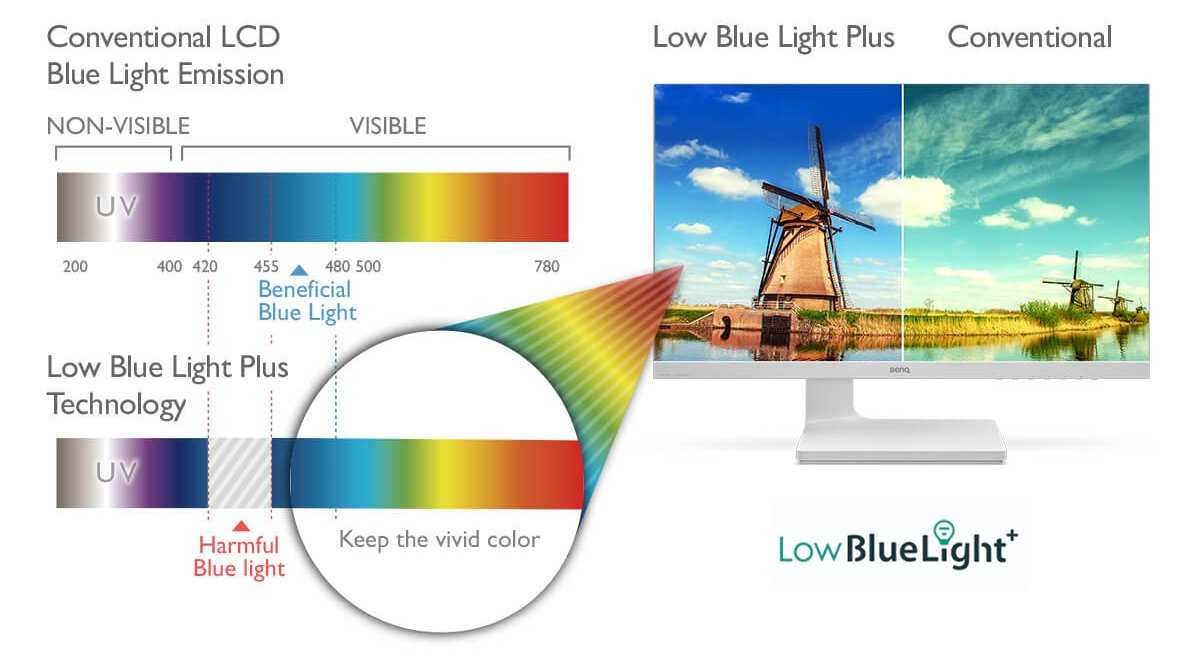
Reducing blue light emissions and setting warmer color temperatures can help prevent eye strain. Some HDR monitors come with built-in blue light filters or easy-to-adjust settings.
Viewing Distance and Ergonomics
Maintaining a proper distance from the screen—about an arm’s length—supports eye comfort. Ergonomic setups, combined with HDR technology, further lessen eye fatigue.
Limitations of HDR Monitoring in Reducing Eye Strain
While HDR helps improve visual quality, it isn’t a complete solution for eye health. Factors like improper lighting, poor posture, and extended screen time still contribute to eye strain. Regular breaks and proper workspace setup remain vital.
Best Practices for Reducing Eye Strain with HDR Monitors
- Adjust Brightness and Contrast: Use monitor settings or preset modes for optimal comfort.
- Use Blue Light Filters: Enable built-in options or wear blue light glasses.
- Follow the 20-20-20 Rule: Every 20 minutes, look at something 20 feet away for 20 seconds.
- Optimize Lighting Conditions: Avoid glare by setting up adequate ambient lighting.
- Maintain Proper Ergonomics: Position the monitor at eye level and keep a comfortable distance.
Comparing HDR Monitors to Standard Displays
| Feature | HDR Monitors | Standard Monitors |
|---|---|---|
| Color Range | Wider, more vibrant | Limited, flatter colors |
| Brightness Levels | Higher peak brightness, dynamic adjustment | Lower, fixed brightness |
| Contrast Ratio | Much better, deeper blacks | Lower contrast, grayer blacks |
| Eye Strain Impact | Potentially less due to better image rendering | More likely to cause fatigue |
Technical Aspects of HDR Technology and Eye Comfort
Peak Brightness Levels
HDR monitors can reach peak brightness levels above 1000 nits, making daylight conditions less harsh and reducing eye strain caused by glare.
Dynamic Range and Local Dimming
Local dimming allows parts of the screen to dim independently, improving contrast and reducing overall brightness fluctuations—lessening eye fatigue.
HDR Certification Standards
Look for monitors with VESA DisplayHDR certification. Higher tiers like DisplayHDR 600 and above offer better brightness, contrast, and color performance for eye comfort.
The Role of Screen Resolution and Refresh Rate
High-resolution screens (like 4K) provide sharper images, reducing eye effort. A higher refresh rate (above 60Hz) leads to smoother visuals, preventing flicker and eye strain during fast movements.
Emerging Technologies Supporting Eye Health
Advances in flicker-free backlights, blue light management, and adaptive brightness are integrated into many HDR monitors. These features contribute to a more comfortable viewing experience over long periods.
While HDR monitors are not a guaranteed cure for eye strain, their improved contrast, color accuracy, and brightness management can make screen time more comfortable. Proper use and ergonomic setup enhance these benefits, helping users reduce fatigue and discomfort during extended sessions. Balancing HDR technology with good habits remains essential for maintaining eye health.
Debunking Myths: Can Screens (really) Damage Your Eyes?
Frequently Asked Questions
How does HDR impact eye comfort during prolonged use?
HDR can improve eye comfort by offering more accurate color representation and better contrast. This reduces the need for the eyes to strain to differentiate details in dark or overly bright areas, making viewing more comfortable over extended periods.
Can using an HDR monitor reduce the fatigue caused by glare?
HDR technology often includes features like improved contrast and local dimming, which help manage glare and reflections. This results in less eye fatigue by providing a clearer picture without harsh light spots or reflections that can cause discomfort.
Does the increased brightness of HDR monitors pose any risks to eye health?
While HDR monitors can display higher brightness levels, they typically have adjustable settings. Properly calibrated brightness helps prevent eye strain or discomfort, allowing users to enjoy vivid visuals without risking eye health.
Is there a difference in eye strain between standard and HDR monitors for long gaming or work sessions?
Many users find that HDR monitors reduce eye strain during long sessions because they deliver more natural and less tiring visuals. The enhanced contrast and color accuracy help eyes process images more comfortably over time.
What features should I look for in an HDR monitor to minimize eye strain?
Look for features like flicker-free technology, low blue light modes, adjustable brightness, and anti-reflective coatings. These features work together to lower eye fatigue and make prolonged use more comfortable.
Final Thoughts
HDR monitors can help reduce eye strain by providing better contrast and more accurate colors. They lessen the need to squint or strain to see details clearly, making long screen time more comfortable. The increased brightness and dynamic range make viewing easier on your eyes. Overall, do hdr monitors reduce eye strain and improve viewing comfort for many users.



