


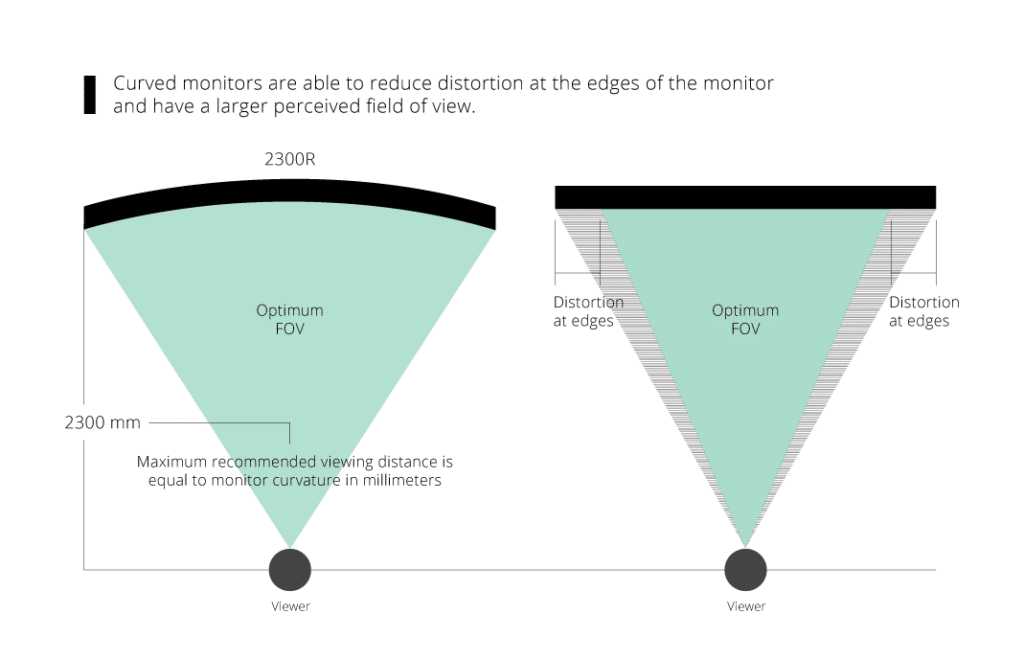
Curved gaming monitors are a game-changer for players seeking an immersive experience with a wide field of view. They wrap around your vision, making you feel like you’re right in the middle of the action, especially in fast-paced games. These monitors reduce distortion and offer better peripheral awareness, giving you a competitive edge and more enjoyment.
In brief, curved gaming monitors designed for a wide field of view enhance immersion and gameplay by wrapping visuals around your eyes, reducing distortions, and increasing peripheral clarity. They are ideal for gamers looking to elevate their experience with a natural, panoramic perspective.
If you’re serious about gaming, investing in a curved monitor tailored for a wide field of view can truly transform your setup. These screens not only boost your immersive experience but also improve your reaction times and overall performance. Whether you’re into racing, first-person shooters, or open-world adventures, a curved monitor helps you see more of the game environment at once, making every scene come alive. With so many options available, knowing what features to prioritize can help you find the perfect fit for your gaming style and space.

Curved gaming monitors for wide field of view
Understanding the importance of a wide field of view in gaming
A wide field of view (FOV) helps gamers see more of the game environment at once. It means fewer blind spots and a more immersive gaming experience. With a broader view, players can spot enemies or objects faster, gaining a competitive edge. This is especially true in fast-paced games like first-person shooters or racing games.
How curvature enhances the gaming experience
The curved design of monitors wraps the display around your eyes slightly, making visuals more natural. This curvature reduces distortion at the edges, giving a consistent image across the screen. It also decreases eye strain by aligning with the natural shape of our eyes, making longer gaming sessions more comfortable.
Types of curvature in gaming monitors
Gaming monitors come with different curvature levels, usually measured in radius. Common options include:
- 1800R: Slightly curved, providing a gentle wrap around
- 1500R: More pronounced curve for enhanced immersion
- 1000R: Very curved, ideal for deep immersion, especially in ultra-wide screens
The choice depends on personal preference and the size of the monitor.
Benefits of curved monitors for wide viewing angles
Curved monitors with wide screens offer several advantages:
- Reduced glare and reflections from ambient light
- Enhanced depth perception and dimensionality
- More consistent image quality across the entire display
- Less distortion at the edges of the screen
Choosing the right screen size for wide field of view
Most gamers prefer larger screens for an expansive view. Typical sizes range from 27 inches to over 49 inches. Larger monitors provide:
- More immersive gameplay
- Better visibility of game details
- Enhanced ability to multitask or use split-screen features
However, ensure your gaming space and graphics card support such large displays for optimal performance.
Resolution considerations for wide view monitors
Resolution plays a crucial role in image clarity and detail. Common options include:
- Full HD (1920×1080): Budget-friendly, good for casual gaming
- Quad HD (2560×1440): Better clarity for mid-range setups
- Ultra HD (3840×2160): Sharp images, ideal for high-end gaming
Higher resolution combined with a wide, curved screen can significantly boost visual quality.
Refresh rate and response time for smooth gaming
A high refresh rate ensures smoother motion and reduces motion blur. Look for monitors with:
- Refresh rates of 120Hz, 144Hz, or higher for competitive gaming
- Response times of 1ms to 4ms for minimal lag
These specifications are essential for fast-paced games where quick reactions matter.
Panel technology and color accuracy
Panel type impacts color reproduction and viewing angles:
- IPS panels offer better color accuracy and wider viewing angles
- VA panels provide higher contrast ratios for deeper blacks
- TN panels are faster but usually have limited color range
Choose based on your priority for vibrant visuals or quick response times.
Adjustability and ergonomic features
Comfort during long gaming sessions depends on adjustability:
- Height adjustment
- Tilt and swivel capabilities
- VESA mount compatibility
These features allow you to customize viewing angles and prevent neck strain.
Connectivity options and compatibility
Ensure your monitor connects easily to your gaming PC or console:
- HDMI and DisplayPort inputs
- USB hubs for peripherals
- Compatibility with G-Sync or FreeSync technology for tear-free gaming
Check your graphics card’s capabilities before choosing a monitor.
Cost considerations and budget options
Curved wide-field monitors come in a range of prices:
- Entry-level models start around $300
- Mid-range options are typically $500 to $800
- Premium ultra-wide monitors may cost over $1500
Balance features with budget to find the best value for your gaming needs.
Popular brands and models of curved gaming monitors
Some well-known brands include:
- Samsung: Known for high-quality ultra-wide models
- Asus: Offers models with high refresh rates and G-Sync support
- Acer: Provides affordable options with good resolution and curvature
- LG: Known for color accuracy and sleek designs
Research specific models within your budget to find one that suits your preferences.
A curved gaming monitor with a wide field of view can significantly improve your gaming experience. It enhances immersion, reduces eye strain, and offers better visibility of game details. By considering factors like screen size, resolution, refresh rate, and curvature, you can select a monitor that fits your gaming style and setup. Prioritizing comfort and visual quality ensures that every gaming session remains enjoyable and engaging.
I Was Wrong – Don’t Buy an Ultrawide Gaming Monitor
Frequently Asked Questions
How does a curved design benefit gaming experiences with wide viewing angles?
A curved gaming monitor offers a more immersive experience by aligning the display with the natural curve of your eyes. This design reduces distortion at the edges and minimizes glare, allowing you to see the entire screen clearly from different angles. As a result, you enjoy a more consistent image quality and a greater sense of depth during gameplay.
What factors should I consider when choosing a curved monitor for a broad field of view?
When selecting a curved monitor for wide viewing, consider the monitor’s curvature radius, size, resolution, and refresh rate. A larger screen with a gentle curve (like 1800R or 1500R) enhances immersion without causing distortion. Additionally, high resolution and fast refresh rates improve image clarity and smooth gameplay, especially for fast-paced titles.
Can a curved monitor improve competitive gaming performance?
Yes, curved monitors can give competitive gamers an edge by providing a more natural viewing angle and reducing eye strain during extended play sessions. The wider field of view helps players notice more details around the edges of the screen, enabling quicker reactions and better situational awareness in fast-moving games.
How does screen size influence the effectiveness of a curved gaming monitor?
Screen size directly impacts immersion and field of view. Larger curved monitors create a more enveloping experience, making it easier to track multiple elements across the display. However, larger screens also require more desk space and a suitable viewing distance to prevent distortion and maintain optimal image quality.
Are there any specific technical features that enhance wide field of view on curved monitors?
Features such as ultrawide aspect ratios (like 21:9 or 32:9), high resolution, and a high refresh rate support a broader view and smoother images. Additionally, monitors with adjustable curvature allow you to customize the viewing experience for maximum comfort and clarity across wider angles.
Final Thoughts
Curved gaming monitors for wide field of view enhance immersion and provide a seamless gaming experience. Their curved design wraps around your peripheral vision, making gameplay more natural and engaging. With wider screens and better clarity, players can react faster and enjoy more precise visuals. Choosing the right curved monitor makes a noticeable difference in competitive and casual gaming, offering comfort and performance.



