


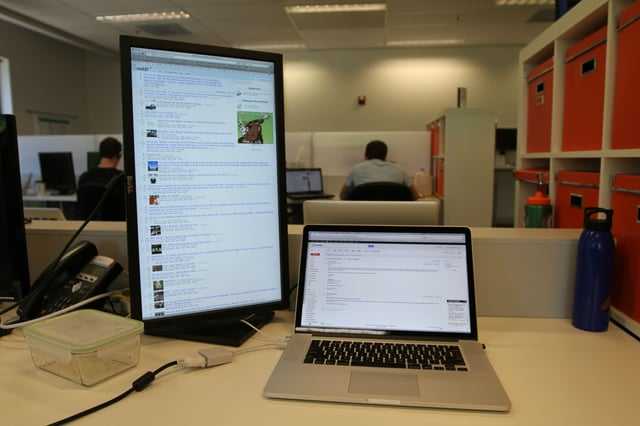
Vertical monitors are an excellent choice for working on spreadsheets, offering a more natural view of long data columns and rows. They can help reduce scrolling and make it easier to analyze large sets of data at once. Overall, if you frequently work with spreadsheets or large documents, a vertical monitor can significantly boost your efficiency and comfort.
Vertical monitors are highly beneficial for spreadsheet work because they allow you to see more rows without having to scroll as much, making it easier to compare data and spot trends. They are particularly useful for tasks that involve reading lengthy lists or working with detailed data sets. If you’re someone who spends hours analyzing spreadsheets, upgrading to a vertical display could be a game-changer.
When it comes to working with spreadsheets, the traditional horizontal screens often fall short because they limit the amount of data visible at once, forcing constant scrolling. Vertical monitors provide a more ergonomic and productive setup by displaying more information vertically, which mimics the natural way we read documents. This setup reduces strain on your neck and eyes while speeding up your workflow. Whether you’re a student, analyst, or office worker, incorporating a vertical monitor into your workspace can make handling large spreadsheets much more efficient and less frustrating.

Are Vertical Monitors Good for Spreadsheets?
Introduction to Vertical Monitors and Spreadsheets
Vertical monitors, also called portrait monitors, are becoming more popular for work tasks that involve looking at multiple lines of text or data. Spreadsheets, which often contain hundreds of rows and columns, can benefit from this setup. Many people ask if using a vertical display really helps when working with spreadsheets.
Why Consider a Vertical Monitor for Spreadsheets?
A vertical monitor shows data in a tall, narrow view. This orientation can make it easier to see more rows of data at once without scrolling. It helps users get a quick overview of large datasets, especially when working with lengthy lists or multiple columns.
How Vertical Monitors Improve Data Visibility
Vertical monitors display more rows vertically, reducing the need to scroll frequently. When dealing with spreadsheets that contain thousands of rows, this can save time. Users can focus on data analysis instead of constantly moving to find information.
Increased View of Rows
A vertical setup allows you to see dozens more rows without moving the scrollbar. This helps in spotting trends or errors faster. It is especially useful for accountants and data analysts who work with detailed records.
Better Handling of Long Lists
If you manage mailing lists, inventories, or project timelines, a vertical monitor helps you view entire lists comfortably. This setup makes it easier to select, copy, or edit data without switching between screens.
Limitations of Vertical Monitors for Spreadsheets
While vertical monitors offer many benefits, they might have some downsides. Not all tasks will benefit from a portrait orientation, especially those that depend heavily on wide views.
Limited Width for Wide Data Sets
Vertical displays are narrow, which can make viewing wide spreadsheets challenging. Users might need to scroll horizontally more often, especially when working with many columns.
Compatibility with Other Tasks
Multitasking can be harder if you need to work side by side with other applications. Horizontal monitors are better suited for tasks requiring wide views or multiple windows open simultaneously.
Best Practices for Using Vertical Monitors with Spreadsheets
To maximize benefits, consider some tips when using a vertical monitor for spreadsheets.
Combine with Horizontal Monitors
Many users connect a vertical monitor with a horizontal display. This setup allows viewing long lists on one screen and wider data or applications on the other. It creates a versatile workspace for multitasking.
Adjust Display Settings
Customize the resolution and scaling options for the best viewing experience. Proper setup ensures that text and numbers are clear and easy to read.
Optimize Your Spreadsheet Layout
Use filters, freeze panes, and selective zooming to improve navigation on a vertical monitor. These features can help you focus on relevant data sections and reduce scrolling.
Who Benefits Most from Vertical Monitors?
Different users find vertical monitors useful for spreadsheets.
Data Analysts
They work with large datasets and need to see as many rows as possible at once. Vertical monitors make it easier to analyze data without constantly scrolling.
Accountants and Finance Professionals
They often review long lists of transactions or budgets. Vertical displays help review such data efficiently.
Project Managers and Administrators
They manage extensive schedules, lists, and reports. Vertical monitors can improve their workflow by showing more data without switching views.
Choosing the Right Vertical Monitor for Spreadsheets
Selecting a good monitor is key to enhancing your spreadsheet work.
Size and Resolution
A 24 to 27-inch screen with at least 1080p resolution works well for most needs. Larger sizes and higher resolutions offer more space and clearer details.
Adjustable Orientation
Look for monitors with pivot features that allow easy switching between portrait and landscape modes. Flexibility helps when changing tasks.
Connectivity and Compatibility
Ensure your computer supports the monitor’s input options and that the setup is simple. Compatibility avoids frustrations during installation.
Vertical monitors can be a helpful addition for anyone who works extensively with spreadsheets. They improve the view of long lists, reduce scrolling, and can increase productivity. However, they also come with some limitations, especially when working with wide data. Combining a vertical monitor with other screens can create a balanced workspace tailored to your needs. Choosing the right size, resolution, and features will help you get the most out of your monitor setup for spreadsheet tasks.
Don’t have 2 monitors, but you use Excel?
Frequently Asked Questions
How does a vertical monitor improve viewing multiple spreadsheet columns?
Using a vertical monitor allows you to display more columns side by side without horizontal scrolling. This setup makes it easier to compare data across extensive spreadsheets, enhancing productivity and reducing the time spent navigating through large datasets.
In what ways does a vertical orientation benefit data analysis tasks?
A vertical monitor aligns well with the structure of spreadsheets, especially when analyzing data that spans many rows. It provides a natural view of long lists, making it easier to scan through information quickly and identify patterns or outliers.
Can a vertical monitor help with managing large datasets efficiently?
Yes, a vertical monitor helps manage large datasets by increasing the vertical viewing area. You can view more rows at once, minimizing the need to scroll, which speeds up data entry, review, and editing processes significantly.
Are there specific spreadsheet functions that work better with a vertical display?
Functions involving extensive row data, such as filtering, sorting, and reviewing transaction logs, benefit from a vertical setup. It provides a clearer overview of sequential data, making it easier to perform and interpret complex operations.
Does the use of a vertical monitor reduce eye strain during prolonged spreadsheet work?
Vertical monitors can reduce eye strain by allowing users to keep their head and eyes in a more natural position when viewing long columns of data. This reduces the need for constant head movement and can lessen fatigue during extended work sessions.
Final Thoughts
Vertical monitors are excellent for spreadsheets because they maximize vertical space, making it easier to view and compare data without scrolling. They improve efficiency by allowing users to see more rows at once, which speeds up data analysis. Whether for work or study, these monitors suit anyone dealing with extensive spreadsheets. Are vertical monitors good for spreadsheets? Absolutely—they enhance your workflow and make managing large datasets more manageable.



