


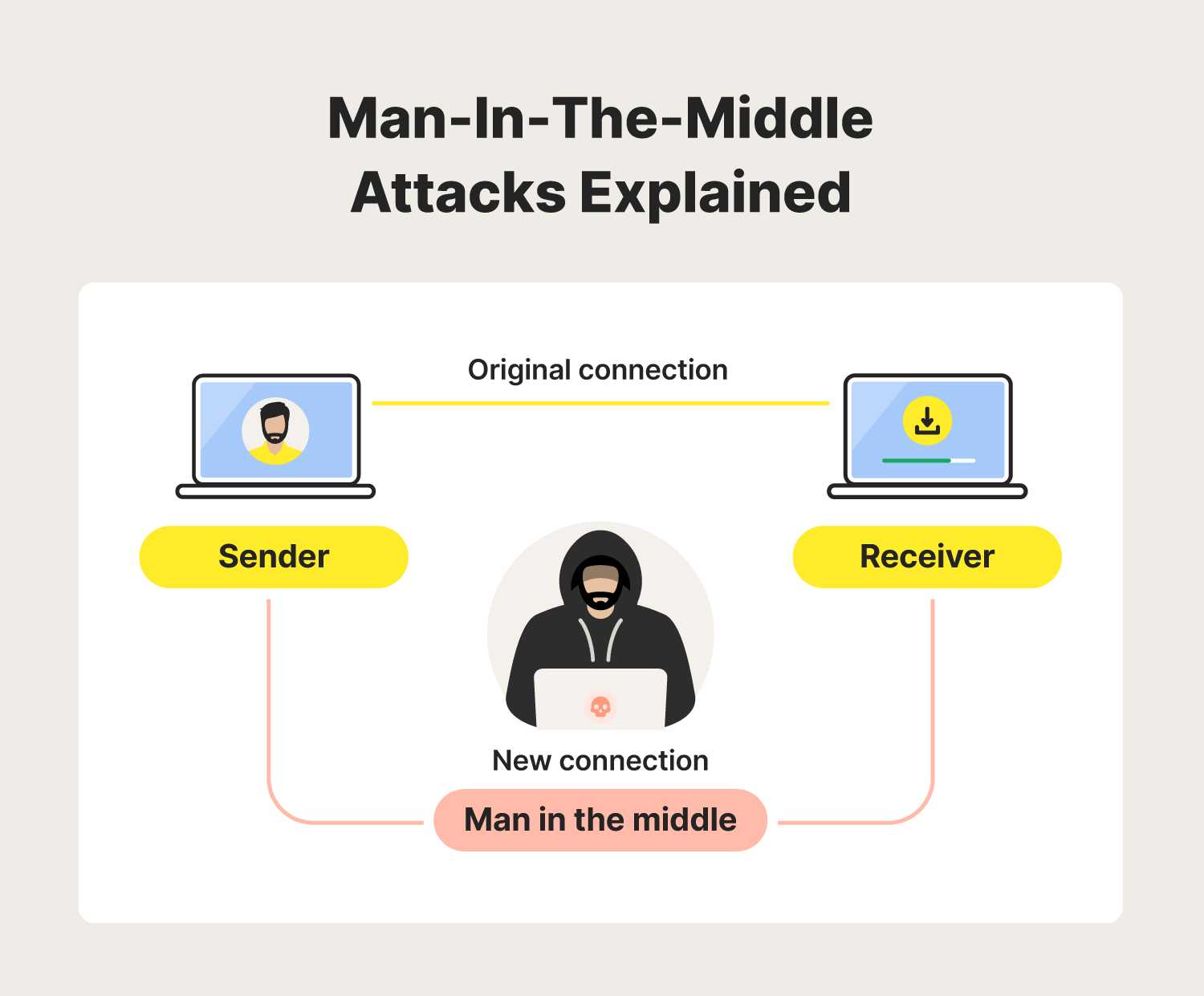
Using your home network instead of public WiFi is the safest way to protect your personal information from cyber threats. By securing your WiFi at home, you minimize the risk of data theft, hacking, and malware attacks that are common on unsecured public networks. Simple steps like enabling strong passwords, updating firmware, and using VPNs can make a huge difference in keeping your online activities safe and private. Staying vigilant and proactive about your network security ensures peace of mind whether you’re working, shopping, or browsing at home.
To avoid the risks associated with public WiFi, always connect through a secure, password-protected home network, utilize VPN services to encrypt your internet traffic, and regularly update your router’s security settings. These practices create a safe online environment, protecting your personal data from potential cyber threats.
If you often rely on public WiFi, the key to safeguarding your data is to switch your activities to your home network whenever possible. Consistently securing your WiFi with strong passwords, activating encryption, and using additional security tools like VPNs will shield you from hackers and malicious attacks, giving you peace of mind every time you log on.

Avoiding Public WiFi Risks by Using Your Home Network Securely
Understanding the Dangers of Public WiFi
Public WiFi networks are convenient but come with many risks. Hackers often target these networks to steal personal information. When you connect to an open WiFi, your data becomes vulnerable to interception. This can include passwords, messages, and even banking details. Being aware of these dangers helps you understand the importance of protecting your information.
Why Your Home Network Is a Safer Choice
Your home WiFi provides a controlled environment. Unlike public networks, you manage who connects to your network. This control reduces risks related to unauthorized access. Securing your home network makes it even safer. It acts as a barrier that keeps intruders out and maintains your privacy.
Steps to Secure Your Home WiFi Network
Securing your WiFi is simple if you follow the right steps. Start by changing the default network name and password. Use a strong password with a mix of letters, numbers, and symbols. Make sure your network uses best security settings, like WPA3 or WPA2 encryption. Regularly update your router’s firmware to fix any security flaws.
Changing Default Settings
Many routers come with default names and passwords that hackers can easily guess. Changing these settings makes it much harder for intruders to access your network. Choose a unique network name not linked to your identity. Use a password that is at least 12 characters long.
Using Strong Passwords and Encryption
Strong passwords include uppercase and lowercase letters, numbers, and special characters. Avoid common words or personal data. Encryption methods like WPA3 are best because they encrypt all data passing through your network. If your router supports WPA3, enable it for added protection.
Keeping Your Devices Updated
Software updates improve security by fixing vulnerabilities. Always update your computer, smartphone, and other devices regularly. Keep your router’s firmware current too. Manufacturers release updates that patch security gaps, preventing hacking attempts.
Enabling Firewall and Antivirus Software
Firewalls act as gatekeepers that block unauthorized connections. Make sure your router’s firewall is active and configured correctly. Install reputable antivirus software on all your devices. Keep it updated to detect and eliminate malware before it causes harm.
Using VPNs to Add Extra Security
Virtual Private Networks hide your online activities and encrypt your data. When you connect to the internet through a VPN, your information remains private, even on unsafe networks. Choose a reliable VPN service with strong encryption features for your home devices. This extra layer of protection shields you from potential threats.
Creating a Guest Network for Visitors
Setting up a separate guest network keeps visitors from accessing your main devices. This prevents malware or hacking attempts from spreading. Make sure the guest network has a different password and security settings. Regularly change the guest password for added security.
Disabling WPS and Remote Management
Wi-Fi Protected Setup (WPS) is convenient but vulnerable. Disable WPS to prevent brute-force attacks. Also, turn off remote management features on your router unless necessary. These settings can be exploited by hackers to gain control over your network.
Monitoring Network Activity
Regularly check your router’s admin panel for unknown devices connected to your network. Most routers provide a list of connected devices. If you see unfamiliar entries, change your WiFi password immediately. Keeping an eye on network activity helps detect unauthorized access early.
Backing Up Your Security Settings
Save your router’s configuration settings after securing it. This allows quick restoration if you reset the device or experience problems. Regular backups ensure your network remains secure without hassle.
Educating Your Household on WiFi Security
Everyone in your home should understand basic WiFi security practices. Teach family members to use strong passwords and avoid sharing network details. Encourage safe internet habits to protect personal and shared devices.
Related Topics for Better WiFi Safety
- How to Set Up a Secure Home WiFi Network
- Best Password Practices for Your Internet Devices
- Understanding Encryption Types for WiFi Security
- Why You Should Avoid Using Public Charging Stations for Devices
Additional Tips for a Safer Internet Experience
Using secure websites (HTTPS), avoiding clicking suspicious links, and regularly running security scans help protect your online presence. Combining these tips with a secure home network creates a safer environment for all your online activities.
Securing your home network is a simple yet effective way to protect yourself from the many dangers of public WiFi. Taking proactive steps like updating firmware, using strong passwords, enabling encryption, and enabling VPNs keeps your data safe. By maintaining vigilant security habits, you ensure your online activities remain private and risk-free. Making your home WiFi a secure zone is a smart choice that benefits your safety in our increasingly connected world.
Hacker Demonstrates Security Risks Of Free Public Wi-Fi
Frequently Asked Questions
What steps can I take to protect my data when connecting to public WiFi networks?
To safeguard your data on public WiFi, always enable your device’s firewall and use a reputable VPN to encrypt your internet traffic. Avoid accessing sensitive information such as banking or personal accounts unless you are on a trusted network. Additionally, ensure your device’s software and security patches are up to date to protect against vulnerabilities.
How can I set up my home network to minimize security risks from external threats?
Configure your home network with a strong, unique password for your WiFi and update your router’s firmware regularly. Enable WPA3 encryption if available, and disable features like WPS that can be exploited. Consider creating a separate guest network for visitors to keep your main network more secure from potential threats.
Why is using a VPN important when accessing the internet from different locations?
A VPN encrypts your internet connection, making it difficult for hackers and third parties to intercept your data. When you connect through a VPN, your online activity remains private, even on unsecured networks. This extra layer of security is especially important when using public WiFi or unfamiliar networks.
How can I ensure my devices stay secure on my home network?
Keep your devices updated with the latest security patches and use strong, unique passwords for all accounts. Enable two-factor authentication where available and disable unnecessary network sharing options. Regularly scan your devices for malware and review your router’s security settings to prevent unauthorized access.
What precautions should I take when connecting new devices to my home WiFi?
Before connecting new devices, change the default passwords and update their firmware if needed. Make sure they are compatible with your network’s security standards, such as WPA3. Avoid connecting devices to unknown or unsecured networks, and always use secure connections when configuring new hardware.
Final Thoughts
Avoiding public WiFi risks by using your home network securely protects your personal information from potential threats. Securing your WiFi with strong passwords and encryption keeps intruders out. Regularly updating your router’s firmware also enhances your network’s safety. Remember, a secure home network offers peace of mind and safer internet use.



