


Have you ever struggled with a noisy keyboard or a stiff mouse while working from home? It’s frustrating when your tools slow you down or cause discomfort during long hours.
Choosing the right keyboard and mouse can change that. The right combo makes typing smooth and clicking easy, helping you stay focused and comfortable. It can even reduce wrist pain and improve your workday mood. In this article, we’ll look at some of the best keyboard and mouse sets designed for home offices.
Whether you want quiet keys, ergonomic design, or wireless freedom, there’s something here for you. Keep reading to find the perfect match that will make your work-from-home days easier and more enjoyable.
Logitech Mk270 Wireless Keyboard And Mouse Combo

The Logitech MK270 Wireless Keyboard and Mouse Combo is ideal for users seeking a reliable and efficient wireless input solution for their PC or laptop. This combo is perfect for students, professionals, and casual users who want to eliminate the clutter of cables while enjoying the convenience of a compact wireless setup. If you need a durable, easy-to-use keyboard and mouse combo with multimedia functionality, this product is an excellent choice.
Pros:
- Reliable 2.4 GHz wireless connection with a long-range of up to 10 meters
- Includes 8 multimedia keys for quick access to volume, play, pause, and other functions
- Compact wireless keyboard and mouse combo that saves desk space
- Long battery life for both keyboard and mouse, reducing the need for frequent replacements
- Easy plug-and-play setup with a single USB receiver
Cons:
- No backlit keys, which may make typing in low light conditions difficult
- Mouse design is basic and may not suit users requiring advanced features or ergonomic comfort
- Limited color options available (only black)
The Logitech MK270 Wireless Keyboard and Mouse Combo offers a seamless wireless experience with its dependable 2.4 GHz technology, ensuring minimal lag and stable connectivity. Its compact design makes it easy to fit into any workspace, while the 8 multimedia keys enhance productivity by allowing instant control over media playback and volume. This feature is particularly useful for multitasking users who want quick access to essential functions without interrupting their workflow.
In addition to its functional design, the combo boasts impressive battery life, which means fewer interruptions due to power loss and greater convenience. The plug-and-play USB receiver simplifies the installation process, making it accessible to users of all technical skill levels. Overall, this combo is a cost-effective and practical solution for anyone looking to upgrade their computer peripherals with a reliable and efficient wireless keyboard and mouse set.
To buy this product, click here.
Logitech Mk345 Wireless Keyboard And Mouse Combo

The Logitech MK345 Wireless Keyboard and Mouse Combo is ideal for users seeking a reliable and comfortable wireless input solution for their PC or laptop. Whether you are a professional working long hours, a student attending virtual classes, or a casual user wanting to upgrade your setup, this combo offers ergonomic design and seamless connectivity to enhance your productivity.
Pros:
- Includes a comfortable palm rest to reduce wrist strain during extended use
- Reliable 2.4 GHz wireless connection with USB receiver for lag-free performance
- Full-sized keyboard layout with well-spaced keys for efficient typing
- Compact and lightweight design (1.1 pounds), easy to transport
- Compatible with a wide range of devices including PCs and laptops
Cons:
- Does not include rechargeable batteries; requires regular battery replacements
- No backlighting on the keyboard, which may affect usability in low-light environments
- Limited customization options for keys and mouse buttons
The Logitech MK345 combo offers a robust wireless setup featuring a 2.4 GHz USB receiver that ensures a stable connection without the clutter of cables. Its black color and sleek design blend well with most workspaces, while the palm rest adds an ergonomic touch by supporting your wrists, reducing fatigue during prolonged typing sessions. The keyboard’s full-sized layout with responsive keys promotes accuracy and speed, making it suitable for intensive typing tasks.
Additionally, the included mouse is designed for smooth navigation and responsive control, complementing the keyboard perfectly. The combo’s lightweight nature and compact dimensions make it convenient for users who need to carry their accessories between home and office or school. Overall, this Logitech wireless keyboard and mouse combo is a practical choice for anyone looking to enhance their computing experience with dependable wireless performance and ergonomic comfort.
To buy this product, click here.
Logitech Mk270 Wireless Keyboard And Mouse Combo

The Logitech MK270 Wireless Keyboard and Mouse Combo in elegant Rose is ideal for users seeking a reliable and compact wireless solution for their PC or laptop. It is perfect for students, remote workers, and casual users who want a clutter-free workspace with efficient functionality and comfortable typing experience.
Pros:
- Stable 2.4 GHz wireless connection with long-range capability
- Includes 8 multimedia keys for quick access to essential functions
- Compact and lightweight design for easy portability
- Long battery life for both keyboard and mouse
- Comfortable typing experience with full-size keyboard layout
Cons:
- No backlit keys, which can be challenging in low light environments
- Mouse may be too small for users preferring larger devices
- Lacks advanced customization options compared to higher-end combos
The Logitech MK270 Wireless Keyboard and Mouse Combo offers a reliable 2.4 GHz wireless connection that ensures minimal input lag and stable communication with your device. The inclusion of 8 multimedia keys enhances productivity by providing instant access to volume control, media playback, and other shortcuts. Its compact size and lightweight design make it an excellent choice for users who need to save space or carry their accessories on the go.
Additionally, the combo’s long battery life reduces the hassle of frequent replacements, allowing users to focus more on work or entertainment. The keyboard’s comfortable layout supports extended typing sessions without fatigue, while the mouse offers smooth and precise tracking. Overall, this combo balances functionality and convenience, making it a practical accessory for everyday computing needs.
To buy this product, click here.
Sablute Ergonomic Wireless Keyboard And Mouse Combo

The Ergonomic Wireless Keyboard and Mouse Combo by SABLUTE is perfect for professionals and home office users seeking a comfortable, quiet, and efficient typing experience. Ideal for business teams and remote workers who need a reliable dual-system setup compatible with both Windows and Mac, this combo enhances productivity with its thoughtful ergonomic design and versatile features.
Pros:
- Ultra-quiet 30dB keystrokes with wave keys to reduce typing noise
- Full-size keyboard with a soft palm rest for enhanced comfort during long work sessions
- Dual-system switch seamlessly supports both Windows and Mac operating systems
- Wireless connectivity offers freedom from clutter and increased mobility
- Compact and lightweight design (2.3 pounds) for easy portability
Cons:
- May require occasional battery replacements for wireless components
- Black color may show fingerprints and dust more prominently
- Some users might prefer a mechanical keyboard feel over membrane keys
The Ergonomic Wireless Keyboard and Mouse Combo stands out with its thoughtfully designed wave keys which not only provide a quiet typing experience but also promote natural finger positioning to reduce strain. The inclusion of a soft palm rest adds to user comfort, making it easier to work for extended periods without discomfort. The keyboard’s full-size layout ensures that all keys are easily accessible, boosting typing efficiency for business professionals and home office users alike.
Another key feature is the dual-system switch, which allows users to effortlessly toggle between Windows and Mac systems, making this combo a versatile choice for teams with mixed operating environments. The wireless connectivity eliminates cable clutter and enhances workspace organization, while the lightweight and compact dimensions make it easy to transport or reposition as needed. Overall, this combo is designed to provide a seamless, comfortable, and productive typing and navigation experience tailored to modern work demands.
To buy this product, click here.
Wireless Keyboard And Mouse Combo
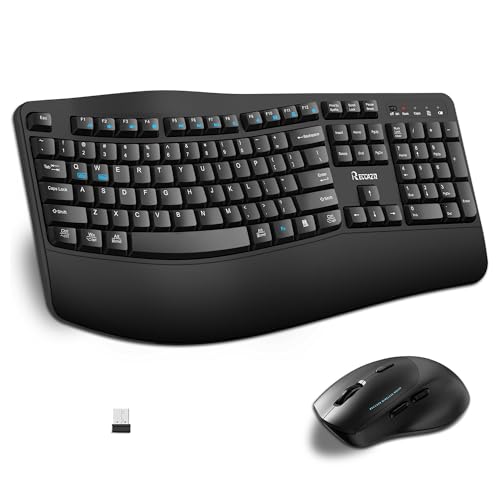
The Wireless Keyboard and Mouse Combo by RECCAZR is ideal for professionals, students, and everyday computer users seeking a comfortable and efficient typing and navigation experience. If you value ergonomic design, silent operation, and wireless convenience for your computer or laptop, this combo is designed with you in mind. It is especially suitable for those who spend long hours typing or working on Windows or Mac systems and want to reduce wrist strain while maintaining productivity.
Pros:
- Ergonomic full-size keyboard with wave keys and wrist rest for natural, comfortable typing
- Wireless 2.4G connectivity offers reliable and clutter-free use
- 3 DPI adjustable silent mouse enhances precision and reduces noise during use
- Compatible with both Windows and Mac systems
- Sleek black design complements any workspace
Cons:
- Weight of 2.5 pounds may be slightly heavy for portable use
- Lacks backlit keys for low-light environments
The RECCAZR Wireless Keyboard features a thoughtfully designed wave key layout that promotes natural hand positioning, minimizing fatigue during extended typing sessions. The included wrist rest provides additional support to reduce strain, making it an excellent choice for users who prioritize ergonomic comfort. The wireless 2.4G connection ensures stable and interference-free performance, allowing users to maintain a clean and organized workspace without the hassle of cables.
The accompanying ergonomic silent mouse offers adjustable DPI settings, enabling users to customize cursor sensitivity for various tasks, from precise graphic work to general browsing. Its silent click functionality ensures minimal noise, ideal for quiet environments such as offices or libraries. Overall, this combo combines style, comfort, and functionality, enhancing your computing experience whether you’re working, gaming, or browsing.
To buy this product, click here.
Frequently Asked Questions
What Makes Logitech Mk270 Ideal For Home Office Use?
Logitech MK270 offers reliable 2. 4 GHz wireless connectivity and 8 multimedia keys. It’s compact, comfortable, and compatible with Windows PCs and laptops, making it great for productivity at home.
How Does The Mk345 Keyboard Improve Typing Comfort?
The MK345 features a palm rest that reduces wrist strain. Its quiet keys and ergonomic design support long typing sessions, enhancing comfort for home office workers.
Are Ergonomic Keyboard Combos Better For Long Work Hours?
Yes, ergonomic combos like Sablute’s reduce wrist and finger fatigue. Their wave keys and soft palm rests promote natural hand positioning, ideal for extended home office use.
Can These Combos Work With Both Windows And Mac Systems?
Some combos, like the Sablute ergonomic set, support dual-system switching. This allows seamless use on Windows and Mac, increasing versatility for home users.
What Benefits Do Adjustable Dpi Mice Provide?
Adjustable DPI mice offer customizable cursor speed. This lets users switch sensitivity for precision tasks or fast navigation, boosting efficiency in home office environments.
Conclusion
Choosing the right keyboard and mouse can make your work from home easier and more comfortable. Wireless combos like the Logitech MK270 and MK345 offer convenience and reliable performance. Ergonomic sets with wrist rests help reduce strain during long hours.
Quiet keys and adjustable mice add to a peaceful workspace. Whether you prefer compact designs or full-size keyboards, there are options to fit your needs. These tools improve productivity by making typing and navigation smooth and simple. Remember, a good setup supports your health and efficiency.
Take time to find what feels best for you. Small changes in your workspace can lead to big benefits in comfort and focus. With the right keyboard and mouse, your home office becomes a place where work gets done with ease.



