


Have you ever struggled with a keyboard that sticks or a mouse that just won’t respond? It’s frustrating when your tools slow you down, especially during important work or relaxing game time.
Choosing the right keyboard and mouse can change all that. The right combo makes typing smooth and clicking easy, so you stay focused and comfortable. It’s amazing how much better your day feels with the perfect setup. In this article, I’ll share some of the best keyboard and mouse combos that fit different needs and budgets.
Whether you want quiet keys, fast scrolling, or wireless freedom, you’ll find options that make your daily tasks easier. Keep reading to discover the products that can truly improve your computer experience.
Logitech Mk270 Wireless Keyboard And Mouse Combo

The Logitech MK270 Wireless Keyboard and Mouse Combo is ideal for users seeking a reliable and efficient wireless input solution for their Windows PC or laptop. Whether you are a student, professional, or casual user, this combo is perfect for those who want to enhance productivity with a compact and portable setup that eliminates cable clutter.
Pros:
- Reliable 2.4 GHz wireless connection with a long-range of up to 10 meters
- Compact and lightweight design for easy portability
- Includes 8 multimedia keys for quick access to volume, play, and other controls
- Long battery life for both keyboard and mouse
- Easy plug-and-play setup with a small USB receiver
Cons:
- No backlit keys for low-light environments
- Mouse might be too small for users with larger hands
- Lacks advanced features such as programmable keys or high DPI settings
The Logitech MK270 Wireless Keyboard and Mouse Combo boasts a reliable 2.4 GHz wireless connection that ensures minimal lag and interference, making it a great choice for everyday computing tasks. Its compact keyboard design coupled with a lightweight mouse provides comfort and ease of use without taking up much desk space. The inclusion of 8 multimedia keys enhances user convenience, allowing quick control over media playback and volume without interrupting workflow.
Additionally, this combo is built for durability and long-lasting performance, featuring extended battery life which means fewer interruptions for battery replacements. The simple plug-and-play USB receiver makes setup hassle-free, allowing users to get started immediately without needing additional drivers or software. Overall, the Logitech MK270 Wireless Keyboard and Mouse Combo is a practical and affordable solution for anyone looking to upgrade their PC or laptop input devices with wireless freedom and functional design.
To buy this product, click here.
Logitech Mx Keys S Combo

The Logitech MX Keys S Combo is perfect for professionals, creatives, and tech enthusiasts who demand a seamless, high-performance wireless keyboard and mouse setup. Ideal for those who work across multiple operating systems like Windows, Linux, Chrome, and Mac, this combo offers enhanced productivity with its versatile connectivity and ergonomic design. If you value customizable lighting, fast scrolling, and a comfortable palm rest, this product is tailored for you.
Pros:
- Ergonomic palm rest for extended comfort during long typing sessions
- Customizable illumination allows for easy typing in any lighting condition
- Fast and smooth scrolling with the advanced mouse included
- Supports Bluetooth and USB-C connectivity for versatile device compatibility
- Compatible across multiple operating systems including Windows, Linux, Chrome, and Mac
- Sleek and modern graphite color that complements any workspace
Cons:
- Higher price point compared to basic keyboard and mouse sets
- May have a slight learning curve for users new to customizable illumination settings
The Logitech MX Keys S Combo features a slim, durable design with a thoughtful layout that enhances typing accuracy and speed. The inclusion of a palm rest provides ergonomic support, reducing wrist strain during extended use. Additionally, the customizable backlighting adapts to your environment, ensuring you can work comfortably in dim or brightly lit spaces without eye strain.
The wireless connectivity options, including Bluetooth and USB-C, offer flexibility for users who switch between multiple devices or operating systems. The mouse included in the combo supports fast scrolling, making navigation smooth and efficient. This combination of features helps boost productivity and user comfort, making it an excellent investment for anyone seeking a premium wireless keyboard and mouse experience.
To buy this product, click here.
Logitech Mk955 Signature Slim Wireless Keyboard And Mouse Combo
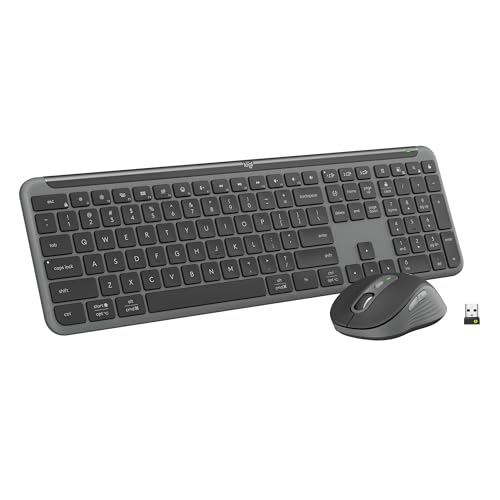
The Logitech MK955 Signature Slim Wireless Keyboard and Mouse Combo is ideal for users with larger hands who seek a comfortable typing and clicking experience. It is perfect for professionals, students, and multi-device users who value quiet operation and the ability to easily switch across three devices seamlessly. Whether you use Windows or Mac, this combo supports multiple operating systems, making it versatile for various setups.
Pros:
- Ergonomic design tailored for larger hands
- Quiet typing and clicking reduce distractions
- Bluetooth connectivity with multi-OS compatibility (Windows and Mac)
- Easy switching between three devices enhances productivity
- Sleek graphite color adds a modern aesthetic
Cons:
- May be slightly larger than standard combos, affecting portability
- Requires Bluetooth-enabled devices for connectivity
- Battery life depends on usage and device settings
The Logitech MK955 Signature Slim Wireless Keyboard and Mouse Combo offers a refined typing and clicking experience with its slim profile and quiet operation, making it perfect for office environments or home use where noise reduction is appreciated. The keyboard layout is spacious and designed specifically for users with larger hands, which prevents cramping and enhances comfort during extended typing sessions.
One of the standout features is the ability to switch seamlessly across three devices using Bluetooth. This multi-device support allows users to effortlessly toggle between a laptop, tablet, and smartphone without the hassle of reconnecting peripherals. Additionally, the combo’s compatibility with both Windows and Mac operating systems ensures that it fits into diverse tech ecosystems, providing flexibility and convenience.
To buy this product, click here.
Logitech Mk710 Wireless Desktop Set

The Logitech 920002416 MK710 Wireless Desktop Set is an ideal choice for professionals, students, and everyday computer users who seek a reliable and comfortable wireless keyboard and mouse combo. This set is perfect for those who value durability, efficiency, and ergonomic design in their workspace accessories. If you are looking to upgrade your desktop setup with a seamless wireless experience, this product is designed to meet your needs.
Pros:
- Long battery life for both keyboard and mouse, reducing the need for frequent replacements
- Ergonomic design that enhances comfort during extended use
- Reliable wireless connection with USB receiver for easy plug-and-play setup
- Compact and sleek black design that fits well in any workspace
- Brand reputation of Logitech ensures quality and durability
Cons:
- The set may be slightly heavier compared to other wireless options
- Lack of customizable keys for advanced users
- No backlighting on the keyboard, which may affect usability in low-light conditions
The Logitech 920002416 MK710 Wireless Desktop Set features a well-crafted wireless keyboard and mouse that provide a clutter-free desktop experience. The keyboard boasts an ergonomic design with a cushioned palm rest, which significantly reduces strain during long working hours. Its keys are responsive and quiet, making it suitable for office environments where noise reduction is important. The wireless USB receiver ensures a stable and fast connection, allowing users to work without interruptions.
Additionally, the mouse in this set complements the keyboard with its precision tracking and comfortable grip, enhancing productivity and ease of navigation. The set’s long battery life is a major benefit, minimizing downtime and maintenance. Overall, this wireless desktop set from Logitech offers a balance of comfort, durability, and functionality, making it an excellent investment for users who want an efficient and stylish workspace solution.
To buy this product, click here.
Logitech Mk345 Wireless Keyboard And Mouse Combo

The Logitech MK345 Wireless Keyboard and Mouse Combo is perfect for users who need a reliable and comfortable input solution for their PC or laptop. Ideal for professionals, students, and home office setups, this combo caters to those seeking wireless convenience combined with ergonomic design and long-lasting performance. If you value seamless connectivity and ease of use without the clutter of wires, this product is a great choice.
Pros:
- Ergonomic palm rest provides comfortable typing experience during extended use
- Reliable 2.4 GHz wireless connection with a USB receiver for stable and lag-free performance
- Full-size keyboard layout with well-spaced keys enhances typing accuracy and speed
- Compact and lightweight design (1.1 pounds) makes it easy to carry and fit on any desk
- Compatible with both PC and laptop devices for versatile use
Cons:
- Lacks backlit keys, which may be inconvenient in low-light environments
- Mouse may be less suitable for high-precision tasks such as gaming or design
The Logitech MK345 combo integrates a wireless keyboard and mouse that operate on a 2.4 GHz USB receiver, ensuring a clutter-free workspace with extended wireless range. The keyboard’s ergonomic palm rest supports wrist comfort, reducing strain during long typing sessions. Its full-size layout with well-spaced keys allows for efficient and accurate typing, making it suitable for professional and casual users alike.
Additionally, the included mouse offers smooth tracking and fits comfortably in the hand, enhancing productivity without the hassle of wires. Its lightweight and compact design make it convenient for portability and easy desk organization. This combo’s compatibility with a wide range of PCs and laptops ensures flexible use across different setups, making it a practical and user-friendly accessory for daily computing tasks.
To buy this product, click here.
Frequently Asked Questions
What Features Make Logitech Mk270 Suitable For Daily Use?
Logitech MK270 offers reliable 2. 4 GHz wireless connectivity and eight multimedia keys. It is compact, durable, and ideal for Windows PCs and laptops, providing comfortable typing and smooth mouse control.
How Does Logitech Mx Keys S Improve Productivity?
The MX Keys S features customizable illumination, fast scrolling, and seamless Bluetooth or USB-C connection. It supports Windows, Linux, Chrome, and Mac, enhancing performance with a comfortable palm rest for long work sessions.
Can Logitech Mk955 Support Multiple Devices Simultaneously?
Yes, the MK955 allows switching across three devices using Bluetooth. It is designed for larger hands with quiet typing and clicking, compatible with both Windows and Mac operating systems.
What Are The Benefits Of Logitech Mk710 Wireless Desktop Set?
Logitech MK710 offers a full-size keyboard and mouse combo with USB connectivity. It features ergonomic design and long battery life, making it perfect for extended desktop use with reliable wireless performance.
Is Logitech Mk345 Combo Comfortable For Long-term Use?
Yes, the MK345 includes a palm rest and ergonomic design. It connects via 2. 4 GHz USB receiver and works well with PCs and laptops, ensuring comfort during extended typing and mouse use.
Conclusion
Choosing the right keyboard and mouse can improve your daily computer use. The models discussed offer different features for various needs. Wireless combos like the Logitech MK270 and MK345 provide convenience and ease of use. For those who want extra comfort, the MX Keys S and MK955 offer quiet typing and ergonomic designs.
The MK710 is great for users who need durability and a full keyboard experience. Consider what matters most: battery life, key feel, or connectivity. Each option fits different users and setups. Think about your workspace and how you use your computer.
This will help you pick a keyboard and mouse that suit your style. With the right combo, work and play become smoother and more enjoyable. Take your time to find the best match for your needs and budget. A good keyboard and mouse make a big difference every day.



