


Have you ever struggled with slow, clunky keyboards while editing your photos or videos? It’s frustrating when your tools get in the way of your creativity.
Every missed shortcut or sticky key can break your focus and waste precious time. But imagine having the perfect keyboard designed just for editing—one that fits your workflow like a glove. Choosing the right keyboard can make your daily work smoother, faster, and more enjoyable.
It helps you focus on what truly matters: creating great content. In this article, I’ll share some of the best keyboards made for editors like you. From customizable keys to smart controls, these options can boost your productivity and creativity. Keep reading to find the one that suits your editing style perfectly!
Logitech Mx Creative Console

The Logitech MX Creative Console is ideal for professionals and creatives who seek enhanced productivity and streamlined workflows. If you are a graphic designer, video editor, or content creator using applications like Adobe Creative Cloud, Zoom, or Spotify, this versatile device is designed to elevate your creative process with customizable controls and intuitive functionality.
Pros:
- Features 9 customizable LCD keys for quick access to frequently used shortcuts.
- Includes a control dial that allows precise adjustments in graphic design and editing tasks.
- Comes with a 3-month Adobe Creative Cloud membership to enhance creative projects.
- Compatible with popular software such as Adobe, Zoom, and Spotify.
- Sleek graphite color design complements any professional workspace.
Cons:
- May have a learning curve for beginners unfamiliar with customizable control devices.
- Premium features might be underutilized by casual users or those outside creative industries.
The Logitech MX Creative Console stands out with its innovative 9 customizable LCD keys that users can program to fit their unique workflow needs. This customization enables swift access to tools and commands, reducing time spent navigating menus and increasing efficiency. The integrated control dial offers fine control, especially beneficial for tasks such as color grading, timeline scrubbing, or volume adjustments, providing users with tactile feedback for precision.
Additionally, the included 3-month Adobe Creative Cloud membership offers users access to industry-standard creative software, complementing the hardware’s capabilities. Its compatibility with widely used applications like Zoom and Spotify also makes it a versatile accessory beyond graphic design, allowing seamless control over various aspects of a professional’s digital workspace. The device’s ergonomic design and graphite finish not only provide aesthetic appeal but also ensure comfortable extended use.
To buy this product, click here.
Xppen Mini Keydial Ack05 Wireless Shortcut Keyboard

The XPPen Mini Keydial ACK05 Wireless Shortcut Keyboard is ideal for digital artists, graphic designers, and video editors who seek a compact, efficient, and customizable control device. If you use a drawing tablet or work extensively on PC, MacBook, or Windows platforms for image or video editing, this programmable remote with dial and express keys will significantly enhance your workflow.
Pros:
- Wireless Bluetooth connectivity allows for a clutter-free workspace.
- Programmable express keys and dial enable personalized shortcuts for increased productivity.
- Compact and lightweight design (0.165 pounds) makes it highly portable.
- Compatible with multiple operating systems including PC, MacBook, and Windows.
- Ergonomic layout designed specifically for creative professionals.
Cons:
- Limited number of keys might not satisfy users needing extensive shortcut options.
- Bluetooth connection may occasionally experience latency depending on environment.
- Blue color option may not appeal to all users’ aesthetic preferences.
The XPPen Mini Keydial ACK05 features a sleek, compact design with dimensions optimized for easy handling and placement on any desk. Its wireless Bluetooth capability ensures freedom of movement without the hassle of cables, making it perfect for creative professionals who prefer a clean and organized workspace. The dial control paired with customizable express keys allows users to assign frequently used shortcuts and commands, speeding up tasks such as brush size adjustment, undo actions, or timeline scrubbing in video editing software.
Moreover, the device’s broad compatibility across drawing tablets, PCs, MacBooks, and Windows systems makes it a versatile tool for various creative workflows. The programmable express remote enhances efficiency by minimizing the need to switch between keyboard and mouse, thereby allowing users to maintain focus on their projects. Lightweight and portable, the XPPen Mini Keydial ACK05 is a valuable addition for artists and editors looking to elevate their productivity and streamline their creative process.
To buy this product, click here.
Tourbox Neo

The TourBox NEO is ideal for creative professionals such as photographers, illustrators, and video editors who seek a highly customizable editing controller to enhance their workflow. If you use software like Adobe Photoshop, Clip Studio Paint (CSP), or other creative applications on Mac or PC, this device can significantly boost your productivity with its intuitive and programmable features.
Pros:
- Highly customizable controls tailored to various editing software
- Compact and ergonomic design for comfortable extended use
- Compatible with both Mac and PC platforms
- Supports precise photo color grading, illustration, and speed editing
- Programmable keyboard that enhances workflow efficiency
Cons:
- Learning curve for beginners to fully utilize customization options
- Device-only color option may not appeal to users wanting more variety
- Relatively compact size might feel small for users with larger hands
The TourBox NEO is designed with an ergonomic form factor measuring approximately 5.5 inches in height and 6.7 inches in length, making it a portable yet powerful tool. Its intuitive dial, buttons, and wheel controls allow users to execute complex commands quickly without relying on traditional keyboard shortcuts. This leads to a smoother editing process and reduced hand fatigue during long creative sessions.
Beyond its physical design, the device’s high degree of customization enables users to program controls that match their unique editing style. Whether you are performing detailed photo color grading or intricate illustration work, the TourBox NEO adapts to your needs. Its compatibility with popular creative software on both Mac and PC platforms ensures seamless integration into existing workflows, making it an indispensable tool for boosting productivity and precision.
To buy this product, click here.
Redthunder K95 Wireless Mechanical Keyboard

The RedThunder K95 Wireless Mechanical Keyboard is ideal for gamers, tech enthusiasts, and professionals who demand high performance and customization from their keyboard. If you are looking for a versatile keyboard that offers wireless connectivity, a vibrant TFT screen, and premium features like hot-swappable switches and an ergonomic gasket structure, this keyboard is designed for you. Its sleek black-gold design also makes it a stylish addition to any setup.
Pros:
- Versatile tri-mode connectivity (BT5.0, 2.4GHz, USB-C) for seamless switching between devices
- Customizable pre-lubed linear pink switches that provide smooth and quiet keystrokes
- Integrated TFT screen and knob for enhanced control and personalization
- Hot-swappable switch design allows easy modification without soldering
- Ergonomic gasket structure for improved typing comfort and noise reduction
- Striking RGB lighting to enhance gaming and work environments
Cons:
- Relatively heavy at 2.16 pounds, which may reduce portability
- Premium features come at a higher price point
- Learning curve for full utilization of TFT screen and knob controls
The RedThunder K95 Wireless Mechanical Keyboard boasts a unique combination of functionality and style. Its tri-mode connectivity means you can effortlessly switch between Bluetooth 5.0, 2.4GHz wireless, and wired USB-C modes, making it perfect for multi-device users. The inclusion of a TFT screen and control knob adds an extra layer of customization and convenience, allowing users to adjust settings on the fly without interrupting their workflow or gaming session.
Equipped with pre-lubed linear pink switches, the keyboard ensures a smooth and quiet typing experience, ideal for long gaming sessions or professional use. The hot-swappable design empowers users to easily swap switches to tailor the feel and sound of their keyboard without any technical hassle. Additionally, the gasket structure enhances typing comfort by reducing vibrations and noise, while the dynamic RGB lighting adds a visually appealing atmosphere that can be customized to match any setup or mood. Overall, the RedThunder K95 is a high-performance keyboard that meets the needs of gamers and professionals alike.
To buy this product, click here.
Tourbox Lite
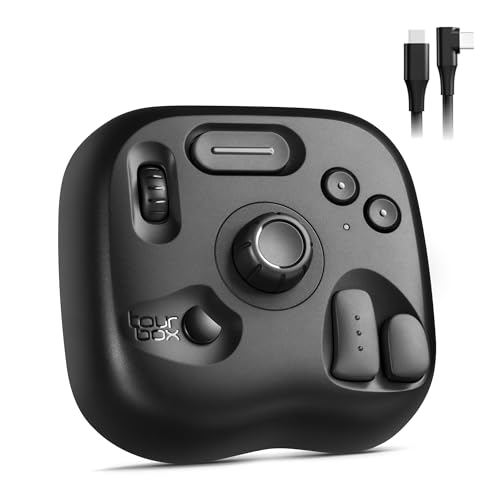
The TourBox Lite is ideal for digital artists, graphic designers, and creative professionals who seek a compact and efficient solution to streamline their editing and drawing workflows. If you frequently use software like Clip Studio Paint and require quick access to customizable shortcuts, this editing keyboard offers an excellent balance of functionality and portability.
Pros:
- Compact and lightweight design for easy portability
- Customizable keys tailored for creative software like Clip Studio Paint
- Wired connection ensures stable and lag-free performance
- Ergonomic layout enhances workflow efficiency and reduces strain
- Compatible with a variety of editing and drawing applications
Cons:
- Wired only, limiting mobility during use
- May require time to customize and get accustomed to the key functions
- Limited to the unit only, no bundled accessories
The TourBox Lite features a compact footprint measuring approximately 6.3 inches in length and under 3 inches in height and width, making it a perfect fit for any workspace. Its lightweight design, weighing less than a pound, ensures it can easily be transported alongside your laptop or drawing tablet. The device is engineered by TOUR BOX with a sleek black finish, adding a professional touch to your creative setup.
Equipped with a range of customizable buttons and dials, the TourBox Lite allows users to assign macros and shortcuts specific to their preferred editing software. This customization capability significantly reduces the time spent navigating menus and enhances productivity. The wired connection guarantees a consistent and responsive experience, vital for precision tasks in digital artwork and photo editing. Overall, this creative controller is a smart investment for anyone looking to streamline their digital workflow efficiently.
To buy this product, click here.
Frequently Asked Questions
What Makes Logitech Mx Creative Console Ideal For Editing?
Logitech MX Creative Console offers 9 customizable LCD keys and a control dial. It integrates with Adobe, Zoom, and Spotify. This enhances workflow efficiency and creative control. The included 3-month Adobe Creative Cloud membership adds extra value for editors.
How Does Xppen Mini Keydial Improve Editing Workflow?
XPPen Mini Keydial features wireless Bluetooth connectivity and programmable express keys. It supports multiple platforms like PC, MacBook, and Windows. The dial and custom keys speed up image and video editing tasks. It’s designed for creative professionals using drawing tablets.
Why Choose Tourbox Neo For Photo And Video Editing?
TourBox NEO provides customizable controls for photo color grading and illustration. It boosts productivity with intuitive dial and button layouts. Compatible with Adobe CSP and other apps, it works smoothly on Mac and PC. It’s tailored for editors seeking precision and speed.
What Are The Benefits Of Redthunder K95 Wireless Mechanical Keyboard?
RedThunder K95 features a TFT screen, customizable knob, and hot-swappable switches. It supports tri-mode connectivity (Bluetooth, 2. 4GHz, USB-C). The pre-lubed linear pink switches offer smooth typing. This RGB gaming keyboard doubles as a powerful editing tool with tactile feedback.
How Does Tourbox Lite Enhance Artists’ Editing Experience?
TourBox Lite is a compact, wired editing keyboard with customizable macro keys. It works well with Clip Studio Paint and other creative software. The device streamlines workflows by offering quick access to shortcuts. It’s a preferred choice for artists and digital creators.
Conclusion
Choosing the best keyboard for editing depends on your needs and workflow. Keyboards like the Logitech MX Creative Console and XPPen Mini Keydial offer customizable keys and dials. These features help speed up tasks in Adobe, video, and photo editing.
Devices such as the TourBox NEO and TourBox Lite provide intuitive controls designed for artists and editors. The RedThunder K95 adds mechanical switches and wireless options for comfort and flexibility. Each keyboard brings unique tools to improve productivity and ease repetitive actions.
Consider what software you use and which shortcuts matter most. A good editing keyboard saves time and reduces strain during long sessions. Investing in the right tool can make your creative process smoother and more enjoyable. Take your pick from these options to find the perfect fit for your editing style.



