


Have you ever felt stuck typing on a keyboard that just doesn’t keep up? Maybe your fingers hit the keys with a loud clack, or the layout feels cramped and slow.
It’s frustrating when your tools slow you down, especially when you want to focus and get things done quickly. The right keyboard can change all of that. It can make typing smoother, quieter, and even more comfortable, so your work flows naturally.
Imagine a keyboard that fits your style, stays quiet, and connects easily to all your devices. In this article, we’ll explore some of the best keyboards designed to boost your productivity and bring ease to your daily routine. Keep reading to find the perfect keyboard that helps you work smarter, not harder.
Logitech Mx Keys S Wireless Keyboard

The Logitech MX Keys S Wireless Keyboard is ideal for professionals, creatives, and tech enthusiasts who demand a high-quality typing experience. Whether you use a Windows PC, Linux, Chrome, or Mac, this keyboard offers seamless compatibility and advanced features that cater to users seeking precision, comfort, and productivity in their daily computing tasks. If you value a sleek, low-profile design combined with programmable keys and backlighting, this keyboard is an excellent choice.
Pros:
- Low profile keys for comfortable and fluid typing
- Quiet keystrokes minimize noise, ideal for shared workspaces
- Backlighting for easy use in low-light environments
- Programmable keys enhance customization and workflow efficiency
- Bluetooth connectivity and USB-C rechargeable battery for convenience and versatility
- Compatible across multiple operating systems: Windows, Linux, Chrome, and Mac
Cons:
- Higher price point compared to basic wireless keyboards
- No numeric keypad, which might be a drawback for users needing extensive number input
- Graphite color may not appeal to everyone’s aesthetic preference
The Logitech MX Keys S Wireless Keyboard combines a sleek, low-profile design with precision-engineered keys that deliver a satisfying and quiet typing experience. The keyboard’s keys are perfectly spaced and shaped to support fluid, accurate typing, reducing fatigue during long work sessions. Its backlighting feature automatically adjusts to ambient lighting, ensuring visibility and comfort whether you’re working late at night or in a dimly lit room.
Beyond its tactile advantages, the keyboard’s programmable keys allow users to customize shortcuts and commands, enhancing productivity for tasks such as coding, design, or content creation. The wireless Bluetooth connection paired with a long-lasting USB-C rechargeable battery makes it highly portable and convenient, eliminating the hassle of frequent charging or tangled wires. This keyboard is a versatile tool crafted to meet the demands of modern users across various platforms, delivering both style and functionality.
To buy this product, click here.
Logitech Mx Keys S Combo

The Logitech MX Keys S Combo is ideal for professionals, creatives, and tech enthusiasts who demand a seamless and efficient workflow. If you work across multiple devices or operating systems like Windows, Linux, Chrome, or Mac, this wireless keyboard and mouse combo provides the perfect balance of comfort, precision, and versatility. Users looking for a durable, customizable, and aesthetically pleasing input solution will find this combo especially beneficial.
Pros:
- Ergonomic design with a comfortable palm rest for prolonged use.
- Customizable illumination enhances typing in low-light environments.
- Supports Bluetooth and USB-C connectivity for flexible device pairing.
- Fast scrolling capability on the mouse improves navigation efficiency.
- Compatible across multiple operating systems including Windows, Linux, Chrome, and Mac.
- High-quality graphite color finish adds a professional aesthetic.
Cons:
- Relatively larger dimensions may not suit compact workspaces.
- Premium price point compared to standard wireless keyboard and mouse combos.
- May require a learning curve for users new to customizable illumination features.
The Logitech MX Keys S Combo offers an exceptional user experience with its precision-engineered keys that provide satisfying tactile feedback. The customizable illumination allows users to adjust the backlighting according to their environment, reducing eye strain during late-night work sessions. Additionally, the fast scrolling feature on the mouse enhances productivity by enabling swift navigation through long documents or web pages.
Designed to connect effortlessly via Bluetooth or USB-C, this combo ensures versatility and convenience across different devices and operating systems. The ergonomic layout with a palm rest helps maintain comfort during extended typing periods, making it a perfect choice for professionals who spend hours at the keyboard. Overall, the Logitech MX Keys S Combo stands out as a high-performance wireless input solution tailored to meet the demands of modern multitasking users.
To buy this product, click here.
Logitech Signature K650 Comfort Full-size Wireless Keyboard

The Logitech Signature K650 Comfort Full-Size Wireless Keyboard is ideal for professionals, students, and anyone who spends long hours typing and desires a comfortable, efficient, and reliable keyboard. Those looking for a versatile keyboard compatible with multiple operating systems, including PC, Windows, and Mac, will find this model particularly beneficial. Its ergonomic design with a built-in wrist rest makes it perfect for users focused on reducing strain during extended typing sessions.
Pros:
- Deep-cushioned keys provide a comfortable typing experience, minimizing finger fatigue.
- Wireless connectivity options including BLE Bluetooth and Logi Bolt USB Receiver offer flexible and stable connections.
- Full-size layout with a dedicated numpad enhances productivity for data entry tasks.
- Compatible with most operating systems such as PC, Windows, and Mac, ensuring broad usability.
- Ergonomic design with a built-in wrist rest promotes better hand positioning and comfort.
- Compact dimensions and lightweight design make it easy to carry and fit into any workspace.
Cons:
- The keyboard’s graphite color may not appeal to users who prefer brighter or more vibrant aesthetics.
- Some users might find the wireless connection occasionally less responsive compared to wired alternatives.
- The wrist rest, while comfortable, is fixed and may not suit everyone’s ergonomic preferences.
The Logitech Signature K650 Comfort Wireless Keyboard features a thoughtfully designed full-size layout that supports efficient typing with its deep-cushioned keys, reducing fatigue during prolonged use. Its dual wireless connectivity options, including BLE Bluetooth and the Logi Bolt USB Receiver, ensure seamless pairing with a wide range of devices, making it a versatile choice for users working across multiple platforms. The inclusion of a numpad further enhances functionality, especially for those engaged in number-intensive tasks.
Additionally, the built-in wrist rest is a standout feature that improves ergonomic comfort by supporting the wrists in a natural position, thereby minimizing strain. Its graphite finish offers a sleek, professional look that complements most workspaces. Lightweight and compact, this keyboard is easy to transport, making it suitable for both office and home use. Overall, the Logitech Signature K650 combines comfort, compatibility, and convenience, making it an excellent investment for anyone seeking a reliable wireless keyboard with enhanced typing comfort.
To buy this product, click here.
Logitech Mx Mechanical Wireless Keyboard

The Logitech MX Mechanical Wireless Illuminated Performance Keyboard is ideal for professionals, creatives, and tech enthusiasts who demand a premium typing experience across multiple devices. Whether you are a writer, programmer, or designer, this keyboard offers the perfect balance of tactile feedback and quiet operation, making it suitable for both office environments and home setups. Its compatibility with macOS, Windows, Linux, iOS, and Android ensures seamless connectivity for users who switch between different operating systems.
Pros:
- Durable metal construction in a sleek graphite finish for long-lasting use and aesthetic appeal
- Tactile quiet switches provide satisfying feedback without disturbing noise
- Backlit keys enhance visibility in low-light conditions with adjustable brightness
- Versatile connectivity options including Bluetooth and USB-C for wired and wireless use
- Compatible with multiple operating systems, supporting macOS, Windows, Linux, iOS, and Android
- Compact dimensions and moderate weight make it portable yet sturdy
Cons:
- Slightly higher price point compared to standard keyboards
- May require time to adapt for users unfamiliar with mechanical switches
- Limited color options, only available in graphite
The Logitech MX Mechanical Wireless Keyboard stands out for its robust metal build and modern design, ensuring durability and a premium look. Its tactile quiet switches strike an excellent balance between responsiveness and noise reduction, which is beneficial for users who want a satisfying typing experience without the typical mechanical keyboard clatter. The backlit keys are adjustable, allowing users to work comfortably in any lighting condition, enhancing productivity during late-night sessions or dimly lit environments.
Connectivity is another strong point, with the keyboard supporting both Bluetooth and USB-C wired options, making it versatile for use with laptops, desktops, tablets, and smartphones. Its compatibility with a wide range of operating systems such as macOS, Windows, Linux, iOS, and Android means users can effortlessly switch between devices without compatibility concerns. Overall, this keyboard is designed to meet the needs of power users seeking an efficient, durable, and stylish typing solution.
To buy this product, click here.
Logitech Signature Slim Solar+ Wireless Bluetooth Keyboard K980
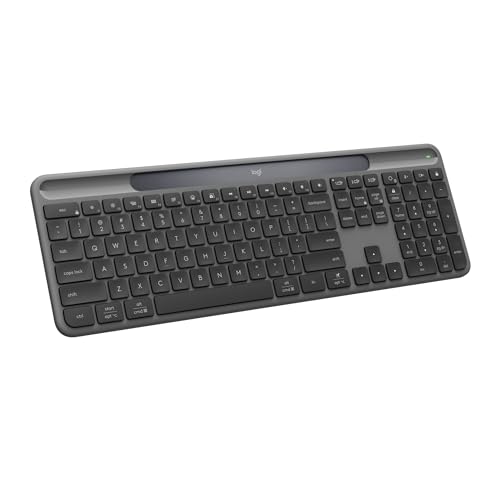
The Logitech Signature Slim Solar+ Wireless Bluetooth Keyboard K980 is ideal for eco-conscious users and professionals who desire a sleek, reliable, and long-lasting keyboard. This keyboard is perfect for those who work from home or in the office and want to minimize battery replacements while enjoying wireless convenience and customizable keys for enhanced productivity.
Pros:
- Solar and artificial light powered for extended usage without frequent charging
- Up to 10 years battery life ensuring durability and low maintenance
- Customizable keys for personalized shortcuts and workflow optimization
- Wireless Bluetooth connectivity allowing seamless pairing with multiple devices
- Slim and lightweight design (weighs only 1.54 pounds) for portability
- Elegant graphite color that fits well in modern workspaces
Cons:
- May require sufficient light exposure to maintain battery charge effectively
- Limited to Bluetooth connectivity, which might not suit users preferring USB receivers
- Higher price point compared to standard wireless keyboards
The Logitech Signature Slim Solar+ K980 features an innovative solar panel that captures both natural and artificial light, significantly reducing the hassle of replacing or charging batteries frequently. This makes it an excellent choice for users who prefer sustainability and convenience. Its slim profile and lightweight design enhance portability without sacrificing typing comfort, making it suitable for both office desks and mobile setups.
Equipped with customizable keys, users can tailor their keyboard shortcuts to increase efficiency and speed up repetitive tasks. The wireless Bluetooth connectivity supports easy switching between multiple devices, providing versatility for multitaskers. Overall, this keyboard combines eco-friendly technology with practical features to deliver a premium typing experience for modern users.
To buy this product, click here.
Frequently Asked Questions
What Makes Logitech Mx Keys S Ideal For Productivity?
The MX Keys S offers precise, quiet typing with programmable keys. Its backlighting and USB-C rechargeability enhance user convenience. Compatible with Windows, Mac, Linux, and Chrome, it supports seamless workflow and multitasking for professionals.
How Does Logitech Mx Keys S Combo Improve Work Efficiency?
This combo includes a wireless keyboard and mouse with fast scrolling. Customizable illumination and ergonomic palm rest boost comfort. Bluetooth and USB-C connectivity ensure smooth performance across multiple operating systems.
Is The Logitech Signature K650 Comfortable For Long Typing?
Yes, it features deep-cushioned keys and a wrist rest for comfort. Full-size layout includes a numpad, enhancing productivity. Wireless with Bluetooth or USB receiver compatibility suits various devices and operating systems.
What Are The Benefits Of Logitech Mx Mechanical’s Tactile Switches?
Tactile quiet switches provide satisfying feedback with minimal noise. Backlit keys improve visibility in low light. Metal build ensures durability. Compatible with multiple OS, it supports efficient typing across devices.
How Does The Logitech Signature Slim Solar+ Sustain Long Usage?
It uses solar and artificial light to recharge, lasting up to 10 years. Wireless Bluetooth connectivity and customizable keys increase productivity. Its slim, lightweight design is perfect for on-the-go professionals.
Conclusion
Choosing the right keyboard can boost your daily productivity and comfort. The options listed offer features like quiet typing, wireless convenience, and long battery life. Whether you prefer a low-profile design or tactile mechanical keys, there is a keyboard that fits your style.
Many support multiple operating systems, making them versatile for different setups. Backlighting and programmable keys help improve your workflow, especially in low-light environments. Some models even include wrist rests to reduce strain during long work sessions. Investing in a quality keyboard can reduce fatigue and increase typing speed.
Remember, a good keyboard is an essential tool for anyone who spends hours working on a computer. Take time to find the one that feels best for you. With the right keyboard, productivity becomes easier and more enjoyable every day.



