


Have you ever felt the frustration of typing for hours on a keyboard that just doesn’t feel right? Maybe the keys are too stiff, or the layout is cramped.
For programmers, these small annoyances can turn into daily struggles. The right keyboard can change everything. It makes coding smoother, reduces fatigue, and even sparks creativity. When you find a keyboard that fits your style, your work feels easier and more enjoyable.
In this article, we’ll explore some of the best keyboards designed especially for programmers. Whether you want quiet keys, wireless freedom, or a mechanical feel, we’ve got options for you. Keep reading to discover which keyboard could become your perfect coding partner.
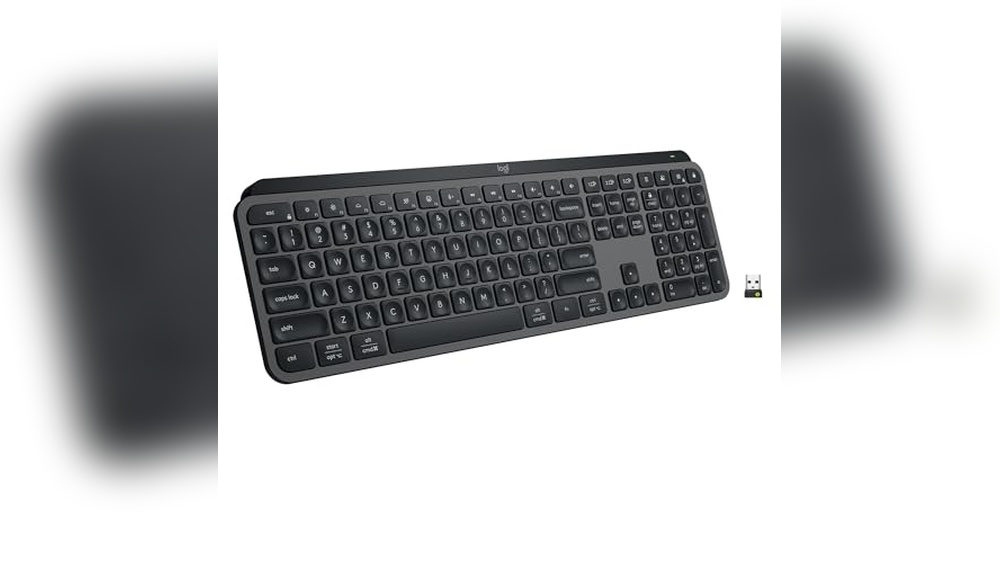
Logitech Mx Keys S Wireless Keyboard

The Logitech MX Keys S Wireless Keyboard is ideal for professionals, creatives, and tech enthusiasts who seek a high-performance, reliable, and comfortable typing experience. If you frequently work across multiple devices or require a keyboard that supports quiet yet precise typing with customizable features, this keyboard is designed for you. Its compatibility with Windows PC, Linux, Chrome, and Mac systems makes it perfect for users who value versatility and advanced functionality.
Pros:
- Low profile design for comfortable and ergonomic typing
- Fluid and precise key action ensuring quiet operation
- Programmable keys for personalized shortcuts and productivity
- Backlighting that adjusts automatically to ambient lighting
- Bluetooth and USB-C rechargeable connectivity options for convenience
- Wide compatibility with multiple operating systems
- Elegant graphite color that complements modern workspaces
Cons:
- Relatively higher price point compared to basic keyboards
- No dedicated numeric keypad which may be a drawback for some users
- May require some adjustment time for users switching from mechanical keyboards
The Logitech MX Keys S Wireless Keyboard features a sleek and slim design that enhances typing comfort with its low-profile keys and fluid keystrokes, reducing finger fatigue during long typing sessions. Its quiet operation makes it suitable for shared work environments or home offices where noise can be a distraction. The keyboard’s backlighting intelligently adapts to surrounding light, ensuring visibility without straining your eyes, which is particularly useful for late-night work.
Connectivity options include Bluetooth and USB-C rechargeable capabilities, offering flexibility and convenience for users who switch between different devices. The programmable keys allow users to customize shortcuts, boosting productivity and workflow efficiency. With its compatibility across major platforms such as Windows, Linux, Chrome, and Mac, this keyboard is a versatile tool for anyone looking to enhance their computing experience with a combination of style, comfort, and advanced features.
To buy this product, click here.
Keychron K10 He Hall Effect Keyboard

The Keychron K10 HE Hall Effect Keyboard Wireless is ideal for users who demand a highly durable and customizable typing experience, including gamers, programmers, and professionals who work long hours at their computer. This keyboard is especially suitable for those who value the tactile feedback of a mechanical keyboard combined with the convenience of wireless connectivity and compatibility across multiple operating systems such as Mac, Windows, and Linux.
Pros:
- Wireless connectivity offers freedom from cables and clutter.
- Magnetic switch hot-swappable design allows easy customization and maintenance without soldering.
- Adjustable actuation rapid trigger mode enhances typing speed and responsiveness.
- Robust aluminum + wood frame combines durability with aesthetic appeal.
- Full-size layout with custom RGB lighting supports a personalized and visually appealing setup.
- Compatible with Mac, Windows, and Linux for versatile use.
Cons:
- Premium materials and features may result in a higher price point.
- Wireless mode might introduce slight latency compared to wired connections.
- The full-size design is less compact, requiring more desk space.
The Keychron K10 HE Hall Effect Keyboard features a unique hall effect magnetic switch mechanism that significantly increases the keyboard’s lifespan and provides an exceptionally smooth and consistent keystroke. This innovative technology, combined with the hot-swappable magnetic switches, allows users to easily customize their typing experience by changing switches without any technical hassle. The adjustable actuation rapid trigger mode further tailors the keyboard’s responsiveness, making it a versatile choice for both fast typists and gamers seeking precision.
Constructed with a premium aluminum and wood frame, the keyboard not only offers durability but also a sophisticated aesthetic that fits perfectly in professional or creative environments. Its full-size layout ensures that users have access to all keys, including the numeric keypad, enhancing productivity for tasks that require extensive data entry. Additionally, the custom RGB lighting allows users to personalize their keyboard with vibrant colors and effects, enhancing the visual appeal and improving visibility in low-light conditions. Its broad compatibility with Mac, Windows, and Linux makes it a truly versatile peripheral for any setup.
To buy this product, click here.
Keychron K3 Version 2 Mechanical Keyboard

The Keychron K3 Version 2 is ideal for professionals, gamers, and tech enthusiasts who seek a compact yet efficient mechanical keyboard. If you desire a blend of wireless convenience with the precision of mechanical switches, especially compatible with both Mac and Windows systems, this ultra-slim keyboard is tailored for you.
Pros:
- Ultra-slim design with only 0.86614 inches height, making it highly portable and space-saving.
- Versatile connectivity options: Bluetooth wireless and USB wired modes for seamless switching.
- Equipped with Keychron Brown low-profile mechanical switches offering tactile feedback without loud noise.
- White LED backlit keys improve visibility in low-light environments.
- Compact 84-key layout ideal for efficient typing and gaming while preserving desk space.
- Compatible with both Mac and Windows systems, enhancing cross-platform usability.
Cons:
- Limited backlight color options, only available in white LED.
- Smaller key layout may require adjustment for users accustomed to full-sized keyboards.
- Battery life could be improved for extended wireless use.
The Keychron K3 Version 2 combines a sleek, ultra-slim profile with the high performance of mechanical brown switches, making it a standout option for those who value both aesthetics and functionality. Its lightweight and compact dimensions (12.04722 inches width and 4.56692 inches length) allow for easy transport and comfortable desk placement. The keyboard’s dual connectivity modes, Bluetooth and USB wired, provide flexibility to users who switch between devices or prefer wired connections for stability.
Designed to accommodate both Mac and Windows users, the Keychron K3 ensures compatibility without sacrificing typing comfort or efficiency. The low-profile keys with tactile brown switches deliver a satisfying typing experience with reduced noise, ideal for office or home environments. Additionally, the white LED backlighting enhances key visibility during nighttime use, although it lacks customizable lighting options. Overall, the Keychron K3 Version 2 is a superb choice for anyone seeking a portable, versatile, and stylish mechanical keyboard.
To buy this product, click here.
Cherry Kc 200 Mx Mechanical Office Keyboard

The Cherry KC 200 MX Mechanical Office Keyboard with New MX2A Silent Red switches is ideal for professionals and office workers seeking a reliable, quiet, and stylish keyboard. If you value a modern design combined with durable build quality and smooth keystrokes for extended typing sessions, this keyboard is perfect for you.
Pros:
- Quiet MX2A Silent Red switches reduce noise, ideal for shared workspaces.
- Modern design with a bronze metal plate frame enhances durability and aesthetics.
- Compact yet spacious layout with dimensions of 16.93 x 4.76 x 1.54 inches and lightweight at 1.83 pounds for easy desk placement.
- Reliable mechanical switches offer precise and consistent typing feedback.
- Manufactured by Cherry, a trusted brand in mechanical keyboard technology.
Cons:
- Limited color options, available only in bronze with MX2A Silent Red switches.
- May be slightly heavier compared to some plastic-frame keyboards.
- Lack of additional multimedia or programmable keys for advanced customization.
The Cherry KC 200 MX Mechanical Office Keyboard features the innovative MX2A Silent Red switches, providing a smooth and quiet typing experience that minimizes disruption in office environments. The mechanical switches ensure durability and responsiveness, making long typing sessions more comfortable and efficient. Its compact dimensions and lightweight design make it easy to position on any desk without occupying excessive space.
Designed with a robust bronze metal plate frame, this keyboard not only offers a modern and professional look but also enhances structural integrity for long-lasting use. The build quality combined with Cherry’s renowned switch technology ensures reliable performance, making it an excellent choice for anyone who demands quality and style in their office peripherals.
To buy this product, click here.
Aula F99 Wireless Mechanical Keyboard

The AULA F99 Wireless Mechanical Keyboard is ideal for gamers, tech enthusiasts, and professionals who demand a versatile and high-performance keyboard. If you are looking for a keyboard that offers multiple connection modes, customizable features, and a premium typing experience, this keyboard is designed for you. It is perfect for users who want seamless compatibility with PCs, tablets, PlayStation, and Xbox devices.
Pros:
- Tri-Mode Connectivity: Supports BT5.0, 2.4GHz wireless, and USB-C wired connection for flexible use.
- Hot Swappable Switches: Easily customize or replace switches without soldering.
- Pre-lubed Linear Switches: Ensures smooth keystrokes and reduces typing noise.
- RGB Backlit: Vibrant customizable lighting enhances gaming ambiance.
- Multi-Device Compatibility: Works seamlessly with PC, tablets, PS, and Xbox.
Cons:
- Relatively heavy weight may affect portability.
- Keyboard dimensions might be larger than some compact models.
- Limited color options with only Black, Grey, and White available.
The AULA F99 Wireless Mechanical Keyboard stands out with its tri-mode connectivity allowing users to switch effortlessly between Bluetooth 5.0, 2.4GHz wireless, and wired USB-C connections. This ensures minimal latency and a stable connection, enhancing both gaming and productivity. The hot swappable feature gives users the freedom to customize or replace the pre-lubed linear switches to match their preferred tactile feedback and typing feel without any technical hassle.
Additionally, the RGB backlit keys provide a visually appealing experience with multiple lighting effects that can be tailored to suit individual preferences or gaming setups. Its compatibility with a variety of devices including PCs, tablets, PlayStation, and Xbox makes it an extremely versatile option for users who operate across different platforms. Although the keyboard is slightly heavier and larger, the build quality and feature set justify its premium performance and user experience.
To buy this product, click here.
Frequently Asked Questions
What Makes The Logitech Mx Keys S Ideal For Programmers?
The Logitech MX Keys S offers quiet, precise typing with low-profile keys. It features programmable keys and backlighting. Its Bluetooth and USB-C rechargeability ensure seamless connectivity for Windows, Mac, Linux, and Chrome users. This keyboard supports long coding sessions efficiently.
How Does The Keychron K10 He Enhance Typing Experience?
Keychron K10 HE uses Hall Effect magnetic switches that are hot-swappable. It has adjustable actuation and a rapid trigger mode for faster typing. Its aluminum and wood frame provide durability and aesthetic appeal. Custom RGB lighting supports Mac, Windows, and Linux compatibility.
Why Choose The Keychron K3 Version 2 For Programming?
Keychron K3 Version 2 is an ultra-slim mechanical keyboard with 84 keys. It offers wireless Bluetooth and USB wired options. Its low-profile mechanical brown switches provide tactile feedback without noise. White LED backlighting improves visibility during night coding sessions.
What Benefits Does The Cherry Kc 200 Mx Offer Programmers?
Cherry KC 200 MX features new MX2A silent red switches for quiet typing. It has a modern design with a sturdy metal plate frame. This keyboard ensures durability and a smooth, responsive typing experience, perfect for long programming hours.
How Versatile Is The Aula F99 Wireless Mechanical Keyboard?
The AULA F99 supports tri-mode connectivity: Bluetooth 5. 0, 2. 4GHz wireless, and USB-C wired. It features hot-swappable, pre-lubed linear switches for easy customization. RGB backlighting enhances aesthetics, and compatibility covers PC, tablet, PS, and Xbox, making it highly versatile for programmers.
Conclusion
Choosing the right keyboard can greatly improve your programming comfort and efficiency. Each keyboard listed offers unique features like quiet typing, wireless options, or mechanical switches. Think about what matters most: quiet keys, backlighting, or the ability to customize switches.
The Logitech MX Keys S is great for quiet, smooth typing with wireless convenience. Keychron models suit those who want mechanical feel and portability. Cherry KC 200 MX stands out with its metal frame and silent switches. AULA F99 adds versatility with multiple connection modes and hot-swappable keys.
Remember, the best keyboard matches your typing style and work environment. Trying a few options can help find the perfect fit. Happy coding!



