


We’ve all been there—struggling with a noisy keyboard or a mouse that just won’t respond. It slows down your work, breaks your focus, and adds stress to your day.
Finding the right keyboard and mouse combo can change all that. A smooth, comfortable setup helps you breeze through tasks and enjoy your time at the computer. Whether you need quiet keys, ergonomic design, or easy device switching, the right combo makes a big difference.
In this article, I’ll share some of the best keyboard and mouse combos that fit different needs. These picks can help you work smarter and feel better while doing it. Keep reading to find the perfect match for your daily routine.
Logitech Mk270 Wireless Keyboard And Mouse Combo

The Logitech MK270 Wireless Keyboard and Mouse Combo is ideal for users seeking a reliable and efficient wireless input solution for their Windows PC or laptop. It is perfect for students, professionals, and casual users who want a clutter-free workspace with seamless connectivity and enhanced productivity.
Pros:
- Reliable 2.4 GHz wireless connection with a long range for uninterrupted use.
- Compact and comfortable wireless keyboard and mouse combo in sleek black design.
- Equipped with 8 multimedia keys for quick access to essential functions.
- Long battery life, reducing the frequency of replacements.
- Easy plug-and-play setup with a tiny USB receiver.
Cons:
- Keyboard lacks backlighting, which may affect usability in low-light conditions.
- Mouse design may feel small for users with larger hands.
- No Bluetooth connectivity option, relying solely on the USB receiver.
The Logitech MK270 Wireless Combo boasts a robust 2.4 GHz wireless technology that ensures a stable and lag-free connection, allowing users to work or play without interruptions. Its compact keyboard design enhances comfort and saves desk space, while the inclusion of 8 multimedia keys provides quick access to media controls, volume adjustments, and other shortcuts, boosting productivity. The wireless mouse complements the keyboard perfectly with smooth tracking and easy handling.
With a lightweight build and long battery life, this combo is designed for extended use without frequent maintenance. The simple plug-and-play setup via the USB receiver makes it compatible with most Windows-based PCs and laptops. Overall, the Logitech MK270 offers a practical and affordable wireless input solution for users looking to improve their workspace efficiency and enjoy the freedom of wireless peripherals.
To buy this product, click here.
Logitech Mk850 Performance Wireless Keyboard And Mouse Combo

The Logitech MK850 Performance Wireless Keyboard and Mouse Combo is ideal for professionals, students, and multitaskers who need a reliable and ergonomic setup compatible with Windows, macOS, and ChromeOS. This combo is perfect for those seeking comfort during long typing sessions and seamless switching between multiple devices.
Pros:
- Ergonomic design with a cushioned palm rest for enhanced comfort.
- Multi-device connectivity via Bluetooth and 2.4 GHz USB receiver.
- Full-size keyboard layout suitable for extensive typing tasks.
- Compatible across multiple operating systems including Windows, macOS, and ChromeOS.
- Durable graphite color finish that resists wear and stains.
Cons:
- Relatively bulky dimensions may not be ideal for small desk spaces.
- The weight, though light, might feel less portable for some users.
- Some users might experience a learning curve when switching between devices.
The Logitech MK850 combo offers a thoughtfully designed full-size keyboard paired with a responsive mouse, making it an excellent choice for productivity. Its ergonomic features, including a cushioned palm rest, help reduce strain during extended use, promoting better wrist posture. The keyboard’s multi-device capability allows users to effortlessly switch between three connected devices, enhancing workflow efficiency.
Connectivity options include both Bluetooth and a 2.4 GHz USB receiver, providing flexibility to connect to different devices without hassle. The compact yet sturdy design in a sleek graphite color ensures durability while complementing any workspace setup. With broad compatibility across Windows, macOS, and ChromeOS, this combo supports diverse user needs, making it a versatile choice for home or office environments.
To buy this product, click here.
Logitech Mk540 Advanced Wireless Keyboard And Mouse Combo

The Logitech MK540 Advanced Wireless Keyboard and Mouse Combo is ideal for users seeking a reliable and efficient wireless input solution for their PC or laptop. Whether you’re a professional working from home, a student managing multiple tasks, or a casual user wanting a clutter-free workspace, this combo offers durability, comfort, and seamless connectivity. It is especially suited for those who prioritize long battery life and multimedia control.
Pros:
- Reliable 2.4 GHz Unifying USB-Receiver for stable wireless connection
- Ergonomic design providing comfortable typing and mouse use
- Convenient multimedia hotkeys for quick access to volume, playback, and other functions
- Long-lasting 3-year battery life reducing frequent replacements
- Compact and lightweight design suitable for desktop and portable use
Cons:
- Limited to Windows operating systems, not compatible with Mac or Linux
- No backlit keys, which may affect usability in low-light conditions
- Mouse may feel basic for users needing advanced features or high precision
The Logitech MK540 Advanced Wireless Keyboard and Mouse Combo features a robust wireless connection through its 2.4 GHz Unifying USB-Receiver, ensuring minimal lag and reliable performance up to several meters away. Its full-size keyboard offers a familiar layout with well-spaced keys, enhancing typing accuracy and comfort during extended use. The inclusion of multimedia hotkeys allows users to control media playback, adjust volume, and access other shortcuts quickly, boosting productivity and convenience.
Designed with user comfort in mind, both the keyboard and mouse have an ergonomic shape that reduces strain during long sessions. The combo’s impressive 3-year battery life means users can enjoy uninterrupted use without worrying about frequent battery replacements, making it an economical and hassle-free choice. Its sleek black design and compact dimensions (Height: 3.5 inches, Width: 6.5 inches, Length: 17.5 inches) blend seamlessly into any workspace, enhancing both aesthetics and functionality.
To buy this product, click here.
Logitech Mk955 Signature Slim Wireless Keyboard And Mouse Combo
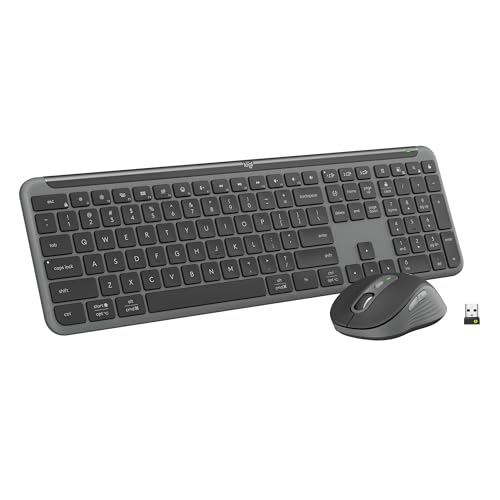
The Logitech MK955 Signature Slim Wireless Keyboard and Mouse Combo is ideal for users with larger hands who seek a comfortable and efficient typing experience. This combo is perfect for professionals, students, and multitaskers who value quiet typing and clicking, and the ability to seamlessly switch across three devices using Bluetooth connectivity. Compatible with both Windows and Mac operating systems, it suits a wide range of users looking for versatility and comfort.
Pros:
- Ergonomic design tailored for larger hands
- Quiet typing and clicking for a distraction-free environment
- Multi-device switching across three devices with ease
- Bluetooth connectivity ensures wireless convenience
- Compatible with both Windows and Mac operating systems
- Sleek graphite color adds a modern aesthetic
Cons:
- May have a learning curve when switching between multiple devices
- Graphite color may show fingerprints easily
- Wireless connection may occasionally experience latency
The Logitech MK955 combo features a slim wireless keyboard that offers a spacious layout, accommodating larger hands comfortably. Its keys are designed for quiet typing, making it ideal for office settings or shared spaces where noise reduction is important. The mouse complements the keyboard with equally quiet clicking, ensuring a smooth and silent user experience throughout the day.
One of the standout features is the ability to switch seamlessly between three devices using Bluetooth, which enhances productivity for users who frequently work across multiple platforms. The combo’s compatibility with multi-OS environments like Windows and Mac further adds to its versatility. Overall, the Logitech MK955 is a reliable, stylish, and efficient choice for those seeking comfort and convenience in their daily computing tasks.
To buy this product, click here.
Logitech Wave Keys & Lift Vertical Mouse

The Logitech Wave Keys & Lift Vertical Mouse Combo is ideal for professionals and home office users who prioritize ergonomic design and comfort during long hours of computer use. This combo is perfect for those experiencing wrist strain or repetitive stress injuries and anyone looking to enhance productivity with a wireless, multi-device setup compatible with both Windows and Mac operating systems.
Pros:
- Ergonomic design with cushioned palm rest for reduced wrist fatigue
- Wireless connectivity via Bluetooth and Easy-Switch technology for seamless device switching
- Compact and lightweight, measuring 8.62 x 14.8 x 1.2 inches and weighing only 1.65 pounds
- Compatible with multiple OS including Windows and Mac for versatile use
- Stylish graphite color that fits professional environments
Cons:
- May require an adjustment period for users new to vertical mouse ergonomics
- Price point might be higher compared to standard keyboard and mouse combos
- Limited color options available
The Logitech Wave Keys & Lift Vertical Mouse combo stands out due to its thoughtfully engineered ergonomic features. The keyboard includes a cushioned palm rest that supports your wrists, helping to minimize strain and increase comfort during prolonged typing sessions. The vertical mouse is designed to keep your hand in a natural handshake position, reducing pronation and the risk of repetitive stress injuries. This combination promotes healthier posture and productivity for users who spend significant time at their computers.
Additionally, this combo offers robust wireless connectivity options, including Bluetooth and Easy-Switch technology, allowing users to effortlessly switch between multiple devices. Its compatibility with both Windows and Mac systems makes it a versatile choice for professionals who use different platforms. The compact and lightweight design ensures the combo fits neatly into any workspace without sacrificing functionality or comfort.
To buy this product, click here.
Frequently Asked Questions
What Makes Logitech Mk270 A Reliable Combo?
Logitech MK270 offers wireless convenience with 2. 4 GHz connectivity. It features 8 multimedia keys and a compact mouse. Its strong battery life and easy setup make it ideal for Windows users seeking durability and simplicity.
How Does Logitech Mk850 Support Multi-device Use?
The MK850 combo connects via Bluetooth and 2. 4 GHz USB receiver. It supports Windows, macOS, and ChromeOS. Its ergonomic design and cushioned palm rest enhance comfort during extended multi-device tasks.
What Is Special About The Mk540 Advanced Combo?
MK540 Advanced provides a full-size wireless keyboard with multimedia hotkeys. It uses a 2. 4 GHz unifying USB receiver and boasts a 3-year battery life. This combo suits users needing longevity and convenient shortcuts.
Can Mk955 Keyboard And Mouse Switch Devices Easily?
Yes, the MK955 supports easy switching across three devices. It uses Bluetooth and works on Windows and Mac. Its slim design and quiet keys benefit users with larger hands and shared setups.
Why Choose Logitech Wave Keys & Lift Mouse Combo?
This combo focuses on ergonomics with a vertical mouse and cushioned palm rest. It connects via Bluetooth and supports multiple OS platforms. It reduces wrist strain, ideal for users prioritizing comfort and efficiency.
Conclusion
Choosing the best keyboard mouse combo depends on your daily needs and comfort. Each option here offers unique features like wireless connectivity, ergonomic design, and multi-device support. Whether you want something compact or a full-sized keyboard with cushioned palm rests, there is a suitable choice.
Consider battery life, compatibility with your devices, and how often you switch between them. Comfort is key to avoid strain during long use. A quiet keyboard and smooth mouse clicks can also improve your experience. By weighing these factors, you can find a combo that fits your workspace perfectly.
Take your time to pick one that feels right for you. This will help boost your productivity and make computer tasks easier. A good keyboard and mouse combo is a simple but smart investment for everyday use.



