


Have you ever struggled with a bulky keyboard and a separate mouse while trying to control your smart TV or laptop from across the room? It’s frustrating when you have to juggle multiple devices just to navigate simple tasks.
Choosing the right keyboard with a built-in touchpad can change all that. It makes working, browsing, or streaming so much easier and more comfortable. Imagine having one sleek device that combines typing and mouse control, designed to work seamlessly with your gadgets.
This small change can save you time and reduce hassle every day. In this article, we’ll explore some of the best keyboards with touchpads that fit different needs and devices. Keep reading to find the perfect one that will simplify your digital life and bring back ease to your daily routine.
Arteck Universal Backlit Bluetooth Touch Tv Keyboard

The Arteck Universal Backlit 7-Colors Bluetooth Touch TV Keyboard is ideal for tech-savvy users who want a versatile and compact input device for their TV-connected computer, smart TV, desktop, laptop, iPad, Surface, tablet, or HTPC. This keyboard is perfect for those seeking an all-in-one solution with easy media control and a built-in touchpad, especially users who prefer wireless connectivity and a sleek, portable design.
Pros:
- Backlit 7-colors feature enhances visibility in low-light environments.
- Bluetooth connectivity allows seamless wireless use across multiple devices.
- Built-in touchpad eliminates the need for an external mouse, saving space and improving convenience.
- Compact and slim design with dimensions of 0.24 inches height, 4.6 inches width, and 14.3 inches length for easy portability.
- Easy media control keys provide quick access to volume, playback, and other functions.
Cons:
- Limited key travel may not suit users who prefer a traditional keyboard feel.
- Touchpad sensitivity might require adjustment for some users.
- Backlighting colors, while attractive, may not be customizable beyond preset options.
The Arteck Universal Backlit Bluetooth Touch TV Keyboard offers a highly functional and stylish input solution with its 7-color backlit keys, enhancing user experience during nighttime or dimly lit usage. Its wireless Bluetooth connectivity ensures compatibility with a wide range of devices, making it a flexible choice for anyone looking to replace multiple input peripherals with one compact device.
Equipped with an integrated touchpad, this keyboard improves navigation without requiring additional accessories. The easy media control keys provide convenient shortcuts for managing audio and video playback, which is especially beneficial when controlling media-centered devices like smart TVs or HTPCs. Overall, the Arteck keyboard combines portability, functionality, and aesthetic appeal to meet the demands of modern multimedia users.
To buy this product, click here.
Arteck 2.4g Wireless Touch Tv Keyboard

The Arteck 2.4G Wireless Touch TV Keyboard is ideal for users who want a versatile and compact input device to control their smart TVs, computers, and HTPCs with ease. If you are someone seeking a convenient way to navigate media content and type without being tethered by cables, this keyboard is perfect for you. It is especially suited for those who value portability and functionality in a sleek, modern design.
Pros:
- Wireless 2.4G connectivity offers reliable and lag-free control.
- Built-in touchpad mouse eliminates the need for an external mouse.
- Ultra-compact full-size keyboard design fits comfortably in any space.
- Easy media control buttons enhance user experience for multimedia tasks.
- Solid stainless steel construction ensures durability and a premium feel.
- Lightweight and slim profile makes it highly portable.
Cons:
- Touchpad sensitivity may require adjustment for some users.
- Limited color option available (only silver).
- May not be ideal for heavy typing sessions due to compact key layout.
The Arteck Wireless Touch TV Keyboard combines a full-size layout with an ultra-compact design, making it an excellent choice for users who want both portability and functionality. Its 2.4G wireless connection ensures a stable and responsive experience when controlling smart TVs or computers from a distance. The inclusion of a built-in touchpad mouse adds convenience, allowing users to navigate without the clutter of additional peripherals.
Additionally, the easy media control buttons provide quick access to volume, playback, and other common functions, enhancing the overall media consumption experience. Crafted from solid stainless steel, this keyboard offers a sturdy and sleek design that complements any modern entertainment setup. Its slim dimensions and lightweight build make it easy to carry and store, perfect for both home and travel use.
To buy this product, click here.
Vilros 15 Inch Usb Keyboard With Touchpad
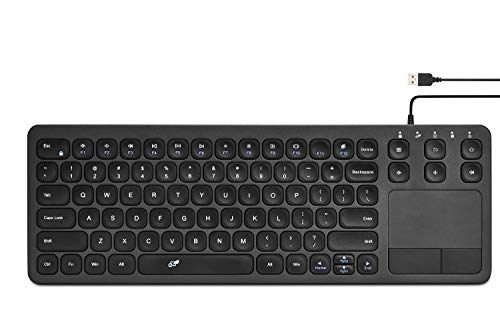
The Vilros 15 Inch USB Keyboard with Touchpad is an ideal choice for tech enthusiasts, Raspberry Pi users, and anyone seeking a compact and versatile input device. If you need a portable keyboard combined with a built-in touchpad for easy navigation, especially when working with small computers or limited desk space, this product is designed for you. Its sleek black design and convenient size make it perfect for both casual and professional use.
Pros:
- Compact and lightweight design measuring only 15 inches, perfect for portability.
- Integrated touchpad eliminates the need for an external mouse, saving desk space.
- Easy USB connectivity compatible with Raspberry Pi and other devices.
- Durable black finish that resists fingerprints and smudges.
- Low profile with a height of just 0.69 inches for comfortable typing.
Cons:
- Smaller key size might require adjustment for users with larger hands.
- Lack of wireless connectivity limits mobility compared to Bluetooth keyboards.
- The touchpad may have limited multi-touch gestures compared to standalone devices.
The Vilros 15 Inch USB Keyboard offers a seamless experience for Raspberry Pi users who want a reliable and space-saving input device. Its compact dimensions—height of 0.69 inches, width of 5.09 inches, and length of 14.76 inches—make it highly portable without sacrificing comfort. The built-in touchpad enhances usability, allowing users to navigate without the clutter of an additional mouse. This makes it especially useful for projects, coding, or media control where desk space is at a premium.
Additionally, the keyboard’s USB connectivity ensures straightforward plug-and-play compatibility with a wide range of devices, not just the Raspberry Pi. The sturdy construction by Vilros guarantees durability and longevity, making it a dependable accessory for everyday use. Whether you’re setting up a compact workstation or need an efficient input device on the go, this keyboard balances functionality and convenience effectively.
To buy this product, click here.
Arteck Universal Wireless And Bluetooth Touch Tv Keyboard
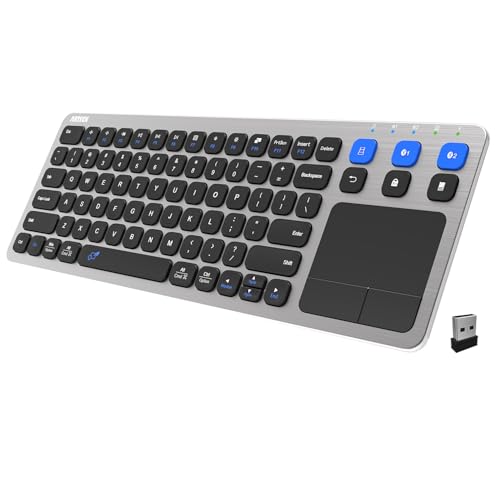
The Arteck Universal 2.4G Wireless and Bluetooth Touch TV Keyboard is ideal for users who want a versatile and compact keyboard solution for their Smart TV, TV Box, or TV-Connected Computer. If you frequently interact with multiple devices like a Mac or HTPC and need seamless switching between Bluetooth and wireless 2.4G connectivity, this keyboard is designed for you. It is perfect for those seeking an easy-to-use media control device with a built-in touchpad for convenient navigation without the hassle of multiple remotes.
Pros:
- Supports both 2.4G wireless and Bluetooth connectivity, enabling multi-device compatibility
- Integrated touchpad for easy cursor control, eliminating the need for an external mouse
- Compact and slim design with dimensions of 0.16 inches height, 5.04 inches width, and 14.64 inches length, perfect for handheld use
- Easy media control buttons for convenient navigation and playback management
- Compatible with a variety of devices including Smart TVs, TV Boxes, Macs, and HTPCs
Cons:
- Small key size may require an adjustment period for some users
- Battery life may vary depending on usage and device connection type
- Lack of backlit keys could make typing in low-light conditions challenging
The Arteck Universal 2.4G Wireless and Bluetooth Touch TV Keyboard offers a highly functional and portable typing experience tailored for entertainment and productivity setups. Its dual connectivity modes allow users to effortlessly switch between devices without needing separate keyboards. The built-in touchpad enhances user interaction by providing precise control over the cursor, making it easier to navigate menus, browse content, and enter text. This keyboard’s compact design ensures it fits comfortably in your hand or on your lap, making it ideal for casual typing and media control from a distance.
Additionally, the inclusion of dedicated media control buttons simplifies managing audio and video playback, reducing the need to reach for multiple remotes or switches. With compatibility across a broad spectrum of devices such as Smart TVs, TV Boxes, Macs, and HTPCs, the Arteck keyboard is a versatile companion that enhances the overall user experience. While the keyboard lacks backlighting and features smaller keys, its ergonomic design and multifunctional capabilities make it a practical choice for anyone looking to streamline their home entertainment or computing environment.
To buy this product, click here.
Frequently Asked Questions
What Devices Are Compatible With Arteck Bluetooth Keyboards?
Arteck Bluetooth keyboards work with Smart TVs, computers, laptops, tablets, iPads, Surface devices, and HTPCs. They support multiple platforms via Bluetooth and 2. 4G wireless connections, ensuring wide compatibility for various smart devices and media centers.
How Does The Built-in Touchpad Improve Usability?
The built-in touchpad allows easy cursor control without a separate mouse. This feature enhances convenience, especially for TV-connected computers and media centers, making navigation smoother and more efficient in compact setups.
Are Arteck Keyboards Backlit For Low-light Use?
Yes, Arteck Universal Backlit keyboards feature 7-color backlighting. This helps users see keys clearly in dim environments, improving typing accuracy during night-time or low-light media sessions.
What Are The Benefits Of 2.4g Wireless Connection?
2. 4G wireless offers reliable, lag-free connectivity with up to 10 meters range. It provides a stable connection for smooth typing and touchpad use without the clutter of wires or Bluetooth pairing issues.
Is The Vilros Usb Keyboard Suitable For Raspberry Pi?
Yes, the Vilros 15 Inch USB keyboard with touchpad is designed specifically for Raspberry Pi users. It offers plug-and-play functionality and compact size, making it ideal for Raspberry Pi projects and media center setups.
Can These Keyboards Control Multiple Devices Simultaneously?
Arteck’s Universal 2. 4G Wireless and Bluetooth keyboard supports multi-device pairing. Users can switch between Smart TVs, computers, and Mac devices seamlessly, enhancing productivity and convenience across different platforms.
Conclusion
Choosing the best keyboard with a touchpad depends on your device and needs. Whether you want a wireless option or a USB keyboard, these models offer good features. Arteck keyboards provide easy media control and multi-device support. Vilros USB keyboard works well with Raspberry Pi and other computers.
All options are compact and user-friendly. A keyboard with a built-in touchpad saves space and adds convenience. It helps you control your screen without extra devices. Think about compatibility, battery life, and comfort when deciding. These keyboards suit smart TVs, laptops, desktops, and tablets.
They make typing and navigation simpler. Finding the right one makes your setup neater and more efficient. Choose a keyboard that fits your daily tasks and device type. Simple, practical, and reliable—that’s what you need for smooth use.



