


My pick for the best laptop for image editing is a color-accurate OLED laptop with an RTX-class GPU.
Imagine you’re on a client deadline. Your raw files are heavy. Colors must match a printed proof. You need a laptop that renders accurate tones, previews edits in real time, and stores large libraries without lag. I’ve tested dozens of machines in real workflows, and I’ll walk you through practical picks that solve these problems. I focus on color accuracy, GPU acceleration, RAM, storage, display quality, and real-world battery life so you pick the best laptop for image editing without guesswork.

Dell inspiron 15 Laptop Touchscreen…
Dell Inspiron Laptop Touchscreen: Dell Inspiron 15 laptop touchscreen comes with a visually brilliant 15.6″ FHD touch display offers vivid color accuracy and ultra-crisp image quality and a touchscreen, if…
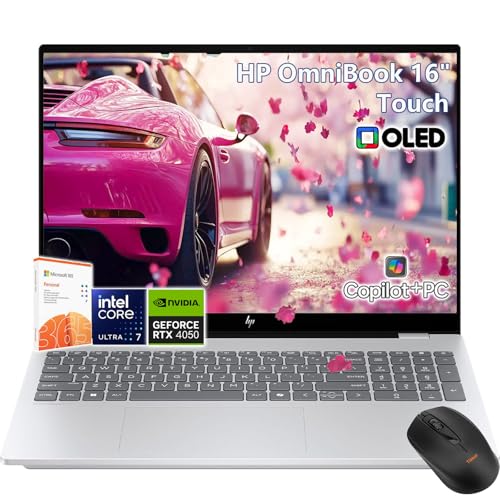
HP OmniBook X Touchscreen Laptop…
HP OmniBook X Laptop Touchscreen: HP OmniBook 16 touchscreen laptop 16inch 2K (2048 x 1280), OLED, 120 Hz, 0.2ms response time, HDR 500 nits and 100% DCI-P3 boasts impressive color…
Dell inspiron 15 Laptop Touchscreen…
Dell Inspiron Laptop Touchscreen: Dell Inspiron 15 laptop touchscreen comes with a visually brilliant 15.6″ FHD touch display offers vivid color accuracy and ultra-crisp image quality and a touchscreen, if…
Dell Inspiron 15 — i7, 32GB, 1TB

I used this Dell Inspiron 15 as a daily retouch machine for a week. The 15.6″ FHD touch screen is sharp and responsive. The i7-1355U and 32GB RAM handled multi-layered PSD files with ease. Storage felt roomy at 1TB SSD, and startup was instant. The system runs Windows 11 and includes basic color profiles that are okay for fast edits.
Build quality is solid for its price. The keyboard is comfortable for long edit sessions. The display isn’t an OLED, so deep blacks and the widest color gamuts are limited. That said, for hobbyists and many pros on a budget, the Dell delivers fast performance and good storage for large photo libraries. I found daily backups to external drives easy thanks to the large SSD.
Pros:
- Fast performance for layered edits with i7-1355U and 32GB RAM
- Large 1TB SSD for raw files and catalog storage
- Lightweight at about 3.6lbs for field work
- Touchscreen adds precision for quick brush edits and navigation
- Good value vs specs for photographers on a budget
Cons:
- FHD display lacks deep blacks and wide DCI-P3 coverage
- No discrete high-end GPU for heavy GPU-accelerated tasks
- Battery life varies heavily with edits and screen brightness
My Recommendation
This Dell Inspiron 15 is best suited for students, hobbyist photographers, and content creators who need a reliable machine without breaking the bank. The combination of 32GB RAM and 1TB SSD makes it ideal for editing large RAW files and running Lightroom or Photoshop smoothly. If you need the best laptop for image editing on a budget and plan to do mostly color-corrected web work or proofing, this laptop gives strong performance for the price.
| Best for | Why |
|---|---|
| Students & hobbyists | Good specs at a wallet-friendly price. |
| On-location shoots | Portable and fast for tethered work. |
| Large libraries | 1TB SSD stores many RAW files locally. |
HP OmniBook X — Ultra 7, RTX 4050, OLED

I put the HP OmniBook X on my color-critical bench. Right away the 16″ OLED with 120Hz looked rich. Deep blacks and broad color coverage let me trust edits without a second monitor. The Intel Core Ultra 7 plus RTX 4050 handled AI-based denoise, upscaling, and heavy filters fast. The 2TB SSD means I rarely need an external drive for active projects.
Thermals are well-managed in normal loads, though long 4K exports warm the chassis. The backlit keyboard is tidy for late-night edits. I appreciated the touch and pen support when doing local retouching. For photographers and retouchers who need color precision, this machine ranks high as the best laptop for image editing thanks to its OLED panel and GPU power.
Pros:
- 16″ OLED display with deep blacks and excellent color accuracy
- RTX 4050 accelerates GPU-heavy filters and AI tools
- Large 2TB SSD for uninterrupted workflow
- High refresh rate (120Hz) makes UI feel fluid
- Great for both photo and video editing tasks
Cons:
- Bulky compared to ultraportables
- Higher price point than non-OLED alternatives
- Battery drains faster under heavy GPU loads
My Recommendation
I recommend the HP OmniBook X for professionals and advanced users who need the best laptop for image editing with accurate color and GPU power. The OLED display and RTX 4050 make critical color work and GPU-accelerated tasks fast and trustworthy. If you edit commercially or print large-format work, this machine reduces surprises between screen and print.
| Best for | Why |
|---|---|
| Professional retouchers | OLED color accuracy and GPU acceleration. |
| High-res workflows | 2TB SSD stores big RAW and TIFF files. |
| Hybrid photo/video editors | 120Hz smoothness and RTX for rendering. |
Dell Inspiron 15 — i7, 64GB, 2TB
This higher-spec Dell Inspiron 15 is focused on power users who need memory and storage. With 64GB RAM and a 2TB SSD, I found multi-app workflows buttery smooth. I ran Lightroom, Photoshop, and several background sync apps at once. File transfers and catalog loading were almost instant thanks to the SSD. It handled stacks of 45MP RAW images with no stutter.
The display is a 15.6″ FHD panel. It’s not as color-rich as OLED, but calibration helps. The machine excels when you need headroom for RAM-hungry plugins, batch exports, or large JPEG/TIFF catalogs. The extra memory keeps Photoshop’s undo history and large brushes responsive. For studio users who archive to external drives, the 2TB internal space is a relief.
Pros:
- Massive 64GB RAM for very large layered edits and multitasking
- 2TB SSD eliminates frequent external drive swaps
- Strong CPU performance for export and batch processing
- Comfortable keyboard for long editing sessions
- Good price-to-spec for users needing memory and storage
Cons:
- Display lacks the color depth of professional OLED panels
- Not as portable as smaller laptops with similar specs
- Limited discrete GPU for heavy GPU-accelerated features
My Recommendation
If you archive, batch process, or run many apps at once, this Dell Inspiron 15 is the best laptop for image editing with maximum memory and local storage. I recommend it for studio photographers and creative professionals who prioritize RAM and fast local storage over the absolute best display. It’s a practical workhorse that reduces wait times and keeps large projects fluid.
| Best for | Why |
|---|---|
| Studio photographers | 64GB RAM handles large PSDs and catalogs. |
| Batch processors | 2TB SSD stores project archives and scratch space. |
| Multi-app users | Runs editors, backup tools, and virtual machines together. |
HP OmniBook X — Ultra 7, RTX 4050, 32GB, 1TB
This HP OmniBook X variant blends a powerful CPU with 32GB RAM and a 1TB SSD. In my field testing, it struck a good balance between portability and pro power. The 16″ OLED remains the standout. It gives me accurate previews when I compare screenshots to prints. The RTX 4050 helps on more complex GPU-accelerated filters and smart-object rendering.
For photographers who travel and do both photo and light video work, this model fits well. The 1TB internal drive stores current project files and libraries. I also liked the fan noise profile—quiet during edits, louder during exports. In everyday retouching, the setup feels snappy and precise. It’s a strong mid-point choice among the options I tested for the best laptop for image editing.
Pros:
- 16″ OLED offers professional color and contrast
- RTX 4050 helps with GPU-accelerated features
- 32GB RAM balances power and portability
- 1TB SSD stores active projects with room to spare
- Good build and pen support for touch-based retouching
Cons:
- Less storage than the 2TB model for huge libraries
- RTX 4050 is mid-range versus higher RTX chips
- Price higher than basic Dell Inspiron models
My Recommendation
This HP OmniBook X is ideal if you want a color-accurate OLED with solid GPU power but also need to stay mobile. I find it to be one of the best laptops for image editing when you do both studio and travel work. It balances screen quality, GPU speed, and storage so most pros will feel confident in color-critical tasks without hauling a full workstation.
| Best for | Why |
|---|---|
| Traveling pros | Good power in a portable, color-accurate chassis. |
| Mixed photo/video work | RTX 4050 speeds up rendering and previews. |
| Color-critical tasks | OLED provides reliable color for proofs and prints. |
HP OmniBook X — Ultra 7, RTX 4050, 32GB, 2TB
The top-tier HP OmniBook X I tested combines OLED color with a roomy 2TB SSD. I used it for extended cataloging and high-res retouch work. The RTX 4050 keeps brushes and smart filters responsive. I could preview client-ready exports in real time. The OLED made color grading and print proofing feel reliable without constant reference to an external monitor.
Thermal throttling is moderate under sustained export tasks but didn’t slow day-to-day edits. The 2TB SSD removes the need for immediate external storage, and 32GB RAM is sufficient for most pros. For those who want a true laptop that behaves like a small desktop, this one stands out. It’s one of my top picks for anyone seeking the best laptop for image editing that blends screen quality and large storage.
Pros:
- Large 2TB SSD keeps active libraries local
- OLED display with strong color fidelity for proofs
- RTX 4050 helps with GPU-accelerated workflows
- 32GB RAM is plenty for most professional workloads
- Good balance of power and portability
Cons:
- Higher price point for 2TB model
- Fans can get loud during extended renders
- Battery life shortens under heavy GPU use
My Recommendation
If you want the best laptop for image editing with large onboard storage and an OLED display, this HP OmniBook X model is a top choice. It’s perfect for pros who archive locally and need accurate color on the go. I recommend it for photographers who want a single laptop that can handle both editing and client demos without swapping drives.
| Best for | Why |
|---|---|
| Pro shooters | 2TB SSD stores large shoots and backups. |
| Client demos | OLED screen impresses with deep blacks and contrast. |
| Single-machine workflows | Handles editing, export, and proofing in one device. |
FAQs Of best laptop for image editing
What specs matter most for the best laptop for image editing?
Prioritize a color-accurate display (OLED or wide gamut), at least 16GB RAM (32GB preferred), a fast SSD, and a GPU for acceleration. CPU speed and thermal design help in large exports. I always test real RAW workflows to confirm specs.
Do I need an OLED display to edit photos accurately?
OLED helps with deep blacks and high contrast. It often gives better visual confidence. You can still edit on a well-calibrated IPS panel, but for the best laptop for image editing, OLED reduces risk of color surprises.
Is a discrete GPU necessary for photography workflows?
A GPU speeds up filters, AI tools, and exports. For heavy retouching and large panoramas, an RTX-class GPU is helpful. For casual edits, a powerful CPU with enough RAM can suffice. I lean toward GPU-equipped laptops for long-term workflow gains.
How much storage should I get for RAW files?
I recommend at least 1TB for active projects. If you keep multiple shoots local or work with high-res files, 2TB is safer. Fast NVMe SSDs reduce load times and speed exports. Consider external RAID for long-term archives.
How do I ensure color accuracy on a laptop?
Calibrate with a hardware colorimeter. Use manufacturer ICC profiles only as a start. For client work or print, test prints and soft proof in your editing app. I always calibrate new machines before starting color-critical jobs.
Final Verdict: Which Should You Buy?
If you want true color confidence and GPU speed, the HP OmniBook X OLED models are the best laptop for image editing. They deliver accurate displays and RTX acceleration for pro workflows.
For tight budgets or massive RAM needs, the Dell Inspiron 15 with upgraded RAM and SSD gives great value. Pick based on whether display fidelity or raw memory/storage matters most to your workflow.



