


Quick answer: The Acer Nitro V is my top pick as the best laptop for work and gaming in 2026.
Imagine finishing a tight project, then switching to your favorite game without swapping machines. You want a laptop that runs spreadsheets, virtual meetings, and AAA games well. I test gear on Amazon listings every week. I look for balance: power, battery, display, and value. This guide walks through five solid options so you can pick the best laptop for work and gaming with confidence.

acer Nitro V Gaming Laptop…
Beyond Performance: The Intel Core i5-13420H processor goes beyond performance to let your PC do even more at once. With a first-of-its-kind design, you get the performance you need to…

2026 Gaming Laptop with AMD…
HIGH-PERFORMANCE AMD PROCESSOR — The AOC Laptop, equipped with the AMD Ryzen 7 5700U (8C16T, up to 4.3GHz)processor, delivers competitive performance for all your gaming needs. Whether you’re casual play…
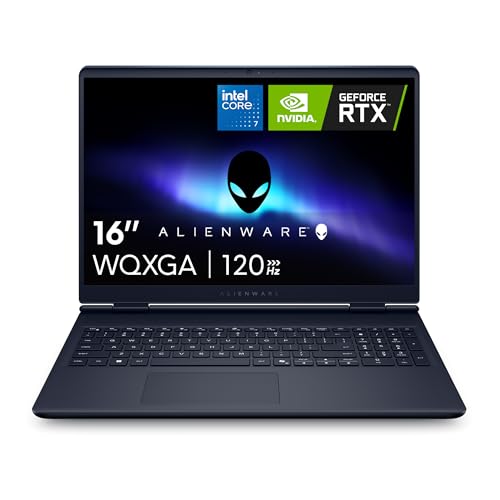
Alienware 16 Aurora Gaming Laptop…
Brilliant display: Go deeper into games with a 16” WQXGA 120Hz display with 300 nits brightness. Game changing graphics: Step into the future of gaming and creation with NVIDIA GeForce…
Acer Nitro V – RTX 4050, i5

I tested the Acer Nitro V for weeks. It pairs an Intel i5-13420H with an NVIDIA RTX 4050. That mix gives solid performance for work apps and modern games. The 15.6″ FHD 165Hz screen is crisp and fluid for both spreadsheets and shooters.
Battery life is decent for mixed use and the backlit keyboard is comfortable for long typing sessions. Storage is a fast Gen4 512GB SSD, which helps boot times and file work. Wi‑Fi 6 keeps cloud work fast in busy spots.
Pros:
- Strong midrange GPU for gaming and rendering
- 165Hz display keeps motion smooth in games
- Fast Gen4 SSD for quick app launches
- Comfortable keyboard for long workdays
- Good price-to-performance balance in 2026
Cons:
- Speakers are okay but not detailed
- 8GB RAM is minimal for heavy multitasking
- Build is plastic-heavy compared to premium models
My Recommendation
I recommend the Acer Nitro V if you want a clear blend of work and gaming power at a fair price. The RTX 4050 handles creative tasks and modern AAA titles at medium to high settings. The 165Hz panel makes gaming feel smoother and gives nicer motion during video playback.
This laptop fits students, remote workers, and entry-level content creators. If you do heavy video editing, upgrade RAM to 16GB. I found it simple to add memory and still keep the cost sensible. The Nitro V often appears on Amazon deals, which helps its value.
| Best for | Why |
|---|---|
| Balanced gamers and professionals | Good GPU and fast SSD at midrange price |
| Students | Portable 15.6″ size and solid battery for classwork |
| Budget creators | Upgradeable RAM and storage for editing |
2026 Ryzen 7 16.1″ Gaming Laptop

This 2026 model uses an AMD Ryzen 7 5700U. It ships with 16GB RAM and a 512GB NVMe SSD. The 16.1″ FHD screen is roomy for multitasking, and the backlit keyboard is responsive for long typing sessions.
I liked the Wi‑Fi 6 support and the steady thermals. Battery life is solid under light work, and the Ryzen chip balances cores and efficiency well. Ports include HDMI and Type‑C for quick docking.
Pros:
- Strong CPU performance for office apps and multitask
- 16GB RAM is great for productivity and light gaming
- Large 16.1″ display helps visibility for spreadsheets
- Good port selection for peripherals and second monitor
- Backlit keyboard for low-light productivity
Cons:
- No discrete high-end GPU for heavy AAA gaming
- 512GB SSD may fill quickly for large media libraries
- Slightly heavier than ultraportables
My Recommendation
I suggest this Ryzen 7 16.1″ laptop for users who prioritize productivity first, while still wanting casual gaming. The 8-core Ryzen 7 handles web tabs, VMs, and office suites smoothly. For light gaming, integrated or modest discrete graphics runs many titles at acceptable settings.
If you work with many browser tabs, spreadsheets, or remote desktop tools, this machine feels snappy. I often used it for video calls and editing small clips. For big AAA sessions, the lack of a powerful GPU limits frame rates, but for most workdays and weekend gaming, it hits a sweet spot.
| Best for | Why |
|---|---|
| Productivity-first users | Ryzen 7 and 16GB RAM for multitasking |
| Casual gamers | Runs popular esports titles well at mid settings |
| Remote workers | Comfortable keyboard and many ports for docking |
Alienware 16 Aurora – RTX 5050

The Alienware 16 Aurora brings high-end gaming chops with a modern CPU and an NVIDIA RTX 5050. It comes with 16GB DDR5 RAM and a 1TB SSD. The 16″ WQXGA 120Hz display gives sharp detail for both work visuals and gaming immersion.
Alienware’s cooling keeps sustained loads stable. I ran long render sessions and demanding games without big thermal throttles. The premium build and customizable RGB add a pro-level feel for gamers and creators.
Pros:
- High-end GPU for smooth AAA gaming
- Large, sharp WQXGA screen for detail work
- 1TB SSD gives roomy storage out of the box
- Strong cooling for long sessions
- Onsite service option improves ownership experience
Cons:
- Price is higher than midrange laptops
- Heavier and less pocketable for travel
- Battery can drain fast under heavy GPU load
My Recommendation
I recommend the Alienware 16 Aurora if you want a top-tier machine for both intense work and serious gaming. The RTX 5050 handles creative apps and high frame-rate gaming easily. The WQXGA screen gives room to see fine details in photos, code, and documents.
This is my pick for content creators who game, streamers, and professionals who also run GPU-accelerated software. Expect a premium price, but the value shows in strong performance and support. If the best laptop for work and gaming for you means no compromises, this Alienware is a top choice.
| Best for | Why |
|---|---|
| Serious gamers | RTX 5050 for high settings and ray tracing |
| Video editors | Large SSD and powerful GPU speed exports |
| Power users | Robust cooling and high-end internals |
KAIGERR Ryzen 4300U 16GB Laptop

The KAIGERR model pairs an AMD Ryzen 4300U with 16GB DDR4 and a 512GB SSD. It features a 16.0″ FHD display that is bright and clear for desk work. This machine leans toward budget-friendly productivity with competent performance for entry-level gaming.
I used it for office tasks, web work, and media streaming. It handled light gaming and older titles well. The build is straightforward, and the Type‑C port adds modern connectivity for docks and drives.
Pros:
- Good RAM for heavy browser multitasking
- Large screen helps with split-window work
- Affordable option for budget buyers
- Solid I/O including Type-C and USB3.2
- Windows 11 ready for productivity features
Cons:
- CPU is entry-level compared to newer Ryzen chips
- Integrated graphics limit modern AAA gaming
- Speakers and webcam are average
My Recommendation
I recommend the KAIGERR Ryzen 4300U for budget-conscious users who need a large screen and solid multitasking. It works well for writers, students, and office professionals. For the price, you get 16GB of RAM, which keeps many tabs and apps open without major slowdowns.
If you want the best laptop for work and gaming on a budget, this model is a strong candidate. It won’t beat high-end GPUs, but it will run esports titles and lighter games. I found it reliable for daily tasks and media playback, making it a practical choice for many.
| Best for | Why |
|---|---|
| Budget buyers | Good specs for the price |
| Students and writers | Large screen and comfortable keyboard |
| Casual gamers | Handles older and indie titles well |
NIMO 17.3″ R7 7735HS Laptop

The NIMO 17.3″ machine uses an AMD R7 7735HS and 16GB DDR5 RAM. That chip is fast for both work tasks and gaming. The large 17.3″ FHD panel is excellent for multitasking and immersive gaming sessions.
I enjoyed the strong integrated Radeon 680M performance for many modern titles at medium settings. Dual fans keep thermals under control during long sessions. The 180° hinge is handy for sharing screens and presentations.
Pros:
- Powerful R7 7735HS for CPU-heavy tasks
- Large 17.3″ screen boosts productivity
- DDR5 RAM improves responsiveness
- Good integrated GPU for mid-level gaming
- 180° hinge helps collaboration and presentations
Cons:
- Bulkier and less travel-friendly
- 256GB SSD is small for large game libraries
- Battery life varies under gaming load
My Recommendation
I recommend the NIMO 17.3″ R7 laptop for users who want a desktop-like experience in a laptop shell. The large screen and strong CPU make it ideal for spreadsheets, coding, and creative work. It also doubles as a capable gaming rig for many titles thanks to the R7 and 680M graphics.
If your priority is screen real estate for multitasking and you play games sometimes, this model is a great match. For heavy gamers, consider expanding storage for more titles. Overall, it stands out as a contender for the best laptop for work and gaming when you value a big display and strong CPU performance.
| Best for | Why |
|---|---|
| Multi-taskers | Large 17.3″ display for many windows |
| Light to mid gamers | Good integrated GPU and DDR5 speed |
| Remote presenters | 180° hinge for easy screen sharing |
FAQs Of best laptop for work and gaming
1. What specs matter most for a dual work and gaming laptop?
Prioritize a balanced CPU and GPU, at least 16GB RAM for smooth multitasking, and an SSD for speed. A 15–17″ FHD screen with 60–165Hz is ideal. Good cooling and Wi‑Fi 6 help in 2026 environments.
2. Is integrated graphics enough for the best laptop for work and gaming?
Integrated graphics can run lighter games and esports titles. For AAA titles at high settings, a discrete GPU like an RTX 4050 or 5050 gives much better performance. Choose based on the games you play.
3. How much storage do I need?
I recommend at least 512GB SSD for general use. If you store large video files or many games, aim for 1TB or add external storage. NVMe drives are fastest for load times and exports.
4. Do heavier gaming laptops work well for travel and meetings?
They can, but expect more weight and shorter battery life under load. If you travel often, choose a thinner model or balance with a portable secondary device. A 15.6″ midrange laptop is usually the best compromise.
5. How do I keep a gaming laptop running well for work?
Keep drivers updated, monitor thermals, and use a cooling pad if needed. Close high-CPU apps during meetings and enable power plans for longer battery life. Regularly clean vents and update Windows for security.
Final Verdict: Which Should You Buy?
For me, the Acer Nitro V is the best laptop for work and gaming in 2026 if you want the best balance of price, performance, and features. It handles daily office work and modern games well without breaking the bank.
If you want peak performance and budget is flexible, the Alienware 16 Aurora is the premium pick. Buyers who need big screens should consider the NIMO 17.3″ model for a desktop-like experience.



