


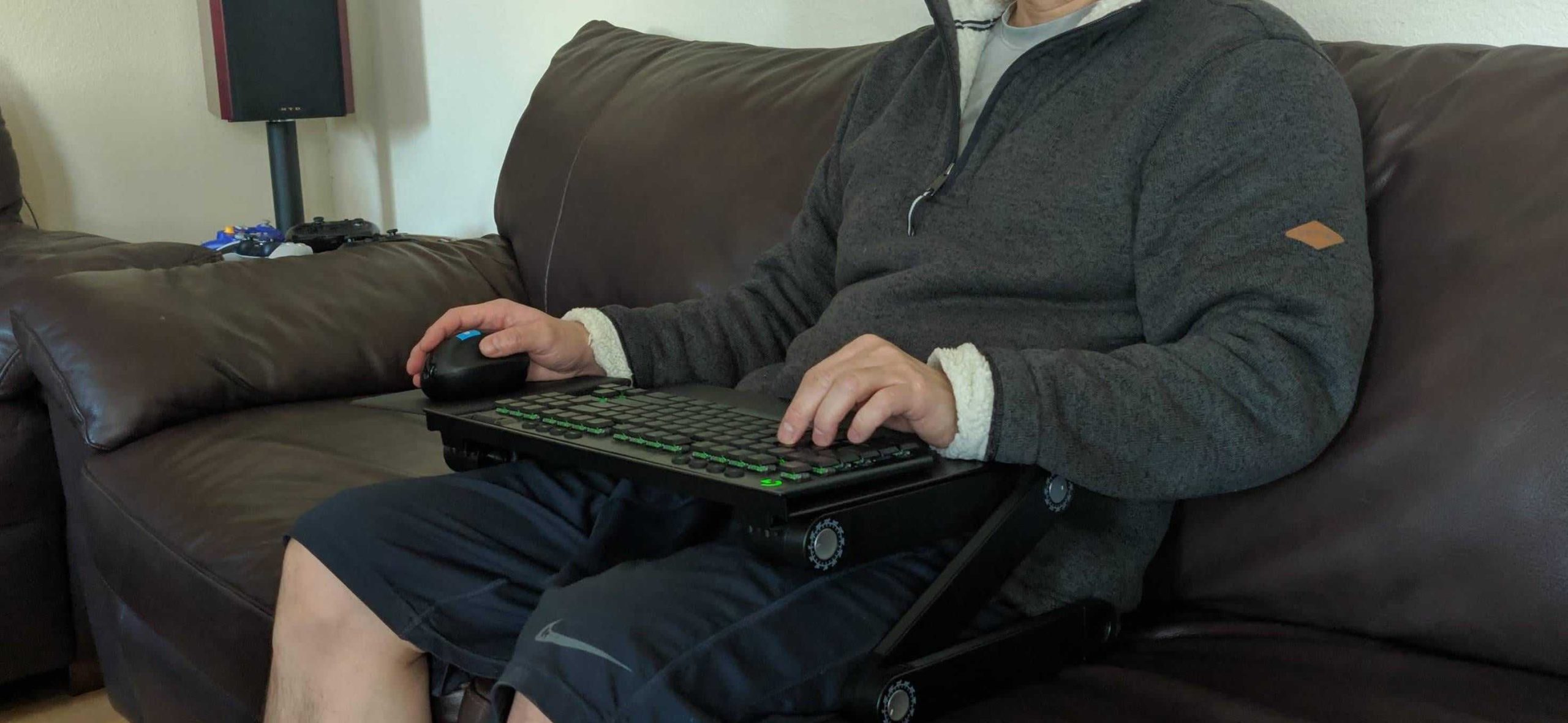
If you want to comfortably use a keyboard and mouse while lounging on the couch, the best solution is to invest in a lap desk or a portable tray table. This setup provides a stable surface for your devices, allowing you to maintain good posture and comfort as you work or play. Additionally, make sure to choose a wireless keyboard and mouse to avoid the hassle of tangled cords. Positioning your screen at eye level will further enhance your experience, reducing strain on your neck and eyes. With these simple adjustments, you can seamlessly enjoy your tech from the comfort of your couch without sacrificing ergonomics or fun.
Finding the right way to use a keyboard and mouse on the couch can be a challenge. Many people crave the relaxed vibe of a couch while working, gaming, or browsing the web, but the lack of proper support can lead to discomfort. A solution lies in creating an ergonomic workspace that fits this casual setting. By choosing the right accessories and making thoughtful adjustments, you can enjoy a productive session without compromising comfort. Let’s dive into the best strategies to ensure your couch experience is as enjoyable and efficient as possible.

“`html
Best Way to Use Keyboard and Mouse on Couch
Using a keyboard and mouse from the comfort of your couch can be a fantastic way to enjoy entertainment, work, or gaming. However, achieving a comfortable and effective setup requires planning. This guide will walk you through the best way to use a keyboard and mouse on your couch for the ultimate relaxation experience.
Choosing the Right Equipment
Before you set up your keyboard and mouse on the couch, selecting the right equipment is crucial. Here are some tips for finding the best tools:
- Wireless Devices: Wireless keyboards and mice eliminate cord clutter, providing more freedom to move.
- Compact Sizes: Look for compact or travel-sized keyboards that are easy to handle when sitting on the couch.
- Ergonomic Features: Ergonomic designs help reduce wrist strain, allowing for longer use without discomfort.
Finding the right devices makes all the difference. Make sure they fit your hands comfortably and work well with your setup.
Optimal Placement of Keyboard and Mouse
Once you have your equipment, the next important step is the placement of your keyboard and mouse. Here are ways to position them effectively:
- Knee Level: Rest the keyboard on your knees. This position allows easy access without overreaching.
- Couch Tray or Lap Desk: Use a lap desk or tray table to create a stable surface, improving comfort and reducing fatigue.
- Flat and Secure: Ensure that both devices are flat and secure to avoid slipping or falling.
These placements can minimize strain on your arms and shoulders.
Adjusting Your Seating
The way you sit on your couch can vastly influence your experience. Adjusting your seating position is vital for good posture. Here’s how to do it:
- Back Support: Use cushions or a pillow to support your lower back, which helps maintain a straight posture.
- Feet Placement: Keep your feet flat on the ground or on an ottoman for better circulation and reduced fatigue.
- Eye Level: Adjust your screen height to eye level to prevent neck strain.
Proper seating can help you feel more energized and focused during use.
Using a Mouse on the Couch
Using a mouse comfortably can be challenging on the couch. Here are some clever methods to enhance usability:
- Mouse Pad: Bring a portable mouse pad to create a smooth surface for tracking.
- Surface Selection: Use a flat and firm surface like a book or tablet to help the mouse function optimally.
- Wireless Range: Ensure your mouse has a good battery life and range, so you don’t experience interruptions.
These tips can improve your overall experience when using a mouse on your couch.
Common Couch Setups
There are various setups you can use based on your preferences. Here are some popular configurations:
1. Classic Couch Setup
The classic setup involves using a laptop and wireless keyboard on your lap. A pillow provides comfort, and cushions support your back.
2. Couch with Ottoman
Using an ottoman can give you a surface to place your keyboard and mouse. This setup helps maintain better posture and support.
3. Lap Desk Arrangement
A lap desk allows you to set up your devices in a stable position. This arrangement is especially good for longer work sessions.
Each of these setups has unique advantages based on comfort and accessibility.
Creating a Comfortable Environment
An inviting environment enhances your experience while using your keyboard and mouse on the couch. Here are some tips to create the best atmosphere:
- Lighting: Use soft ambient lighting to reduce glare on screens.
- Temperature: Keep the room at a comfortable temperature to avoid distractions.
- Minimize Distractions: Turn off notifications or use ‘Do Not Disturb’ mode on devices to focus better.
A well-set environment can lead to increased productivity and enjoyment.
Taking Breaks
Staying on the couch can lead to stiffness or discomfort over time. Remember to take short breaks. Here are some suggestions:
- Stand Up: Stand up every 30 minutes to stretch and walk around.
- Hand Exercises: Try simple wrist and hand exercises to keep circulation flowing.
- Hydrate: Keep a water bottle nearby and take sips regularly to stay hydrated.
Taking breaks can boost your energy and concentration levels.
Cleaning and Maintenance of Devices
To keep your devices in top shape, regular cleaning is important. Here are tips for maintaining your keyboard and mouse:
- Regular Wipes: Use a microfiber cloth to wipe down surfaces frequently to remove dust and grime.
- Dietary Safety: Avoid eating near your keyboard to prevent crumbs and spills.
- Battery Checks: Regularly check your devices for battery levels and replace as needed.
Regular maintenance ensures a longer lifespan for your devices.
Ergonomic Accessories
Investing in ergonomic accessories can significantly improve your comfort level. Here are some must-have add-ons:
- Wrist Rests: Wrist rests can reduce strain during longer typing sessions.
- Adjustable Lap Desks: A desk that elevates or tilts can help you find your ideal angle.
- Footrests: A footrest can elevate your legs and improve circulation while seated.
Using these accessories can make a huge difference in comfort over extended use.
Using Shortcuts for Efficiency
Keyboard shortcuts can greatly improve productivity when using your keyboard. Familiarize yourself with useful shortcuts such as:
- Ctrl + C: Copy selected text.
- Ctrl + V: Paste copied text.
- Alt + Tab: Switch between open programs.
Learning these shortcuts can help you work faster and more efficiently from your couch.
Final Thoughts on Comfort and Functionality
The best way to use a keyboard and mouse on the couch requires careful consideration and preparation. From choosing the right devices to ensuring your seating is comfortable, each element plays a crucial role in enhancing your experience.
Taking time to adjust your workspace will ultimately lead to more enjoyable and productive sessions. Emphasizing comfort, efficient setups, and regular breaks will keep you engaged while ensuring you feel relaxed.
By following these guidelines, you can make your couch the perfect place to work, play, or enjoy entertainment while using your keyboard and mouse comfortably.
“`
The New King of Couch Gaming? – Roccat Sova MK
Frequently Asked Questions
“`html
What type of keyboard and mouse setup is ideal for couch use?
For couch use, wireless keyboards and mice work best. They provide freedom of movement without the constraints of cables. Look for compact or mini keyboards that easily fit on your lap. Ergonomic designs can enhance comfort during prolonged use, reducing strain on your wrists and hands.
How can I improve my posture while using a keyboard and mouse on the couch?
To improve your posture, use a cushion or a lap desk to elevate your hands and support your arms. Sit back against the couch to maintain a straight back. Keep your feet flat on the ground and avoid slouching. Regular breaks can help reduce tension and keep your body comfortable.
Is it advisable to use a mouse pad on the couch?
Yes, using a mouse pad can enhance accuracy and control. Choose a mouse pad with a non-slip bottom to prevent it from sliding around. A thicker mouse pad can provide a stable surface on softer couch fabrics, making it easier to navigate while seated.
What accessories can enhance comfort while using a keyboard and mouse on the couch?
Consider investing in a lap desk or a portable table for added stability. A wrist rest can provide extra support for your hands, while a cushion can improve comfort during extended sessions. If you often use your devices on the couch, a small, adjustable stand for your laptop or tablet can also help improve your viewing angle.
How can I manage cable clutter when using devices on the couch?
To manage cable clutter, use cable organizers or clips to keep cords tidy. Opt for wireless options to eliminate cables altogether. If you must use wired devices, run cables along the back of the couch or through a cable management box to keep your space looking neat and organized.
“`
Final Thoughts
To maximize comfort and efficiency while using a keyboard and mouse on the couch, opt for a lap desk for stability. This setup allows for better ergonomics and reduces strain on your wrists.
Position your screen at eye level to prevent neck discomfort and maintain a relaxed posture. Ensure your seating allows for proper back support, avoiding slouching.
In conclusion, the best way to use keyboard and mouse on couch combines a sturdy surface, ideal screen height, and supportive seating for an enjoyable experience.



