


Have you ever been on an important video call with your MacBook, only to realize your webcam looks grainy and dull? It’s frustrating when others can’t see you clearly, or your voice sounds muffled.
These little tech problems can make meetings and chats feel stressful instead of smooth and natural. But choosing the right webcam can change all that. The right camera brings your face into sharp focus and makes your voice sound clear.
It helps you connect better with friends, family, and colleagues. With improved light correction and noise cancellation, your video calls become more professional and enjoyable. In this article, you’ll find some of the best webcams for MacBook that fit different needs and budgets. Keep reading to discover which webcam can make your daily video chats easier and more enjoyable.
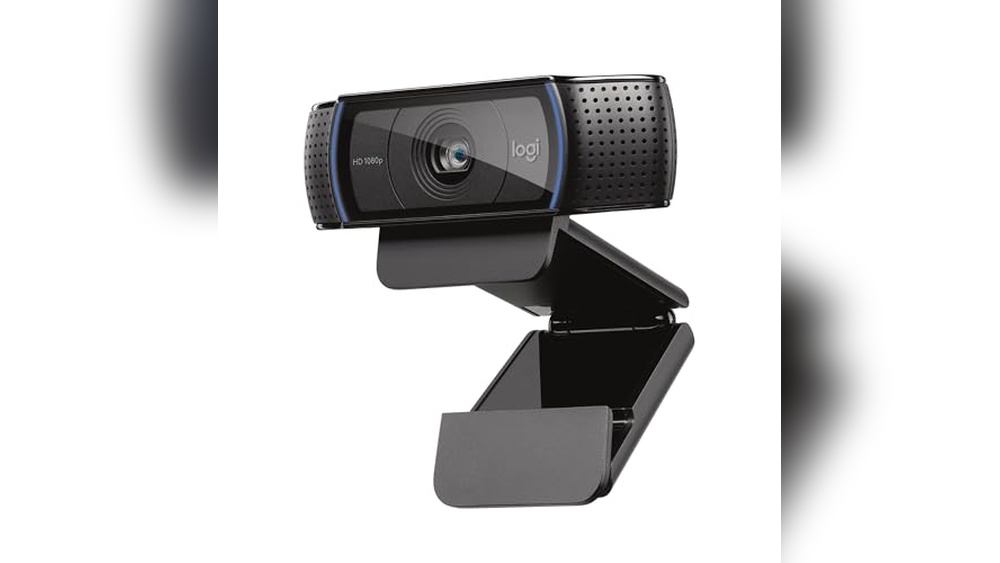
Logitech C920x Hd Pro Pc Webcam

The Logitech C920x HD Pro PC Webcam is ideal for professionals, content creators, and gamers who require high-quality video and clear audio for their online meetings, streaming sessions, or video calls. If you use platforms like Microsoft Teams, Google Meet, Zoom, or even the Nintendo Switch 2’s new GameChat mode, this webcam offers a reliable and versatile solution to enhance your communication experience. Its compatibility with both Mac and tablets makes it a great choice for users seeking seamless integration with multiple devices.
Pros:
- Full HD 1080p video resolution at 30fps for crystal-clear visuals
- HD light correction ensures optimal image quality even in low-light conditions
- Clear and natural audio quality with dual microphones
- Broad compatibility with popular video conferencing and streaming platforms
- Compact and lightweight design (3.7 x 1.7 x 2.8 inches, 0.35625 pounds) for easy portability
Cons:
- Fixed focus lens may not be ideal for extremely close-up shots
- No built-in privacy shutter included
- USB-A connection may require an adapter for newer devices with USB-C ports
The Logitech C920x HD Pro Webcam stands out with its ability to deliver sharp 1080p video at a smooth 30 frames per second, ensuring that every detail is clear and vibrant during your calls or streams. The inclusion of HD light correction technology helps maintain excellent image quality in varied lighting environments, reducing the need for additional lighting setups. This feature is especially beneficial for users who often participate in meetings or live streams from different locations.
Additionally, the webcam’s dual microphones capture clear and natural audio, making conversations feel more lifelike and engaging. Its broad compatibility with major platforms like Zoom, Microsoft Teams, and even the Nintendo Switch 2’s GameChat mode provides flexibility for both professional and entertainment uses. Overall, its compact size and robust performance make the Logitech C920x an excellent choice for anyone seeking a reliable and high-quality webcam.
To buy this product, click here.
Shcngqio 1080p Hd Webcam

The Shcngqio 1080P HD Webcam with Microphone is ideal for remote workers, streamers, online educators, and anyone seeking to enhance their video communication experience. Those who need a reliable, high-quality webcam for Zoom, Skype, or streaming on PC, Mac, or laptops will find this device particularly beneficial. Its features cater to users who want clear visuals, excellent audio, and privacy controls in one compact device.
Pros:
- Crisp 1080P HD video quality for sharp and clear visuals
- Built-in noise cancellation microphone ensures clear audio during calls
- Convenient privacy cover for enhanced security
- Wide-angle lens captures more of the background or group conversations
- Auto light correction adjusts lighting for optimal image quality in different environments
- Easy plug & play USB setup compatible with various operating systems
Cons:
- May require manual adjustment for optimal angle in some setups
- Limited color options, available only in black
The Shcngqio 1080P HD Webcam boasts a high-definition camera that delivers crisp and vibrant video, making virtual meetings and streaming more professional. Its wide-angle lens allows users to include more participants or background in the frame without needing to reposition the camera frequently. This is particularly useful for group calls or interactive online sessions.
Equipped with a noise cancellation microphone, the webcam filters out background noise, ensuring that your voice comes through clearly. The auto light correction feature automatically adjusts to varying lighting conditions, enhancing the video quality in dim or bright rooms. Combined with the privacy cover, this webcam offers a balance of functionality, security, and ease of use, making it a versatile choice for multiple applications.
To buy this product, click here.
Logitech Brio 101 Full Hd Webcam

The Logitech Brio 101 Full HD 1080p Webcam is ideal for professionals, streamers, and remote workers who require crisp and clear video quality for online meetings, streaming sessions, and gaming chats. If you use platforms like Zoom, Microsoft Teams, or the Nintendo Switch 2’s New GameChat Mode, this webcam is designed to meet your needs with its versatile compatibility and enhanced features.
Pros:
- Full HD 1080p video quality for sharp and vibrant visuals
- Built-in microphone ensuring clear audio capture
- Privacy shutter for secure and worry-free usage
- Compact and sleek black design fits well on any desktop or laptop
- Works seamlessly with popular platforms like Zoom, Microsoft Teams, and Nintendo Switch 2
- Easy USB-A connectivity for plug-and-play setup
Cons:
- May require additional lighting for optimal video quality in low-light environments
- USB-A connection might limit compatibility with some newer devices using USB-C without adapters
- No built-in tripod mount, limiting flexible placement options
The Logitech Brio 101 Webcam boasts a high-definition 1080p resolution that delivers crystal-clear video, enhancing your presence during virtual meetings and streaming sessions. Its built-in microphone captures clear, natural sound, reducing the need for external audio devices. The webcam’s compact size and sleek black finish make it a stylish yet unobtrusive addition to any workspace or gaming setup.
Designed for compatibility, this webcam works flawlessly with major communication platforms such as Zoom and Microsoft Teams, as well as the innovative Nintendo Switch 2’s GameChat Mode. The inclusion of a privacy shutter allows users to maintain control over their video feed, ensuring peace of mind when the camera is not in use. With simple USB-A connectivity, setting up the Logitech Brio 101 is hassle-free, making it a practical choice for both beginners and experienced users alike.
To buy this product, click here.
Anker Powerconf C200 Webcam

The Anker PowerConf C200 2K Webcam is ideal for professionals, remote workers, and content creators who demand high-quality video and audio for their virtual meetings and recordings. If you need a reliable and versatile computer camera that delivers clear visuals and crisp sound, especially in low-light environments, this webcam is designed for you.
Pros:
- 2K resolution delivers sharp and clear video quality.
- Low-light correction ensures excellent image clarity in dim environments.
- AI-noise canceling microphones provide crystal-clear audio by reducing background noise.
- Adjustable field of view allows customization for different meeting setups.
- Built-in privacy cover offers security and peace of mind when the camera is not in use.
- Stereo mics enhance sound capture for natural voice reproduction.
- Compact and lightweight design fits easily on PC, laptop, or Mac.
Cons:
- May require manual adjustment to optimize field of view for some users.
- The privacy cover, while convenient, can be small and easy to misplace.
The Anker PowerConf C200 stands out with its impressive 2K resolution that ensures your video calls and recordings are vibrant and detailed. The camera’s low-light correction technology significantly improves image quality even in poorly lit rooms, making it perfect for home offices or dim meeting spaces. This feature helps maintain a professional appearance regardless of lighting conditions.
Additionally, the webcam is equipped with AI-noise canceling microphones and stereo mics that deliver clear and natural audio by filtering out distracting background sounds. The adjustable field of view allows users to customize their framing, which is beneficial for solo meetings or group calls. With a built-in privacy cover, users can easily protect their privacy when the webcam is not in use, combining convenience with security.
To buy this product, click here.
Logitech Brio 4k Webcam

The Logitech Brio 4K Webcam is ideal for professionals, content creators, and remote workers who demand high-quality video and clear audio for their virtual meetings and recordings. If you require superior resolution, excellent light correction, and seamless integration with popular platforms like Microsoft Teams, Zoom, and Google Meet, this webcam is designed for you. It also suits users who prioritize security features such as Windows Hello facial recognition.
Pros:
- Supports ultra-high 4K video resolution for crystal-clear image quality.
- Equipped with a noise-cancelling microphone to ensure clear voice transmission.
- HD auto light correction adapts to various lighting environments for optimal video clarity.
- Wide field of view allows more people or background to be captured in the frame.
- Compatible with multiple platforms including Microsoft Teams, Zoom, Google Meet, and more.
- Works seamlessly with Windows Hello for secure facial recognition login.
- Compact and lightweight design (1.02 inches height, 4.02 inches width, 1.02 inches length), easy to mount on laptops, desktops, and tablets.
Cons:
- Higher price point compared to standard webcams.
- 4K video streaming may require a powerful computer and fast internet connection.
- Some advanced features may not be fully utilized by casual users.
The Logitech Brio 4K Webcam stands out with its exceptional video quality, delivering ultra-clear 4K resolution that enhances any video call or recording session. Its HD auto light correction technology automatically adjusts brightness and contrast, ensuring you look your best even in low-light or uneven lighting conditions. This makes it highly suitable for professional environments where appearance matters. The wide field of view is another significant feature, providing ample frame coverage, which is especially useful for group meetings or showcasing your surroundings.
Beyond visual excellence, the webcam’s noise-cancelling microphone plays a crucial role in delivering crisp and clear audio by filtering out background noise, which improves communication quality during calls. Compatibility with popular conferencing platforms and support for Windows Hello facial recognition adds layers of convenience and security. Its compact and lightweight form factor ensures easy portability and simple setup across various devices, including PCs, Macs, laptops, MacBooks, and tablets, making it a versatile choice for diverse user needs.
To buy this product, click here.
Frequently Asked Questions
What Is The Best Webcam Resolution For Macbook?
For MacBook, a webcam with at least 1080p resolution offers clear and sharp video. Models like Logitech C920x and Anker PowerConf C200 provide excellent Full HD clarity for meetings and streaming.
Do Macbook Webcams Support Built-in Microphones?
Many external webcams, such as Logitech Brio 101 and Shcngqio 1080P, include built-in microphones. These mics offer noise cancellation and clear audio, improving overall communication quality on MacBooks.
Are Webcams Compatible With Macbook Video Apps?
Yes, webcams like Logitech C920x and Anker PowerConf C200 work seamlessly with Zoom, Microsoft Teams, and Google Meet on MacBooks. They offer plug-and-play USB connectivity for easy setup.
What Features Improve Video Quality On Macbook Webcams?
Auto light correction, HD clarity, and wide-angle lenses enhance video quality. Webcams like Logitech Brio 4K and Shcngqio 1080P optimize low light and provide crisp visuals for MacBook users.
Do Webcams Offer Privacy Protection For Macbooks?
Many webcams, including Logitech Brio 101 and Anker PowerConf C200, come with built-in privacy covers. These covers ensure your camera is physically blocked when not in use, enhancing security.
Can Webcams Support Macbook For Gaming And Streaming?
Yes, webcams like Logitech C920x and Brio 4K support high-quality video for streaming and gaming. They are compatible with platforms like Nintendo Switch 2’s GameChat mode and popular streaming software.
Conclusion
Choosing the best webcam for your MacBook depends on your needs and budget. Each model listed offers clear video and good audio quality. Features like noise cancellation, privacy covers, and light correction help improve your video calls. Whether you want simple plug-and-play use or advanced features like 4K resolution, there is an option for you.
Consider how you will use the webcam—meetings, streaming, or casual chats. Also, check compatibility with your MacBook and favorite apps. Good lighting and a quiet environment make a big difference too. Investing in a reliable webcam can enhance your online experience and make communication smoother.
Take your time to pick the one that fits your setup best. With the right webcam, your video calls will look sharp and sound clear every time.



