


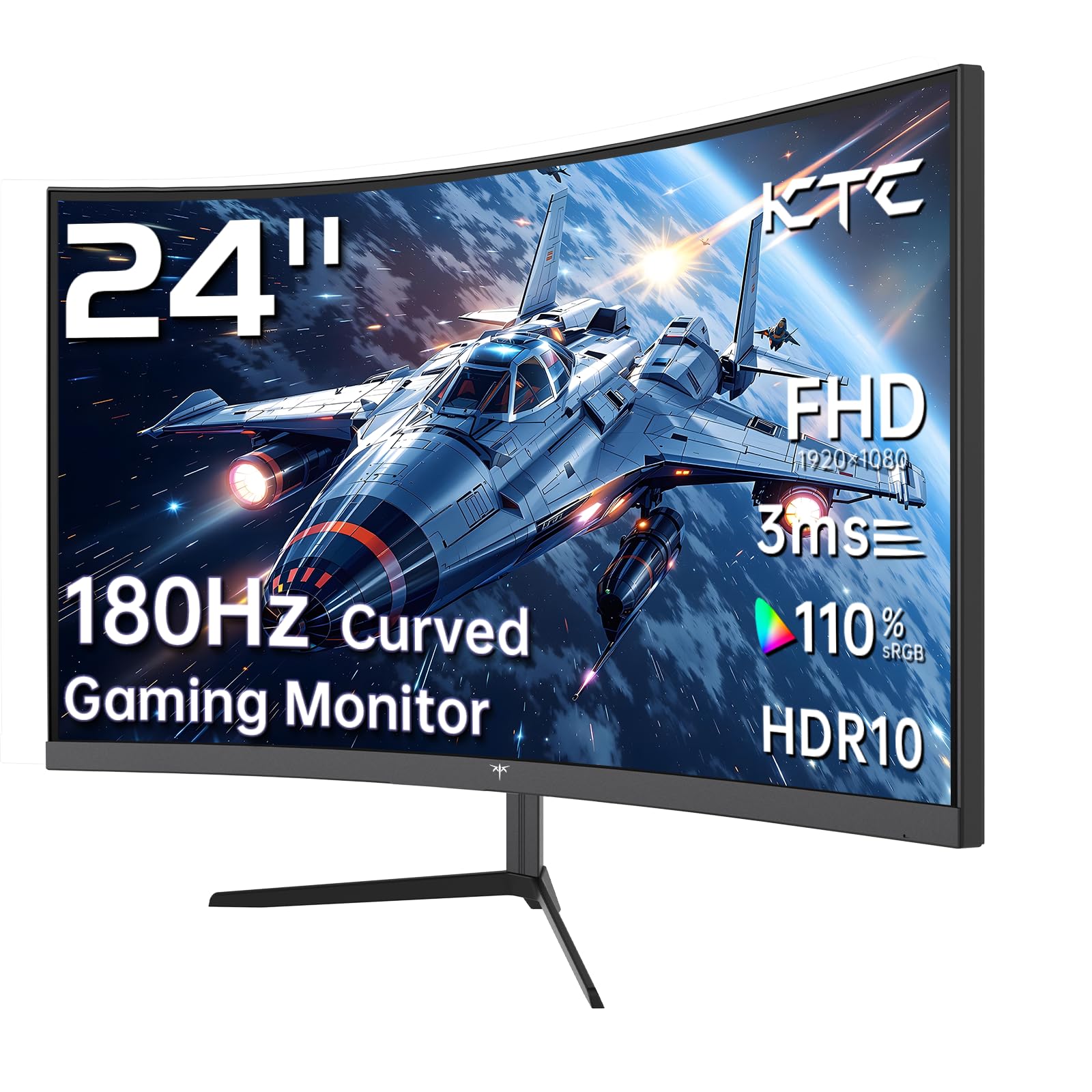
KTC 24 Inch 1500R

Sceptre Curved 24
Choosing the right monitor can feel like a big task. You want something that fits your budget and your desk. But you also want it to perform well for work and play. Two popular names in the world of budget-friendly curved screens are the KTC 24 Inch 1500R Curved Gaming Monitor and the Sceptre Curved 24-inch Gaming Monitor. They might seem similar at first glance. Both are 24-inch, curved, 1080p displays. But the details tell a very different story.
This comparison matters because your monitor is your window to everything digital. A wrong choice can lead to eye strain, a poor gaming experience, or just general frustration. The KTC model leans hard into the gaming scene with high refresh rates. The Sceptre offers a more basic, value-oriented package. We are going to peel back the layers on both.
By the end of this article, you will know exactly which monitor aligns with your needs. We will break down specs, analyze real user experiences, and compare them head-to-head. Whether you are a competitive gamer, a casual user, or someone setting up a home office, this guide will help you make a confident choice. Let’s dive in.
In-Depth Look: KTC 24 Inch 1500R
The KTC 24 Inch 1500R is not shy about its purpose. It’s branded as a gaming monitor, and the specs back that up emphatically. Right from the start, the 165Hz refresh rate (with a 180Hz overclock) and 1ms response time signal that this is built for speed. Let’s unpack what makes this screen tick.
The standout feature is undoubtedly its performance. A 165Hz refresh rate means the image updates 165 times per second. For context, a standard monitor runs at 60Hz. The difference in smoothness, especially in fast-moving games like first-person shooters or racing sims, is night and day. Everything feels more fluid and connected. Paired with the 1ms response time, motion blur is drastically reduced. Fast-paced action stays crisp and clear, giving you a tangible edge in competitive gaming.
Adding to that smoothness is AMD FreeSync support. This technology syncs the monitor’s refresh rate with your graphics card’s frame rate. It eliminates screen tearing and stuttering without adding input lag. Even if your PC can’t hit 165 frames per second all the time, FreeSync ensures the experience remains buttery smooth across a range of frame rates.
The 1500R curvature is more aggressive than the Sceptre’s 1800R. The “R” stands for radius in millimeters. A smaller number means a tighter, more pronounced curve. The 1500R curve on the KTC 24 Inch 1500R wraps around your field of view more, aiming to increase immersion and reduce eye strain by keeping all parts of the screen at a more uniform distance from your eyes.
Color performance is another strong suit. It covers 110% of the sRGB color space and 90% of the DCI-P3 gamut. This means colors are vibrant and rich, great for gaming and even some casual content creation. The 3000:1 contrast ratio, typical of VA panels, promises deep blacks and good shadow detail. It also supports HDR, though on a monitor at this price point, don’t expect mind-blowing HDR performance—it’s a nice bonus that can add a bit of extra pop.
Ergonomics and connectivity are thoughtful. It includes a tilt-adjustable stand (-5 to -20 degrees) and VESA 100x100mm compatibility for mounting. Ports include two HDMI 2.0 ports and a DisplayPort 1.4, which is necessary to unlock the full 165Hz+ refresh rate. It lacks built-in speakers, which is common on focused gaming monitors, as most gamers prefer dedicated headphones or external speakers.
Pros and Cons
Pros:
- Excellent 165Hz/180Hz refresh rate for super-smooth gameplay.
- 1ms response time minimizes ghosting and motion blur.
- AMD FreeSync support for tear-free gaming.
- Wide color gamut (110% sRGB, 90% DCI-P3) for vibrant visuals.
- Useful connectivity with DisplayPort and multiple HDMI.
- More aggressive 1500R curvature for heightened immersion.
Cons:
- No built-in speakers.
- Stand only offers tilt, no height or swivel adjustment.
- HDR support is basic due to peak brightness limitations.
What Customers Are Saying
Users are impressed with the value proposition. One customer building a high-end PC found it to be a great match, implying it doesn’t bottleneck a powerful system. Another was “pleasantly surprised,” highlighting the incredible price-to-performance ratio, getting 1440p-like value for a very low cost. A third user recommended it for 1080p gaming, noting the trade-off for a larger screen at that resolution is worth it for the performance offered.
Best For
The KTC 24 Inch 1500R is best for competitive and enthusiast gamers on a budget who prioritize smooth, responsive gameplay above all else. It’s also a great choice for general users who want a premium, fluid desktop experience for everyday tasks and multimedia. If you play fast games like Valorant, Call of Duty, or Apex Legends, this monitor’s specs are tailored for you.
Check Price on Amazon for KTC 24 Inch 1500R
In-Depth Look: Sceptre Curved 24
The Sceptre Curved 24 takes a different approach. It’s a straightforward, no-frills curved monitor that focuses on delivering core functionality at an accessible price point. It has “gaming” in its name, but its specs place it firmly in the realm of casual and general use. This is the monitor you buy when you want a curved screen without breaking the bank.
The most immediate difference is the refresh rate: 75Hz. This is a step up from the standard 60Hz, offering a slightly smoother visual experience in everyday scrolling and casual gaming. However, it’s nowhere near the high-refresh-rate territory of the KTC model. For non-competitive games, older titles, or simulation games, 75Hz is perfectly adequate and provides a nice little boost over basic monitors.
Its curvature is 1800R, which is gentler than the 1500R curve of the KTC. The wrap-around effect is less intense, but it still provides that immersive feeling that curved monitors are known for, helping with panoramic views in games and movies.
A unique advantage the Sceptre Curved 24 holds is its built-in speakers. They are a convenient feature for saving desk space and clutter. However, temper your expectations. As noted in reviews, these speakers are not loud and are of low quality. They’re fine for system sounds, a quick YouTube video, or a conference call in a pinch, but for any serious media consumption or gaming, you’ll want external audio.
Connectivity includes two HDMI ports and a VGA port. The inclusion of VGA is a telltale sign of an older design, catering to legacy systems or specific business environments. It lacks a DisplayPort, which isn’t a problem at 75Hz but shows its age. The stand is fixed with no adjustability, which can be a downside for ergonomics. Like the KTC, it is VESA mount compatible (75x75mm), so you can add an adjustable arm later.
Color coverage is stated at 98% sRGB, which is good for accurate and vibrant colors in everyday tasks. It doesn’t boast the wider color gamuts of the KTC, but for most users, it’s perfectly sufficient.
Pros and Cons
Pros:
- Very budget-friendly price point.
- Includes convenient built-in speakers (though basic).
- 75Hz refresh rate is a nice upgrade over 60Hz.
- Includes a VGA port for compatibility with older devices.
- Simple, plug-and-play setup.
Cons:
- Low 75Hz refresh rate limits gaming performance.
- No Adaptive Sync (FreeSync/G-Sync) technology.
- Stand is not adjustable (tilt, height, swivel).
- Weaker overall color gamut compared to the KTC.
- Uses older connection types (VGA).
What Customers Are Saying
Customers praise its value and picture quality. One user loved that the bezels were thin, making the screen feel larger. They wished the stand was adjustable, though. Another customer was thrilled with the easy setup and the surprise of having built-in speakers, which solved an immediate need. A common thread in reviews is the comment on the speakers being a handy inclusion but low in quality and volume, with most users opting for their own audio solutions.
Best For
The Sceptre Curved 24 is best for budget-conscious users, general home office work, casual gamers, and as a secondary monitor. It’s perfect for someone who wants the immersive feel of a curved screen for watching movies, browsing the web, working on documents, or playing casual, non-competitive games. It’s a great “get the job done” monitor.
Check Price on Amazon for Sceptre Curved 24
Head-to-Head Comparison
Now, let’s put these two monitors side-by-side and see how they stack up in key areas. This is where your personal needs will dictate the winner.
Performance & Gaming
This is the clearest differentiator. The KTC 24 Inch 1500R is in a different league. Its 165Hz/180Hz refresh rate and 1ms response time, combined with FreeSync, create a silky-smooth, responsive gaming environment. It’s designed to keep up with fast action. The Sceptre Curved 24, with its 75Hz refresh rate and lack of Adaptive Sync, is adequate for casual or older games but will show its limitations in fast-paced competitive scenes. Winner for Performance: KTC 24 Inch 1500R.
Visual Quality & Immersion
Both are 1080p VA panels, so sharpness is similar. The KTC has a clear advantage in color, with a wider gamut (110% sRGB vs. 98%) and higher contrast, leading to more vibrant and potentially more accurate colors. The KTC’s 1500R curve is also more pronounced than the Sceptre’s 1800R, offering a slightly more wrapped, immersive feel. Winner for Visuals: KTC 24 Inch 1500R.
Features & Connectivity
The KTC 24 Inch 1500R offers more modern connectivity with DisplayPort and HDMI 2.0, which are essential for its high refresh rate. Its tilt-adjustable stand is a minor ergonomic win. The Sceptre Curved 24 fights back with built-in speakers (a convenience feature) and a VGA port (a legacy feature). For most users, the KTC’s ports are more future-proof and useful. Winner for Features: KTC 24 Inch 1500R (for modern needs).
Value & Budget
This is the Sceptre’s home turf. It is almost always priced significantly lower than the KTC. If your absolute priority is getting a curved 24-inch screen for the lowest possible cost, and you can live with the performance limitations, the Sceptre Curved 24 offers undeniable value. The KTC costs more but delivers proportionally more performance and features for that extra money. Winner for Pure Budget: Sceptre Curved 24. Winner for Performance-per-Dollar: KTC 24 Inch 1500R.
Build Quality & Ergonomics
Neither monitor has a premium, all-metal build—both are plastic. The KTC 24 Inch 1500R’s stand offers tilt adjustment, while the Sceptre’s is fixed. Both are VESA compatible, giving you upgrade options. It’s a slight edge to the KTC for the basic tilt function. Winner for Ergonomics: KTC 24 Inch 1500R.
Frequently Asked Questions
Q: I mostly play single-player RPGs and strategy games. Do I need the high refresh rate of the KTC?
A: Probably not. Games like Skyrim, Civilization, or The Witcher are stunning and immersive but aren’t as dependent on ultra-fast reaction times. The Sceptre Curved 24’s 75Hz and curved screen would likely provide a very enjoyable experience for a lower price. The high refresh rate of the KTC 24 Inch 1500R is most crucial for competitive shooters, fast-paced action games, and esports titles.
Q: Can I use either monitor for my home office and productivity?
A: Absolutely. Both are fine for productivity. The curve can help reduce eye strain during long sessions by keeping the edges of the screen closer. The KTC’s higher refresh rate makes scrolling through documents and websites feel slightly smoother. If you do a lot of color-sensitive work like basic photo editing, the KTC’s wider color gamut might be a slight benefit, but for spreadsheets, writing, and browsing, both are excellent.
Q: Which monitor is better for console gaming like a PS5 or Xbox Series S/X?
A: The KTC 24 Inch 1500R is the better choice for modern consoles. While the PS5 and Xbox support 120Hz gameplay in many titles, the Sceptre’s 75Hz ceiling limits that potential. The KTC can accept a 120Hz signal via its HDMI 2.0 ports, allowing you to enjoy smoother console gaming where supported. It’s more future-proof for the console generation.
Q: I have a tight desk space and hate clutter. Does the lack of speakers on the KTC a big deal?
A> It depends on your audio setup. If you always use a gaming headset or have a dedicated pair of desktop speakers, it’s no issue at all. If you rely on your monitor for sound and don’t want any extra devices, the Sceptre Curved 24’s built-in speakers, while low quality, provide a simple, clutter-free solution. For better sound from the KTC, you’d need to add external speakers or use headphones.
Q: Is the 1500R curve vs. 1800R curve noticeably different on a 24-inch screen?
A> On a 24-inch screen, the difference is subtle but perceptible if you look for it. The 1500R curve (tighter) will feel slightly more enveloping. The 1800R curve is gentler. For most people, either will provide the curved monitor “feel.” It’s not a major deciding factor at this size; the performance differences are far more significant.
Final Verdict: Which One Should You Choose?
Choosing between the KTC 24 Inch 1500R and the Sceptre Curved 24 comes down to your budget and how you define “performance.”
Choose the KTC 24 Inch 1500R if: You are a gamer—especially a competitive or enthusiast gamer. You value smooth, tear-free gameplay above all else. You want a more color-rich display and modern connectivity like DisplayPort. You are willing to spend a bit more for a significantly better performance package that will keep you happy for years. This monitor is an investment in your gaming experience.
Choose the Sceptre Curved 24 if: Your budget is the absolute top priority. Your gaming is casual, or you primarily need a monitor for work, web browsing, and media consumption. You value the convenience of having basic built-in speakers and don’t mind a fixed stand. You need a reliable, curved screen that gets the job done without any fancy extras.
In essence, the KTC 24 Inch 1500R is the performance champion, while the Sceptre Curved 24 is the value king. Both are good at what they do, but they serve distinctly different users. Identify which camp you fall into, and your choice becomes clear.
Ready to make your decision? Click the links below to check the latest prices and see current deals on Amazon.



