


Yes, 4K monitors can help reduce eye strain, but it depends on various factors like screen size, display settings, and user habits. Higher resolution screens provide sharper images and less pixelation, which can lessen eye fatigue during long hours of use. However, simply upgrading to a 4K display isn’t a guaranteed fix if other ergonomic practices are ignored.
Using a 4K monitor can indeed make a difference in reducing eye discomfort, mainly because of its high pixel density that produces clearer images and smoother text. That said, optimal eye health also depends on proper lighting, screen positioning, and taking regular breaks. So, while 4K monitors have potential benefits, they should be part of a broader approach to eye comfort during extended screen time.
If you’re wondering whether switching to a 4K monitor could ease your eye strain, the answer is generally yes—thanks to their increased resolution and image clarity. The key is to set up your workspace correctly and practice healthy viewing habits to maximize the benefits. When combined with good lighting and periodic breaks, a 4K display can significantly enhance your viewing experience and reduce eye fatigue over time.
Eyestrain from prolonged screen use is a common concern for many, especially in today’s digital-driven world. The debate around 4K monitors centers on whether their higher resolution can genuinely alleviate this problem. While a sharper display can reduce the need for squinting and improve overall comfort, it’s not a silver bullet. Factors like screen brightness, contrast, ergonomics, and personal habits play crucial roles. Thankfully, understanding these elements and choosing a good quality 4K monitor can lead to a noticeably more comfortable viewing experience, making your work or leisure time less tiring and more enjoyable.

Do 4K Monitors Reduce Eye Strain? Exploring the Facts
Understanding Eye Strain and Its Causes
Eye strain is a common issue for many people who spend hours in front of screens. It happens when your eyes work harder than usual to focus on digital displays. Factors like poor lighting, glare, and small text can make eye strain worse. Knowing what causes eye strain helps us find ways to prevent it.
What Are 4K Monitors?
A 4K monitor offers a display resolution of 3840 pixels by 2160 pixels. This means it has four times more pixels than a standard Full HD (1080p) display. The high pixel count results in sharper images and clearer text, which can affect eye comfort.
Does Higher Resolution Reduce Eye Strain?
Higher resolution screens can lessen eye strain by providing clearer images. When text and images are sharper, your eyes don’t need to work as hard to focus. This reduces the fatigue that often comes with blurry or pixelated displays.
Impact of 4K Resolution on Image Sharpness and Text Clarity
With 4K monitors, images look more detailed and text appears crisper. These advantages help reduce squinting and eye fatigue during long reading or working sessions. Clearer visuals mean your eyes won’t strain as much trying to decipher blurry content.
Benefits of 4K Monitors for Eye Strain Reduction
- Enhanced Text Clarity: Small fonts seem sharper, decreasing eye strain when reading.
- Reduced Need to Constantly Refocus: High-quality images lessen the effort needed to stay focused.
- Less Pixelation and Glare: Better display quality minimizes visual discomfort.
- More Screen Real Estate: Allows for multitasking without overlapping windows, reducing mental fatigue.
Additional Factors That Affect Eye Comfort
Even with a 4K monitor, other factors influence eye health. Proper lighting, monitor placement, and screen brightness are essential for minimizing eye fatigue. Managing these elements can complement the benefits of a high-resolution display.
Eye-Friendly Features to Look for in Monitors
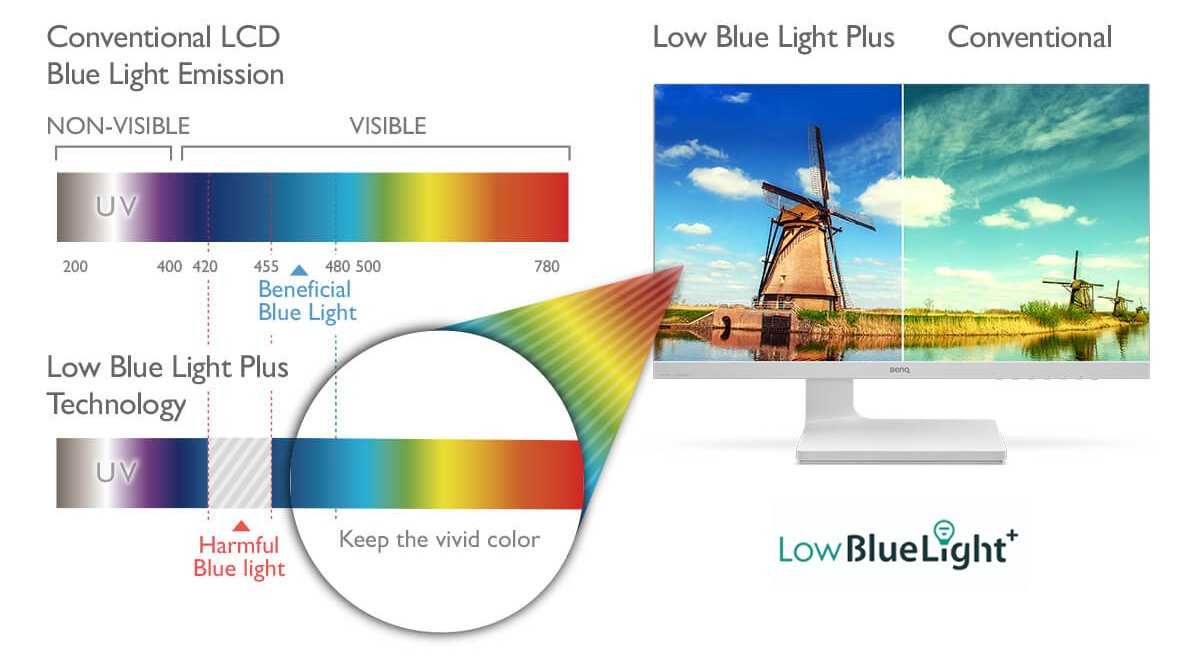
- Blue Light Filters: Reduce exposure to blue light that can disturb sleep and cause eye discomfort.
- Flicker-Free Technology: Eliminates screen flickering that can cause eye strain and headaches.
- Adjustable Brightness and Color Settings: Allow customization for optimal viewing comfort.
- Anti-Reflective Coatings: Minimize reflections and glare from light sources.
Ergonomics and Screen Use
Proper ergonomics can enhance the benefits of a 4K monitor. Position your screen at eye level and maintain a comfortable viewing distance. This helps prevent neck strain and reduces the eye’s effort to focus.
Optimal Monitor Positioning
Place your monitor about an arm’s length away, with the top of the screen at or slightly below eye level. Tilt the screen slightly to reduce reflections and glare, creating a more comfortable viewing experience.
Adjusting Settings for Better Comfort
Customize your monitor’s brightness and contrast to match your ambient light. Use larger font sizes and high-contrast themes to make reading easier on your eyes. Regularly taking breaks also helps prevent fatigue.
Related Technologies That Support Eye Comfort
Modern monitors incorporate features that aid eye health. These include flicker-free lighting, blue light reduction modes, and adaptive refresh rates. Combining these with high resolution enhances overall visual comfort.
Comparing 4K Monitors to Other Resolutions
While 4K offers significant advantages, some users find that QHD (2560×1440) or even Full HD displays still serve their needs well. The key is balancing resolution with screen size and user preference for comfort.
How Screen Size Matters
A larger screen with 4K resolution allows for more detailed images and easier reading without needing to squint. Smaller screens at 4K may not provide the same readability benefits and could lead to unnecessary eye strain.
The Role of Screen Brightness and Contrast
Adjusting these settings can optimize visual comfort. Avoid overly bright screens that cause glare and eye fatigue. Instead, set a comfortable brightness level matching your environment.
Summary of Key Points
High-resolution 4K monitors can help reduce eye strain through sharper images and clearer text. Proper setup, ergonomic placement, and supplementary features like blue light filters further enhance eye comfort. However, individual preferences and usage habits also play vital roles in preventing fatigue. Combining a 4K display with good habits and settings provides the best experience for reducing eye strain during extended screen time.
Why I Tried Eye Care Monitor for 7 Days
Frequently Asked Questions
How does a 4K monitor affect eye comfort during extended use?
A 4K monitor offers sharper images and clearer details, which can reduce eye strain by minimizing the effort your eyes make to focus on text and images. The increased resolution allows for larger, more legible fonts and reduces the need to squint or lean closer to see fine details, contributing to greater comfort during prolonged use.
Can adjusting display settings on a 4K monitor help reduce eye fatigue?
Yes, fine-tuning display settings such as brightness, contrast, and color temperature can significantly decrease eye fatigue. Setting the monitor’s brightness to match your environment, enabling blue light filters, and selecting warmer color tones help create a more comfortable viewing experience, especially over extended periods.
Does utilizing a 4K monitor with appropriate ergonomics improve eye health?
Using a 4K monitor with proper ergonomic setup, including correct monitor height and distance, encourages good eye health. Keeping the monitor at eye level and about an arm’s length away reduces strain on your eyes and neck, making it easier to view high-resolution content comfortably.
Are there specific features in 4K monitors designed to minimize eye strain?
Many 4K monitors come equipped with flicker-free technology and low blue light modes, which help reduce eye fatigue. Flicker-free screens eliminate screen flickering that can cause eye discomfort, while low blue light settings cut down on potentially harmful blue wavelengths, providing a more comfortable viewing experience.
Is the benefit of reduced eye strain more noticeable when working with high-resolution graphics or text?
Yes, high-resolution displays make fine details in graphics and text clearer, reducing the effort required to focus and interpret visual information. This clarity helps prevent eye fatigue, especially during tasks that demand precision, like editing images or reading lengthy documents.
Final Thoughts
do 4k monitors reduce eye strain. Higher resolution displays provide sharper images, making text easier to read and reducing eye fatigue. Additionally, many 4k monitors offer flicker-free technology and blue light filters, which further protect your eyes.
Choosing a 4k monitor can contribute to a more comfortable viewing experience, especially during long work sessions. Overall, investing in a 4k monitor can be a beneficial step toward minimizing eye strain and enhancing productivity.



