


Designers tend to favor flat monitors because they offer a true representation of colors and details, essential for precision work. However, some may opt for curved screens to immerse themselves more deeply in their projects, especially for creative workflows involving multiple screens. The choice ultimately depends on personal preference and the type of design work involved.
In brief, most designers lean towards flat monitors for their accuracy and clarity, but curved monitors can provide a more immersive experience for certain tasks. Whether flat or curved, the best choice hinges on the nature of the designer’s work and comfort preferences.
When it comes to choosing the perfect monitor, designers often find themselves weighing the pros and cons of curved versus flat screens. Flat monitors have long been the go-to for graphic professionals because they deliver a straight, distortion-free view of their work, making color accuracy and fine details easier to judge. On the other hand, curved monitors are gaining popularity for their ability to reduce glare and provide a more natural viewing angle, especially on larger screens or multi-monitor setups. The decision is not just about aesthetics but also how the monitor enhances workflow and comfort. Whether a designer prefers the traditional flat screen for precision or the immersive experience of a curved monitor depends heavily on individual needs and the specific demands of their creative process.

Do designers prefer curved or flat monitors?
Understanding the Basics: What Are Flat and Curved Monitors?
Flat monitors have a straightforward, traditional design with a flat screen surface. They provide a broad viewing area and are commonly used in offices and homes.
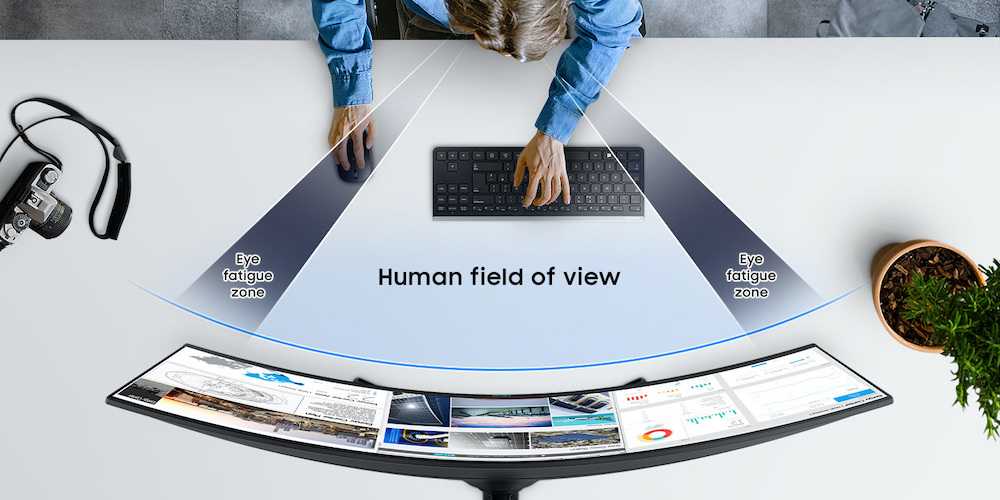
Curved monitors feature a slight bend that surrounds the viewer, creating a more immersive experience. This design aims to reduce glare and distortions, especially on larger screens.
Designers’ Preferences: What Do They Usually Choose?
Many designers lean towards flat monitors because of their consistent image quality and predictable viewing angles. Flat screens tend to be more reliable for color accuracy, an essential factor for creative professionals.
However, some designers prefer curved monitors for focusing on specific projects, particularly when working on detailed or panoramic visuals.
How Curved Monitors Enhance Creativity
Curved monitors can make a designer feel more “inside” their work environment, increasing engagement. The curvature reduces eye strain over long periods, allowing for extended creative sessions.
This type of monitor can also improve the perception of depth in visual projects, such as 3D modeling or illustration.
The Practical Benefits of Flat Monitors for Designers
Flat monitors often offer better color consistency from different angles, which is important for color-sensitive projects.
They also tend to be more affordable and easier to integrate into multiple-screen setups, a common choice for professionals handling complex workflows.
Screen Size and Curvature: Does It Matter?
The size of a monitor influences whether a curved or flat screen is more suitable.
For displays larger than 27 inches, curved monitors can provide better peripheral vision and reduce distortions.
Smaller monitors often work well as flat screens, offering a clear, straightforward image without the need for added immersion.
Color Accuracy and Calibration on Different Monitors
Color accuracy is critical for designers, and both flat and curved monitors can deliver high-quality displays.
However, flat monitors generally have more predictable color reproduction and calibration capabilities, making them preferred for photo editing and color grading.
Curved monitors might require more precise calibration to achieve the same level of accuracy, especially when used for professional work.
Ergonomics and Comfort for Extended Use
Both types of monitors can support ergonomic setups, but curved screens may offer better comfort.
The gentle bend helps reduce neck and eye strain, especially during long hours of detailed work.
Proper placement and adjustable stands are essential regardless of monitor type to maintain comfort.
Work Environment and Desk Space Considerations
Flat monitors are often more compact and easier to fit into smaller workspaces.
Curved monitors, especially larger ones, may require additional desk space but can replace multiple flat screens seamlessly.
Designers with limited space might prefer flat monitors, while those seeking an immersive experience might opt for a curved setup.
Compatibility with Multiple Monitors and Workflow Flexibility
For multitasking, flat monitors are generally easier to align side by side.
Curved monitors can be combined with other flat screens for a panoramic view but might require more adjustment for seamless viewing.
The choice depends on the workflow, with some designers preferring the seamless experience of a curved monitor for specific tasks.
Price Range and Budget Factors
Curved monitors tend to be more expensive due to their specialized design and larger sizes.
Flat monitors are more budget-friendly and available in a wider range of prices.
Professional designers must balance their budget with the necessity of color accuracy and screen quality.
Popular Brands and Models for Designers
Brands like Dell, LG, Asus, and BenQ offer a variety of flat and curved monitors.
Models such as the Dell UltraSharp series and LG UltraFine are favored for flat screens because of high color fidelity.
Curved options like the Samsung Odyssey or Asus ROG series are popular for immersive design experiences.
Future Trends in Monitor Design for Creatives
The trend points toward more customizable and high-resolution displays.
Manufacturers are working on curved monitors with better calibration tools and wider color gamut support.
The integration of touch and pen input on larger screens is also becoming more common for creative professionals.
Summary: Which Monitor Do Most Designers Prefer?
While preferences vary, a majority of designers favor flat monitors for their reliability and color accuracy.
Curved monitors are gaining popularity among those who prioritize immersive workflows and long-term comfort.
Ultimately, choosing between the two depends on individual needs, workspace, and the nature of creative work.
In the end, both curved and flat monitors offer unique benefits tailored to different types of design work. Consider your specific needs, workspace, and budget to make the best choice for your creative projects. Ensuring that your screen provides consistent color, comfort, and ample workspace will help you produce your best work regardless of the type of monitor you select.
Flat or Curved Monitor? Which is Better?
Frequently Asked Questions
How does the curved screen benefit graphic designers compared to flat monitors?
Curved screens can provide a more immersive viewing experience, especially for large-format displays often used in graphic design. They reduce distortion at the edges and can help designers see details more clearly across the entire workspace. This can lead to increased accuracy and productivity when working on complex visual projects.
Are flat monitors more suitable for detailed editing tasks in design work?
Flat monitors tend to be preferred for tasks requiring precise alignment and detailed editing, as they offer consistent angles and minimal distortion. Their straightforward display makes it easier to focus on fine details without the distraction of curvature, making them ideal for photo retouching, vector work, and other pixel-perfect tasks.
What considerations should designers keep in mind when choosing between curved and flat monitors for their workflow?
Designers should think about their workspace size, viewing comfort, and the type of projects they handle. Curved monitors can improve immersion for multi-monitor setups and reduce eye strain by wrapping the display slightly around their field of view. Flat monitors, on the other hand, often provide a more traditional experience and are easier to position in tight workspaces.
Does the size of the monitor influence the preference for either curved or flat designs among designers?
Yes, larger monitors tend to be more popular with curved designs because they can better match the natural curve of human vision, reducing distortion and glare. Smaller displays, however, are often preferred flat, as they are easier to position and manage within limited spaces.
How does the ergonomics of curved versus flat monitors impact long-term comfort for designers?
Curved monitors can offer a more natural and comfortable viewing angle, potentially reducing neck and eye strain during prolonged work sessions. They promote a more uniform distance from the eye to all points on the screen. Flat monitors, while standard, might require adjustments in positioning to avoid uncomfortable neck angles, especially with larger screens.
Final Thoughts
Designers often prefer flat monitors for their simplicity and accurate color representation, essential for precise work. Curved monitors create an immersive experience, reducing eye strain during long hours.
Many professionals value flat screens for their straightforward design and ease of use. Curved options appeal to those who seek a more immersive viewing environment.
In the end, do designers prefer curved or flat monitors? It depends on individual needs, but functionality and accuracy often tip the scales toward flat monitors.



