


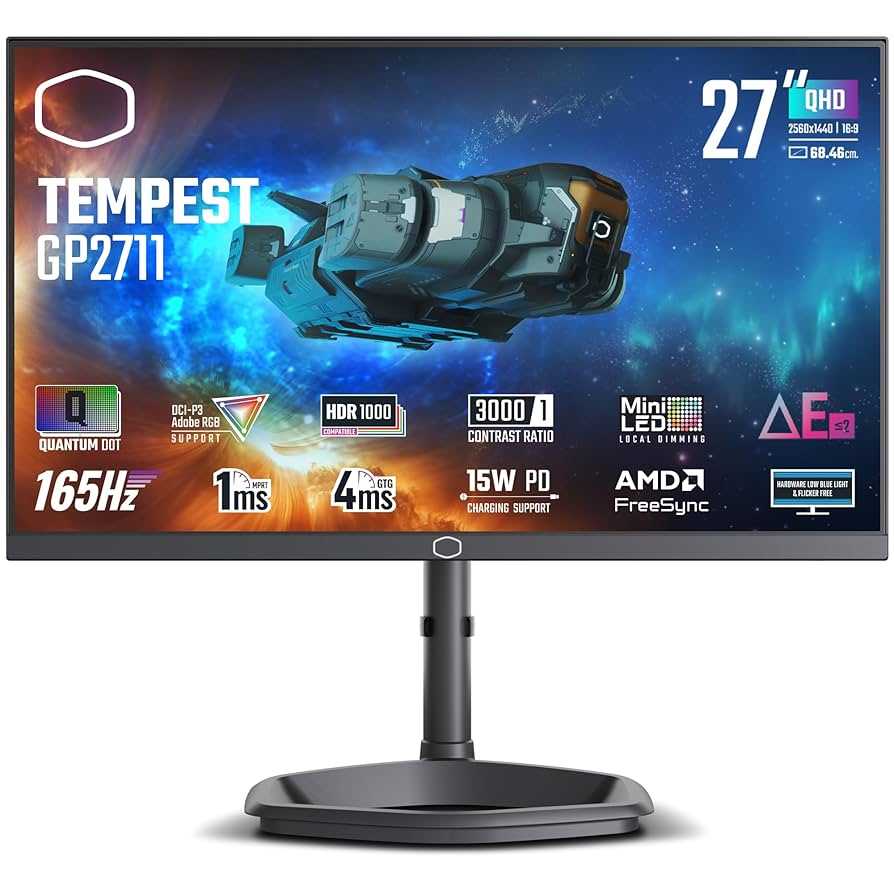
Yes, many mini LED monitors do support FreeSync, making them a fantastic choice for gamers and professionals looking for smooth, tear-free visuals. These monitors leverage adaptive sync technology to enhance your gaming and multimedia experience, offering fluid motion and reduced input lag. Whether you’re into fast-paced gaming or detailed creative work, mini LED monitors with FreeSync can deliver superior performance by synchronizing the display’s refresh rate with your graphics card.
In short, if you’re wondering whether mini LED monitors support FreeSync, the answer is generally yes—many models do. However, it’s essential to check the specifications before purchasing, as support varies between brands and models. This combination of mini LED technology and adaptive sync offers a compelling upgrade for those seeking enhanced visual quality and smoother gameplay.
Mini LED monitors have become increasingly popular thanks to their impressive brightness, contrast, and color accuracy, making them highly sought-after for both gaming and professional work. But as more options flood the market, consumers often ask: do mini LED monitors support FreeSync? The good news is that a significant number of these monitors do include FreeSync support, allowing for dynamic refresh rate adjustment that eliminates screen tearing. This integration results in a more immersive and fluid visual experience without sacrificing the benefits of the cutting-edge mini LED backlighting. Whether you’re a gamer craving seamless gameplay or a content creator needing precise visuals, understanding the compatibility between mini LED technology and FreeSync can help you make a smarter purchase decision.

Do Mini LED Monitors Support FreeSync?
Mini LED monitors are gaining popularity for their impressive display quality and lighting capabilities. Many gamers and content creators ask whether these advanced screens support FreeSync, a technology that enhances gaming and video playback. Understanding if mini LED monitors support FreeSync involves exploring the technology behind both and how they work together. This article will delve into the details of mini LED displays, FreeSync compatibility, and what you need to consider when choosing a monitor.
What Are Mini LED Monitors?
Mini LED monitors feature a new type of backlighting that uses thousands of tiny LEDs. These LEDs are much smaller than traditional LED backlights, allowing for more precise control of brightness and contrast. This results in deeper blacks, brighter highlights, and a more dynamic picture overall.
The increased number of LEDs enables local dimming zones to be smaller and more numerous. This means the monitor can dim specific areas of the screen independently, reducing blooming effects and improving image quality. Mini LED technology is often found in high-end displays used for gaming, professional editing, and cinematic viewing.
Understanding FreeSync Technology
FreeSync is a variable refresh rate technology developed by AMD that helps eliminate screen tearing and stuttering during gameplay. It synchronizes the monitor’s refresh rate with the frame rate of the graphics card, creating smoother motion. FreeSync works best when the monitor and graphics card support the same version of the technology.
There are multiple versions of FreeSync, including FreeSync, FreeSync Premium, and FreeSync Premium Pro. Each offers different levels of performance, with FreeSync Premium and Pro providing lower latency and additional features like HDR support. It’s crucial to verify if a monitor’s FreeSync support aligns with your graphics card capabilities.
Do Mini LED Monitors Support FreeSync?
Many mini LED monitors do support FreeSync technology, but support varies based on the specific model. Manufacturers often incorporate FreeSync to enhance gaming experiences, especially in high-end displays. When shopping for a mini LED monitor, check the specifications for FreeSync compatibility to ensure it supports your desired features.
In general, most recent mini LED gaming monitors from popular brands include FreeSync support, often along with other adaptive sync technologies like G-Sync compatibility. However, not all mini LED displays are gaming-oriented; some focus primarily on color accuracy and HDR performance without supporting FreeSync.
Factors Affecting FreeSync Support in Mini LED Monitors
Panel Type and Design
The panel type influences whether FreeSync is supported. IPS panels, known for color accuracy, frequently include FreeSync support, but it’s less common in VA panels. The panel’s design dictates the compatibility and efficiency of adaptive sync features.
Manufacturer and Model
Brand reputation plays a role in FreeSync implementation. Top manufacturers like ASUS, Dell, LG, and Samsung tend to include FreeSync support in their mini LED gaming monitors. Always review technical specs before purchasing.
Firmware and Software Updates
Firmware updates can add or improve FreeSync support on existing monitors. Checking for updates and ensuring your monitor’s firmware is current can enhance compatibility and performance.
Benefits of Using FreeSync with Mini LED Monitors
- Reduced Screen Tearing: FreeSync synchronizes frame rate and refresh rate, preventing tearing artifacts during fast motion.
- Smoother Gameplay: Gamers experiencing less stuttering and judder enjoy more immersive experiences.
- Lower Input Lag: FreeSync often reduces input delay, making controls more responsive.
- Enhanced HDR Performance: When combined with HDR support, FreeSync can improve color and contrast consistency during gaming.
Compatibility Between FreeSync and Other Technologies
G-Sync Compatibility
Although FreeSync is an AMD technology, some mini LED monitors also support Nvidia’s G-Sync via adaptive sync protocols. This feature allows users with Nvidia graphics cards to benefit from similar motion smoothness. However, G-Sync support is not universal, and compatibility varies by monitor.
HDR Support and FreeSync
High Dynamic Range enhances the visual experience, especially in mini LED displays with local dimming zones. Many FreeSync-compatible monitors also support HDR, further improving image quality during gaming and media consumption.
How to Confirm FreeSync Support in a Mini LED Monitor
Always verify the monitor’s specifications on the manufacturer’s website or retail listings. Look for phrases like “FreeSync compatible” or “support for AMD FreeSync.” Additionally, user reviews and professional tests can confirm real-world performance.
It’s also useful to check whether the monitor supports FreeSync Premium or FreeSync Premium Pro, which offer improved features like lower latency and better HDR performance. Compatibility with your graphics card setup is essential to enjoy the full benefits.
Practical Tips When Choosing a Mini LED Monitor with FreeSync
- Check the refresh rate: Aim for at least 120Hz for smooth gaming performance.
- Assess HDR capabilities: For best visual quality, choose a monitor with HDR support and local dimming zones.
- Verify compatibility: Confirm that your graphics card supports FreeSync or G-Sync, depending on your system.
- Review user feedback: Read reviews to understand real-world performance and potential issues.
Related Topics to Explore
- Mini LED vs. OLED Displays
- Best gaming monitors with FreeSync support
- Impact of refresh rates on gaming and video editing
- Choosing between G-Sync and FreeSync technology
Summary
In conclusion, most mini LED monitors do support FreeSync, especially those designed with gaming in mind. These monitors leverage the technology to deliver smooth, tear-free gameplay and better visual harmony. However, support availability depends on the brand, model, and intended use, so always verify specifications before purchasing. Considering the interplay of features like HDR, refresh rate, and adaptive sync ensures you select a monitor that delivers an optimal viewing experience.
Using Nvidia G-SYNC on AMD Freesync Monitors – Tutorial
Frequently Asked Questions
Are all mini LED monitors compatible with FreeSync technology?
Not all mini LED monitors support FreeSync. Compatibility depends on the specific model and its hardware specifications. Many newer mini LED monitors are designed to include FreeSync support to enhance gaming experiences, but it’s important to check the manufacturer’s details to confirm support for this adaptive sync technology.
Can I enable FreeSync on a mini LED monitor that doesn’t explicitly list it in the specifications?
If a mini LED monitor does not explicitly mention FreeSync support, it likely doesn’t support the technology. While some monitors may have the hardware to support adaptive sync, they might not enable it through firmware or firmware updates. Always verify the specifications or contact the manufacturer to be sure about FreeSync support before making a purchase.
Do mini LED monitors with FreeSync support work well with both AMD and NVIDIA graphics cards?
Mini LED monitors with FreeSync are primarily optimized for AMD graphics cards, but some also support NVIDIA’s G-SYNC Compatible mode. To ensure optimal performance, check whether the monitor is labeled as compatible with both AMD FreeSync and NVIDIA G-SYNC. Compatibility varies among models, so reviewing the manufacturer’s specifications helps confirm support for your graphics setup.
What benefits does FreeSync provide when used with mini LED monitors?
Using FreeSync with a mini LED monitor reduces screen tearing, stuttering, and input lag during fast-paced gaming. It enables smoother gameplay and improves visual consistency by synchronizing the monitor’s refresh rate with the graphics card’s frame rate, providing a more enjoyable and responsive gaming experience.
Is it necessary to enable FreeSync in the monitor settings when using a mini LED display?
Yes, enabling FreeSync through the monitor’s on-screen display menu or your graphics card settings is essential to utilize its benefits. Often, you need to activate FreeSync manually, and some monitors may require specific connection types like DisplayPort or HDMI to support adaptive sync features effectively. Always consult the user manual for proper setup instructions.
Final Thoughts
Mini LED monitors often support FreeSync, but compatibility varies by model. Many modern monitors include FreeSync to reduce screen tearing, providing smoother gameplay. Always check the specifications to confirm if a specific Mini LED monitor supports FreeSync. In conclusion, do mini led monitors support freesync? Yes, many do, making them suitable for gamers seeking enhanced visual performance.



