


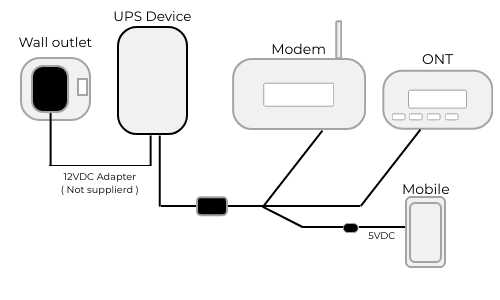
To connect your router to an uninterruptible power supply (UPS), simply plug your router into the UPS outlet, ensuring it’s capable of handling the router’s power requirements. Use a surge protector if needed, and verify that the UPS has enough capacity to support your devices during outages. This simple setup keeps your internet alive during power cuts, ensuring seamless connectivity.
Connecting your router to a UPS is straightforward and can be a game-changer during unexpected power failures. By plugging your router directly into the UPS, you ensure continuous internet access, whether you’re working from home or just staying connected. This setup protects your network equipment from power surges and provides peace of mind knowing your connection remains stable even during storms or outages, so you can stay online without interruptions. Now, let’s walk through how to do it easily and effectively.

How to Connect Router to UPS
Connecting your router to an uninterruptible power supply (UPS) is a smart move to keep your internet connection running during power outages. It helps prevent interruptions, especially if you work or study online. This guide will walk you through each step with clear instructions and tips.
Understanding the Benefits of Connecting Your Router to a UPS
A UPS provides backup power to your devices during blackouts, ensuring your internet stays active. It also protects against power surges that can damage your router. Connecting your router to a UPS gives you peace of mind and maintains connectivity when the power goes out.
Choosing the Right UPS for Your Router
Picking a suitable UPS depends on your router’s power needs and usage duration. Look for a model with enough wattage to support your router and any other connected devices. Here are key factors to consider:
- Power Capacity: Ensure the UPS supplies sufficient wattage or VA (volt-amps). For a standard router, a UPS with at least 300 VA is recommended.
- Battery Runtime: Determine how long you want the UPS to power your router during outages. Usually, 10 to 30 minutes is sufficient for most needs.
- Number of Outlets: Select a UPS with enough outlets for your router and other essential devices.
- Type of UPS: There are offline, line-interactive, and online UPS types. For home networking, line-interactive UPS models are generally the best balance of price and power quality.
Preparing Your Setup Before Connecting
Gather all necessary equipment before starting. This includes your router, UPS, power cords, and possibly surge protectors. Verify that your UPS is fully charged if it’s new or recently unplugged.
Step-by-Step Guide to Connecting Router to UPS
Step 1: Turn Off Your Router and Other Devices
Before making any connections, power down your router and any connected devices. This prevents electrical surges and ensures a safer setup.
Step 2: Connect Your Router to the UPS
Use the power cord that came with your router. Plug one end into your router’s power port and the other into an available outlet on the UPS. Make sure the plug is secure.
Step 3: Power On the UPS
Turn on the UPS and wait for it to initialize. Many models have indicator lights showing battery status and load capacity. Confirm that it’s ready to supply power.
Step 4: Power On Your Router
Once the UPS is active, turn on your router. It should now draw power from the UPS, providing backup in case of outages. Check that the router’s power indicator lights are on and stable.
Additional Tips for Successful Connection
- Avoid Overloading: Do not connect too many devices to the UPS. Each device adds to the load, reducing backup runtime.
- Use Surge Protectors with UPS: Some UPS units include surge protection. If not, consider adding a surge protector for extra safety.
- Regular Testing: Periodically unplug the UPS to check if it still provides backup power. Replace batteries as needed for optimal performance.
- Proper Placement: Keep the UPS in a cool, dry location away from direct sunlight or moisture to extend its lifespan.
Understanding Power Consumption and Runtime
It’s important to know how long your UPS can keep your router running during power cuts. This depends on your router’s power draw and the UPS’s battery capacity. You can estimate the backup time with a simple calculation.
| Device Power Consumption (Watts) | UPS Battery Capacity (VA) | Estimated Runtime (Minutes) |
|---|---|---|
| 10 | 300 VA | Approximately 10-15 minutes |
| 15 | 600 VA | Approximately 20-30 minutes |
Remember, actual times may vary based on the age of the battery and connected load.
Maintaining Your UPS and Router Connection
Regular maintenance helps ensure your setup works when needed. Keep the UPS battery charged, clean dust from vents, and replace batteries according to manufacturer recommendations.
Battery Replacement Tips
Most UPS batteries need replacement approximately every 3 to 5 years. Check for signs of poor performance, such as a shorter backup time or warning lights. Always use compatible batteries recommended by the manufacturer.
Safe Handling and Storage
When not in use, disconnect the UPS from the main power supply. Store it in a cool, dry place. Avoid exposing it to extreme temperatures or humidity.
Enhancing Your Network’s Reliability
Connecting your router to a UPS is one part of maintaining a stable network. Consider protecting your entire home network with a surge protector, especially in areas prone to electrical storms. Use high-quality cables and regularly update router firmware for better performance.
Related Topics: Extending Battery Backup and Power Management
- Using Power Strips Wisely: Not all power strips are suitable for UPS connections. Use a UPS-compatible surge protector if necessary.
- Implementing Network Redundancy: For critical setups, consider adding a secondary internet connection or a more advanced UPS system.
- Smart Power Management: Explore UPS models with monitoring software to track power status and battery health remotely.
Connecting your router to a UPS is straightforward once you understand the basics. It’s a simple step that can keep your internet running smoothly and protect your devices from power damage. Proper selection, setup, and maintenance of your UPS will ensure reliable backup power whenever needed.
how to plug the router into the ups
Frequently Asked Questions
What are the steps to connect a router to an Uninterruptible Power Supply (UPS) properly?
Start by turning off the router and unplugging it from the power outlet. Connect the router’s power adapter to the UPS’s power output socket. Then, plug the UPS into a grounded wall outlet. Turn on the UPS first, then power on the router. Ensure that the UPS has enough battery capacity to support the router during power outages for consistent connectivity.
How do I ensure my router remains operational during power outages when connected to a UPS?
Choose a UPS with sufficient capacity to handle your router’s power consumption and estimated runtime during outages. Keep the UPS fully charged and consider setting up an automatic shutdown process for your network devices after a certain battery threshold. Regularly test the UPS to verify it provides backup power effectively when needed.
Can I connect multiple devices to the UPS along with my router, and how should I do it?
Yes, you can connect multiple devices, including your router, modems, and other essential electronics, to the same UPS. Use the UPS’s multiple outlets, ensuring they are compatible with your devices’ plugs. Prioritize connecting critical items like your router and modem to outlets with backup power, and avoid overloading the UPS by exceeding its maximum capacity.
What precautions should I take when connecting a router to a UPS for safety and performance?
Use a surge-protected outlet and ensure your UPS is properly grounded to prevent electrical surges. Avoid connecting high-power appliances to the same UPS to prevent overload. Keep the UPS in a well-ventilated area to avoid overheating. Regularly check the UPS’s battery health and replace it as recommended by the manufacturer to maintain reliable backup power.
Final Thoughts
To connect your router to UPS, start by turning off both devices. Plug your router directly into the UPS outlet to ensure it receives backup power during outages. Confirm the connection is secure, then turn on the UPS before powering up the router.
Proper connection helps protect your network from power fluctuations and outages. Remember, how to connect router to ups is straightforward with a direct plug-in. A stable power supply keeps your internet running smoothly without interruptions.



