


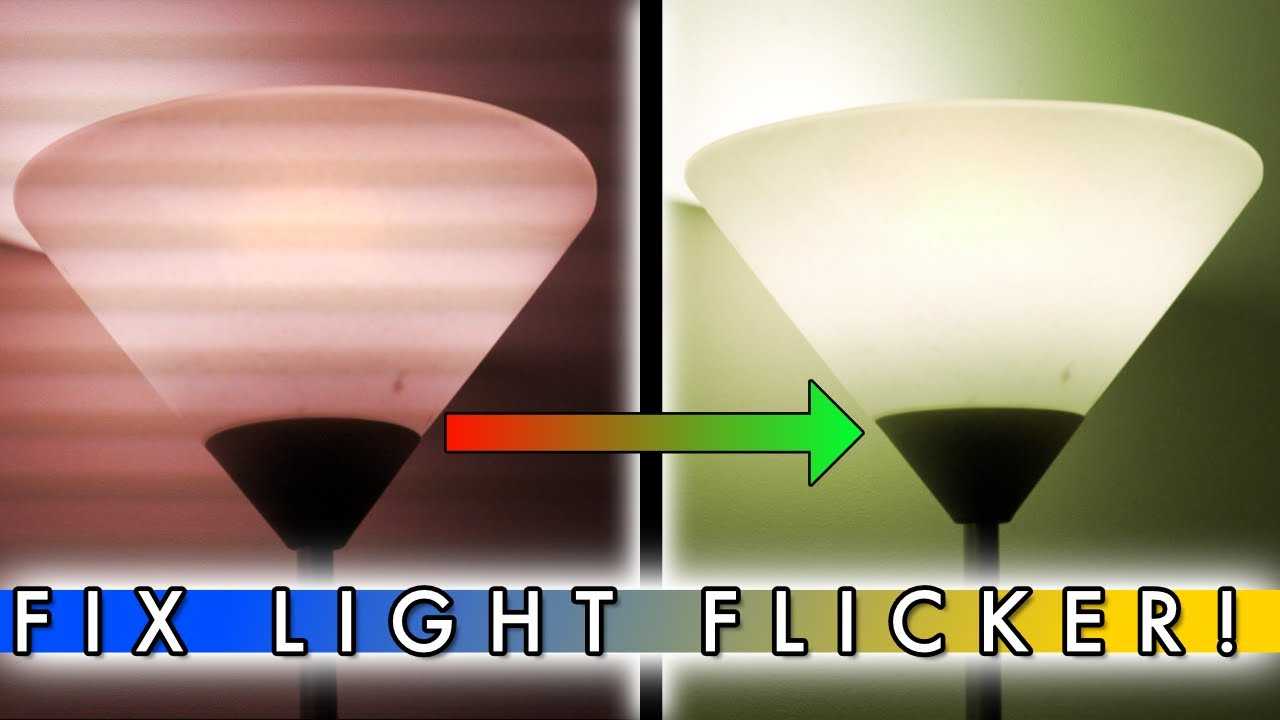
Quick fix: Try adjusting your webcam’s refresh rate, use flicker-free or anti-flicker settings, or switch to non-LED lighting to eliminate flickering. These simple tweaks can dramatically improve your video quality instantly.
Webcam flickering under LED lights can be frustrating, especially if you rely on clear video for meetings or streaming. The flicker often happens because LED lights operate on a different electrical frequency than your webcam expects, causing it to capture inconsistent light levels. Fortunately, fixing this issue is usually straightforward. Adjusting your webcam’s settings, such as enabling anti-flicker mode, changing the refresh rate, or switching to natural or incandescent lighting, can often solve the problem. By understanding the cause and applying these easy solutions, you can enjoy smooth, flicker-free video even under modern LED lighting. So, no more distracting flickering — just crisp, clear visuals!

How to Fix Webcam Flickering Under LED Lights
Understanding Why Your Webcam Flickers Under LED Lights
Identify if Flickering is Caused by Lighting or Camera Settings
Adjust Your Webcam Settings for Better Compatibility
- Exposure: Set it to manual and adjust until flickering decreases.
- Frame Rate: Lowering the frame rate can help the camera better adapt to flickering lights.
- White Balance: Set this to manual to prevent automatic adjustments that cause flickering.
Use External Lighting to Minimize Flickering
Tips for Effective Lighting Setup
- Place lights at a 45-degree angle on either side of your face for even illumination.
- Use diffusers or softboxes to spread the light evenly and prevent harsh shadows.
- Adjust brightness gradually to match your room’s lighting levels.
Switching to Different Types of Lights
Options for Non-Flickering Lighting
- Incandescent bulbs: These generate continuous light without flickering but are less energy-efficient.
- Halogen bulbs: Provide steady illumination similar to incandescent lights.
- Flicker-free LED bulbs: Use advanced technology to eliminate flickering at the source.
Use Camera Software to Reduce Flicker
Optimize Power Supply and Electrical Setup
Additional Tips for Stable Video Quality
- Keep your webcam and lighting equipment away from other electronic devices that may cause interference.
- Use grounded outlets for your setup to minimize electrical noise.
- Avoid using multiple power strips or extension cords that may lead to unstable power delivery.
Regular Maintenance and Updates
Summary of Key Solutions
| Solution | Description |
|---|---|
| Adjust Camera Settings | Manually set exposure, frame rate, and white balance to improve synchronization with lighting. |
| Improve Lighting Setup | Use diffused, flicker-free lights and position them correctly for even illumination. |
| Switch Light Types | Choose flicker-free bulbs like incandescent, halogen, or specialized LED options. |
| Use Software Features | Enable anti-flicker options in webcam or video conferencing software. |
| Ensure Stable Power | Use surge protectors and minimize electrical interference for consistent lighting and camera operation. |
| Keep Software Updated | Update camera drivers and firmware for optimal performance and reduced flickering. |
Related Topics You Might Find Useful
- Best webcams for streaming: Choosing cameras with built-in flicker reduction features.
- How to set up professional lighting at home: Creating ideal conditions for clear video quality.
- Electrical safety tips for home studio setups: Ensuring a safe and reliable power supply.
- Top LED lights for video recording: Features of flicker-free LED lighting options.
WebCam Flickering Issue Fixed
Frequently Asked Questions
What settings can I adjust on my webcam to reduce flickering caused by LED lights?
Adjust the exposure and white balance settings on your webcam to minimize flickering. Lowering the exposure can prevent over-saturation caused by LED lighting, while setting the white balance manually helps stabilize color consistency. Access your webcam’s settings through the camera software or device manager to make these changes.
How does changing the power supply or electrical setup affect webcam flickering under LED lights?
Using a stable power supply and ensuring proper grounding can significantly reduce flickering. Fluctuations in electrical current often cause LEDs to flicker, which is captured by the webcam. Consider plugging your webcam and LED lights into the same power outlet or using surge protectors to maintain consistent power flow.
Can switching to different LED lights help prevent webcam flickering?
Yes, switching to high-quality LED lights with flicker-free technology can eliminate or greatly reduce flickering issues. Look for LEDs labeled as “flicker-free” or “constant current” to ensure stable illumination that the webcam can handle without flickering artifacts.
What role does camera refresh rate play in flickering issues under LED lighting?
The refresh rate of your webcam interacts with the flickering frequency of LED lights. If your webcam’s frame rate aligns with the flickering frequency, flickering becomes more noticeable. Adjusting your camera’s frame rate or using software that can sync with flickering frequencies can help mitigate this problem.
Are there any software solutions that can help stabilize webcam footage under flickering LED lights?
Yes, some webcam software includes anti-flicker or flicker reduction features. These tools analyze and compensate for flickering, resulting in a steadier image. Make sure to enable or configure these options within your webcam or video conferencing software to improve video quality under LED lighting conditions.
Final Thoughts
Pour résoudre le problème de webcam qui clignote sous des lumières LED, commencez par ajuster la fréquence de synchronisation de votre webcam dans les paramètres de votre logiciel. Essayer de désactiver la réduction de bruit peut aussi réduire le scintillement. Vérifiez si votre éclairage LED peut être modifié ou si vous pouvez utiliser des ampoules à lumière constante. En suivant ces conseils, vous pouvez corriger efficacement le flickering de votre webcam sous LED lights.
Conclure en disant que savoir comment fixer le flickering de la webcam sous des lumières LED est essentiel pour une qualité vidéo optimale.



