


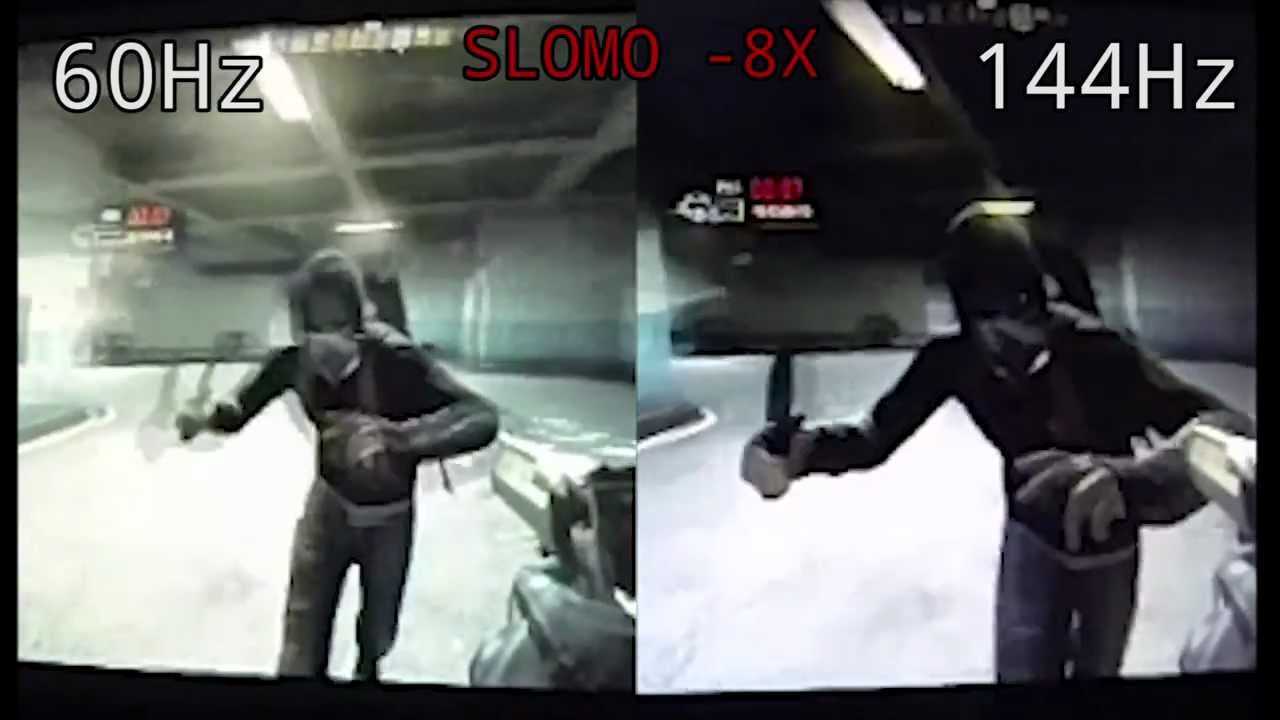
Yes, a 144Hz monitor is excellent for gaming. It offers smoother gameplay and reduces motion blur, giving you a competitive edge and a more immersive experience.
A 144Hz monitor is highly regarded among gamers because of its ability to deliver fluid visuals and minimize lag. If you’re into fast-paced games like shooters or racing titles, upgrading to a 144Hz display can significantly improve your reaction time and overall gaming performance. While it might require a capable graphics card to fully take advantage of the high refresh rate, most gamers find the investment worthwhile due to the noticeable difference in gameplay quality.
Jumping into gaming with a high-refresh-rate monitor can transform your experience, making every movement more responsive and visually stunning. Whether you’re a casual gamer seeking better visuals or a competitive player aiming for an edge, a 144Hz monitor is a smart choice to elevate your gaming setup.

Is 144Hz Monitor Good for Gaming?
Understanding Refresh Rates and Their Impact on Gaming
A refresh rate indicates how many times a monitor updates its image each second. A higher refresh rate makes movements appear smoother and more natural. For gamers, this can significantly improve the overall experience, especially during fast-paced action.
A 144Hz monitor refreshes the image 144 times per second. This is much faster than standard monitors, which usually run at 60Hz. The increased refresh rate can reduce motion blur and make quick movements clearer.
People often ask if a 144Hz monitor is really worth it for gaming. The answer depends on the types of games you play and your gaming setup. But generally, 144Hz monitors provide a noticeable advantage over lower refresh rates.
Why 144Hz Is Considered Ideal for Gaming
Many gamers consider 144Hz as the sweet spot for gaming. It offers a good balance between performance and affordability. This refresh rate allows for smooth gameplay without requiring super-expensive hardware.
Fast-paced competitive games like first-person shooters and racing games benefit greatly from 144Hz. These games rely on quick reflexes, and a smooth display helps players react faster.
In addition, 144Hz monitors can reduce eye strain during long gaming sessions. The smoother motion leads to less flickering and helps prevent headaches and fatigue.
Comparison of 144Hz and Other Refresh Rates
| Refresh Rate | Smoothness | Gaming Benefits | Hardware Requirements |
|---|---|---|---|
| 60Hz | Moderate | Basic gaming | Lower graphics power needed |
| 75Hz | Slightly smoother | Better experience for casual gaming | Minimal extra hardware |
| 120Hz | More fluid | Improved gameplay for fast games | Higher-end graphics card |
| 144Hz | Very smooth | Optimal for competitive gaming | Powerful GPU recommended |
As shown in the table, 144Hz strikes a good balance, offering smoother visuals than 60Hz or 75Hz without demanding the high-end hardware of 240Hz or 240Hz+ monitors.
Hardware and Software Considerations for 144Hz Gaming
To get the most out of a 144Hz monitor, your computer needs to have a suitable graphics card. Graphics cards like Nvidia GeForce GTX 1660 or higher and AMD Radeon RX 5600 XT or better can handle 144Hz at high settings.
It’s also important that your system can deliver enough frames per second (FPS). For optimal experience, aim for at least 120FPS. This ensures the monitor displays close to its full potential without tearing or lag.
Some games may require you to enable V-Sync or G-Sync. These features sync your GPU’s frame rate with the monitor’s refresh rate, reducing screen tearing and stuttering during gameplay.
Advantages of a 144Hz Monitor for Gaming
- Smoother motion: Faster updates lead to fluid visuals, especially during rapid movements.
- Reduced motion blur: Clearer images make fast actions easier to see.
- Better response times: Quicker reactions are possible, giving players a competitive edge.
- Lower input lag: Less delay between your input and on-screen action improves gameplay accuracy.
- Enhanced visual experience: Overall immersion increases when gameplay looks more lifelike.
These benefits make 144Hz ideal for games that demand quick reflexes and precision.
Limitations and Downsides of 144Hz Monitors
While 144Hz offers many advantages, it also has some drawbacks. One major consideration is the hardware requirement. To fully utilize 144Hz, a powerful GPU is necessary; otherwise, you may not see much difference.
Additionally, some older games or less optimized software might not reach high frame rates, limiting the benefits of the high refresh rate. The slight increase in cost compared to 60Hz monitors is another factor to consider.
Another issue can be screen tearing if the frame rate exceeds the refresh rate and V-Sync is off. Using adaptive sync technologies like G-Sync or FreeSync can help mitigate this.
Best Types of Games for 144Hz Monitors
Fast-paced games are the perfect match for 144Hz monitors. These include:
- First-person shooters (for example, Call of Duty, Battlefield, Apex Legends)
- Battle royale games with quick movements
- Fast racing games like Forza Horizon or F1
- Action-adventure titles with rapid scene changes
- Multiplayer online games requiring fast reactions
While slower games like RPGs or turn-based strategy games benefit less from higher refresh rates, they still look better with smoother visuals.
Choosing the Right 144Hz Monitor
When selecting a 144Hz gaming monitor, consider factors like size, resolution, and response time. A larger screen, such as 27 inches or more, enhances immersion, but may require a more powerful GPU.
Resolution choices range from Full HD (1080p) to 1440p (QHD) or 4K. While 1080p is common for 144Hz, higher resolutions offer sharper images but demand more graphics power.
Response time, measured in milliseconds, indicates how quickly pixels change. A lower response time (1-3ms) leads to less motion blur and ghosting.
Additional features to look for include:
- G-Sync or FreeSync support for smoother gameplay
- Excellent color accuracy for vibrant visuals
- Adjustable stands for ergonomic comfort
- Multiple input options, including HDMI and DisplayPort
Choosing the right combination of these features will ensure a satisfying gaming experience.
Is a 144Hz Monitor Worth the Investment?
For gamers who prioritize competitive play and fast action, a 144Hz monitor is a worthwhile upgrade. It offers noticeable improvements in motion clarity and responsiveness.
Even casual gamers can benefit from the smoother visuals, making gameplay more enjoyable. However, ensure your PC hardware can handle the increased demands to make full use of this technology.
Remember, pairing a 144Hz monitor with a capable GPU and a fast processor maximizes benefits. It’s a worthwhile investment for those seeking a better gaming experience.
Related Topics for Better Gaming Experiences
Apart from refresh rates, consider exploring topics like:
- G-Sync vs FreeSync
- Best gaming graphics cards for 144Hz monitors
- How to optimize your PC for high frame rates
- The importance of response time and input lag
- Choosing between ultrawide and standard aspect ratios
These aspects help create a complete gaming setup tailored to your preferences.
Final Thoughts on 144Hz Monitors for Gaming
A 144Hz monitor provides a clear advantage for fast-moving games, making gameplay smoother and more responsive. It helps players react quicker, especially in competitive environments. If your hardware supports it, investing in a 144Hz monitor can significantly enhance your gaming experience and enjoyment.
Best Monitor Type for Gaming?
Frequently Asked Questions
How does a 144Hz monitor impact gaming performance?
A 144Hz monitor provides higher refresh rates than standard monitors, allowing smoother motion and quicker response times. This leads to more fluid gameplay, especially in fast-paced games where timing and precision are crucial. As a result, players can react faster and enjoy a more immersive gaming experience.
Is a 144Hz monitor suitable for competitive gaming?
Yes, a 144Hz monitor is well-suited for competitive gaming. Its higher refresh rate offers a competitive edge by reducing motion blur and input lag. This allows gamers to see quick movements more clearly and react promptly, which is vital in genres like first-person shooters and real-time strategy games.
Can a 144Hz monitor handle graphically demanding games?
Does the benefit of 144Hz decrease with lower-end hardware?
If your hardware struggles to produce frame rates above 60fps, the advantages of a 144Hz monitor may not be fully realized. To experience the benefits of higher refresh rates, your system should be capable of generating consistently high frame rates. Otherwise, you might not notice significant improvements over standard monitors.
Is it worth upgrading to a 144Hz monitor from a standard 60Hz display?
Upgrading from a 60Hz to a 144Hz monitor can significantly enhance your gaming experience by providing smoother visuals and more responsive gameplay. If you play fast-paced or competitive games, this upgrade offers tangible benefits. However, ensure your hardware can support higher frame rates to make the most of this improvement.
Final Thoughts
A 144Hz monitor offers smoother gameplay and reduces motion blur, making it ideal for fast-paced games. Gamers enjoy quicker reflexes and improved visual clarity, enhancing overall experience.
Considering these benefits, a 144Hz monitor is good for gaming, especially for competitive players. It provides a noticeable edge over standard monitors, making gameplay more responsive.
In summary, if you seek improved gaming performance, a 144Hz monitor is good for gaming. It delivers enhanced responsiveness and fluid visuals, ensuring an enjoyable gaming session.



