


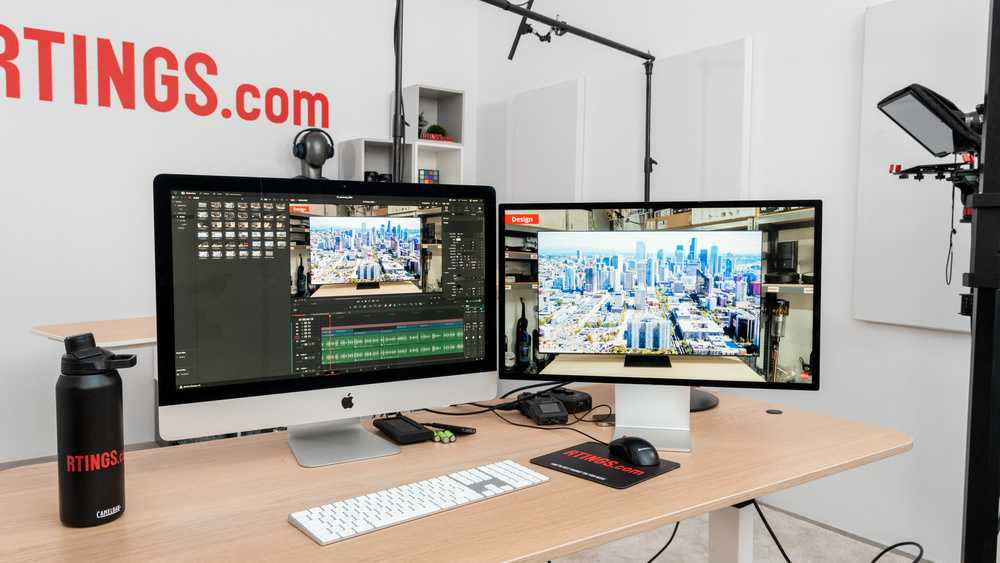
A 32-inch monitor can be an excellent choice for video editing, offering a spacious workspace and sharp visuals that help you see every detail clearly. However, whether it’s perfect depends on your workflow, desk space, and personal preferences. For many editors, a 32-inch screen strikes a balance between immersive viewing and manageable size, making it easier to spot color nuances, fine lines, and intricate edits without feeling overwhelmed. If you have sufficient desk room and want a monitor that enhances your productivity with an expansive display, a 32-inch model could be ideal. But if you prefer a more compact setup or work in tight spaces, smaller screens might be more practical. Ultimately, it’s about matching your needs with the monitor’s features to create the perfect editing environment.
Yes, a 32-inch monitor can be a great fit for editing videos, providing ample screen real estate and clarity, but it’s important to consider your workspace and workflow preferences. This size offers enough room for multiple windows and detailed work, making editing more comfortable and efficient, especially with high-resolution displays. If you’re looking to elevate your editing experience with a larger, immersive screen, a 32-inch monitor could be an excellent investment, but ensure your desk can accommodate it comfortably.

Is 32 Inch Monitor Ideal for Editing Videos
Understanding the Size and Its Impact on Video Editing
A 32 inch monitor offers a large viewing area, which many video editors find helpful for detailed work. The bigger screen allows more space to see timelines, toolbars, and preview windows at once. This size can improve workflow by reducing the need to toggle between multiple screens or windows.
However, a larger monitor also requires more desk space and might feel overwhelming in a small workspace. For editing, a display in this size can be a real advantage when handling complex projects or multitasking. The wide viewing area enables a clearer view of intricate details and fine editing nuances.
Resolution Matters for 32 Inch Monitors
The resolution significantly impacts how a 32 inch monitor performs for video editing. Common options include Full HD (1080p), Quad HD (1440p), and 4K (2160p). For editing videos, higher resolutions like 4K are preferred, offering sharper images and more detailed visuals.
A 32 inch monitor with 4K resolution provides crisp images, making color grading, retouching, and fine editing more accurate. Lower resolutions on such a large screen lead to pixelation or less detail, which can hinder precision. Always select a monitor with at least 2560×1440 pixels if 4K isn’t available, but 4K is ideal for the best clarity.
Color Accuracy and Its Role in Video Editing
Accurate color representation is crucial for editing videos, especially for projects involving color grading or professional production. Look for monitors with high color gamut coverage like Adobe RGB or DCI-P3. This ensures the colors you see are true to life and match what viewers will see on other screens or screens meant for professional display.
A 32 inch monitor with factory calibration provides better color consistency out of the box. Consider models that support hardware calibration tools to fine-tune color accuracy further. A monitor with wide viewing angles also prevents color distortion when viewing from different positions.
Panel Types and Their Suitability for Video Editing
Different panel technologies affect how a monitor displays images. IPS panels are generally preferred for video editing because they offer superior color accuracy and wider viewing angles. TN panels, while faster, tend to compromise on color consistency, making them less ideal for editing work.
VA panels provide good contrast ratios and deep blacks, which can be advantageous for editing scenes with high contrast and dark areas. When choosing a 32 inch monitor for editing, prioritize IPS panels for optimal image quality and color fidelity.
Refresh Rate and Its Importance in Video Editing
While refresh rate is often associated with gaming, it also influences video editing, especially when working with high frame rate footage. A refresh rate of 60Hz is standard and sufficient for most editing tasks.
Higher refresh rates, like 120Hz or 144Hz, can provide smoother previews during playback and editing, especially with fast-moving scenes. However, these are less critical than resolution and color accuracy for editing purposes.
Connectivity and Compatibility
A 32 inch monitor with versatile connectivity options makes editing easier. Look for models with HDMI, DisplayPort, and USB-C ports for compatibility with various computers and laptops. This ensures quick setup without the need for adapters or converters.
Some monitors include built-in USB hubs, which allow connecting peripherals like external drives, thumb drives, or drawing tablets. Compatibility with editing software and hardware accelerators also enhances workflow efficiency.
Ergonomics and Viewing Comfort
Extended editing sessions can lead to eye strain or discomfort if the monitor isn’t ergonomically designed. Choose a model with adjustable height, tilt, swivel, and VESA mount compatibility. This lets you position the monitor for maximum comfort and minimizes fatigue.
Anti-glare coatings on the screen improve visibility in well-lit environments. Proper lighting and the ability to customize brightness and contrast help reduce eye strain during long editing sessions.
Price Range and Value for Money
High-quality 32 inch monitors with 4K resolution and accurate color support tend to be more expensive. Budget options may offer adequate resolution but lack color precision or ergonomic features.
Investing in a slightly pricier model can provide better display quality, durability, and features tailored for video editing. Consider what features are most important for your workflow to determine the best value.
Popular 32 Inch Monitors for Video Editing
Some models stand out for their combination of size, resolution, and color accuracy. For example:
- LG UltraFine 32UN880: Offers 4K resolution, good color coverage, and ergonomic design.
- Dell UltraSharp U3223QE: Features wide color gamut, excellent connectivity, and factory calibration.
- BenQ PD3220U: Designed for creative professionals with 4K resolution, accurate colors, and multiple ergonomic options.
Evaluating reviews and specs can help find a monitor that fits your editing needs and budget.
Impacts on Workflow and Productivity
A 32 inch monitor can streamline editing by providing more screen real estate. You can have the timeline, media preview, and editing tools open simultaneously without clutter. This setup minimizes switching between windows and enhances focus.
Moreover, the larger screen size can reduce eye strain by allowing you to work comfortably without squinting or constantly zooming in. This can lead to more efficient editing and faster project turnaround times.
Summary of Pros and Cons
- Pros:
- Large viewing area for multitasking
- Enhanced detail view for precise editing
- Better color accuracy with the right panel
- Cons:
- Requires significant desk space
- Potentially higher cost
- Can be overwhelming if workspace is small
Understanding these benefits and limitations helps you decide if a 32 inch monitor suits your editing workflow.
Final Thoughts on Using a 32 Inch Monitor for Video Editing
While a 32 inch monitor can be an excellent choice for editing videos, it depends on your workspace and specific needs. If you prioritize a large screen, high resolution, and accurate colors, this size can greatly improve your editing experience.
However, ensure your computer hardware can support the resolution and display features. Also, consider your comfort and ergonomics to work efficiently over long periods. Ultimately, choosing the right monitor size and features will make your editing smoother and more enjoyable.
The Ultimate Monitor Buying Guide for Video Editors!
Frequently Asked Questions
Does a 32-inch monitor provide enough detail for video editing tasks?
A 32-inch monitor offers a large display area that makes it easier to view intricate details in videos. The increased screen real estate allows editors to see finer elements clearly, reducing eye strain and improving precision during editing. However, the display resolution plays a significant role; a 4K resolution on a 32-inch screen will deliver sharper images, enhancing editing accuracy.
Is a 32-inch screen suitable for multitasking while editing videos?
Yes, the size of a 32-inch monitor makes it ideal for multitasking. It offers ample space to open multiple windows or panels side by side, such as timelines, preview screens, and asset libraries. This setup speeds up workflow and reduces the need for switching between different screens or windows.
How does a 32-inch monitor influence color accuracy and calibration for video projects?
A larger monitor often comes with better color reproduction and calibration options, which are crucial for video editing. With a 32-inch display, editors can view colors more accurately across the entire screen, ensuring consistency in color grading and correction. Investing in a monitor with high color fidelity and calibration features benefits professional video work.
Are there any downsides to using a 32-inch monitor for editing videos?
While a 32-inch monitor provides many advantages, it can be bulky and take up significant desk space. Additionally, if the resolution isn’t sufficient (like only Full HD on such a large screen), images may appear less sharp. Proper positioning is essential to reduce neck strain, especially when working for extended periods.
What should I consider regarding resolution and refresh rate on a 32-inch monitor for editing videos?
Choosing a 32-inch monitor with at least 4K resolution ensures sharp, detailed images suitable for editing. A higher refresh rate, such as 60Hz or above, can improve the smoothness of motion previews and reduce lag during editing sessions. These features make a 32-inch monitor more effective and comfortable for professional video work.
Final Thoughts
A 32 inch monitor offers ample screen space, making it easier to view multiple editing tools simultaneously. It provides an immersive experience that enhances precision and workflow.
However, it may be bulky for smaller desks and could cause ergonomic concerns if not set up properly.
Overall, is 32 inch monitor ideal for editing videos? For those with enough space and seeking a detailed editing view, yes, it can significantly improve productivity and clarity.



