


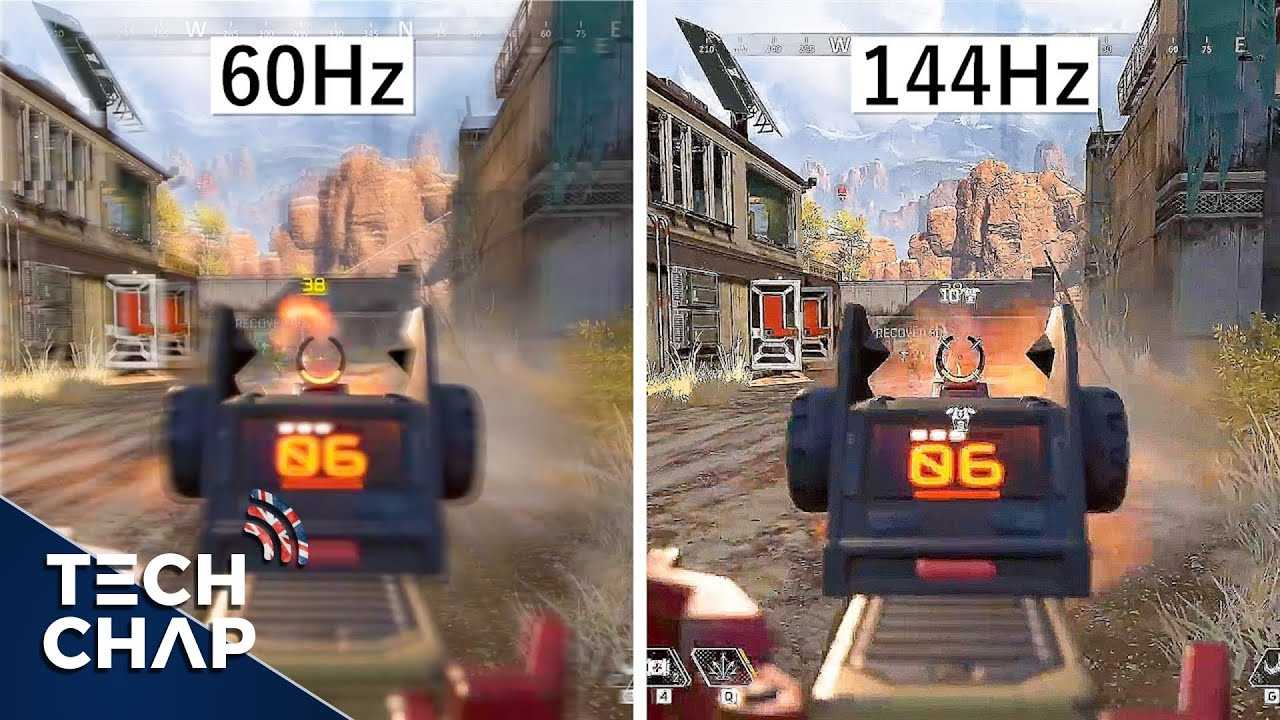
A 60Hz monitor isn’t necessarily bad for gaming, but it can limit your gaming experience, especially in fast-paced titles. If you’re a casual gamer or playing less demanding games, a 60Hz screen can suffice; however, for competitive or action-packed games, higher refresh rates provide smoother visuals and better responsiveness.
In short, while 60Hz monitors aren’t inherently terrible, they may hold you back from fully experiencing the fluid motion and quick reactions that higher refresh rates like 120Hz or 144Hz offer. Choosing the right monitor depends on your gaming style and expectations, but if you want an edge in fast-moving games, upgrading to a higher refresh rate is worth considering.

Is 60Hz Monitor Bad for Gaming? An In-Depth Look
Understanding Monitor Refresh Rates
A monitor’s refresh rate indicates how many times per second the screen updates its image. Common refresh rates include 60Hz, 120Hz, 144Hz, and higher. A higher refresh rate means the display updates more frequently, resulting in smoother motion.
Why Refresh Rate Matters in Gaming
In fast-paced games like shooters or racing titles, smooth visuals are essential. A higher refresh rate reduces motion blur and makes gameplay feel more responsive. While 60Hz displays can handle basic gaming, they may not deliver the best experience for competitive play.
Is a 60Hz Monitor Suitable for Casual Gaming?
For players who enjoy gaming as a casual hobby, a 60Hz monitor can be sufficient. Many popular titles run smoothly without requiring high refresh rates. However, casual gamers might notice the difference when switching to higher-refresh-rate screens.
The Impact of 60Hz on Fast-Paced Games
Fast-moving scenes appear less smooth on 60Hz screens, which can affect reaction times. In competitive gaming, this delay can hinder performance because players rely on quick visual cues. Therefore, for serious or competitive gamers, 60Hz might feel limiting.
Motion Clarity and 60Hz Displays
At 60Hz, motion may appear blurry or choppy during rapid movements. This effect is called motion blur and can make precise actions more difficult. Higher refresh rates help clarify fast movements, making gameplay more comfortable and accurate.
Frame Rates and How They Relate to Refresh Rates
Frame rate refers to how many images your graphics card produces per second. To get the full benefit of a high refresh rate monitor, your system should produce frame rates matching or exceeding the monitor’s refresh rate. On a 60Hz screen, frame rates above 60 FPS may not be fully visible.
Does Screen Tearing Occur More on 60Hz Monitors?
Screen tearing happens when the frame rate and refresh rate are out of sync. On a 60Hz monitor, tearing can occur if your GPU outputs more than 60 FPS without synchronization. Using V-Sync can help reduce this issue but may introduce input lag.
How Important Is Response Time on a 60Hz Monitor?
Response time is how quickly a pixel changes colors. Lower response times lead to less motion blur. Even on a 60Hz monitor, choosing one with a low response time can improve visual clarity during gameplay.
Can Upgrading to a Higher Refresh Rate Give Better Results?
Switching to 120Hz, 144Hz, or higher monitors can significantly enhance the gaming experience. These displays provide smoother visuals and reduce motion blur, especially noticeable in fast-paced scenes. However, your system must be capable of supporting higher frame rates to enjoy the benefits.
The Cost Difference Between 60Hz and Higher Refresh Rates
Generally, higher refresh rate monitors are more expensive due to advanced technology. 60Hz monitors are budget-friendly and widely available, making them an attractive option for casual gamers. Investing in a higher refresh rate may be worthwhile if you seek a more responsive gaming experience.
Are There Any Downsides to Using a 60Hz Monitor?
Some drawbacks include less smooth visuals and potential motion artifacts. For competitive gamers, the limited refresh rate can hinder reaction times and overall performance. Additionally, 60Hz screens might not fully utilize high-end graphics cards’ capabilities.
Related Topics to Consider
- G-Sync and FreeSync technologies improve synchronization between GPU and monitor
- The advantages of 144Hz and 240Hz monitors for serious gamers
- How to optimize your gaming setup for better performance
- The importance of response time and input lag in gaming monitors
While a 60Hz monitor can handle many games adequately, it may not provide the smoothest experience in fast-paced or competitive titles. Upgrading to a higher refresh rate monitor offers clearer visuals and quicker responses, but the decision depends on your gaming needs and budget. Understanding your system’s capabilities and your gaming style will help determine if a 60Hz monitor suits your gaming adventures.
FPS VS Refresh Rate
Frequently Asked Questions
How does a 60Hz refresh rate affect fast-paced games like FPS or racing titles?
In fast-paced games such as first-person shooters or racing titles, a 60Hz monitor can cause motion blur and make it harder to react quickly. This refresh rate limits how many images update per second, which can lead to less smooth gameplay and a delayed response time. For players seeking sharper visuals and more precise controls, a higher refresh rate monitor offers a noticeable improvement.
Can a 60Hz monitor still provide a good gaming experience for casual players?
Yes, casual gamers who enjoy less competitive titles or play for fun may find a 60Hz monitor sufficient. It allows for a decent gaming experience without requiring the investment in higher-end equipment. However, for those who want smoother gameplay and quicker reactions, upgrading to a higher refresh rate can enhance overall enjoyment.
Does a 60Hz monitor limit my ability to perform well in competitive gaming scenarios?
While you can still compete on a 60Hz monitor, it can put you at a disadvantage against players using higher refresh rates like 120Hz or 144Hz. Higher refresh rates provide smoother visuals and reduce input lag, giving you faster response times. To stay competitive, gamers often prefer monitors with refresh rates of 120Hz or more.
Final Thoughts
A 60Hz monitor is generally not ideal for competitive gaming, where higher refresh rates provide smoother visuals. It can cause motion blur and input lag, affecting your accuracy and reaction time.
However, for casual gaming, a 60Hz monitor remains a reasonable option, especially if you play less fast-paced titles.
In conclusion, is 60Hz monitor bad for gaming? It depends on your gaming style, but for fast-paced, competitive play, higher refresh rates are preferable.



