


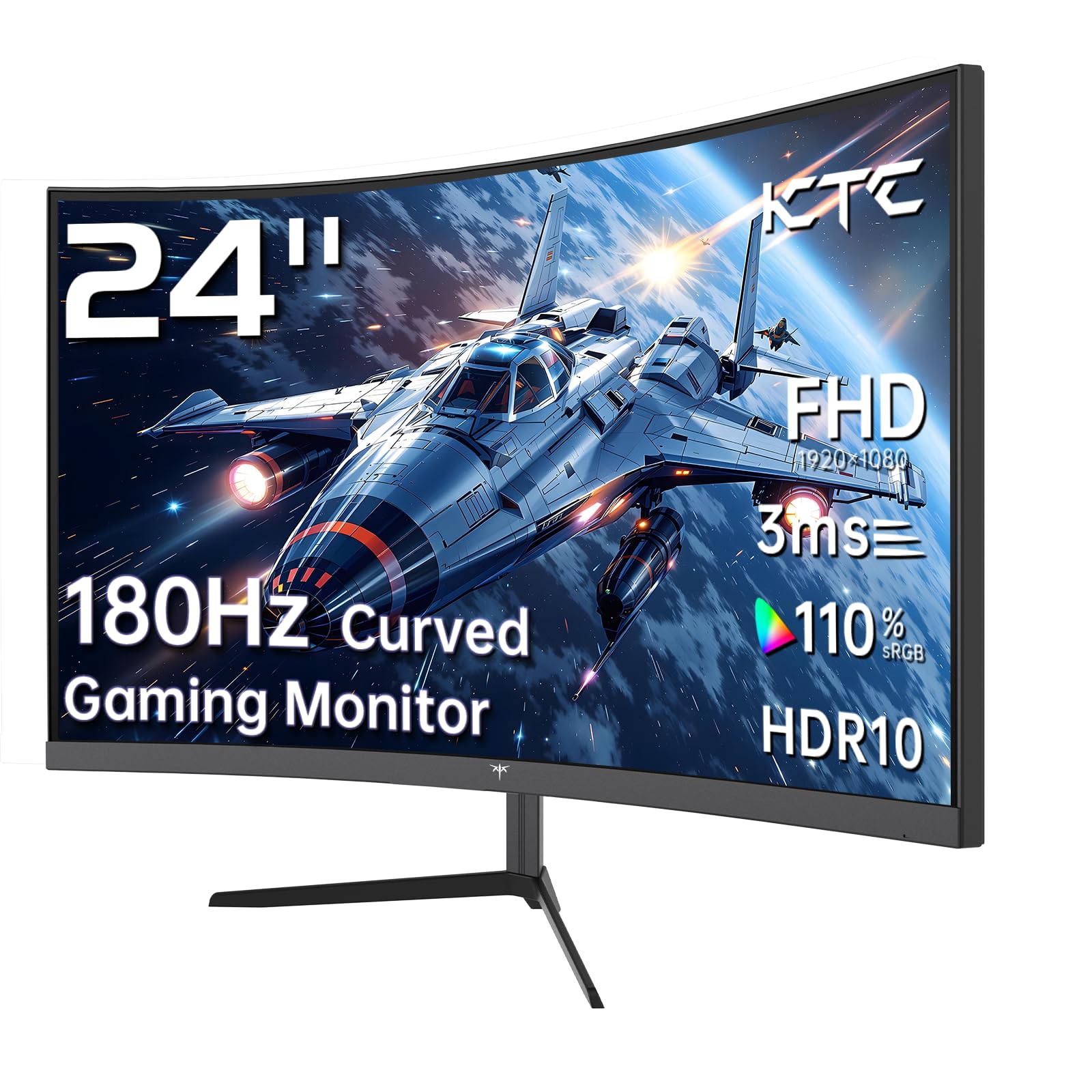
KTC 24 Inch 1500R

New! Sceptre 27
Choosing a new monitor can feel like a high-stakes decision. It’s your main window into your digital world, whether you’re fragging enemies, crunching numbers, or binge-watching your favorite shows. Today, we’re putting two compelling and popular budget-friendly monitors head-to-head: the KTC 24 Inch 1500R Curved Gaming Monitor and the New! Sceptre 27-inch Gaming Monitor.
At first glance, they seem similar—both offer 1ms response times, adaptive sync, and VESA mounting. But look closer, and you’ll find a fascinating clash of philosophies. One bets on a high-refresh-rate curved panel for immersive speed. The other offers a larger, flatter screen with practical extras like speakers. This comparison matters because your perfect choice hinges on what you value more: raw gaming performance and immersion or screen real estate and all-in-one convenience.
In this deep dive, we’ll tear down every spec, analyze real user experiences, and compare them across every category that counts. By the end, you’ll know exactly which monitor belongs on your desk.
In-Depth Look: KTC 24 Inch 1500R
The KTC 24 Inch 1500R makes a bold statement from the get-go. It’s not just another flat screen. Its 1500R curvature is designed to wrap your field of view, pulling you into the action. This is a monitor that clearly prioritizes the gaming experience above all else. Let’s see what makes it tick.
The star of the show is undoubtedly its 165Hz refresh rate paired with a 1ms (MPRT) response time. For fast-paced shooters like Counter-Strike 2 or Call of Duty, this combo is a game-changer. Motion looks incredibly smooth, and fast turns feel more responsive, giving you a tangible edge. The inclusion of Adaptive-Sync (covering both AMD FreeSync and NVIDIA G-Sync compatibility) ensures this smoothness stays tear-free even if your frame rate dips.
Its VA panel delivers excellent contrast (3000:1), meaning dark scenes in games or movies have more depth and less of a washed-out gray look. The color performance is also impressive for the price, covering 110% of the sRGB gamut and 90% of DCI-P3. This means vibrant, saturated colors that make worlds pop. While HDR support is listed, view it as a nice bonus rather than true HDR1000 performance—it can brighten the image but lacks the peak brightness for a full HDR experience.
Ergonomically, it offers tilt adjustment (-5° to -20°) and a full VESA 100x100mm mount, so you can pair it with a premium arm. Connectivity is solid with two HDMI 2.0 ports and a DisplayPort 1.4, which you’ll need to use to unlock the full 165Hz. It lacks built-in speakers, which is a common trade-off for monitors in this performance bracket.
What Users Are Saying:
Customer reviews highlight its standout value for performance. One user who upgraded their entire PC setup praised it as a “great selection for 1080p gaming,” acknowledging that some might prefer a smaller screen for 1080p but found the trade-off for a bigger, curved display worth it. Another was “pleasantly surprised” by the monitor’s performance given its low cost, specifically noting that “it performs well and that’s what counts.”
Pros and Cons
Pros:
- Superior 165Hz refresh rate for ultra-smooth gameplay.
- 1500R curvature enhances immersion in games and movies.
- Excellent contrast and wide color gamut for a vibrant picture.
- Strong motion clarity with 1ms response and Adaptive-Sync.
- Includes DisplayPort for full refresh rate capability.
Cons:
- No built-in speakers.
- 1080p resolution on a 24-inch screen is sharp, but larger screen lovers may want more.
- HDR support is very basic.
- Ergonomics are limited to tilt-only on the included stand.
Best for: The competitive or enthusiast gamer who values fluid motion and immersive gameplay above all else. It’s also a fantastic choice for anyone building a dual-monitor curved setup for sim racing or flight games. If your primary goal is winning matches and getting lost in game worlds, this is your contender.
Check Latest Price for KTC 24 Inch 1500R
In-Depth Look: New! Sceptre 27
The New! Sceptre 27 takes a different, more pragmatic approach. It swaps the aggressive curve for three extra inches of flat screen real estate. This monitor feels designed for the user who needs a capable, do-it-all display that handles work, play, and entertainment without fuss.
The most immediate benefit is its 27-inch screen. You simply get more digital workspace for spreadsheets, coding windows, or web browsing. For gaming and movies, the larger screen provides a more cinematic feel. However, it’s crucial to note this is still a 1080p (FHD) resolution. At 27 inches, the pixel density is lower than the 24-inch KTC, meaning images and text won’t be as razor-sharp if you sit very close. For many users at a normal viewing distance, this is a perfectly acceptable trade-off for the bigger picture.
Its refresh rate is a solid 100Hz. This is a significant step up from the standard 60Hz, making everyday scrolling and casual gaming feel noticeably smoother, but it doesn’t reach the competitive heights of the KTC’s 165Hz. The 1ms response time helps keep motion clear. AMD FreeSync is on board to handle screen tearing.
Where the Sceptre really scores practical points is with its built-in speakers. They won’t replace a dedicated sound system, but for desk space savings, quick video calls, or casual listening, they are incredibly convenient. The frameless design on three sides also gives it a modern look and minimizes bezel distraction in multi-monitor setups.
It includes useful game modes (FPS and RTS presets) to quickly tweak the image, and Blue Light Shift technology helps during long sessions. Connectivity covers two HDMI ports and one DisplayPort, plus an audio-out jack.
What Users Are Saying:
Users consistently praise its value and image quality. One long-term user stated it offers a “crisp picture and a good refresh rate,” noting no issues after over a year of use. Another called it an “Amazing Monitor — Highly Recommended,” thrilled with the “vibrant colors, great brightness, and sharp clarity” for work, streaming, and gaming. A user who replaced a dead 24-inch monitor found the upgrade in screen size and the “brighter” image with “great contrast” to be a major win.
Pros and Cons
Pros:
- Larger 27-inch screen is great for multitasking and media.
- Includes surprisingly handy built-in speakers.
- Modern frameless bezel design.
- 100Hz is a sweet spot for smooth general use and casual gaming.
- Often available at a very compelling price point.
Cons:
- 1080p resolution can appear slightly less sharp on the 27-inch screen.
- 100Hz refresh rate, while good, lags behind higher-end gaming monitors.
- Flat panel lacks the immersive “wrap-around” effect for games.
- Color gamut (100% sRGB) is good but less wide than the KTC.
Best for: The versatile, mixed-use user. If your day involves switching between office tasks, content streaming, and casual gaming sessions, the New! Sceptre 27 brings a balanced feature set to the table. It’s also an excellent choice for console gamers or as a secondary monitor where the built-in speakers and large screen are major assets.
Check Latest Price for New! Sceptre 27
Head-to-Head Comparison
Gaming Performance: Smoothness vs. Size
This is the core battleground. The KTC 24 Inch 1500R is the undisputed performance champion here. A 165Hz refresh rate provides 65% more frames per second than the 100Hz Sceptre. In competitive titles, this difference is palpable, offering smoother tracking and potentially quicker reaction times. The curved screen further enhances immersion, making you feel “inside” the game world. The New! Sceptre 27 offers a perfectly enjoyable gaming experience, especially for campaign-based or strategy games, but its 100Hz cap and flat screen position it more for casual or general enjoyment rather than try-hard competitiveness.
Visual Quality & Productivity: Pixels Per Inch vs. Screen Real Estate
For pure pixel sharpness, the KTC wins. Its 1080p resolution packed into 24 inches results in a higher Pixels Per Inch (PPI), meaning finer details and crisper text. The KTC also boasts a wider color gamut (110% sRGB vs. 100%), so colors can appear more vibrant and rich. However, for productivity, the New! Sceptre 27 fights back with its larger 27-inch canvas. Having more windows open side-by-side, viewing large spreadsheets, or editing timelines is simply easier. It’s a classic trade-off: do you want sharper detail or more screen space?
Design & Convenience: Immersion vs. Practicality
The KTC’s curved design is a deliberate choice for immersion but can be divisive for tasks like photo editing or graphic design where straight lines are critical. Its stand only tilts. The Sceptre’s flat panel is the safe, versatile choice for all content types, and its three-sided frameless design looks sleek. The killer practical feature for the Sceptre is its built-in speakers. For a clean desk setup or a secondary monitor, not needing external audio is a huge convenience the KTC lacks.
Value Proposition: Specialized Tool vs. Jack-of-All-Trades
Both monitors offer exceptional value, but in different ways. The KTC 24 Inch 1500R delivers specialized, high-performance gaming features (165Hz, curve) at a budget price. You’re paying for performance first. The New! Sceptre 27 delivers a well-rounded feature set (big screen, speakers, 100Hz) for general use at a very accessible price. You’re paying for versatility and convenience.
Frequently Asked Questions
Q: Is 100Hz enough for gaming, or do I need 165Hz?
A: 100Hz is a great upgrade from 60Hz and provides a very smooth experience for most games, especially single-player adventures or strategy titles. However, 165Hz (or higher) is the sweet spot for competitive first-person shooters and fast-paced esports where every millisecond and frame of smoothness counts. If competitive gaming is your priority, go for the 165Hz of the KTC. For casual or general gaming, the Sceptre’s 100Hz is perfectly satisfying.
Q: Is a curved screen better than a flat one?
A: It depends on use. A curved screen, like on the KTC 24 Inch 1500R, enhances immersion in games and movies by filling more of your peripheral vision. Some users also find it reduces eye strain for long sessions. However, for tasks requiring geometric accuracy—like CAD work, detailed photo editing, or even viewing spreadsheets with straight lines—a flat screen like the New! Sceptre 27 is the standard and preferred choice.
Q: Will 1080p look bad on a 27-inch monitor?
A: “Bad” is subjective. It will look less sharp than 1080p on a 24-inch monitor or a 1440p on a 27-inch monitor. If you sit at a typical desk distance (2-3 feet), the image on the New! Sceptre 27 will still look good for most content. However, if you have sharp eyesight and sit very close, you might notice individual pixels or slightly soft text. It’s a trade-off for the larger screen size at a budget price.
Q: Which monitor is better for office work and productivity?
A: The New! Sceptre 27 is generally better suited for office work. The larger 27-inch screen allows for more efficient multitasking with multiple windows. The flat panel ensures lines and text appear straight across the entire screen. The built-in speakers are also handy for conference calls. The KTC can do the job, but its curve and smaller size are less ideal for heavy productivity use.
Q: Do I need to buy separate speakers for the KTC monitor?
A: Yes. The KTC 24 Inch 1500R does not have any built-in speakers. You will need to use headphones, external PC speakers, or a soundbar for audio. The New! Sceptre 27 has built-in speakers, so you can get sound immediately without any extra purchases.
Q: Can both monitors be wall-mounted?
A: Yes! This is a great feature they both share. Each monitor supports the VESA 100mm x 100mm mounting standard. You can attach them to a monitor arm, wall mount, or desk clamp for superior ergonomics and a cleaner desk setup.
Final Verdict: Which One Should You Choose?
This isn’t a case of one monitor being objectively better than the other. It’s about which one is better for you.
Choose the KTC 24 Inch 1500R if:
- You are a competitive or serious gamer who values high refresh rates (165Hz) above all.
- You want an immersive, curved experience that pulls you into games and movies.
- You prioritize motion clarity, deep contrast, and vibrant colors.
- You don’t mind using external speakers or headphones.
Choose the New! Sceptre 27 if:
- You want a larger screen for productivity, multitasking, and a more cinematic view.
- You prefer a versatile, do-it-all monitor for work, casual gaming, and entertainment.
- You value practical features like built-in speakers and a modern frameless design.
- You want excellent overall smoothness (100Hz) at a typically lower price point.
In short, pick the KTC 24 Inch 1500R for a specialized, performance-driven gaming tool. Pick the New! Sceptre 27 for a versatile, value-packed all-rounder. Both represent fantastic value in their respective lanes, and you really can’t go wrong once you match their strengths to your needs.
Ready to make your choice? Click below to check the latest prices and see current deals on Amazon.



