


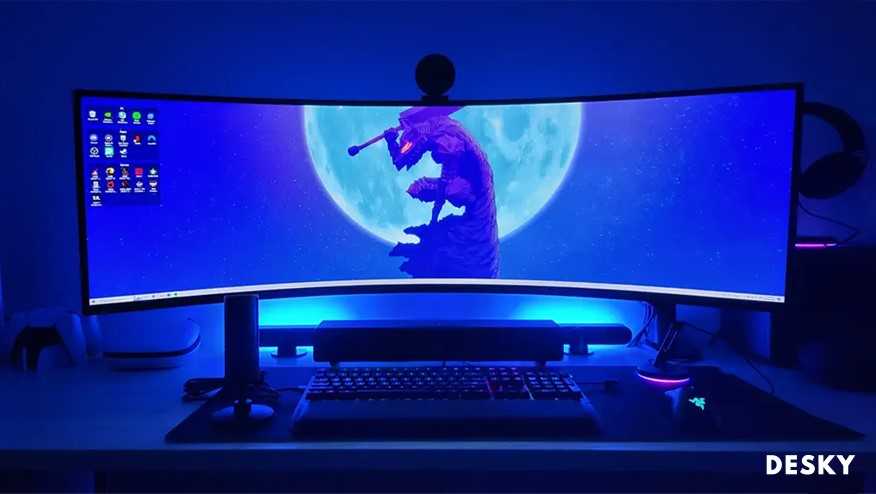
A curved monitor can transform your viewing experience, making it more immersive and comfortable, but it also has its downsides. Whether you’ll love or regret your curved display depends on your needs and preferences. In short, curved monitors provide enhanced immersion and reduce eye strain for some users, but they can also distort images and limit viewing angles.
Curved monitors are quickly gaining popularity, especially among gamers and creative professionals, because they promise a more engaging visual experience. However, they aren’t perfect for everyone. While they excel at providing a sense of depth and minimizing reflections, their unique shape can cause distortions and compatibility issues with certain setups. If you’re weighing the benefits against potential drawbacks, it’s important to understand what a curved monitor offers and where it might fall short for your specific uses. That way, you can decide if a curved screen is the right choice for elevating your workspace or gaming setup.

Pros and Cons of Having a Curved Monitor
Introduction to Curved Monitors
Curved monitors are becoming more popular among gamers, designers, and everyday users. Their unique shape offers a different visual experience compared to flat screens. But like any technology, they come with advantages and disadvantages worth considering.
Enhanced Immersive Experience
One of the main benefits of a curved monitor is how it creates a more immersive experience. The curve naturally wraps around your field of view, making it feel like you’re inside the display. This is especially helpful for gaming and watching movies, providing a more engaging feel.
Better Field of View
The curved shape helps to extend your peripheral vision. This means less need to turn your head or eyes to see different parts of the screen, which can reduce eye strain during long sessions. It makes the content feel more present and life-like.
Increased Depth Perception
A curved monitor adds a sense of depth that flat screens lack. This makes images and videos appear more three-dimensional, creating a richer visual experience. For gamers and designers, this effect can be quite enjoyable and beneficial.
Reduced Glare and Reflections
Curved screens can help minimize unwanted reflections from ambient light sources. The screen’s curvature directs reflections away from the viewer’s line of sight, leading to cleaner visuals. This feature is especially helpful in bright rooms or offices with multiple light sources.
Improved Viewing Angles
Unlike flat monitors, curved screens provide better viewing angles from different positions. Whether you’re sitting directly in front or slightly to the side, the display remains clear and accurate. This makes them a good choice for collaborative work or shared viewing.
Potential for Better Ergonomics
Many curved monitors are designed with ergonomic features that promote comfortable use. Adjustments for tilt, height, and sometimes even swivel are common, helping users maintain better posture during extended use. This can cut down on neck and back strain.
Drawbacks of Curved Monitors
While curved monitors offer many benefits, they are not perfect. Some users may find the shape uncomfortable or unsuitable for specific tasks. Here, we discuss some of the disadvantages to evaluate before making a purchase.
Limited Suitable Desk Space
Curved monitors tend to be wider than traditional flat screens, requiring more desk space. If your workspace is small or cluttered, a large curved monitor might not fit comfortably. It could crowd your desk and make it harder to organize other equipment.
Distortion in Certain Viewing Conditions
While the curve enhances immersion for most users, it can cause distortion when viewed from an angle or if the screen is very wide. Content displayed at the edges might appear stretched or warped, affecting tasks that need precise visuals.
Price Considerations
Curved monitors generally cost more than flat ones of similar size and specs. Their unique manufacturing process and features contribute to a higher price tag. Budget-conscious buyers may need to weigh if the benefits justify the extra expense.
Compatibility with Flat Surfaces and Mounts
Some curved monitors are not compatible with standard mounts or wall brackets. Their shape demands specific mounting solutions, which might add to the cost or limit placement options. Additionally, setting up multiple monitors can be more complicated with curved displays.
Impact on Multitasking and Productivity
The curvature can influence how you organize your workspace. While it improves viewing angles, it may also make aligning multiple monitors more complex. For creative or professional workflows, this could be a drawback if seamless multi-screen setups are required.
Learning Curve in Usage
Users unfamiliar with curved screens might find it strange at first. Adjusting to the new perspective takes some time, and the difference may be distracting initially. For some, these visual quirks reduce overall comfort and productivity.
Best Use Cases for Curved Monitors
Understanding which scenarios benefit most from a curved monitor can help decide if one is right for you. They excel in immersive environments such as gaming, video editing, and large-scale multitasking setups.
Gaming and Entertainment
Gamers benefit from the added depth and field of view, especially in first-person shooters or racing games that require wide, panoramic visuals. Movies also appear more engaging and lifelike on curved screens.
Design and Creative Work
Graphic designers and video editors appreciate the consistent color and minimal distortion on curved screens. The curved shape allows for a more natural viewing experience during detailed work.
General Use and Home Office
While they provide comfort and an immersive experience, curved monitors are also suitable for everyday tasks. However, users should consider their workspace size and the potential for distortion before investing.
Maintenance and Durability
Curved monitors often require careful cleaning due to their shape. Dust and fingerprints can be more noticeable and tricky to clean from the edges. When choosing a monitor, look for durable materials and protective coatings to keep it in good condition.
Summary of Key Factors
Understanding the pros and cons can help you decide if a curved monitor fits your needs:
- Advantages: immersive experience, better viewing angles, reduced glare, ergonomic design.
- Disadvantages: higher cost, larger footprint, potential distortion, compatibility issues.
Choosing a curved monitor depends on your specific use case, preferences, and workspace. They are excellent for creating immersive environments and reducing glare but might be less suitable for precise tasks or small desks. Evaluate your needs carefully to determine if the advantages outweigh the disadvantages in your situation.
Flat or Curved Monitor? Which is Better?
Frequently Asked Questions
How does a curved monitor improve viewing comfort during extended use?
A curved monitor reduces eye strain by matching the natural curvature of the human eye, allowing for more even focus across the screen. This design minimizes the need for constant eye movement, decreasing fatigue during long sessions. As a result, users experience increased comfort and less visual discomfort over time.
What are some potential drawbacks of using a curved display in a professional setting?
In professional environments, a curved monitor may cause distortion when viewing files or documents at certain angles, especially if the curve is pronounced. It can also be challenging to share the screen with others sitting beside the user, as the curvature may make it difficult for everyone to see content clearly from different positions.
Can a curved monitor enhance gaming or multimedia experiences?
Yes, a curved monitor can enhance gaming and multimedia by providing a more immersive experience. The curvature pulls the viewer into the action, creating a sense of depth and realism. This setup often results in a wider field of view, making gaming visuals more engaging and movies more captivating.
Does a curved monitor require special adjustments or setup considerations?
Setting up a curved monitor typically involves ensuring it is positioned at an optimal distance and height for your line of sight. It’s important to place the monitor directly in front of you to avoid distortion, and some users may need to adjust the monitor’s tilt or use a sturdy stand to achieve the best viewing angle and minimize reflections.
How does a curved screen impact workspace organization and multitasking?
A curved monitor can improve workspace efficiency by offering a wider viewing area, allowing you to organize multiple windows more comfortably. With fewer bezels and a seamless display, multitasking becomes more straightforward, as you can easily glance between different applications without turning your head excessively.
Final Thoughts
The pros and cons of having a curved monitor highlight its impact on your visual experience. Curved screens provide immersive viewing, reducing eye strain and enhancing focus. However, they can be expensive and may not fit well in all setups.
While they improve gaming and multitasking, viewing angles can be limited, impacting shared use. Overall, curved monitors suit those seeking an engaging visual experience but require consideration of space and budget.



