


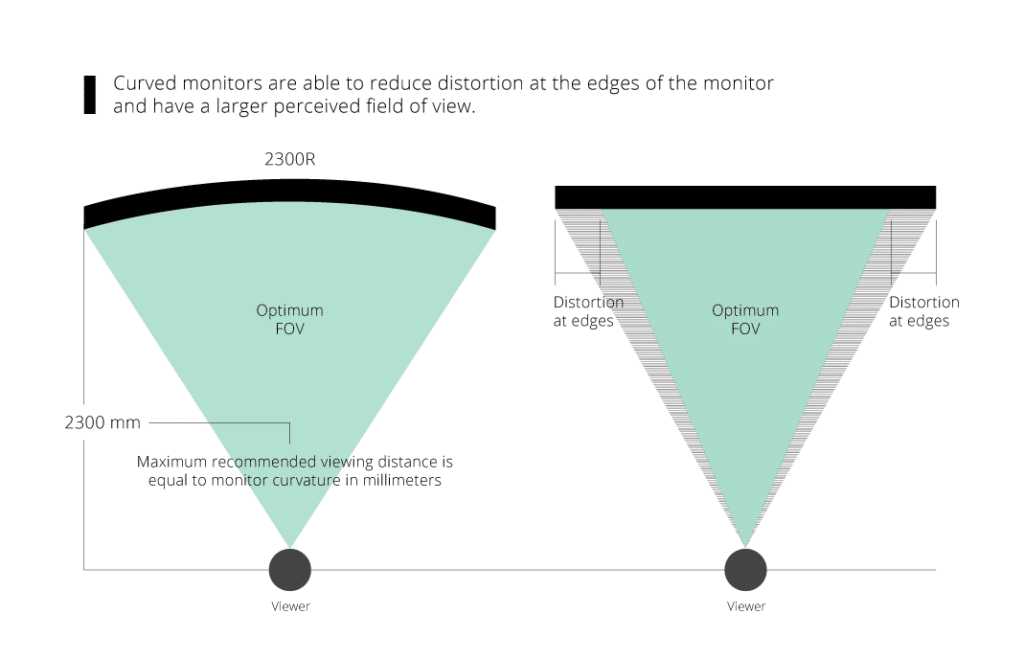
Curved monitors immerse you more deeply into your content, while flat monitors deliver a more traditional viewing experience. The main difference lies in how each design impacts your field of view and overall comfort during extended use. Curved screens wrap around your eyes, reducing glare and distortion, making them ideal for gaming and immersive tasks. Flat monitors, on the other hand, offer a straightforward, versatile setup suitable for professional work and general use.
In essence, the choice depends on your preferences and usage needs. Curved monitors are great if you want a more engaging experience, especially for gaming or multimedia, whereas flat monitors are better for office work and color accuracy. Understanding these distinctions helps you pick the right display for your specific needs, ensuring a better visual experience.

What is the Difference Between Curved and Flat Monitors
Understanding the Basic Shapes of Monitors
Curved and flat monitors have distinct shapes that affect how you view the screen. Flat monitors are traditional screens with a straight surface, providing a uniform view from any angle. Curved monitors, on the other hand, have a gentle arc that wraps around your eyes, giving a more immersive experience.
Design and Construction
Flat monitors are simple in design, with a uniform plane that doesn’t change shape. Curved monitors are built with a slight bend, usually between 1800 and 3000 R, which indicates how much they curve. This curvature aims to match the natural shape of your eyes, creating a more comfortable viewing experience.
How Curvature Affects Viewing Experience
The curved shape directs light towards your eyes more directly. This helps reduce glare and reflections that often occur on flat screens, especially in bright environments. It also creates a sense of depth, making the display feel larger and more lifelike.
Optimal Viewing Angles
With flat monitors, the best viewing angles are directly in front of the screen. When you move sideways, colors and brightness may shift. Curved monitors maintain consistent image quality across wider angles because the curvature aligns better with your eye position.
Immersiveness and Field of View
Curved monitors offer a more immersive experience, especially for gaming and multimedia. The arc surrounds your field of view, making you feel part of the action. Flat monitors are less enveloping but provide a straightforward visual experience suitable for multitasking.
Color Accuracy and Brightness Consistency
Color and brightness can vary more on flat screens when viewed from different angles. Curved screens help maintain accurate colors and brightness across the entire display because the surface faces your eyes more directly, reducing color shift.
Screen Size and Aspect Ratio Considerations
Curved monitors are often available in larger sizes, such as 27 inches and above, with ultra-wide aspect ratios like 21:9 or 32:9. Flat monitors also come in various sizes but are particularly common in standard 16:9 ratios. Curves enhance the experience on large screens by reducing distortion at the edges.
Usage Scenarios for Flat Monitors
Flat monitors are versatile and widely used for everyday tasks. They are suitable for office work, casual gaming, and media consumption. Their predictable shape makes them easy to mount and position in various setups.
Usage Scenarios for Curved Monitors
Curved monitors shine in immersive gaming, video editing, and detailed design work. They are ideal for users who spend long hours in front of the screen, as the curvature can reduce eye strain and fatigue.
Advantages of Flat Monitors
Flat displays are usually less expensive and more widely available. They provide a consistent image quality from all angles and can be easier to clean. Flat screens also have less distortion at the edges, making them suitable for various workspace setups.
Advantages of Curved Monitors
The main benefit of curved monitors is their immersive experience. They can also reduce reflections and glare, especially in brightly lit rooms. Additionally, the curvature can lessen eye strain during extended use.
Potential Drawbacks of Flat Monitors
Flat screens can exhibit glare more easily and may cause color shifts when viewed from the sides. For some users, they might feel less engaging compared to curved displays, especially for gaming or multimedia.
Potential Drawbacks of Curved Monitors
Curved monitors generally cost more and may not fit well into small or shared spaces. They can also cause distortion when used for certain tasks like photo editing, where flatness is preferred for accuracy.
Price Range and Budget Considerations
Flat monitors are available at a wide range of prices, from budget-friendly options to premium models. Curved monitors tend to be more expensive due to their specialized design and larger sizes, but they also offer unique advantages worth the investment.
Compatibility and Mounting Options
Flat monitors are easier to mount on walls or stands and are compatible with more adjustable arms. Curved monitors require specific mounting solutions that accommodate their shape, sometimes limiting flexibility but ensuring stability.
Maintenance and Durability
Both types of monitors need proper cleaning and care. Flat screens are straightforward to clean, while curved monitors might be slightly more challenging due to their shape. Quality build materials influence durability in both cases.
Considering Your Usage and Environment
Choosing between curved and flat depends on your workspace, usage patterns, and budget. Flat monitors suit standard office environments, while curved models are better for immersive media and gaming setups.
Summary of Key Differences
| Feature | Flat Monitors | Curved Monitors |
|---|---|---|
| Shape | Flat, straight surface | With a gentle arc/bend |
| Immersiveness | Less immersive | More immersive for gaming and multimedia |
| Viewing Angles | Best directly in front | Wider, consistent across angles |
| Cost | Generally less expensive | Often more costly |
| Ergonomics | Standard viewing comfort | Reduces eye strain, better comfort for extended use |
| Screen Size | Available in various sizes | Typically larger, widescreen options |
Related Topics to Explore
- Best monitor for gaming — Curved vs flat for gaming performance
- Monitor resolution — How size and shape affect clarity and detail
- Monitor ergonomics — Choosing the right setup for comfort
- Screen technology — IPS vs TN vs VA panels in curved and flat displays
Understanding the difference between curved and flat monitors can help you select the best display for your needs. Whether you prioritize immersion, clarity, or budget, knowing each type’s strengths and limitations is essential for making an informed decision.
Curved vs Flat Gaming Monitor – Which Monitor Should You Choose?
Frequently Asked Questions
How do curved monitors affect the viewing experience compared to flat screens?
Curved monitors provide a more immersive viewing experience by matching the natural curvature of the human eye. This reduces distortion at the edges and minimizes glare, allowing for a more comfortable and engaging visual. As a result, users can enjoy a wider field of view and better focus during long periods of use.
In what scenarios might flat monitors be more suitable than curved ones?
Flat monitors work well in environments where multiple screens are used side by side, such as in office work or multi-monitor setups, since they align seamlessly without gaps. They also tend to be more affordable and easier to mount or place on desks, making them ideal for standard applications like document editing, browsing, or coding.
How does screen size and shape influence the choice between curved and flat monitors?
Large screens over 27 inches benefit from curved designs because the curvature helps maintain consistent viewing angles across the display. On smaller screens, flat monitors might suffice and are more cost-effective. The shape impacts how the content appears; curved screens create a more natural perspective for immersive tasks, while flat monitors provide a straightforward view suitable for diverse uses.
What should I consider regarding eye comfort and potential fatigue with each type?
Curved monitors often reduce eye strain by lessening the need for constant head and eye movement, especially when viewing from a distance or at an angle. They also decrease glare and reflections. Flat monitors, however, can cause more fatigue if the viewing angle is not optimal or if glare is present, particularly in bright environments. Choosing the right type depends on your workspace and usage habits.
Are there differences in the cost and durability between curved and flat monitors?
Generally, curved monitors tend to be more expensive due to their advanced manufacturing and design features. They may also require more careful handling to prevent damage to the curved surface. Flat monitors are usually more affordable and widely available, with a simpler structure that offers consistent durability and easier maintenance.
Final Thoughts
Curved monitors offer a more immersive viewing experience by wrapping the display around your eyes, which reduces glare and enhances depth perception. Flat monitors, on the other hand, provide a straightforward, traditional display that suits general use and offers consistent image quality.
The main difference between curved and flat monitors lies in their design and how they interact with the user’s vision. Curved monitors excel in gaming and multimedia, while flat monitors suit professional tasks and everyday activities.
In conclusion, what is the difference between curved and flat monitors influences your comfort and application needs. Curved monitors create a more engaging visual experience, whereas flat monitors focus on simplicity and versatility.



