


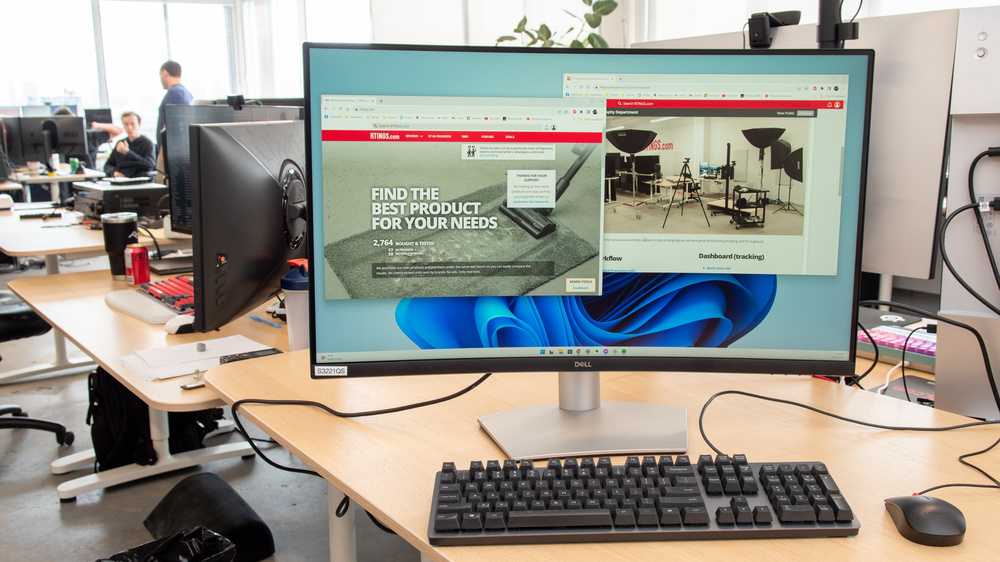
The best office monitor for students combines size, clarity, and affordability to enhance both studying and multitasking. After careful consideration, the ideal choice is a monitor that offers a sharp display, adjustable settings, and a comfortable viewing experience without breaking the bank.
In short, the perfect office monitor for students should feature a 24 to 27-inch screen with full HD resolution, ergonomic adjustments, and eye-care technologies like flicker-free screens and blue light filters. These features help reduce eye strain during long study sessions and make multitasking easier. With many options available, students should prioritize a reliable brand that offers good value, ensuring their workspace stays efficient and comfortable.
Choosing the right office monitor might seem overwhelming, but focusing on essential features can simplify the process. As students spend hours working on assignments, researching, or attending online classes, investing in a good monitor can transform their productivity and comfort, making studying more enjoyable and less tiring.

Which Office Monitor is Best for Students
Understanding the Needs of Students for an Office Monitor
Students spend hours working on assignments and projects, so choosing the right monitor is important. A good office monitor should be comfortable to use for long periods. It must also be versatile enough for studying, browsing, and occasional entertainment.
Screen Size and Resolution for Student Monitors
The size of the monitor affects how comfortable it is to work. Most students prefer screens between 24 and 27 inches for a good balance of space and desk fit. Higher resolution options, like Full HD (1080p) or Quad HD (1440p), provide clearer images and sharper text.
Why Resolution Matters
A higher resolution makes reading easier and reduces eye strain during repetitive tasks. It also allows for multitasking, as multiple windows can be open side by side without clutter.
Panel Types and Their Impact on Student Use
There are three main panel types to consider: Twisted Nematic (TN), In-Plane Switching (IPS), and Vertical Alignment (VA). Each offers different benefits suited for students.
TN Panels
TN panels are affordable and have fast response times, making them ideal for gaming. However, they often have limited color accuracy and viewing angles, which can be a drawback for detailed work.
IPS Panels
IPS monitors provide better color quality and wider viewing angles. They are perfect for tasks that demand accuracy, such as graphic design or study materials with detailed images.
VA Panels
VA panels deliver high contrast ratios and deep blacks. They are good for watching videos and reading, providing a comfortable viewing experience over long periods.
Refresh Rate and Response Time
A refresh rate of 60Hz is usually sufficient for students. However, for those interested in gaming or fast-paced videos, a 75Hz or higher refresh rate can make a difference. Response time should be low, ideally under 5 milliseconds, to prevent blurring during quick movements.
Ergonomics and Eye Care Features
Comfort is key for students who spend many hours in front of their screens.
Adjustable Stands
Look for monitors that allow height, tilt, and swivel adjustments to promote good posture.
Blue Light Filters and Flicker-Free Technologies
Features like blue light reduction and flicker-free screens help decrease eye strain, especially during long study sessions.
Connectivity Options for Student Monitors
Flexibility in connectivity helps students connect multiple devices easily.
- HDMI and DisplayPort for modern laptops and desktops
- USB-C for quick data transfer and charging
- Additional USB ports for connecting peripherals
Choosing a monitor with multiple options ensures compatibility with different devices.
Budget Considerations for Student Monitors
Most students need a monitor that balances quality and affordability. Entry-level options start around $150 and go up to $300 for advanced features. Comparing specs and reviews helps find the best value for money.
Popular Monitors for Students
Based on reviews and features, some models stand out as top choices.
| Model | Size | Resolution | Panel Type | Price Range |
|---|---|---|---|---|
| Dell UltraSharp U2422H | 24 inches | Full HD | IPS | $200-$250 |
| ASUS ProArt Display PA278CV | 27 inches | QHD (1440p) | IPS | $350-$400 |
| Acer Nitro VG271 | 27 inches | Full HD | TN | $190-$220 |
| BenQ EX3501R | 34 inches (Ultrawide) | QHD | VA | $500-$550 |
Additional Features to Consider
Other useful features include built-in speakers, adjustable stands, and anti-glare coatings. These enhance comfort and usability without adding much to the cost.
Choosing the Best Monitor Based on Student Specific Activities
Different students have different needs—those studying arts may prioritize color accuracy, while those in sciences might want large screens for data analysis.
Students in Creative Fields
Opt for IPS monitors with high color accuracy for tasks like photo editing and design. Look for models with 99% sRGB coverage and calibration options.
Students Focusing on Reading and Writing
A monitor with a matte finish, flicker-free technology, and eye protection features helps reduce fatigue and makes reading comfortable.
Selecting the best office monitor for students involves considering size, resolution, panel type, and additional features. Prioritizing ergonomic design and eye care features provides a comfortable working environment. By evaluating these factors and aligning them with your specific needs, you can find a monitor that makes studying more pleasant and efficient.
The 6 Best Work Monitors You Should Buy In 2025!
Frequently Asked Questions
What screen size should students consider when choosing an office monitor?
Students should opt for monitors between 24 to 27 inches for optimal viewing and desk space. A 24-inch monitor provides enough screen real estate for multitasking without cluttering the workspace, while a 27-inch display offers a more immersive experience for detailed tasks like graphic design or video editing. Consider your available space and the type of work you do to select the most suitable size.
Which resolution is ideal for student office monitors?
A resolution of at least 1080p (Full HD) is recommended for students, ensuring clear text and sharp images. If your tasks involve more detailed work, such as photo editing or 3D modeling, consider a monitor with higher resolutions like 1440p (QHD) or 2160p (4K). Higher resolution screens improve clarity and reduce eye strain during long study sessions.
What features should students prioritize in an office monitor?
Students should look for monitors that include adjustable stands for ergonomic comfort, flicker-free technology, and blue light filters to reduce eye fatigue. Connectivity options like multiple HDMI or DisplayPort inputs also help when connecting various devices. Additionally, choosing an energy-efficient model can save power during extended use.
Are curved monitors suitable for students’ office work?
Curved monitors can enhance viewing comfort by providing a more natural field of vision, especially for larger screens. They help reduce distortion at the edges and minimize reflections, which can improve focus during long study sessions. However, the choice depends on personal preference and the available desk space.
How important is refresh rate for a student’s office monitor?
A standard refresh rate of 60Hz works well for most academic tasks and general use. However, students engaged in activities like gaming or video editing may benefit from higher refresh rates, such as 75Hz or 120Hz, which can provide smoother visuals and reduce motion blur. For typical study needs, a 60Hz monitor remains sufficient.
Final Thoughts
Choosing the right office monitor for students depends on clarity, size, and affordability. A monitor with good resolution reduces eye strain during long study sessions. Smaller screens are portable, but larger displays enhance multitasking.
Features like adjustable stands and eye care technology improve comfort and focus. Students should prioritize models that balance price and performance to meet their needs.
which office monitor is best for students? It ultimately comes down to personal preferences and budget. Selecting a versatile, high-quality monitor helps students stay productive and comfortable throughout their work.



