


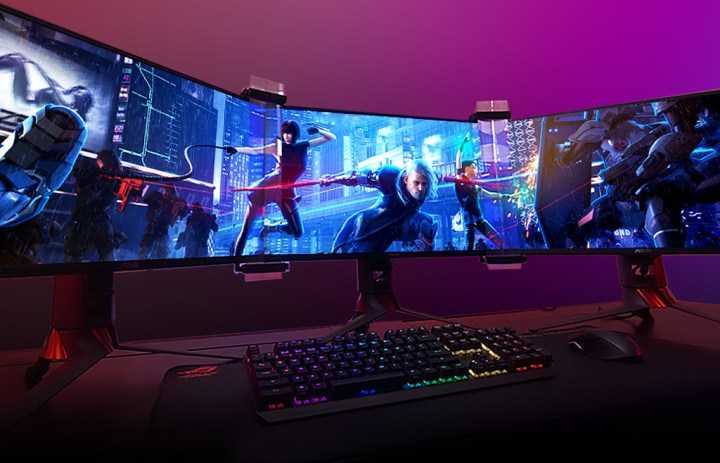
Gamers use multiple monitors to elevate their gaming experience, gain a competitive edge, and enjoy immersion like never before. It’s a game-changer that transforms how players interact with their games, making everything more seamless and exciting. The main reason gamers opt for multiple screens is to expand their view, allowing for better situational awareness and multitasking during intense gameplay. Additionally, it enhances the visual experience by providing stunning, panoramic visuals that pull players deeper into the game world. Whether for streaming, multitasking, or simply improving gameplay, multiple monitors have become a popular choice. This setup not only boosts productivity but also takes gaming to a whole new level, making every session more immersive, strategic, and enjoyable.
Using multiple monitors in gaming allows players to see more of their game environment, manage chat windows or guides alongside gameplay, and enjoy smoother, more detailed visuals. It’s a perfect blend of practicality and entertainment that’s rapidly becoming a staple in the gaming community.

Why Do Gamers Use Multiple Monitors
Many gamers choose to use more than one monitor during their gaming sessions. This setup is not just about having a bigger screen but about getting a better gaming experience. Multiple monitors can make gaming more immersive, convenient, and enjoyable.
Enhanced Gaming Experience
Using several monitors allows players to see more of the game at once. A wider view creates a sense of being inside the game world. This setup helps gamers notice small details that they might miss on a single screen.
This increased field of view can give a gamer an advantage in fast-paced games. With more visual space, players can react quicker to enemies or challenges. It makes gameplay feel more real and engaging.
Better Multitasking
Games are not the only thing gamers do on their computers. Many players use additional monitors to run chat apps, streaming platforms, or guides at the same time. This way, they can keep track of everything without switching windows constantly.
For example, a gamer streaming their gameplay can monitor chat messages on a second screen. They can also watch tutorials or keep track of game stats while playing without interrupting their main game.
Increased Productivity During Gaming
Multiple monitors help gamers organize their workspace effectively. They can dedicate one screen for the game, another for communications, and a third for tools or streaming controls. This setup reduces clutter and makes multitasking easier.
Gamers no longer need to minimize or switch between windows, saving time and keeping focus. It is especially useful during long gaming sessions or when participating in team-based games.
Improved Strategy and Team Play
In multiplayer or team-based games, strategic awareness is crucial. Multiple screens allow players to monitor different aspects of gameplay. For instance, a player might watch the map on one monitor and focus on combat on another.
This setup enhances coordination with teammates and improves decision-making. It also allows players to quickly respond to threats from different directions.
Higher Performance and Graphics Settings
Gamers with multiple monitors often have powerful graphics cards to support high resolutions and smooth gameplay. Having more screens can require a lot of processing power but also makes games look visually stunning.
Advanced GPU setups can manage multiple displays efficiently, enabling gamers to enjoy high-quality graphics across all monitors. This results in brighter, sharper images and more immersive visuals.
Customization and Personalization
Using multiple monitors allows gamers to customize their setup to match their preferences. They can choose the size, position, and orientation of each screen for maximum comfort and efficiency.
This flexibility lets gamers create a workspace that suits their gaming style, whether they prefer a panoramic view or multiple smaller screens for specific tasks.
Types of Multi-Monitor Setups
There are several ways gamers arrange multiple monitors, each suited for different needs. Common configurations include a horizontal setup, a vertical stack, or a combination of both.
| Setup Type | Description | Best For |
|---|---|---|
| Horizontal | Monitors placed side by side in a row | Wide field of view for racing, simulation, or immersive FPS gaming |
| Vertical Stack | Monitors stacked vertically | Reading long documents, coding, or certain strategy games |
| Mixed Setup | Combination of horizontal and vertical arrangement | Multitasking with dedicated screens for different tasks |
Hardware and Connectivity Considerations
Setting up multiple monitors requires compatible hardware. A powerful graphics card with multiple outputs is essential for smooth performance. It’s important to check the video ports on the card and monitors.
Connecting multiple monitors involves using HDMI, DisplayPort, or DVI cables. Ensure your PC or gaming console can handle the total resolution and refresh rate of all screens combined. Adequate power supply and cooling are also necessary for high-performance setups.
Popular Features in Multi-Monitor Gaming Setups
- High Refresh Rate: Ensures smooth visuals and quick reactions.
- Thin Bezels: Minimize gaps between screens for a seamless view.
- Adjustable Stands: Allow customization of height and tilt for ergonomic comfort.
- Color Accuracy: Enhances visual clarity and realism, especially for graphics-intensive games.
Advancements in Multi-Monitor Technology
Recent developments have made multi-monitor setups more accessible. Ultra-wide monitors sometimes replace multiple screens, providing a similar experience in a single display. However, many gamers prefer physical monitors for their flexibility and upgrade options.
G-Sync and FreeSync technologies help synchronize the monitor’s refresh rate with the GPU, reducing lag and tearing. These features are especially important for competitive gamers who need smooth visuals.
Pros and Cons of Using Multiple Monitors for Gaming
Advantages
- Immersive experience with a broader view of the game environment
- Improved multitasking for streaming, chat, or game guides
- Better strategic awareness and team coordination
- Enhanced visual quality and graphics performance
Disadvantages
- Requires significant investment in hardware
- Can be demanding on graphics cards and power supplies
- Setup may involve troubleshooting display configurations
- Physical space constraints for large multi-monitor arrangements
Choosing to use multiple monitors can greatly improve a gaming experience by expanding the field of view, boosting productivity, and offering greater control. While setting up such a system involves extra costs and technical considerations, the benefits often outweigh these challenges. Gamers who want to get the most out of their gameplay tend to find that multiple monitors help them perform better and feel more connected to their games.
Extra Monitors DO Hurt Your Gaming Performance
Frequently Asked Questions
What benefits do gamers gain from using multiple monitors during gameplay?
Using several screens allows gamers to view more information simultaneously, such as maps, chat windows, and game stats, without interrupting their main gameplay. This setup reduces the need to toggle between different screens, creating a smoother and more engaging gaming experience. It also enhances situational awareness, giving players an edge in fast-paced games.
How does a multi-monitor setup improve competitive gaming performance?
With multiple monitors, gamers can keep critical information like enemy positions and objectives visible at all times, minimizing distractions and reaction times. This setup helps them stay alert to vital in-game details and respond quickly to changing situations, which can be crucial in competitive scenarios where milliseconds matter.
In what ways do multi-monitor configurations enhance immersive gaming experiences?
Multiple screens create a larger and more enveloping field of view, making the gaming environment feel more realistic. This setup provides a panoramic perspective, drawing players deeper into the game world and increasing visual engagement, especially in simulation and open-world genres.
What considerations should gamers keep in mind when setting up multiple monitors?
Gamers should ensure that their graphics cards support the number of monitors they plan to connect and that the monitors have compatible resolutions and refresh rates. Proper positioning is also crucial to avoid neck strain and maintain a comfortable viewing angle. Additionally, they should balance the setup with enough desk space and good cable management for a tidy environment.
How do multi-monitor setups affect system performance during gaming?
Running multiple monitors can demand more from your graphics card, potentially reducing frame rates if the hardware isn’t powerful enough. Gamers need to consider their system’s capabilities and optimize settings accordingly to maintain smooth gameplay. Upgrading GPU components or adjusting graphic settings can help achieve better performance with multiple screens.
Final Thoughts
Gamers use multiple monitors to enhance their gaming experience by creating a more immersive environment. With more screen space, they can see more of the game world and improve their situational awareness. This setup also allows for multitasking, such as chatting or monitoring performance metrics without pausing gameplay.
Using multiple monitors helps gamers stay competitive by providing quick access to maps, stats, or streaming tools. It reduces the need to switch between windows, making gameplay smoother.
In conclusion, why do gamers use multiple monitors? They do so to boost their gaming efficiency and enjoyment. This setup offers expanded view, better multitasking, and improved focus, making it a popular choice among serious gamers.



