


Yes, content creators often benefit from using dual color profiles to ensure their work looks consistent across different devices and platforms. Whether you’re editing photos, videos, or designing graphics, having the right color management is crucial for professional results.
In short, content creators do need dual color profiles if they want accurate color representation across various devices and mediums. This approach helps maintain consistency from editing to viewing, avoiding unpleasant surprises when sharing work externally. However, whether it’s necessary depends on the type of content and the production process involved.
Color plays a vital role in content creation, impacting how your work is perceived by viewers. For creators aiming for precision, especially in photography and design, understanding and using dual color profiles can be a game-changer. It allows them to work in a controlled environment and deliver content that looks great on screens, prints, or different display setups. This article explores whether dual color profiles are essential, how they work, and when content creators should consider implementing them for their projects.

Do Content Creators Need Dual Color Profiles? An In-Depth Look
Understanding Color Profiles
Color profiles are digital instructions that help devices interpret colors consistently. They ensure that colors look the same across different screens and printers. For content creators, understanding these profiles is crucial for maintaining color accuracy throughout their work.
The Basics of Color Management
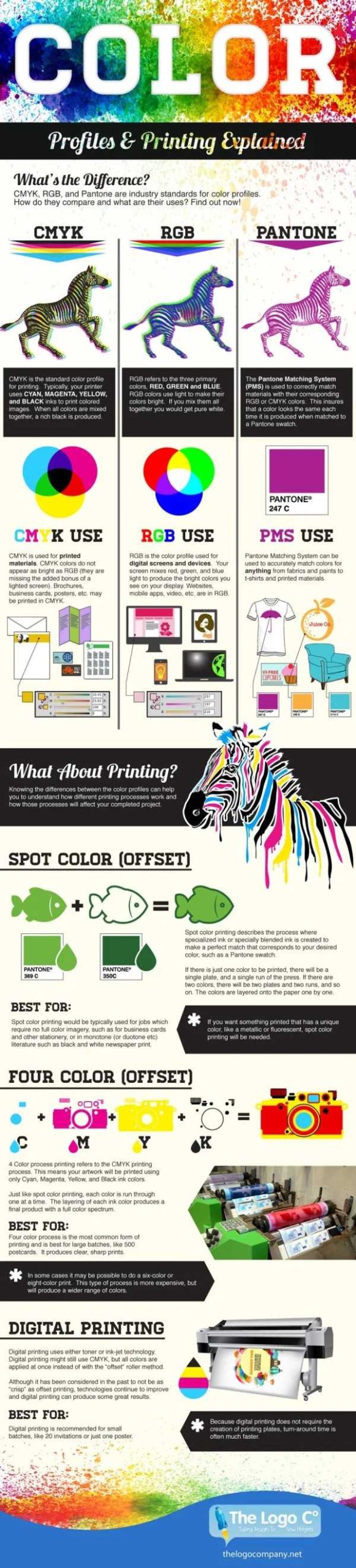
Color management involves using color profiles to control how colors appear on various devices. RGB color profiles are used for screens, while CMYK profiles suit printing. Proper management prevents colors from looking different on computers, tablets, or printers.
Why Do Color Profiles Matter for Content Creators?
Content creators need precise color control to produce high-quality visuals. Using the right color profiles helps ensure that images and videos look professional and consistent across platforms. It also prevents surprises when images are printed or displayed on different screens.
What Are Dual Color Profiles?
Dual color profiles mean using two different color settings within a workflow. Typically, this involves an RGB profile for digital displays and a CMYK profile for printing. Many creators wonder if they should use both to get the best results.
Advantages of Using Dual Color Profiles
Color Accuracy Across Mediums
Applying dual profiles helps maintain color consistency from digital display to print. It ensures that the final printed image matches the on-screen version as closely as possible. This is especially important for photographers and designers.
Professional Results
Using dual profiles demonstrates a high skill level and attention to detail. It allows creators to deliver content that looks polished and true to vision, whether on screens or in print.
Workflow Flexibility
Dual profiles give creators more control over their projects. They can adapt their images for different mediums without losing color fidelity. This makes the production process more flexible and efficient.
Challenges of Using Dual Color Profiles
Complex Workflow
Managing two profiles requires extra steps and knowledge. It can be confusing for beginners to switch between profiles correctly. Proper setup and understanding are necessary to avoid mistakes.
Increased Time Investment
Applying dual profiles may take more time during editing and exporting. This can slow down the workflow for quick projects or tight deadlines.
Software Compatibility
Not all editing software handles dual profiles seamlessly. Some programs may struggle with managing color consistency between modes. Choosing compatible tools is important for smooth operation.
When Do Content Creators Need Dual Color Profiles?
For Print and Digital Projects
If a project involves both digital display and print, dual profiles are advisable. This ensures color accuracy in both mediums, making the transition seamless.
In Professional Photography and Design
Professionals working on clients’ projects often require dual profiles. They need to ensure that images look perfect online and in printed materials.
For Brand Consistency
Brands that rely on accurate color representation across platforms benefit from using dual profiles. It helps maintain a consistent visual identity whether online or in physical media.
How to Set Up Dual Color Profiles Effectively
Choose the Right Profiles
Select color profiles based on your work’s end purpose. Use sRGB or Adobe RGB for screens. For printing, opt for CMYK profiles suited to your printer.
Calibrate Your Devices
Regular calibration of monitors and printers ensures the chosen profiles are accurate. This step minimizes discrepancies and keeps colors consistent.
Use Professional Editing Software
Tools like Adobe Photoshop or Lightroom support dual profiles and offer advanced color management options. Learning how to navigate these tools is essential.
Maintain a Consistent Workflow
Developing a standard process for converting and managing profiles reduces errors. Document your steps to ensure consistency across projects.
Best Practices for Content Creators
- Always work on calibrated screens to see true colors.
- Switch profiles only when necessary to prevent color shifts.
- Save versions of your work in different color modes for flexibility.
- Test your images on multiple devices before finalizing.
- Communicate with printers or clients about color expectations upfront.
Related Topics
Color Calibration Devices
Using hardware calibration tools can improve color accuracy and simplify profile management. These devices help maintain consistent display performance.
Color Theory for Content Creators
Understanding basic color theory enhances your ability to choose the right profiles and create visually appealing content.
Differences Between RGB and CMYK
Knowing the technical differences helps determine when to switch profiles and how to prepare images for each medium effectively.
Future of Color Management
Emerging technologies aim to make dual profile management even easier. Staying updated ensures creators can keep up with industry standards.
Summary
Content creators often benefit from using dual color profiles, especially when producing work for both digital and print. The key is understanding your workflow, choosing appropriate profiles, and maintaining device calibration. While managing dual profiles might seem complicated initially, it leads to consistent, professional-quality visuals across all mediums.
Add your pronouns to your IG bio #shorts #shorts
Frequently Asked Questions
What are the benefits of using dual color profiles for content creation?
Using dual color profiles allows content creators to maintain consistent color fidelity across different devices and workflows. It ensures that the colors seen during editing match what viewers see on various screens or in print. This consistency helps produce high-quality visuals, whether designing for digital platforms or physical media, and reduces the need for adjustments later in the project.
How can dual color profiles improve collaboration among creative teams?
Dual color profiles facilitate a shared understanding of color standards within a team. When everyone works with the same color settings, it minimizes misunderstandings and discrepancies in the final output. This shared baseline allows team members to review, approve, and make adjustments with confidence, streamlining the collaboration process and ensuring project consistency.
Are dual color profiles essential for printing content or physical media?
Yes, dual color profiles are particularly important when preparing content for printing or other physical formats. They help ensure that the colors you see on your screen match the printed output as closely as possible. This accuracy is vital for maintaining brand colors, achieving artistic intent, and reducing costly reprints caused by color mismatches.
Can using dual color profiles help in maintaining color accuracy during post-production?
Absolutely. Implementing dual color profiles helps maintain accurate color representation from the initial capture stage through editing and final output. It allows creators to make precise adjustments, ensuring that the colors remain consistent across all phases of production. This accuracy ultimately leads to a more polished and professional result.
What challenges might content creators face when managing dual color profiles?
Managing dual color profiles requires a clear understanding of color workflows and compatible software tools. Creators might face challenges such as setting up correct profiles, calibrating monitors accurately, and maintaining consistency across different devices. Proper training and routine calibration help overcome these obstacles, leading to more reliable color management.
Final Thoughts
Content creators often work across different devices and platforms, which can impact color accuracy. Dual color profiles ensure consistent visuals, making content look professional everywhere.
While not everyone needs dual profiles, they benefit those aiming for precise color control.
In conclusion, do content creators need dual color profiles? Yes, especially if maintaining color consistency across various screens matters for your work.



