


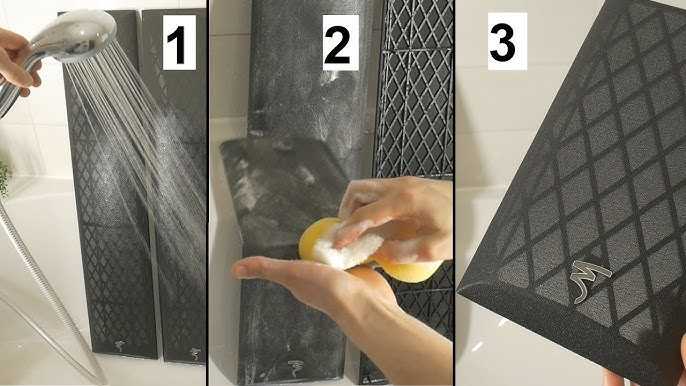
To clean your TV’s speaker grills effectively, gently use a soft brush or a microfiber cloth to remove dust and debris. For stubborn dirt, lightly dampen the cloth with water or a mild cleaning solution and wipe carefully. Avoid using harsh chemicals or soaking the grills, as this can damage your TV. Regular cleaning helps maintain sound quality and keeps your screen looking pristine.
Keeping the speaker grills on your TV clean not only enhances the visual appeal but also ensures the best audio experience. Dust and dirt tend to build up over time, muffling sound and diminishing picture clarity. Thankfully, cleaning them is quick and simple if you follow a few gentle techniques. With the right approach, you can keep your TV looking fresh and sounding clear without risking damage. Whether it’s a quick dusting or a more thorough clean, maintaining your speaker grills is an easy way to extend your TV’s lifespan and enjoy optimal performance.

How to clean speaker grills on your TV
Understanding Why Cleaning Your TV’s Speaker Grills Matters
Cleaning your TV’s speaker grills is an important step in maintaining your television’s audio quality and overall appearance. Dust and dirt can build up over time, which may muffle sound or cause the grills to look dull and dirty. Regular cleaning helps ensure your TV sounds clear and looks great in your living room.
Gathering the Right Supplies
Before starting, it’s best to have the proper tools ready. You will need a soft microfiber cloth, a small brush with gentle bristles, a vacuum cleaner with a brush attachment, and possibly, a mild cleaning solution. Using the right materials prevents damage to delicate speaker components.
Preparing Your TV for Cleaning
Always turn off your TV and unplug it before cleaning. Wait a few minutes so that the device cools down and any residual electricity dissipates. Place your TV in a well-lit, dust-free area to make cleaning easier and more effective.
Steps to Safely Clean Your TV’s Speaker Grills
Cleaning speaker grills involves gentle action to avoid damaging the screen or internal components. Follow these steps for a safe, thorough clean:
- Use a soft microfiber cloth to wipe the exterior of the speaker grills. This initial step removes surface dust and loose debris.
- Attach the brush to your vacuum cleaner and gently run it over the grills. This helps lift away deeper dust and dirt lodged within the tiny openings.
- If stubborn dirt remains, lightly dampen your microfiber cloth with water or a mild cleaning solution. Wipe carefully, avoiding excess moisture that can seep into the speakers.
- For very tight or clogged holes, use a small, soft-bristled brush to dislodge dirt without applying too much pressure.
- Finally, dry the grills with a clean, dry microfiber cloth to remove any remaining moisture.
Deep Cleaning Techniques for Persistent Dirt
Sometimes, dust buildup is stubborn or the grills appear quite dirty. In such cases, deeper cleaning is necessary. Follow these tips to improve cleaning results:
Using Compressed Air
Using a can of compressed air can blow out dirt from hard-to-reach spots. Hold the can upright and spray short bursts to avoid moisture buildup. Keep the nozzle at a safe distance from the grills.
Removing and Cleaning the Grills
If your speaker grills are removable, carefully detach them following the TV manufacturer’s instructions. Wash the grills with a solution of warm water and mild soap, then dry thoroughly before reattaching.
Cleaning Internal Components
While many speaker grills are straightforward to clean externally, internal cleaning is best handled by professionals. Avoid poking or probing inside as this can cause damage.
Preventing Future Dirt Accumulation
Proper maintenance can reduce the frequency of deep cleanings. Keep your TV in a dust-free environment and clean the grills regularly with a dry microfiber cloth. Avoid smoking or using the TV in dusty areas to minimize buildup.
Additional Tips for Effective Cleaning
To keep your TV’s speaker grills looking and sounding their best, consider these extra tips:
- Use a dust cover or cloth when the TV is not in use to reduce dirt settling on the grills.
- Clean the grills at least once a month to prevent thick buildup.
- Avoid harsh chemicals, abrasive materials, or excessive water, as they can damage delicate parts.
Common Mistakes to Avoid
While cleaning your speaker grills, steer clear of certain common pitfalls:
- Applying too much pressure, which can bend or break fragile parts.
- Using excessive water or cleaning solutions that can seep inside the speakers.
- Ignoring the importance of turning off and unplugging the TV during cleaning.
When to Seek Professional Help
If your speaker grills are heavily damaged or if cleaning does not improve sound quality, it’s wise to contact a professional technician. They can clean internally or repair any damage safely.
Summary of Best Practices
– Always turn off and unplug your TV before cleaning.
– Use soft, non-abrasive tools like microfiber cloths and gentle brushes.
– Avoid excess moisture and harsh chemicals.
– Clean regularly to prevent buildup.
– Handle removable grills with care and wash them separately if possible.
By following these detailed steps, you can keep your TV’s speaker grills clean, ensuring optimal sound quality and a fresh appearance. Regular maintenance extends the life of your TV and enhances your viewing experience.
🔥💧 How to Clean Car Speaker Grills Fast, Safe & Simple
Frequently Asked Questions
What cleaning supplies are best suited for speaker grills on a TV?
Use a soft, dry microfiber cloth to gently remove dust and dirt from the speaker grills. If necessary, slightly dampen the cloth with water or a gentle, alcohol-free cleaning solution. Avoid using harsh chemicals, abrasive materials, or excessive moisture, as they can damage the grills or interfere with sound quality.
How can I prevent dust buildup on TV speaker grills?
Regularly dust the speaker grills with a soft cloth or a gentle brush to prevent accumulation. Keep your TV in a clean, dry environment, and consider covering it with a dust cover when not in use for extended periods. Ensuring good air circulation around the TV also helps minimize dust settling on the grills.
Is it safe to use compressed air to clean speaker grills?
Using compressed air can be effective for removing dust from hard-to-reach spots on speaker grills. Hold the can upright and spray in short bursts to avoid moisture build-up. Maintain a safe distance to prevent damaging the grill material or forcing debris further inside. Be gentle to avoid dislodging any delicate components.
What precautions should I take before cleaning my TV’s speaker grills?
Turn off and unplug your TV before cleaning to avoid electrical issues. Make sure the grills are cool to touch. Test cleaning methods on a small, inconspicuous area first to ensure they do not cause any damage. Avoid applying excessive pressure or using liquids directly on the grills.
How often should I clean the speaker grills on my TV?
Clean the speaker grills at least once every few months or more frequently if you notice an increase in dust or debris. Regular maintenance helps preserve sound quality and keeps your TV looking tidy. Adjust your cleaning schedule based on your environment and household conditions.
Final Thoughts
To clean speaker grills on your TV effectively, first turn off the device and unplug it. Use a soft brush or compressed air to gently remove dust and debris from the grill surface. If needed, lightly dampen a microfiber cloth with water or a gentle cleaner and wipe the grills carefully. Regular cleaning prevents dust buildup and maintains good sound quality.
In conclusion, knowing how to clean speaker grills on your TV helps preserve audio clarity. Use soft tools and gentle cleaning methods for the best results. Proper maintenance keeps your TV sounding great and extends its lifespan.



