


Looking to enjoy seamless internet throughout your spacious home? Extending your Wi-Fi range can seem tricky, but with a few smart adjustments, you can finally eliminate dead zones and stay connected everywhere.
The quickest way to boost your Wi-Fi coverage is by using Wi-Fi extenders or Mesh networks, which help spread the signal more evenly across large spaces. Placing routers in optimal locations, upgrading to higher-power devices, and reducing interference also play key roles in enhancing your connection.
If you live in a large house, you probably know how frustrating weak signals can be, especially in hard-to-reach corners. A strong, reliable Wi-Fi isn’t just a convenience — it’s essential for working from home, streaming, and keeping connected with loved ones. Luckily, improving your Wi-Fi range doesn’t require complex solutions; with a few strategic tweaks, you can turn your expansive house into a Wi-Fi paradise.

How to extend wifi range in a large house
Understanding the Challenges of Covering a Large Home
Large houses often have multiple rooms, thick walls, and complex layouts that make WiFi signals weaker or inconsistent. Walls, furniture, and appliances can all block or weaken the signal, leading to dead zones. Recognizing these obstacles helps in choosing the right strategies to improve your WiFi coverage.
Assess Your Current Wifi Setup
Start by evaluating your existing setup. Use a WiFi analyzer app to determine the strength of your signal in different areas of your house. Identify spots with weak or no signal and note the locations of your router and other devices. This assessment guides your decision-making process for improving coverage.
Strategic Placement of Your Main Router
Proper placement of your router is crucial. Place it in a central location, elevated off the floor, away from metal objects and electronic devices that may cause interference. Keep it out of closets or cabinets to maximize the signal spread. The goal is to minimize obstacles between your router and the areas needing coverage.
Upgrade Your Router
If your router is outdated, it may not deliver the coverage needed for a large house. Invest in a high-performance router that supports the latest standards, such as WiFi 6. Look for models with multiple antennas and beamforming technology, which focus the signal towards devices. These features significantly broaden your WiFi range.
Utilize WiFi Extenders and Repeaters
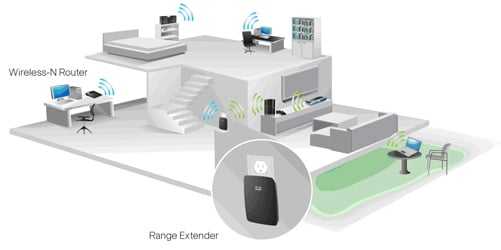
WiFi extenders and repeaters are affordable solutions to boost coverage. Place these devices halfway between your router and the dead zones. They capture the existing WiFi signal and rebroadcast it, effectively enlarging your network’s reach. Remember, positioning is key for optimal performance.
Choosing the Right Extender
Opt for extenders that support the same WiFi standard as your router. Dual-band extenders can operate on 2.4 GHz and 5 GHz frequencies, providing flexibility and better performance. Consider models with Ethernet ports to connect devices directly for faster speeds.
Proper Placement Tips for Extenders
Place extenders in locations where they get a strong signal from the main router, but are close enough to the dead zones. Avoid placing them behind walls or furniture that could block the signal. Elevation and open space improve their effectiveness.
Implementing Mesh WiFi Systems
Mesh networks are designed for large spaces and complex layouts. They consist of a main router and multiple satellite nodes that work seamlessly together. Mesh systems offer consistent and broad coverage, often outperforming traditional extenders.
Advantages of Mesh WiFi
Mesh systems eliminate dead zones and provide uniform speed throughout the house. They are easy to set up and manage via smartphone apps. Many models automatically optimize the connection for each device, ensuring a stable experience.
Setting Up a Mesh System
Place the main mesh router centrally in your home. Distribute the satellite nodes evenly, ideally in areas with weak WiFi. Follow the manufacturer’s guidelines for placement and connect everything to your existing modem for immediate coverage boost.
Powerline Adapters: An Alternative Approach
Powerline adapters utilize your home’s electrical wiring to extend your network. Plug one adapter near your router and connect it via Ethernet, then plug another adapter into a different room to provide wired or wireless access.
Benefits of Powerline Adapters
They offer fast and reliable connections, especially useful where WiFi signals are blocked by thick walls. They’re simple to set up without additional wiring and can support multiple devices with minimal lag.
Considerations When Using Powerline Adapters
Ensure your home’s wiring is compatible and not too old or noisy. Use adapters from the same manufacturer to ensure optimal communication. Keep adapters away from appliances that generate electrical noise for best results.
Adjust Your WiFi Settings for Better Coverage
Optimizing your router’s settings can make a big difference. Change the WiFi channel to avoid interference from neighbors. Enable features like beamforming to focus signals toward connected devices. Use the 2.4 GHz band for broader coverage and 5 GHz for higher speeds in close proximity.
Additional Tips for Maximizing WiFi Coverage
- Use a WiFi analyzer to find the best channels and locations
- Limit interference by reducing numbers of electronic devices nearby
- Update your router’s firmware regularly for performance improvements
- Secure your network to prevent unauthorized access that could slow speeds
Ensuring Signal Strength in Dead Zones
Identify dead zones by testing your WiFi signal strength in every room. Use repeaters or mesh nodes specifically in these areas. Consider adding a wired access point via Ethernet for stable performance in critical zones.
Security Considerations When Extending Wifi
Always enable WPA3 or WPA2 encryption on your network to protect your data. Change default passwords on routers and extenders. Regularly update firmware to patch security vulnerabilities and ensure reliability.
Cost-Effective Solutions for Large Houses
Start with basic steps like repositioning your router or adding extenders. If coverage remains insufficient, invest in a mesh network or high-end router. Balance your budget with the size of your house and your internet needs.
Summing Up
Extending WiFi in a large house requires strategic planning and the right tools. From choosing the best router to deploying mesh systems or powerline adapters, each method addresses specific coverage challenges. Combining these solutions often yields the most reliable results.
By understanding your home’s layout and investing in quality equipment, you can enjoy strong, consistent WiFi throughout your house. This ensures all your devices stay connected and your online activities run smoothly, no matter how big your home is.
Easily Extend Your Home WiFi To Your Barn, Shed and Beyond!
Frequently Asked Questions
What are the best placements for Wi-Fi routers in a large house?
Position your router centrally on the main floor to evenly distribute the signal. Keep it elevated on a shelf or high piece of furniture, away from walls and metal objects. Avoid placing it near large appliances, thick walls, or in basements, as these can weaken the signal. Proper placement ensures that the Wi-Fi reaches all areas effectively.
How can using a Wi-Fi extender improve coverage in a large home?
A Wi-Fi extender receives the existing signal and rebroadcasts it to areas with weak or no coverage. Place the extender halfway between your router and the areas with poor signal—ensure it is within the router’s range. This setup helps eliminate dead zones and provides a stronger, more reliable connection throughout your home.
What role do mesh Wi-Fi systems play in expanding internet coverage?
Mesh Wi-Fi systems consist of multiple nodes that communicate with each other to blanket your entire house in Wi-Fi. Place the primary node near your modem and position additional nodes strategically across different floors or large rooms. This setup provides seamless coverage, reduces dead zones, and handles multiple devices efficiently.
Are there specific types of routers better suited for large homes?
Yes, routers designed for large spaces typically feature multiple antennas, higher power output, and advanced technologies like beamforming. These features focus the Wi-Fi signal directly toward devices, enhancing coverage and stability over larger areas. Consider routers with the latest standards, such as Wi-Fi 6, to future-proof your network.
How can updating firmware and channel selection improve Wi-Fi range?
Regularly update your router’s firmware to ensure optimal performance and security. Additionally, choose the best Wi-Fi channel—often less congested—to reduce interference from neighboring networks. Using tools to analyze network channels helps identify the optimal setting, resulting in a stronger and more reliable Wi-Fi signal across your home.
Final Thoughts
To extend wifi range in a large house, start by placing your router in a central, open location to maximize coverage. Use WiFi extenders or mesh networks to eliminate dead zones and ensure a strong signal throughout your home. Adjust the router’s antennas and update firmware regularly to optimize performance.
Implementing these steps helps improve connectivity and ensures reliable internet access across a large house. Remember, how to extend wifi range in a large house depends on strategic placement and additional devices to boost coverage. Proper setup guarantees a seamless online experience in every corner of your home.



