


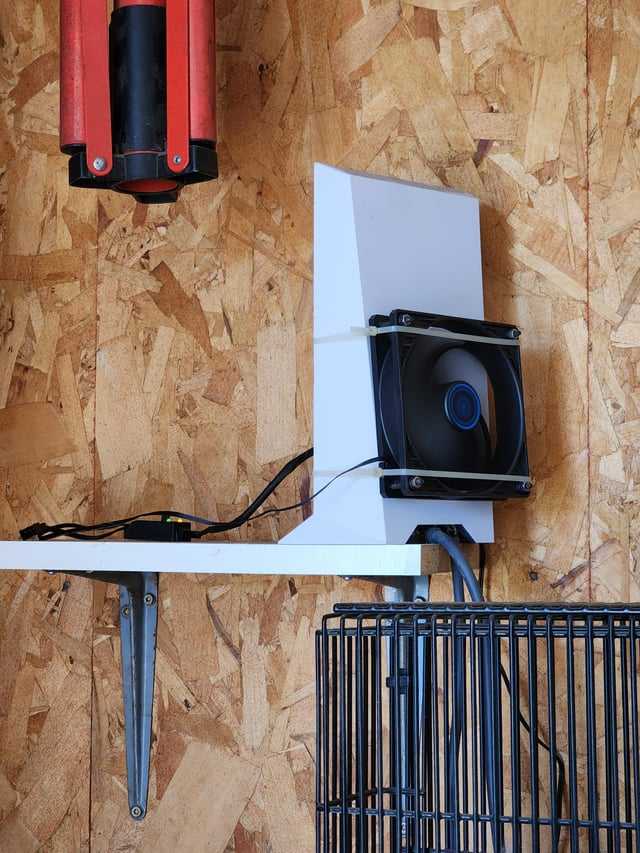
Is your router overheating and causing slow or dropped internet connections? Don’t worry, this common issue can be fixed quickly with a few simple steps. First, ensure your router is placed in a well-ventilated area, away from direct sunlight or heat sources. You can also clean dust from the vents and update your firmware to improve performance and cooling. If overheating persists, consider using a cooling pad or replacing your router if it’s old. By taking these easy measures, you can keep your router cool and ensure a stable, fast internet connection.
Overheating routers are a frustrating problem that can degrade your internet experience, but it’s usually easy to fix. This article will guide you through simple, effective solutions to prevent your router from overheating, from optimizing placement to maintenance tips. Whether you’re experiencing slow speeds or frequent disconnects, these tricks will help keep your device running smoothly and extend its lifespan. No need for technical expertise—just some practical steps to restore your internet stability and keep your Wi-Fi blazing.

Router Overheating Problem Fix: How to Keep Your Router Cool and Running Smoothly
Understanding Why Routers Overheat
Routers generate heat because they process data and handle multiple connected devices. When they work hard for long periods, heat builds up inside the device. Overheating can cause slow internet speeds, frequent disconnections, or even damage the router. Recognizing the signs of overheating helps in taking quick corrective steps.
Common Causes of Router Overheating
Router overheating can happen due to several reasons. One major cause is poor ventilation, where the device is placed in a confined space. Overloading the network with too many devices can also put extra stress on the router’s processor, leading to heat buildup. Dust accumulation inside the device can block airflow, increasing the risk of overheating.
Signs Your Router Is Overheating
Look for these signs to identify if your router is too hot:
- Frequent disconnects or network drops
- Slow internet or buffering issues during intense use
- Router feels hot to the touch
- Unusual noises or burning smell from the device
- Sudden loss of Wi-Fi signal
If you notice these symptoms, it’s time to take action to cool your router.
How Overheating Affects Router Performance
Overheating impacts the router’s ability to function properly. It can cause the device to restart randomly or shut down completely. Heat stress can also damage internal components, decreasing the lifespan of your router. Maintaining a cool operating temperature protects your investment and keeps your network running smoothly.
Simple Tips for Preventing Router Overheating
Prevention is better than fixing. Here are easy steps to keep your router cool:
- Place your router in a well-ventilated area away from direct sunlight
- Avoid stacking objects on top of the device
- Ensure there’s at least a few inches of space around the router for airflow
- Turn off the router when it’s not needed for long periods
- Regularly clean dust from vents and internal parts
Implementing these tips helps prevent heat buildup in the first place.
How to Fix a Router That Is Overheating
1. Improve Ventilation and Placement
Position the router in a cool, open space, ideally on a hard surface. Avoid hiding it behind furniture or placing it inside cabinets. Elevating the device on a small stand can improve airflow around it.
2. Reduce Network Load
Too many devices connected at once can cause the router to overheat. Disconnect devices that are not in use and limit bandwidth-heavy activities like streaming or gaming during peak hours. Using Quality of Service (QoS) settings can prioritize important devices, reducing stress on the router.
3. Clean Dust and Debris
Dust clogs vents and internal components, obstructing airflow. Turn off the router, unplug it, and carefully clean vents with a soft brush or compressed air. Be gentle to avoid damaging sensitive parts.
4. Use External Cooling Solutions
If your router continues to overheat despite placement improvements, consider adding a small fan directed toward the device. Cooling pads used for laptops can also be effective. These solutions help dissipate heat faster and maintain a safe temperature.
5. Adjust Router Settings
Some routers have built-in settings to manage temperature. Check the admin panel for options like reducing signal power or disabling unnecessary features. Firmware updates can also optimize performance and thermal management.
Upgrading Your Router for Better Heat Management
Older routers may lack efficient heat dispersion features. Upgrading to a newer model with enhanced cooling technology can eliminate overheating issues. Look for routers with larger vents, heat sinks, or fan cooling systems.
Regular Maintenance for Long-Term Cooling
Consistent care prolongs your router’s lifespan. Schedule regular cleaning and firmware updates. Keeping the firmware current ensures your device uses the latest thermal management features.
Additional Tips for a Cooler Router Environment
Creating an ideal environment involves more than just placement:
- Keep the room temperature below 75°F (24°C)
- Avoid placing the router near heat sources like radiators or ovens
- Ensure good air circulation in your home or office
- Use a surge protector to protect from electrical surges that may cause overheating
Optimizing your environment keeps your router operating efficiently.
When to Seek Professional Help
If none of these steps work and your router still overheats frequently, it may be a hardware fault. Contact the manufacturer or a qualified technician for repairs or replacements. Persistent overheating can damage internal components, so timely professional assistance is essential.
Summary of Effective Router Overheating Fixes
To sum up, the key to fixing router overheating involves:
- Proper placement and ventilation
- Reducing network load
- Regular cleaning and maintenance
- Using external cooling solutions if needed
- Upgrading to a newer, better-cooled router model
Adopting these practices ensures your Wi-Fi stays fast, reliable, and safe from heat damage.
Related Topics to Explore
- Best Wi-Fi routers for heat dissipation
- How to improve home Wi-Fi coverage
- Tips for extending the life of your router
- Understanding router firmware updates
These topics complement your knowledge about maintaining a healthy network.
Maintaining a cool router not only boosts its performance but also helps in avoiding costly repairs or replacements. Regular attention to placement, cleanliness, and environmental factors keeps your device functioning optimally for years to come.
Wifi router overheating | Wifi Router restart problem due to overheat #wifirouter #wifi #overheat
Frequently Asked Questions
What steps can I take to improve air circulation around my router?
Ensure your router is placed in an open, well-ventilated area away from walls, furniture, or other objects that may block airflow. Elevate the router on a stand or shelf to prevent heat buildup from surfaces. Avoid stacking devices directly on top of the router, as that can trap heat. Regularly clean vents and fans to remove dust and debris that hinder airflow, helping the device stay cool during operation.
How do I adjust my router’s settings to reduce overheating?
Reduce the transmission power settings if your router allows, limiting unnecessary energy output that can generate excess heat. Disable features like QoS or guest networks when not in use to lessen the load on the device. Ensure your firmware is updated, as manufacturers often release optimizations that improve performance and thermal management. Turning off unused ports and services can also help decrease heat production.
What hardware modifications can help prevent my router from overheating?
Adding external cooling solutions, such as small fans directed at the router, can help dissipate heat more effectively. Using heat sinks or thermal pads on hot components may improve heat transfer. Consider replacing internal thermal compounds if you are comfortable opening the device, ensuring better heat conduction. Additionally, upgrading to a router with better thermal design or increased cooling capabilities can provide a long-term solution for overheating issues.
Can environmental factors contribute to router overheating?
Yes, high ambient temperatures and humidity can significantly impact your router’s cooling. Keep the device away from direct sunlight, heaters, or other heat sources. Maintain your room’s temperature at a moderate level and ensure proper airflow in the environment. Using a dehumidifier in humid conditions can also prevent moisture buildup, which might affect electronic components and lead to overheating problems.
Are there signs indicating my router is overheating, and how should I respond?
Indicators include frequent crashes, slow performance, or the router restarting unexpectedly. If you notice these signs, immediately turn off the router and unplug it. Allow the device to cool in a well-ventilated area before turning it back on. Regularly monitor for temperature spikes, and consider implementing the above air circulation and hardware improvement tips. Persistent overheating issues may require professional inspection or replacement of the device.
Final Thoughts
A router overheating problem fix often involves improving ventilation and ensuring proper placement. Cleaning dust from vents and avoiding direct sunlight can significantly reduce heat buildup. Using a cooling pad or fan may also help maintain optimal temperatures. By taking these simple steps, you can extend your router’s lifespan and improve connectivity. Addressing the overheating issue promptly ensures reliable internet performance and prevents potential hardware damage.



